
mkdocs-pipeline-visualizer
Introduction
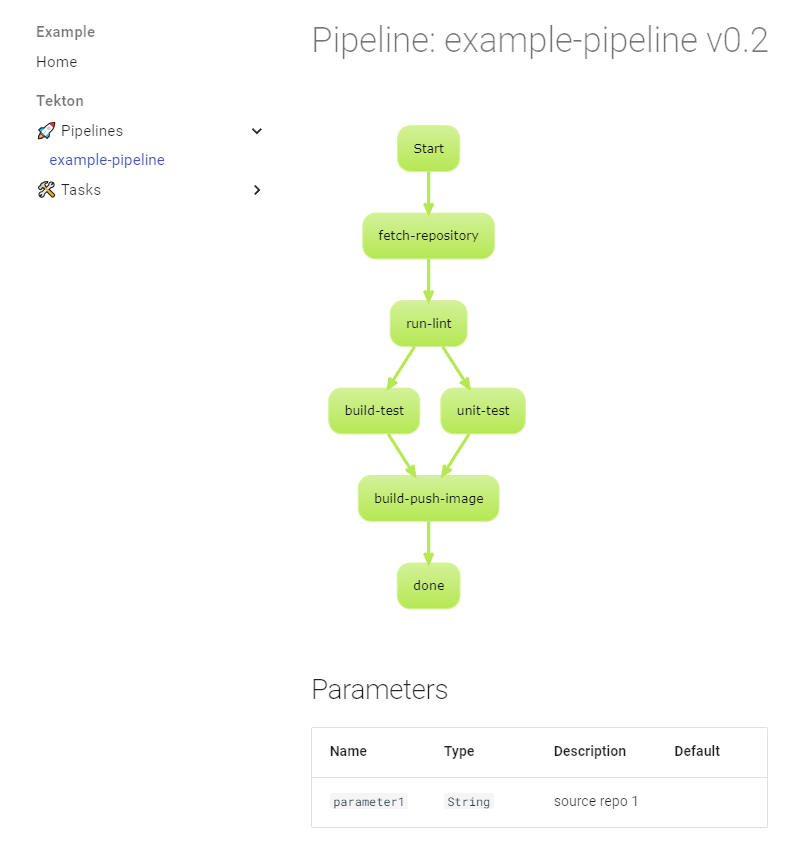
The mkdocs-pipeline-visualizer plugin automates the creation of up-to-date documentation for your Tekton pipelines and tasks.
Installation
To install the mkdocs-pipeline-visualizer plugin, run the following command:
$ pip install mkdocs-pipeline-visualizer
Example Configuration
Below is an example of how to configure mkdocs.yaml:
site_name: Tekton
docs_dir: ./tekton

nav:
  - Home: index.md

plugins:
  - pipeline-visualizer

markdown_extensions:
  plantuml_markdown:
    server: http://www.plantuml.com/plantuml

theme:
  name: material
  features:
    - navigation.sections
Configuration
By default, the plugin creates two sections at the root level: Pipelines and Tasks. The docs_dir should point to the location of pipelines and tasks manifests.
| Config parameter | Type | Description | Default | Since |
|---|---|---|---|---|
plantuml_graphs |
[bool] | Controls if pipeline graph should be visible | True |
0.1.5 |
plantuml_graph_direction |
[string] | TB(top to bottom) or LR(left to right) | TB |
0.1.3 |
plantuml_theme |
[string] | Any theme listed on https://plantuml.com/theme to style e.g hacker, spacelab | _none_ |
0.1.3 |
nav_generation |
[bool] | Automatically generate navigation tree | True |
0.2.0 |
nav_hide_empty_sections |
[bool] | Hide empty navigation sections | False |
0.4.0 |
nav_group_tasks_by_category |
[bool] | Group tasks in navigation by tekton.dev/categories annotation |
False |
0.3.0 |
nav_section_pipelines |
[string] | Section name used for pipelines | Pipelines |
0.2.0 |
nav_section_tasks |
[string] | Section name used for tasks | Tasks |
0.2.0 |
nav_section_stepactions |
[string] | Section name used for stepactions | StepActions |
0.4.0 |
nav_pipeline_grouping_offset |
[string] | Controls how pipeline file paths are represented in the navigation structure. The format is "start:end", where: "start" is the index of the first directory to include "end" is the index of the last directory to include (use negative numbers to count from the end) | None |
0.2.0 |
nav_task_grouping_offset |
[string] | Same as nav_pipeline_grouping_offset but for tasks |
None |
0.2.0 |
nav_stepaction_grouping_offset |
[string] | Same as nav_pipeline_grouping_offset but for stepactions |
None |
0.4.0 |
log_level |
[string] | DEBUG INFO WARNING ERROR CRITICAL |
INFO |
0.2.0 |
nav_category_mapping |
[dict] | Custom category name mappings | {} |
0.3.0 |
Example for nav_pipeline_grouping_offset
Let's say you have a pipeline file located at:
./pipelines/project-a/deployment/my-pipeline.yaml
Here's how different nav_pipeline_grouping_offset values would affect the navigation structure:
-
"0:-1": Includes all directories except the last one (which is the file name).- Result:
Pipelines > pipelines > project-a > deployment > my-pipeline
- Result:
-
"1:-1": Skips the first directory and includes all others except the last one.- Result:
Pipelines > project-a > deployment > my-pipeline
- Result:
-
"1:-2": Skips the first directory and excludes the last two (the last directory and the file name).- Result:
Pipelines > project-a > my-pipeline
- Result:
-
None(default): All pipelines are placed directly under thenav_section_pipelinessection.- Result:
Pipelines > my-pipeline
- Result:
How To
Customizing Documentation Locations
You can change the location of the documentation sections by placing an empty section in any location of the navigation (nav) and setting it to the value of nav_section_pipelines or nav_section_tasks:
site_name: Tekton
docs_dir: ./tekton

nav:
  - Home: index.md
  - Tekton:
    - "Tasks": []
    - "Pipelines": []
    - "StepActions": []

plugins:
  - pipeline-visualizer
Customizing Menu Section Names and Graph Themes
To change the names of the menu sections and apply a custom graph theme, use the following configuration:
site_name: Tekton
docs_dir: ./tekton

nav:
  - Home: index.md
  - Tekton:
    - "🛠️ Tasks": []
    - "🚀 Pipelines": []
    - "⚙️ StepActions": []

plugins:
  - pipeline-visualizer:
      plantuml_theme: hacker
      nav_section_tasks: "🛠️ Tasks"
      nav_section_pipelines: "🚀 Pipelines"
      nav_section_stepactions: "⚙️ StepActions"
Category Name Mapping
You can customize how task categories appear in the navigation by providing mappings in the nav_category_mapping configuration:
plugins:
  - pipeline-visualizer:
      nav_category_mapping:
        "Code Quality": "Quality Tools"
        "Build": "Build Tools"
        "Deploy": "Deployment"
Changelog
0.4.2
Fixed
- Fix rendering of StepAction
0.4.1
Fixed
- Corrected markdown code block rendering for scripts.
0.4.0
Added
- Support for Tekton StepActions.
nav_section_stepactionsandnav_stepaction_grouping_offsetconfiguration options.- Updated navigation generation to include StepActions.
- Updated example configuration and documentation.
Fixed
- Resolved infinite loop issue with
mkdocs serveby preventing unnecessary file writes when content is unchanged.
0.3.0
Added
- Optional support for categorization of tasks in navigation using
tekton.dev/categoriesannotation.
0.2.1
Added
- Example in
example/. - Visualization for step templates in tasks.
Fixed
- Corrected typo in
plantuml_graphsattribute name (fromplantum_graphs). - Corrected typo in
nav_task_grouping_offsetattribute name (fromnav_tasks_grouping_offset).
0.2.0
Added
- Navigation generation feature with customizable sections for pipelines and tasks.
- Support for grouping pipelines and tasks in the navigation.
- Improved logging with configurable log levels.
- Version-based sorting for resources in navigation.
Changed
- Improved visualization of tasks, parameters, and workspaces.
- Better handling of different script types in task steps.
Fixed
- Various bug fixes and code structure improvements.
0.1.8
Removed
- Version of tasks from the documentation until a better presentation is available.
0.1.7
Fixed
- Issue with backslashes (
\) in usage examples. - Example in the README.
0.1.6
Added
- Version of pipeline/task when available.
Fixed
- Hide workspaces for tasks when none are used.
0.1.5
Added
- Sample on how to use a task in a pipeline.
plantuml_graphsoption to make PlantUML graphs optional.
Fixed
- Removed extra
---after tasks. - Processing of only pipelines or tasks.
0.1.4
Added
- Display of all tasks in the
finallyblock.
0.1.3
Added
- Configuration for graph direction (
plantuml_graph_direction). - Configuration for PlantUML theme (
plantuml_theme). - Display of references to
configMaps.
0.1.2
Changed
- Presentation of default and empty values.
Removed
- Unused code.
0.1.1
Fixed
- Issue with multidoc YAML.
1 maintainer

Metadata
1 maintainer
Release files for mkdocs-pipeline-visualizer 0.4.2
For a detailed explanation of source distributions (sdists) and built distributions (wheels), please see the package formats documentation.
Source distribution (sdist)
| File | Size | Uploaded | |
|---|---|---|---|
| mkdocs_pipeline_visualizer-0.4.2.tar.gz | 14.7 kB | Details |
Built distribution (wheel)
| File | Interpreter | ABI | Platform | Reset |
|---|---|---|---|---|
| mkdocs_pipeline_visualizer-0.4.2-py3-none-any.whl | Python 3 | none | any | Details |
Total release size: 30.6 kB
Release files / mkdocs_pipeline_visualizer-0.4.2.tar.gz
| Download URL | mkdocs_pipeline_visualizer-0.4.2.tar.gz |
|---|---|
| Size | 14.7 kB |
| Tags | Source |
|
SHA-256 checksum How to use checksums |
88da3a59d3565aee510c21244e0858a04cf94f79d38526912b2781a084cf0d30
|
|
BLAKE2b-256 checksum How to use checksums |
34ea74931135580e7f789fc8df14a6d3c8df17a75d47217a8aede1d629fa0ceb
|
| Upload date | |
|
Uploaded using Trusted Publishing? What is trusted publishing? |
No |
| Uploaded via |
twine/6.2.0 CPython/3.9.23
|
Release files / mkdocs_pipeline_visualizer-0.4.2-py3-none-any.whl
| Download URL | mkdocs_pipeline_visualizer-0.4.2-py3-none-any.whl |
|---|---|
| Size | 15.9 kB |
| Tags | Python 3 |
|
SHA-256 checksum How to use checksums |
e5d7f72d87a5375de4ce1f06da0374b504c88a6ba3ff655f85ee2d73a8db2044
|
|
BLAKE2b-256 checksum How to use checksums |
4cca430ce3a09be9f4e96d1280e37b6fbb3aa4d2121fe9eda94ff1f353185c6a
|
| Upload date | |
|
Uploaded using Trusted Publishing? What is trusted publishing? |
No |
| Uploaded via |
twine/6.2.0 CPython/3.9.23
|














