
This is a mkdocs theme, this supports some CSS-styles to publish your documents with PDF or printing.Please see the 'Demo' section
mkdocs-theme-topdf
a mkdocs theme to generate pdf or print.
[TOC]
Prerequiresites/ Dependency
This plugin aim to use these softwares
- mkdocs (convert markdown to html)
- paged.js (to generate pdf, page borders and page headers)
- node.js (to generate pdf, for pagedjs-cli)
Installation - this plugin
Install this package with pip.
from PyPi
pip install mkdocs-theme-topdf
from github
pip install git+https://github.com/kuri65536/mkdocs-theme-topdf
Installation - paged.js
so paged.js uses node.js and portable chrome, it is separate from mkdocs theme.
to prepare paged.js, follow these method.
from this plugin
python -m topdf --check
> ... check node.js and npm ...
python -m topdf --setup
> ... install take long time ...
python -m topdf --test
> output report-3stamps.pdf
from manual
$ npm install pagedjs-cli
... take long time ...
$ ./node_modules/.bin/pagedjs-cli
... paged.js message ...
How to use
prepare
to use mkdocs theme see material theme documentation
setup mkdocs.yml
change mkdocs.yml to use this plugin.
site_name: the test document
theme:
    name: topdf
write markdown
write your document
convert with paged.js
$ pagedjs-cli --outline-tags h1,h2,h3,h4,h5,h6 site/your/document.html
     -o document.pdf  # 1-line
About PDF output
- paged.js render the PDF with portable chrome and pupetter
please watch out the difference of rendering results among
them engine and your browser. - wkhtmltopdf render the PDF with webkit (old)
and stable release (0.12.5) can not generate TOC with its limitation.
wkhtmltopdf is more convinient to install, but
I can't resolve the TOC problem and switched to paged.js
Demo
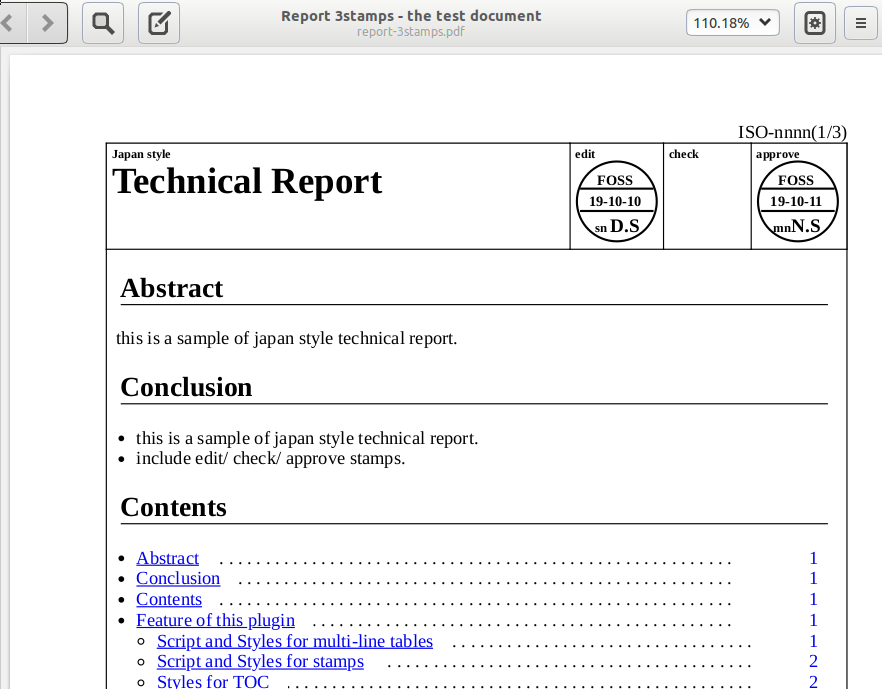
About scripts and styles
please see the report sample
FAQ
T.B.D
History
{: .before-dl-table .table2-8 }
version : desc
0.4.0 : append CSS-counters for figures and tables.
0.3.0
: append theme to the package name
0.2.7 : TOC and styles
0.2.6 : append explanation for paged.js TOC and styles
0.2.5 : append explanation for paged.js styles
0.2.4 : append explanation for paged.js styles
0.2.3 : append slash line to the no-stamp cells.
0.2.2 : append screenshot
0.2.1 : append explanation for dl-dt-dd tables
0.2.0 : start to edit/ 3stamps
0.1.2 : start to use paged.js
0.1.1 : start to use mkhtmltopdf
0.1.0 : append dl-dt-dd tables
0.0.6 : start to edit
Donations
If you are feel to nice for this software, please donation to my
- Bitcoin | 1FTBAUaVdeGG9EPsGMD5j2SW8QHNc5HzjT |
- or Ether | 0xd7Dc5cd13BD7636664D6bf0Ee8424CFaF6b2FA8f | .
1 maintainer

Metadata
1 maintainer
Release files for mkdocs-theme-topdf 0.5.0
For a detailed explanation of source distributions (sdists) and built distributions (wheels), please see the package formats documentation.
Source distribution (sdist)
| File | Size | Uploaded | Provenance | Actions |
|---|---|---|---|---|
| mkdocs-theme-topdf-0.5.0.tar.gz | 8.6 kB | Without provenance | Details for mkdocs-theme-topdf-0.5.0.tar.gz |
Built distribution (wheel)
| File | Interpreter | ABI | Platform | Actions Reset |
|---|---|---|---|---|
| mkdocs_theme_topdf-0.5.0-py3-none-any.whl | Python 3 | none | any | Details for mkdocs_theme_topdf-0.5.0-py3-none-any.whl |
Total release size: 25.2 kB
Release files / mkdocs-theme-topdf-0.5.0.tar.gz
| Download URL | mkdocs-theme-topdf-0.5.0.tar.gz |
|---|---|
| Size | 8.6 kB |
| Tags | Source |
|
SHA-256 checksum How to use checksums |
5c98aa81ed45649654b715609079a80836180b99b94e6b2a811a765d14e9550b
|
|
BLAKE2b-256 checksum How to use checksums |
f76c5c3946f829639f48c142509fb939a827c685e4f395d4abfc1168f277a7ab
|
| Upload date | |
|
Uploaded using Trusted Publishing? What is trusted publishing? |
No |
| Uploaded via |
twine/3.1.1 pkginfo/1.5.0.1 requests/2.22.0 setuptools/42.0.2 requests-toolbelt/0.9.1 tqdm/4.42.0 CPython/3.7.5
|
Release files / mkdocs_theme_topdf-0.5.0-py3-none-any.whl
| Download URL | mkdocs_theme_topdf-0.5.0-py3-none-any.whl |
|---|---|
| Size | 16.6 kB |
| Tags | Python 3 |
|
SHA-256 checksum How to use checksums |
a0d08fa6e9e8036be39438d7b0328b92cef6522f9719eec1af7e7402f1383810
|
|
BLAKE2b-256 checksum How to use checksums |
fef1d5e70fd2ef45ff1f1820ab734a0acd6d21d3acb740b47acbc1865b892c96
|
| Upload date | |
|
Uploaded using Trusted Publishing? What is trusted publishing? |
No |
| Uploaded via |
twine/3.1.1 pkginfo/1.5.0.1 requests/2.22.0 setuptools/42.0.2 requests-toolbelt/0.9.1 tqdm/4.42.0 CPython/3.7.5
|
Security for mkdocs-theme-topdf 0.5.0
Provenance
Provenance describes where a file came from. On PyPI, provenance is shared via attestations, which provide a verifiable record of the build or publishing details. View details, limitations and caveats.
No provenance found
None of the files in this release were uploaded with provenance metadata.
A note on package security
PyPI is a repository for distributing packages, not a service for auditing them. While third-party security researchers and our staff do their best to detect and remove malicious packages, PyPI cannot guarantee the quality, security or suitability of any given package.
To learn more about protecting yourself from malicious actors, visit our package security documentation.














