

MMD Bone Tools (MMDボーンツール)
Translate Japanese MMD bone names to English, map bones between MMD, Blender, Unity, VRM and Mixamo, and retarget VMD motions to any model.
MMDのボーン名を日本語から英語へ自動翻訳・変換し、VMDモーションを他のモデルへリターゲットする無料ツール




Download: Windows app (no install) ·
pip install mmd-bone-tools · Website · 日本語の説明
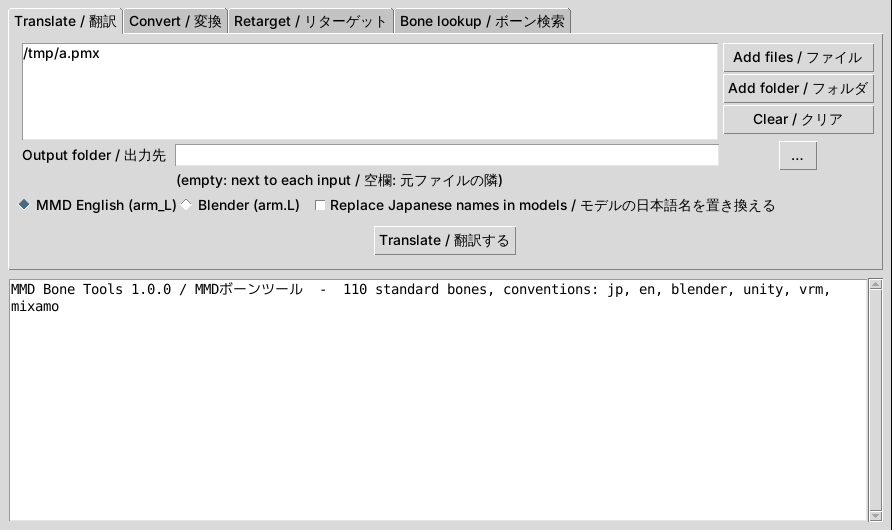
MMD Bone Tools is a free, open-source MikuMikuDance (MMD) rigging toolkit. It
renames bones in PMX and PMD models and VMD motion files so that
Japanese models, English models, Blender (mmd_tools), Unity Humanoid, VRM and
Mixamo rigs can share motions. Use the desktop app, the mmdbt command line or
the Python library.
Tools for the boring parts of MMD rigging: translating Japanese bone names, mapping bones between naming conventions and making downloaded motions fit the model you want to use them on.
Works directly on the binary files (PMX 2.0/2.1, PMD, VMD). No Blender, MMD or PMXEditor needed, no dependencies beyond Python 3.10+. Files are rewritten byte for byte except for the names you change.
Install
- Windows app: download
MMDBoneTools-…-windows-x64.zipfrom the latest release, unzip, runMMDBoneTools.exe. No Python needed. Drop files onto the exe to load them. Windows SmartScreen may warn because the exe is not code-signed: choose "More info", then "Run anyway". - Python (any OS):
pip install mmd-bone-tools, thenmmdbt-guifor the app ormmdbtfor the command line. - From source:
pip install -e .in a checkout.
Desktop app
Four tabs, labelled in English and Japanese:
- Translate / 翻訳: add files, folders or zip downloads and translate every PMX, PMD and VMD inside them.
- Convert / 変換: rename a model's or motion's bones to another convention.
- Retarget / リターゲット: make a motion fit a model, optionally with rest-pose correction from the original model.
- Bone lookup / ボーン検索: type any bone name and see it in every convention.
What it does
| Command | What for |
|---|---|
mmdbt info FILE |
Format, bone/morph counts, detected naming convention (--bones lists them, --json for scripts) |
mmdbt translate FILE |
Japanese to English bone, morph, material, frame, rigid body and joint names |
mmdbt convert FILE --to unity |
Rename bones to another convention: jp, en, blender, unity, vrm, mixamo |
mmdbt retarget MOTION.vmd --model MODEL.pmx |
Rename a motion's tracks so they drive this model's bones |
mmdbt map MODEL --to unity |
Export a bone map (JSON or CSV) for Unity, Blender or scripts |
mmdbt lookup NAME... |
Show one bone in every convention |
mmdbt table |
The whole standard bone table as CSV |
mmdbt unpack DL.zip |
Extract an MMD download with its Shift-JIS file names intact |
mmdbt batch FOLDER |
Translate every PMX/PMD/VMD in a folder, zips included |
mmdbt gui |
Open the desktop app |
Translate a download
mmdbt unpack "ミク.zip" -d miku
mmdbt translate miku/ミク.pmx              # fills the English name fields, keeps JP names
mmdbt translate miku/ミク.pmx --rename     # replaces the JP names too
mmdbt translate dance.vmd                  # motion tracks -> English (dance_en.vmd)
mmdbt batch ~/Downloads/mmd -o ~/mmd_en    # everything at once
Two modes for models, because MMD matches motions to bones by name:
- default: the Japanese names stay, the English (universal) fields are filled. Japanese motions keep working and tools that read English names see English.
--rename: the primary names become English. Use English motions with it, or runretargeton Japanese ones.
Standard bones use the MMD semi-standard English names (arm_L, upper body2,
leg IK_R, thumb0_L...). Other bones (hair, skirts, accessories, physics)
are translated word by word (右スカート前2 -> skirt_front2_R), with kana
romanized as a fallback. Anything still containing Japanese is listed as
untranslated so you can fix it with a mapping file.
Make a motion fit a model
mmdbt retarget dance.vmd --model unity_named.pmx
mmdbt retarget dance.vmd --model tpose.pmx --source-model original.pmx
Track matching tries, in order: your --map overrides, the exact name, the
standard bone table (so 左腕 finds arm_L, arm.L or LeftUpperArm), the
15-byte truncated form of long names, and finally the English translation.
With --source-model (the model the motion was made for) it also corrects
rotations for rest-pose differences, such as an A-pose motion on a T-pose
model, and scales translations by the leg length ratio. Each corrected key is
q' = R_parent⁻¹ · q · R_bone, where R takes the target's rest bone
direction onto the source's. Bones whose offset differs from their parent's
get a constant key even if the motion never touched them.
The report lists tracks with no matching bone and the model's core bones the motion does not drive.
Custom names
Any command that renames accepts --map FILE, either JSON
({"左髪1": "long_hair_L"}) or a two-column CSV. Entries there win over
everything else.
The 15-byte limit
VMD stores bone and morph names in 15-byte Shift-JIS fields. A model bone whose name is longer can never be animated by a VMD. So:
- translated non-standard bone names are shortened to fit
(
skirt_front_tip_L->skirtFrontTip_L), using the same rule for models and motions so they still match; convert --to mixamo/unity/vrmwarns when the result is too long (mixamorig:LeftForeArm). Those conventions are for exporting to other software, not for playing VMDs in MMD;- truncated names in existing VMDs are matched back to the full model names.
Conventions
| key | convention | left upper arm |
|---|---|---|
jp |
Japanese MMD | 左腕 |
en |
English MMD (semi-standard) | arm_L |
blender |
Blender, mirror-friendly | arm.L |
unity |
Unity Humanoid avatar slots | LeftUpperArm |
vrm |
VRM 1.0 humanoid | leftUpperArm |
mixamo |
Mixamo | mixamorig:LeftArm |
MMD-only bones (センター, グルーブ, IK bones, D bones, twist bones...) have no
Unity/VRM/Mixamo slot and are left out of those maps. MMD's 下半身 maps to
Hips and 上半身/上半身2/上半身3 to Spine/Chest/UpperChest. Watch out for
Mixamo's LeftLeg: it is the shin, while MMD's leg_L is the thigh. Name
lookups are convention-aware for that reason, and the convention is
auto-detected when you do not pass --from.
Library
from mmd_bone_tools import load_model, save_model, load_vmd, save_vmd, ops

model = load_model("miku.pmx")
report = ops.translate_model(model, rename=True)
save_model(model, "miku_en.pmx")

motion = load_vmd("dance.vmd")
ops.retarget(motion, model)
save_vmd(motion, "dance_for_miku_en.vmd")
Development
python -m venv .venv && .venv/bin/pip install -e '.[dev]'
.venv/bin/pytest
.venv/bin/ruff check src tests packaging
pip install -e ".[exe]" && python packaging/build.py   # standalone executables
Pushing a v* tag runs .github/workflows/release.yml, which tests, builds the
wheel, sdist and Windows/Linux executables, and publishes a GitHub release.
Tests build PMX/PMD/VMD files byte by byte in tests/builders.py and check
that every codec round-trips exactly, plus forward kinematics checks for the
rest-pose retargeting. The codecs were also checked against the sample PMD
and VMD files that ship with three.js (byte-identical round trips).
FAQ
How do I translate MMD bone names from Japanese to English?
Open the app, add the model (.pmx/.pmd) or motion (.vmd) and press
Translate. On the command line: mmdbt translate model.pmx --rename.
Why doesn't my VMD motion move my model?
MMD applies motions by bone name. If the motion uses Japanese names (左腕)
and the model uses English ones (arm_L), nothing moves. Run
mmdbt retarget motion.vmd --model model.pmx to rename the motion's tracks to
the model's bones.
How do I use MMD motions in Blender, Unity, VRChat or with Mixamo rigs?
mmdbt convert model.pmx --to blender (or unity, vrm, mixamo) renames the
bones; mmdbt map model.pmx --to unity exports a bone map you can paste into
an avatar setup or script.
What is the English name of 上半身 / 下半身 / センター / 足IK?
upper body, lower body, center, leg IK_L/leg IK_R. Run
mmdbt table for all 110 standard bones in every convention, or mmdbt lookup <name>.
My download's file names are garbled (文字化け).
mmdbt unpack download.zip extracts Japanese zips with their Shift-JIS names
decoded correctly.
Does it change anything besides names? No. Files are written back byte for byte except for the names (and, when you retarget with a source model, the corrected keyframes).
Sources and licensing
Everything here was written from the public format descriptions of PMX, PMD
and VMD and the published bone lists of Unity HumanBodyBones, VRM 1.0 and
Mixamo. No code or dictionaries were copied from other tools. MIT licensed.
Model and motion files you process keep their own licenses; check them before
redistributing anything you converted.
Keywords
MMD, MikuMikuDance, PMX, PMD, VMD, PMXEditor, bone names, bone translation, Japanese to English, ボーン名, 英語化, 翻訳, rigging, retargeting, motion retarget, A-pose to T-pose, Blender mmd_tools, Unity Humanoid, VRM, VRChat, Mixamo.
1 maintainer

Metadata
1 maintainer
Release files for mmd-bone-tools 1.0.0
For a detailed explanation of source distributions (sdists) and built distributions (wheels), please see the package formats documentation.
Source distribution (sdist)
| File | Size | Uploaded | |
|---|---|---|---|
| mmd_bone_tools-1.0.0.tar.gz | 51.0 kB | Details |
Built distribution (wheel)
| File | Interpreter | ABI | Platform | Reset |
|---|---|---|---|---|
| mmd_bone_tools-1.0.0-py3-none-any.whl | Python 3 | none | any | Details |
Total release size: 95.8 kB
Release files / mmd_bone_tools-1.0.0.tar.gz
| Download URL | mmd_bone_tools-1.0.0.tar.gz |
|---|---|
| Size | 51.0 kB |
| Tags | Source |
|
SHA-256 checksum How to use checksums |
8ff514367d99dc5c1d2dc2ef638e89ce35f8d5d49dbd4b00ed8960275c12a8df
|
|
BLAKE2b-256 checksum How to use checksums |
81452392cd956d6f4fc7b4c8bfbc9c3a351b5c34ea3d783a98cb87460e4869ee
|
| Upload date | |
|
Uploaded using Trusted Publishing? What is trusted publishing? |
Yes |
| Uploaded via |
twine/7.0.0 CPython/3.13.14
|
Provenance
Provenance describes where a file came from. On PyPI, provenance is shared via attestations, which provide a verifiable record of the build or publishing details. View details, limitations and caveats.


PyPI Publish Attestation
PyPI verified that this artifact, at this checksum, originated from the publisher listed below.
Signed by GitHub Actions, verified by PyPI on Oct 14, 2026.
Transparency logRelease files / mmd_bone_tools-1.0.0-py3-none-any.whl
| Download URL | mmd_bone_tools-1.0.0-py3-none-any.whl |
|---|---|
| Size | 44.8 kB |
| Tags | Python 3 |
|
SHA-256 checksum How to use checksums |
fd4148c625361f15b4041e3b16ce08db803c220f2da45e961efd7edd8f9a92d7
|
|
BLAKE2b-256 checksum How to use checksums |
aaea47a451d781ec7ef8fda31b385a7b3e7d77dc33d0a78e20fd2110a06176e8
|
| Upload date | |
|
Uploaded using Trusted Publishing? What is trusted publishing? |
Yes |
| Uploaded via |
twine/7.0.0 CPython/3.13.14
|
Provenance
Provenance describes where a file came from. On PyPI, provenance is shared via attestations, which provide a verifiable record of the build or publishing details. View details, limitations and caveats.
PyPI Publish Attestation
PyPI verified that this artifact, at this checksum, originated from the publisher listed below.
Signed by GitHub Actions, verified by PyPI on Oct 14, 2026.
Transparency log












