
mobtimer

A simple timer for mob programming in your OS status bar.
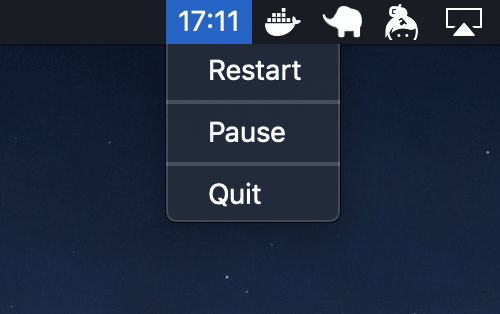
Currently supported operating systems:
- macOS
Install
# Install with systems Python 2.7 interpreter
$ sudo /usr/bin/python -m pip install mobtimer

# or using pyenv
$ pyenv shell system
$ sudo pip install mobtimer
Usage
# Start timer for 20 minute mobs
$ nohup mobtimer &

# or for 25 minute mobs
$ nohup mobtimer 25 &
$ mobtimer -h
usage: mobtimer [-h] [minutes]

A simple timer for mob programming.

positional arguments:
  minutes     Duration of each mob in minutes. Default: 20

optional arguments:
  -h, --help  show this help message and exit
1 maintainer

Metadata
1 maintainer
Release files for mobtimer 1.1.3
For a detailed explanation of source distributions (sdists) and built distributions (wheels), please see the package formats documentation.
Source distribution (sdist)
| File | Size | Uploaded | |
|---|---|---|---|
| mobtimer-1.1.3.tar.gz | 2.8 kB | Details |
Built distribution (wheel)
| File | Interpreter | ABI | Platform | Reset |
|---|---|---|---|---|
| mobtimer-1.1.3-py2-none-any.whl | Python 2 | none | any | Details |
Total release size: 6.2 kB
Release files / mobtimer-1.1.3.tar.gz
| Download URL | mobtimer-1.1.3.tar.gz |
|---|---|
| Size | 2.8 kB |
| Tags | Source |
|
SHA-256 checksum How to use checksums |
26e29aa07098bc8e198d4cbeea5b6b11f30734f6ad408e1c9a671071fdca8317
|
|
BLAKE2b-256 checksum How to use checksums |
18fda3200c5d61203153ddfab6607588fdbdd609dbafadb21b3ebb2db751209c
|
| Upload date | |
|
Uploaded using Trusted Publishing? What is trusted publishing? |
No |
| Uploaded via |
twine/1.13.0 pkginfo/1.5.0.1 requests/2.21.0 setuptools/40.8.0 requests-toolbelt/0.9.1 tqdm/4.31.1 CPython/2.7.15
|
Release files / mobtimer-1.1.3-py2-none-any.whl
| Download URL | mobtimer-1.1.3-py2-none-any.whl |
|---|---|
| Size | 3.4 kB |
| Tags | Python 2 |
|
SHA-256 checksum How to use checksums |
295fb03ac4459dab658cb4f31cdea6ba886a76d30f26ee67afd353e62a44f071
|
|
BLAKE2b-256 checksum How to use checksums |
c37de91a102bb7cbaa067cfa7facfefcb75439b3caaa50127bff3dd783e51976
|
| Upload date | |
|
Uploaded using Trusted Publishing? What is trusted publishing? |
No |
| Uploaded via |
twine/1.13.0 pkginfo/1.5.0.1 requests/2.21.0 setuptools/40.8.0 requests-toolbelt/0.9.1 tqdm/4.31.1 CPython/2.7.15
|














