
Muse 




A mopidy player with snapcast support
Features
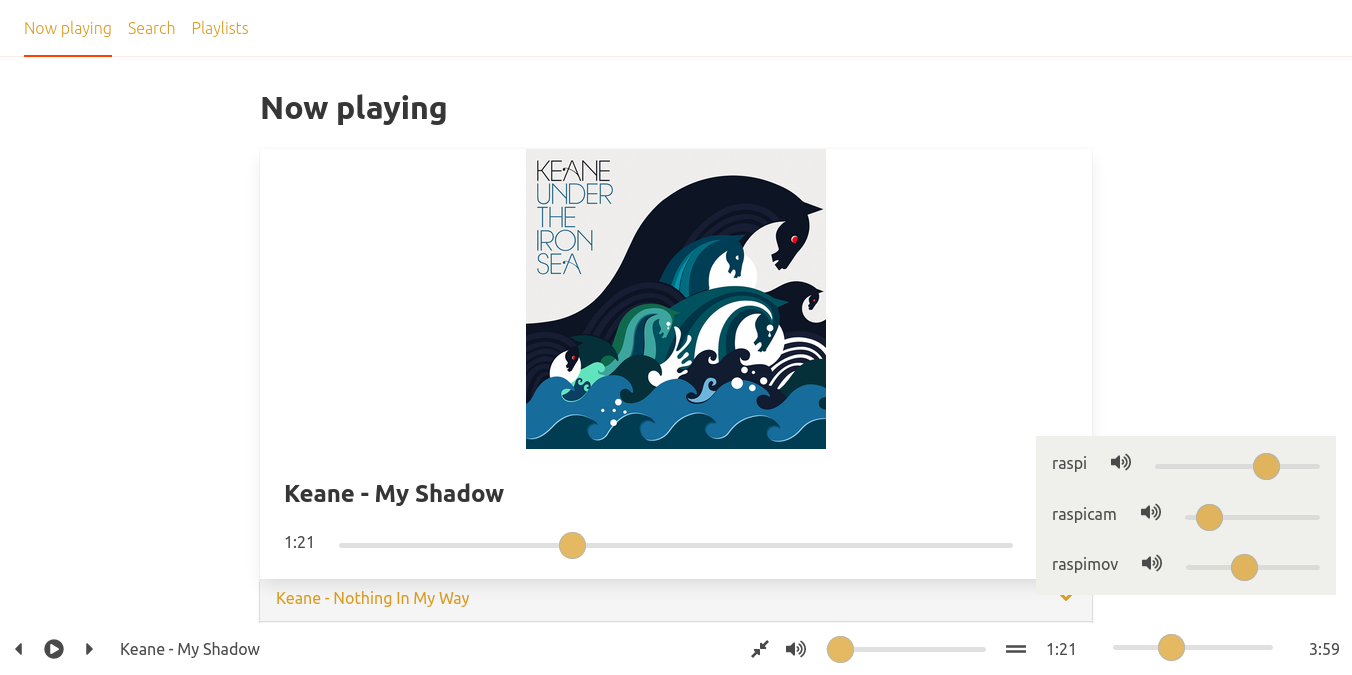
- Support for snapcast volume control
- Responsive design based in bulma framework
- Modify tracklists using drag and drop motions
- Create and modify playlists
- Reactive search for tracklists in different sources
- No user tracking (No Google Analytics)
- Created using state of the art web technologies:
- Svelte framework for small package size
- Svelte kit for multiple pages and server side rendering
- Github Actions CI/CD workflow for build and publish
Checkout a detailled description at this blog post
Installation
Python
Install by running:
python3 -m pip install Mopidy-Muse
Before starting Mopidy, you must add configuration for Mopidy-Muse to your Mopidy configuration file:
[muse]
enabled = true
# the following are optional values
mopidy_host = localhost
mopidy_port = 6680
mopidy_ssl = false
snapcast_host = localhost
snapcast_port = 1780
snapcast_ssl = false
Docker installation
Using docker compose:
make start
Using docker run command:
make mopidy-docker
Project resources
1 maintainer

Release files for Mopidy-Muse 0.0.36
For a detailed explanation of source distributions (sdists) and built distributions (wheels), please see the package formats documentation.
Source distribution (sdist)
| File | Size | Uploaded | |
|---|---|---|---|
| Mopidy-Muse-0.0.36.tar.gz | 188.0 kB | Details |
Built distribution (wheel)
| File | Interpreter | ABI | Platform | Reset |
|---|---|---|---|---|
| Mopidy_Muse-0.0.36-py3-none-any.whl | Python 3 | none | any | Details |
Total release size: 399.0 kB
Release files / Mopidy-Muse-0.0.36.tar.gz
| Download URL | Mopidy-Muse-0.0.36.tar.gz |
|---|---|
| Size | 188.0 kB |
| Tags | Source |
|
SHA-256 checksum How to use checksums |
a5c16761d0920e7a1431ca92a8674b26c79abea035759bfe40c8a619a9856c42
|
|
BLAKE2b-256 checksum How to use checksums |
bb9b2f263eee87ed1677111913f6c791bba06431f398fdcdedf44225b059149e
|
| Upload date | |
|
Uploaded using Trusted Publishing? What is trusted publishing? |
No |
| Uploaded via |
twine/5.0.0 CPython/3.12.2
|
Release files / Mopidy_Muse-0.0.36-py3-none-any.whl
| Download URL | Mopidy_Muse-0.0.36-py3-none-any.whl |
|---|---|
| Size | 211.1 kB |
| Tags | Python 3 |
|
SHA-256 checksum How to use checksums |
3728898ac05592e4774fdb3a434ff477fa94c5351404f020cdd384670e829d8c
|
|
BLAKE2b-256 checksum How to use checksums |
90a22750908645fd8e59399ede1d79c308d1dfb7d5cd41462dd589f5bc535aa0
|
| Upload date | |
|
Uploaded using Trusted Publishing? What is trusted publishing? |
No |
| Uploaded via |
twine/5.0.0 CPython/3.12.2
|














