
mousekey
- Works with multi screens
- Keyboard and mouse can be used in Games like Roblox
- Has only a few dependencies (all of them pure python except NumPy)
- Can simulate human-like mouse movement
- Facilitates multi key presses
Check out the videos
Some methods
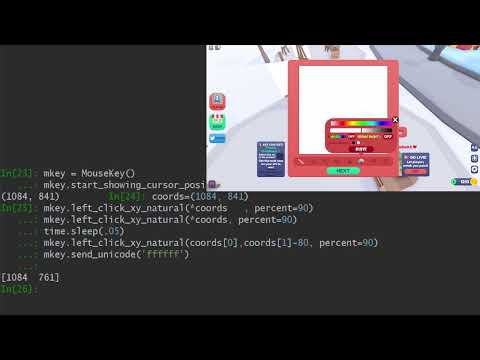
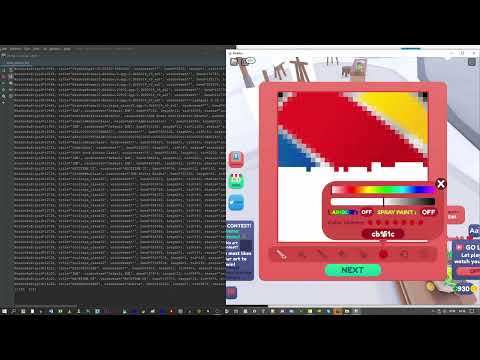
25 minutes of Roblox botting - 900x clicks / 900x keystrokes
Installation
$pip install mousekey
from mousekey import MouseKey
mkey = MouseKey()
Before you start, enable your guardian angel :)
# Kills the whole process, does always work (even with pure except)
mkey.enable_failsafekill('ctrl+e')

try:
    while True:
        try:
            print('baba')
            time.sleep(1)
        except:
            pass
except:
    pass
baba
baba
baba
baba

# After pressing ctrl+e:
Process finished with exit code 1
How to click and move
The click methods should be able to handle any Game
I have tested it with Roblox, which is known for blocking almost everything.
As far as I know, there is no Python module that can handle Roblox (https://pypi.org/project/ahk/ works, but you need to download ahk.exe)
Absolute coordinates
mkey.left_click_xy_natural(
    200,
    200,
    delay=.3, # duration of the mouse click (down - up)
    min_variation=-3, #  a random value will be added to each pixel  - define the minimum here
    max_variation=3,  # a random value will be added to each pixel  - define the maximum here
    use_every=4, # use every nth pixel
    sleeptime=(0.005, 0.009), # delay between each coordinate
    print_coords=True, # console output
    percent=90, # the lower, the straighter the mouse movement
) # A logarithm calculation lowers the speed when the cursor is getting close to the destination, like you do it in real life.
# Also available:
mkey.middle_click_xy_natural
mkey.right_click_xy_natural
# if you don't want to click, only move, use:
mkey.move_to_natural(100,100) # natural mouse movement
mkey.move_to(3100,100) = move # no delay
# Moving without delay and clicking:
mkey.left_click_xy(10,10)
mkey.right_click_xy(10,10)
mkey.middle_click_xy(10,10)

#Only clicking:
mkey.left_click()
mkey.middle_click()
mkey.right_click()
Relative coordinates
# For relative coordinates, use:
mkey.left_click_xy_natural_relative(
    50,
    50,
    delay=0.1,
    sleeptime=(0.00005, 0.00009),
    print_coords=True,
)

mkey.right_click_xy_natural_relative(
    x=500,
    y=500,
    delay=0.1,
    sleeptime=(0.00005, 0.00009),
    print_coords=True,
)
# move and click relatively
mkey.move_relative
mkey.middle_click_xy_relative(-100,-100)
mkey.move_to_natural_relative(300,-400)
Pressing keys
# press a single key
mkey.force_activate_window(10290540)
mkey.press_key('f', delay=1) # delay in seconds
# You can press as many keys simultaneously as you want.
# The first value in each tuple indicates the sleep time before the next key is pressed, and presstime is the delay of the whole action.
mkey.force_activate_window(10290540)
mkey.press_keys_simultaneously_own_interval(
    keystopress=[(0.1, "ctrl"), (0.1, "v")], presstime=.5
)
# This method will calculate the sleep time between each key presses, so you don't have to worry about it.
mkey.force_activate_window(10290540)
mkey.press_keys_simultaneously(
    keystopress=["alt", "f4", "enter", "enter"],
    presstime=1.1,
    percentofregularpresstime=100,
)
# You can get a list with all available keys here: mkey.show_all_keys
# I covered different writing styles ('volume_mute', 'VOLUME_MUTE', 'VOLUME MUTE', 'volume mute'),
{'control-break processing': 3,
 'backspace': 8,
 'tab': 9,
 'clear': 254,
 'enter': 13,
 'shift': 16,
 'ctrl': 17,
 'alt': 18,
 'pause': 19,
 'caps lock': 20,
 'ime hangul mode': 21,
 'ime junja mode': 23,
 'ime final mode': 24,
 'ime kanji mode': 25,
 'esc': 27,
 'ime convert': 28,
 'ime nonconvert': 29,
 'ime accept': 30,
 'ime mode change request': 31,
 'spacebar': 32,
 'page up': 33,
 ...}
# You can block the mouse/keyboard input while executing actions.
# That way, the user can't mess it up.
# If something goes wrong, press ctrl+alt+del
# This will automatically unlock the mouse/keyboard

# Here is one example. Always use mkey.block_user_input() / mkey.unblock_user_input()
if mkey.block_user_input():
    try:
        for k in range(3):
            mkey.right_click()
            sleep(1)
            mkey.left_click_xy_natural(10, 10)
            sleep(1)
    finally:
        mkey.unblock_user_input()
# You can send Unicode strings as well
mkey.force_activate_window(10290540)
mkey.send_unicode('bababöä')
# I have slightly modified 2 methods from pywinauto
# Most of the code is from pywinauto, I only changed the way the window gets activated
mkey.send_keys_to_hwnd(handle=7539468, keys='babadu')
mkey.send_keystrokes_to_hwnd(handle=7539468, '%{F4}')  # alt+f4

# Here are all keystrokes for those 2 methods:
https://pywinauto.readthedocs.io/en/latest/code/pywinauto.keyboard.html?highlight=VK_SPACE#pywinauto-keyboard

{SCROLLLOCK}, {VK_SPACE}, {VK_LSHIFT}, {VK_PAUSE}, {VK_MODECHANGE},
{BACK}, {VK_HOME}, {F23}, {F22}, {F21}, {F20}, {VK_HANGEUL}, {VK_KANJI},
{VK_RIGHT}, {BS}, {HOME}, {VK_F4}, {VK_ACCEPT}, {VK_F18}, {VK_SNAPSHOT},
{VK_PA1}, {VK_NONAME}, {VK_LCONTROL}, {ZOOM}, {VK_ATTN}, {VK_F10}, {VK_F22},
{VK_F23}, {VK_F20}, {VK_F21}, {VK_SCROLL}, {TAB}, {VK_F11}, {VK_END},
{LEFT}, {VK_UP}, {NUMLOCK}, {VK_APPS}, {PGUP}, {VK_F8}, {VK_CONTROL},
{VK_LEFT}, {PRTSC}, {VK_NUMPAD4}, {CAPSLOCK}, {VK_CONVERT}, {VK_PROCESSKEY},
{ENTER}, {VK_SEPARATOR}, {VK_RWIN}, {VK_LMENU}, {VK_NEXT}, {F1}, {F2},
{F3}, {F4}, {F5}, {F6}, {F7}, {F8}, {F9}, {VK_ADD}, {VK_RCONTROL},
{VK_RETURN}, {BREAK}, {VK_NUMPAD9}, {VK_NUMPAD8}, {RWIN}, {VK_KANA},
{PGDN}, {VK_NUMPAD3}, {DEL}, {VK_NUMPAD1}, {VK_NUMPAD0}, {VK_NUMPAD7},
{VK_NUMPAD6}, {VK_NUMPAD5}, {DELETE}, {VK_PRIOR}, {VK_SUBTRACT}, {HELP},
{VK_PRINT}, {VK_BACK}, {CAP}, {VK_RBUTTON}, {VK_RSHIFT}, {VK_LWIN}, {DOWN},
{VK_HELP}, {VK_NONCONVERT}, {BACKSPACE}, {VK_SELECT}, {VK_TAB}, {VK_HANJA},
{VK_NUMPAD2}, {INSERT}, {VK_F9}, {VK_DECIMAL}, {VK_FINAL}, {VK_EXSEL},
{RMENU}, {VK_F3}, {VK_F2}, {VK_F1}, {VK_F7}, {VK_F6}, {VK_F5}, {VK_CRSEL},
{VK_SHIFT}, {VK_EREOF}, {VK_CANCEL}, {VK_DELETE}, {VK_HANGUL}, {VK_MBUTTON},
{VK_NUMLOCK}, {VK_CLEAR}, {END}, {VK_MENU}, {SPACE}, {BKSP}, {VK_INSERT},
{F18}, {F19}, {ESC}, {VK_MULTIPLY}, {F12}, {F13}, {F10}, {F11}, {F16},
{F17}, {F14}, {F15}, {F24}, {RIGHT}, {VK_F24}, {VK_CAPITAL}, {VK_LBUTTON},
{VK_OEM_CLEAR}, {VK_ESCAPE}, {UP}, {VK_DIVIDE}, {INS}, {VK_JUNJA},
{VK_F19}, {VK_EXECUTE}, {VK_PLAY}, {VK_RMENU}, {VK_F13}, {VK_F12}, {LWIN},
{VK_DOWN}, {VK_F17}, {VK_F16}, {VK_F15}, {VK_F14}

'+': {VK_SHIFT}
'^': {VK_CONTROL}
'%': {VK_MENU} a.k.a. Alt key
Activating windows
# lists all current windows and their hwnds, pid ...
mkey.get_all_windows()

 WindowInfo(pid=24880, title='tooltips_class32', windowtext='', hwnd=38931464, length=1, tid=14156, status='invisible', coords_client=(0, 0, 0, 0), dim_client=(0, 0), coords_win=(0, 0, 0, 0), dim_win=(0, 0), class_name='tooltips_class32', path='C:\\Windows\\explorer.exe'),
 WindowInfo(pid=24916, title='IME', windowtext='Default IME', hwnd=333592, length=12, tid=6716, status='invisible', coords_client=(0, 0, 0, 0), dim_client=(0, 0), coords_win=(0, 0, 0, 0), dim_win=(0, 0), class_name='IME', path='C:\\Windows\\System32\\notepad.exe'),
 WindowInfo(pid=24916, title='IME', windowtext='Default IME', hwnd=1706956, length=12, tid=20004, status='invisible', coords_client=(0, 0, 0, 0), dim_client=(0, 0), coords_win=(0, 0, 0, 0), dim_win=(0, 0), class_name='IME', path='C:\\Windows\\System32\\notepad.exe'),
 WindowInfo(pid=24916, title='MSCTFIME UI', windowtext='MSCTFIME UI', hwnd=35652702, length=12, tid=20004, status='invisible', coords_client=(0, 0, 0, 0), dim_client=(0, 0), coords_win=(0, 0, 0, 0), dim_win=(0, 0), class_name='MSCTFIME UI', path='C:\\Windows\\System32\\notepad.exe'),
 WindowInfo(pid=24916, title='Notepad', windowtext='*Untitled - Notepad', hwnd=10290540, length=20, tid=20004, status='visible', coords_client=(0, 840, 0, 519), dim_client=(840, 519), coords_win=(714, 1570, 196, 774), dim_win=(856, 578), class_name='Notepad', path='C:\\Windows\\System32\\notepad.exe'),
 WindowInfo(pid=24916, title='WorkerW', windowtext='', hwnd=984520, length=1, tid=6716, status='invisible', coords_client=(0, 120, 0, 0), dim_client=(120, 0), coords_win=(0, 136, 0, 39), dim_win=(136, 39), class_name='WorkerW', path='C:\\Windows\\System32\\notepad.exe')]
# pass and hwnd (code above) as argument.
mkey.activate_window(10290540) # usually this is enough to activate a window

#if not, use this method
# Activating a window is sometimes tricky. This method forces the activation of the window and works quite often when other methods don't
mkey.force_activate_window(17630556)
# Pins a window on top of all others.
mkey.activate_topmost(17630556)

# Restore the normal hierarchy.
# This method is helpful when one of your windows gets stuck during the automation in the topmost position
mkey.deactivate_topmost(17630556)
# Some apps hide the cursor, here can you check it
mkey.is_cursor_shown ()
True
# Shows you the coordinates of the current cursor position. Press ctrl+l when you have found the right coordinates.
mkey.start_showing_cursor_position(exit_keys='ctrl+l')
mkey.get_single_element_from_coords(200,200)

WindowInfo(parent=-1, pid=20440, title='Edit', windowtext='', hwnd=592576, length=1, tid=17252, status='visible', coords_client=(0, 1903, 0, 1007), dim_client=(1903, 1007), coords_win=(0, 1920, 43, 1050), dim_win=(1920, 1007), class_name='Edit', path='C:\\Windows\\System32\\notepad.exe')


mkey.get_elements_from_coords(200,200)

{'element': WindowInfo(parent=-1, pid=20440, title='Edit', windowtext='', hwnd=592576, length=1, tid=17252, status='visible', coords_client=(0, 1903, 0, 1007), dim_client=(1903, 1007), coords_win=(0, 1920, 43, 1050), dim_win=(1920, 1007), class_name='Edit', path='C:\\Windows\\System32\\notepad.exe'),
 'family': [WindowInfo(parent=-1, pid=20440, title='Edit', windowtext='', hwnd=592576, length=1, tid=17252, status='visible', coords_client=(0, 1903, 0, 1007), dim_client=(1903, 1007), coords_win=(0, 1920, 43, 1050), dim_win=(1920, 1007), class_name='Edit', path='C:\\Windows\\System32\\notepad.exe'),
  WindowInfo(parent=-1, pid=20440, title='Notepad', windowtext='*Untitled - Notepad', hwnd=1051364, length=20, tid=17252, status='visible', coords_client=(0, 1920, 0, 1007), dim_client=(1920, 1007), coords_win=(-8, 1928, -8, 1058), dim_win=(1936, 1066), class_name='Notepad', path='C:\\Windows\\System32\\notepad.exe'),
  WindowInfo(parent=-1, pid=20440, title='msctls_statusbar32', windowtext='', hwnd=2886324, length=1, tid=17252, status='invisible', coords_client=(0, 484, 0, 23), dim_client=(484, 23), coords_win=(0, 484, 461, 484), dim_win=(484, 23), class_name='msctls_statusbar32', path='C:\\Windows\\System32\\notepad.exe'),
  WindowInfo(parent=-1, pid=784, title='#32769', windowtext='', hwnd=65552, length=1, tid=984, status='visible', coords_client=(0, 1920, 0, 1080), dim_client=(1920, 1080), coords_win=(0, 1920, 0, 1080), dim_win=(1920, 1080), class_name='#32769', path='')]}


mkey.get_elements_from_hwnd(2886324)

{'element': WindowInfo(parent=-1, pid=20440, title='msctls_statusbar32', windowtext='', hwnd=2886324, length=1, tid=17252, status='invisible', coords_client=(0, 484, 0, 23), dim_client=(484, 23), coords_win=(0, 484, 461, 484), dim_win=(484, 23), class_name='msctls_statusbar32', path='C:\\Windows\\System32\\notepad.exe'),
 'family': [WindowInfo(parent=-1, pid=20440, title='Edit', windowtext='', hwnd=592576, length=1, tid=17252, status='visible', coords_client=(0, 1903, 0, 1007), dim_client=(1903, 1007), coords_win=(0, 1920, 43, 1050), dim_win=(1920, 1007), class_name='Edit', path='C:\\Windows\\System32\\notepad.exe'),
  WindowInfo(parent=-1, pid=20440, title='Notepad', windowtext='*Untitled - Notepad', hwnd=1051364, length=20, tid=17252, status='visible', coords_client=(0, 1920, 0, 1007), dim_client=(1920, 1007), coords_win=(-8, 1928, -8, 1058), dim_win=(1936, 1066), class_name='Notepad', path='C:\\Windows\\System32\\notepad.exe'),
  WindowInfo(parent=-1, pid=20440, title='msctls_statusbar32', windowtext='', hwnd=2886324, length=1, tid=17252, status='invisible', coords_client=(0, 484, 0, 23), dim_client=(484, 23), coords_win=(0, 484, 461, 484), dim_win=(484, 23), class_name='msctls_statusbar32', path='C:\\Windows\\System32\\notepad.exe'),
  WindowInfo(parent=-1, pid=784, title='#32769', windowtext='', hwnd=65552, length=1, tid=984, status='visible', coords_client=(0, 1920, 0, 1080), dim_client=(1920, 1080), coords_win=(0, 1920, 0, 1080), dim_win=(1920, 1080), class_name='#32769', path='')]}


mkey.get_single_element_from_hwnd(10290540)

Out[18]: WindowInfo(parent=-1, pid=24916, title='Notepad', windowtext='*Untitled - Notepad', hwnd=10290540, length=20, tid=20004, status='visible', coords_client=(0, 840, 0, 519), dim_client=(840, 519), coords_win=(714, 1570, 196, 774), dim_win=(856, 578), class_name='Notepad', path='C:\\Windows\\System32\\notepad.exe')
# Gets the rgb values from coordinates and shows the values simultaneously, press ctrl+c when you are done, the method will return a list with all coordinates and colors.
rgblist = mkey.show_rgb_values_at_mouse_position(
        sleeptime=0.01,
        on_left_click=False,
        on_right_click=False,
        rgb_values=True,
        rgba_values=True,
        coords=True,
        time_value=True,)
# Getting the screen resolution
mkey.get_screen_resolution()
(1920, 1080)

mkey.get_active_window()
WindowInfo(pid=11144, title='SunAwtFrame', windowtext='Python Console - dfdir', hwnd=30283760, length=23, tid=6976, status='visible', coords_client=(0, 1921, 0, 996), dim_client=(1921, 996), coords_win=(2039, 3976, 54, 1058), dim_win=(1937, 1004), class_name='SunAwtFrame', path='C:\\Program Files\\JetBrains\\PyCharm Community Edition 2020.3\\bin\\pycharm64.exe')

mkey.get_cursor_position() # executed only once
(2436, 994)
1 maintainer

Metadata
1 maintainer
Release files for mousekey 0.12
For a detailed explanation of source distributions (sdists) and built distributions (wheels), please see the package formats documentation.
Source distribution (sdist)
| File | Size | Uploaded | Provenance | Actions |
|---|---|---|---|---|
| mousekey-0.12.tar.gz | 47.5 kB | Without provenance | Details for mousekey-0.12.tar.gz |
Built distribution (wheel)
| File | Interpreter | ABI | Platform | Actions Reset |
|---|---|---|---|---|
| mousekey-0.12-py3-none-any.whl | Python 3 | none | any | Details for mousekey-0.12-py3-none-any.whl |
Total release size: 95.1 kB
Release files / mousekey-0.12.tar.gz
| Download URL | mousekey-0.12.tar.gz |
|---|---|
| Size | 47.5 kB |
| Tags | Source |
|
SHA-256 checksum How to use checksums |
46bbc77bf3d9e5b68c4611a7fd3861a46bcfb252e7a3c9f712ada36c9e453845
|
|
BLAKE2b-256 checksum How to use checksums |
aa940120fc94daa40a3035cb42fc8a7bab6473cff7d606c3656d9698c5327ff5
|
| Upload date | |
|
Uploaded using Trusted Publishing? What is trusted publishing? |
No |
| Uploaded via |
twine/4.0.2 CPython/3.10.10
|
Release files / mousekey-0.12-py3-none-any.whl
| Download URL | mousekey-0.12-py3-none-any.whl |
|---|---|
| Size | 47.6 kB |
| Tags | Python 3 |
|
SHA-256 checksum How to use checksums |
d6ea374a14470b8b63665eae535c582a9e69401389f9b1c110ef550e51d8cb73
|
|
BLAKE2b-256 checksum How to use checksums |
0da82ffea2ffc7443f2e9f97f73bcf4a3aec0d2cf48b053466c98705febc1ddc
|
| Upload date | |
|
Uploaded using Trusted Publishing? What is trusted publishing? |
No |
| Uploaded via |
twine/4.0.2 CPython/3.10.10
|
Security for mousekey 0.12
Provenance
Provenance describes where a file came from. On PyPI, provenance is shared via attestations, which provide a verifiable record of the build or publishing details. View details, limitations and caveats.
No provenance found
None of the files in this release were uploaded with provenance metadata.
A note on package security
PyPI is a repository for distributing packages, not a service for auditing them. While third-party security researchers and our staff do their best to detect and remove malicious packages, PyPI cannot guarantee the quality, security or suitability of any given package.
To learn more about protecting yourself from malicious actors, visit our package security documentation.














