
A simple toolbox for getting mpc forces from output files from Optistruct

Project description
MPCForces-Extractor
This tool outputs the MPC forces via summing it up per connected part. It is used in combination with Optistruct.
Motivation
When you have simple rigid elements for modelling bolts, the mpcforces can be written out to either .h3d or .mpcf file among other options. With these options there seems to be no easy way of getting the summed up forces per conneced part for every mpc elmeent. Below you can see an image with the mpc forses printed as a vector plot. In the image there are two connected parts. To manually get the desired force per part you have to go into hyperview, do a table export and sum them up. This also requires you to have sets or to manually select the nodes per part. For a multitude of mpc elements this process is a problem.

The desired process is this:

This tool is destined to solve this by automating it. The two major problems regarding this:
- Detect the connected parts with in an efficient way
- Read the mpcf File and assign each force to the mpc element (as this is not printed in the mpcf file)
Overview
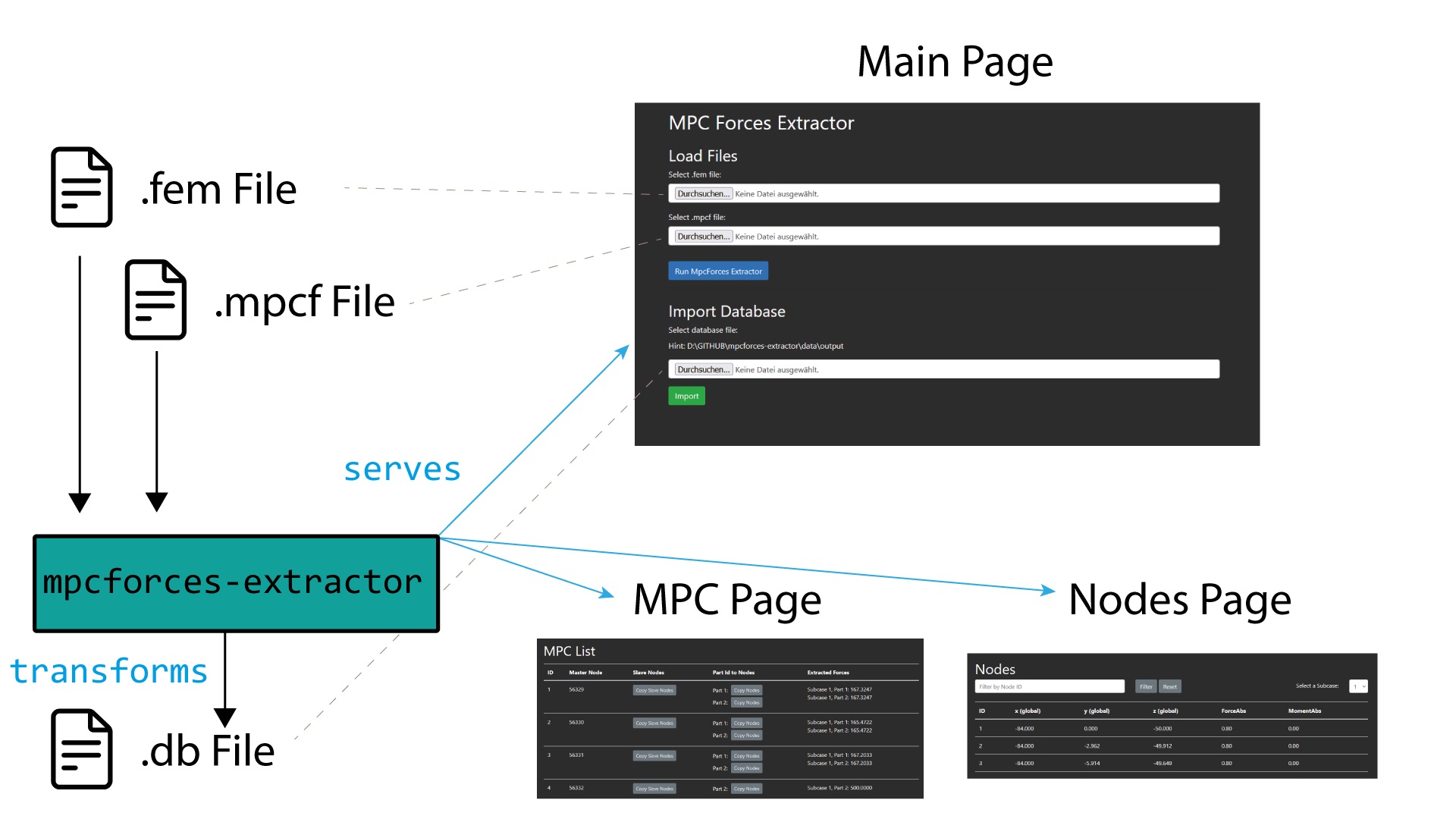
As seen in the picture above, the .fem and .mpcf files are being transformed by the mpcforces-extractor in a .db file. This can be triggered from the main page and the extracted entities are saved in the .db and can be seen on the mpc and node page.
If you have transformed files into a .db file already you can directly load them in on the bottom half of the main page. This way, the tool is not triggered again but just the entities are displayed on the mpc and node pages.
The mpcforces-extractor serves a small webserver with the pages when being called as descriebed in the quickstart section below.
Quickstart
To use this tool, you can simply use the pip install command like so:
pip install mpcforces-extractor
After installing it, you can access the tool via: mpcforces-extractor which will launch a small webserver wher you can select input files and start the process:
If you need more documentation, you can access it here
Test Files
In order to make testing the tool easier, you can download the following files:
Questions?
- Write me a e-mail :)
Release history Release notifications | RSS feed


Download files
Download the file for your platform. If you're not sure which to choose, learn more about installing packages.
Source Distribution
Built Distribution
Filter files by name, interpreter, ABI, and platform.
If you're not sure about the file name format, learn more about wheel file names.
Copy a direct link to the current filters
File details
Details for the file mpcforces_extractor-0.1.7.4.tar.gz.
File metadata
- Download URL: mpcforces_extractor-0.1.7.4.tar.gz
- Upload date:
- Size: 32.7 kB
- Tags: Source
- Uploaded using Trusted Publishing? No
- Uploaded via: twine/5.1.1 CPython/3.10.15
File hashes
| Algorithm | Hash digest | |
|---|---|---|
| SHA256 |
e9a470491b9d92b82b9d2db42aa8c9f2f3cd3d598c4a31d4dc5215529f05cae2
|
|
| MD5 |
0d82dcd082edd28e81fd6d8089dc9068
|
|
| BLAKE2b-256 |
2867d7738d0c4b9ffb7c1f3f2b7f9d07c80ebfce55b3ca8f1a8c4b511b77c52e
|
File details
Details for the file mpcforces_extractor-0.1.7.4-py3-none-any.whl.
File metadata
- Download URL: mpcforces_extractor-0.1.7.4-py3-none-any.whl
- Upload date:
- Size: 48.1 kB
- Tags: Python 3
- Uploaded using Trusted Publishing? No
- Uploaded via: twine/5.1.1 CPython/3.10.15
File hashes
| Algorithm | Hash digest | |
|---|---|---|
| SHA256 |
663798c81c339d08726a31d5aa50e56fc65d6efaddea03fee194c492f079cbda
|
|
| MD5 |
87c2028b9196aab0993c18adfe683b67
|
|
| BLAKE2b-256 |
edfbf5407e0536b48b0eeb3857f60c7ec9b8d179ad563f7d4732c5b762acb921
|






