
mqttwarn

To warn, alert, or notify.
Status






GitHub | PyPI | Documentation | Issues | Changelog
About
mqttwarn - subscribe to MQTT topics and notify pluggable services.
Description
mqttwarn subscribes to any number of MQTT topics and publishes received payloads to one or more notification services after optionally applying sophisticated transformations.
A picture says a thousand words.
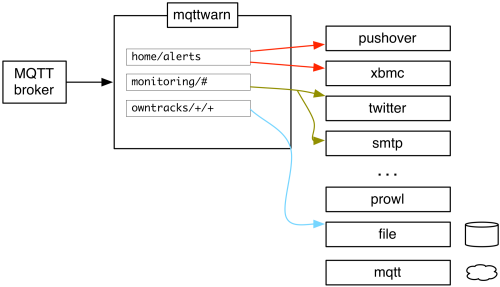
Notification service coverage
mqttwarn comes with over 70 notification handler plugins, covering a wide range of notification services and is very open to further contributions. You can enjoy the alphabetical list of plugins on the mqttwarn notifier catalog page.
On top of that, it integrates with the excellent Apprise notification library. Apprise notification services has a complete list of the 80+ notification services supported by Apprise.
Documentation
The mqttwarn documentation is the right place to read all about mqttwarn’s features and integrations, and how you can leverage all its framework components for building custom applications. Its service plugins can be inspected on the mqttwarn notifier catalog page.
Installation
Using pip
Synopsis:
pip install --upgrade mqttwarn
You can also add support for a specific service plugin:
pip install --upgrade 'mqttwarn[xmpp]'
You can also add support for multiple services, all at once:
pip install --upgrade 'mqttwarn[apprise,asterisk,nsca,desktopnotify,tootpaste,xmpp]'
See also: Installing mqttwarn with pip.
OCI container image
For running mqttwarn on a container infrastructure like Docker or Kubernetes, corresponding images are automatically published to the GitHub Container Registry (GHCR).
ghcr.io/mqtt-tools/mqttwarn-standard:latest
ghcr.io/mqtt-tools/mqttwarn-full:latest
To learn more about this topic, please follow up reading the Using the OCI image with Docker or Podman documentation section.
Configuration
In order to learn how to configure mqttwarn, please head over to the documentation section about the mqttwarn configuration.
Usage
Interactive service
Just launch mqttwarn:
# Run mqttwarn
mqttwarn
To supply a different configuration file or log file, optionally use:
# Define configuration file
export MQTTWARNINI=/etc/mqttwarn/acme.ini

# Define log file
export MQTTWARNLOG=/var/log/mqttwarn.log

# Run mqttwarn
mqttwarn
System daemon
There are different ways to run mqttwarn as a system daemon. There are examples for systemd, traditional init, OpenRC, and Supervisor in the etc directory of this repository, for example supervisor.ini (Supervisor) and mqttwarn.service (systemd).
Standalone
In order to directly invoke notification plugins from custom programs, or for debugging them, see Running notification plugins standalone.
Development sandbox
For hacking on mqttwarn, please install it in development mode, using a mqttwarn development sandbox installation.
Project information
About
These links will guide you to the source code of mqttwarn and its documentation.
Requirements
You will need at least the following components:
Python 3.x or PyPy 3.x.
An MQTT broker. We recommend Eclipse Mosquitto.
For invoking specific service plugins, additional Python modules may be required. See setup.py file.
Contributing
We are always happy to receive code contributions, ideas, suggestions and problem reports from the community.
So, if you would like to contribute, you are most welcome. Spend some time taking a look around, locate a bug, design issue or spelling mistake, and then send us a pull request or create an issue.
Thank you in advance for your efforts, we really appreciate any help or feedback.
License
mqttwarn is copyright © 2014-2023 Jan-Piet Mens and contributors. All rights reserved.
It is and will always be free and open source software.
Use of the source code included here is governed by the Eclipse Public License 2.0, see LICENSE file for details. Please also recognize the licenses of third-party components.
Troubleshooting
If you encounter any problems during setup or operations or if you have further suggestions, please let us know by opening an issue on GitHub. Thank you already.
Attributions
Acknowledgements
Thanks to all the contributors of mqttwarn who helped to conceive it in one way or another. You know who you are.
Legal stuff
“MQTT” is a trademark of the OASIS open standards consortium, which publishes the MQTT specifications. “Eclipse Mosquitto” is a trademark of the Eclipse Foundation.
Supported by

Special thanks to the people at JetBrains s.r.o. for supporting us with excellent development tooling.
Have fun!


Release files for mqttwarn 0.36.1
For a detailed explanation of source distributions (sdists) and built distributions (wheels), please see the package formats documentation.
Source distribution (sdist)
| File | Size | Uploaded | Provenance | |
|---|---|---|---|---|
| mqttwarn-0.36.1.tar.gz | 978.0 kB | With provenance | Details |
Built distribution (wheel)
| File | Interpreter | ABI | Platform | Reset |
|---|---|---|---|---|
| mqttwarn-0.36.1-py3-none-any.whl | Python 3 | none | any | Details |
Total release size: 1.1 MB
Release files / mqttwarn-0.36.1.tar.gz
| Download URL | mqttwarn-0.36.1.tar.gz |
|---|---|
| Size | 978.0 kB |
| Tags | Source |
|
SHA-256 checksum How to use checksums |
308f582244fe0f76b15ad5fc07ecd8252c7a3b1814bafe3f94e84a1a1d211fda
|
|
BLAKE2b-256 checksum How to use checksums |
6373ba682378993be7278cfee416fb9e1a46a5cd06332aed7eb0ccccce563a7b
|
| Upload date | |
|
Uploaded using Trusted Publishing? What is trusted publishing? |
Yes |
| Uploaded via |
twine/6.1.0 CPython/3.13.12
|
Provenance
Provenance describes where a file came from. On PyPI, provenance is shared via attestations, which provide a verifiable record of the build or publishing details. View details, limitations and caveats.


PyPI Publish Attestation
PyPI verified that this artifact, at this checksum, originated from the publisher listed below.
Signed by GitHub Actions, verified by PyPI on Jul 12, 2026.
Transparency logRelease files / mqttwarn-0.36.1-py3-none-any.whl
| Download URL | mqttwarn-0.36.1-py3-none-any.whl |
|---|---|
| Size | 121.3 kB |
| Tags | Python 3 |
|
SHA-256 checksum How to use checksums |
f9d71ec44cc6b8b2a18ede088278368fcac85188d8e8daaa50584eb041a5f1af
|
|
BLAKE2b-256 checksum How to use checksums |
4226f2d6cec9fbe51611ca181bf68e22616eb2fe81022bdbca5d07c9ed04b021
|
| Upload date | |
|
Uploaded using Trusted Publishing? What is trusted publishing? |
Yes |
| Uploaded via |
twine/6.1.0 CPython/3.13.12
|
Provenance
Provenance describes where a file came from. On PyPI, provenance is shared via attestations, which provide a verifiable record of the build or publishing details. View details, limitations and caveats.
PyPI Publish Attestation
PyPI verified that this artifact, at this checksum, originated from the publisher listed below.
Signed by GitHub Actions, verified by PyPI on Jul 12, 2026.
Transparency logSecurity for mqttwarn 0.36.1
Provenance
Provenance describes where a file came from. On PyPI, provenance is shared via attestations, which provide a verifiable record of the build or publishing details. View details, limitations and caveats.
Full provenance
All 2 files in this release have been uploaded with provenance metadata.
Attestation for mqttwarn-0.36.1.tar.gz
PyPI Publish Attestation
PyPI verified that this artifact, at this checksum, originated from the publisher listed below.
Signed by GitHub Actions, verified by PyPI on Jul 12, 2026.
Transparency logA note on package security
PyPI is a repository for distributing packages, not a service for auditing them. While third-party security researchers and our staff do their best to detect and remove malicious packages, PyPI cannot guarantee the quality, security or suitability of any given package.
To learn more about protecting yourself from malicious actors, visit our package security documentation.














