
MRQ


MRQ is a distributed task queue for python built on top of mongo, redis and gevent.
Full documentation is available on readthedocs
Why?
MRQ is an opinionated task queue. It aims to be simple and beautiful like RQ while having performances close to Celery
MRQ was first developed at Pricing Assistant and its initial feature set matches the needs of worker queues with heterogenous jobs (IO-bound & CPU-bound, lots of small tasks & a few large ones).
Main Features
- Simple code: We originally switched from Celery to RQ because Celery's code was incredibly complex and obscure (Slides). MRQ should be as easy to understand as RQ and even easier to extend.
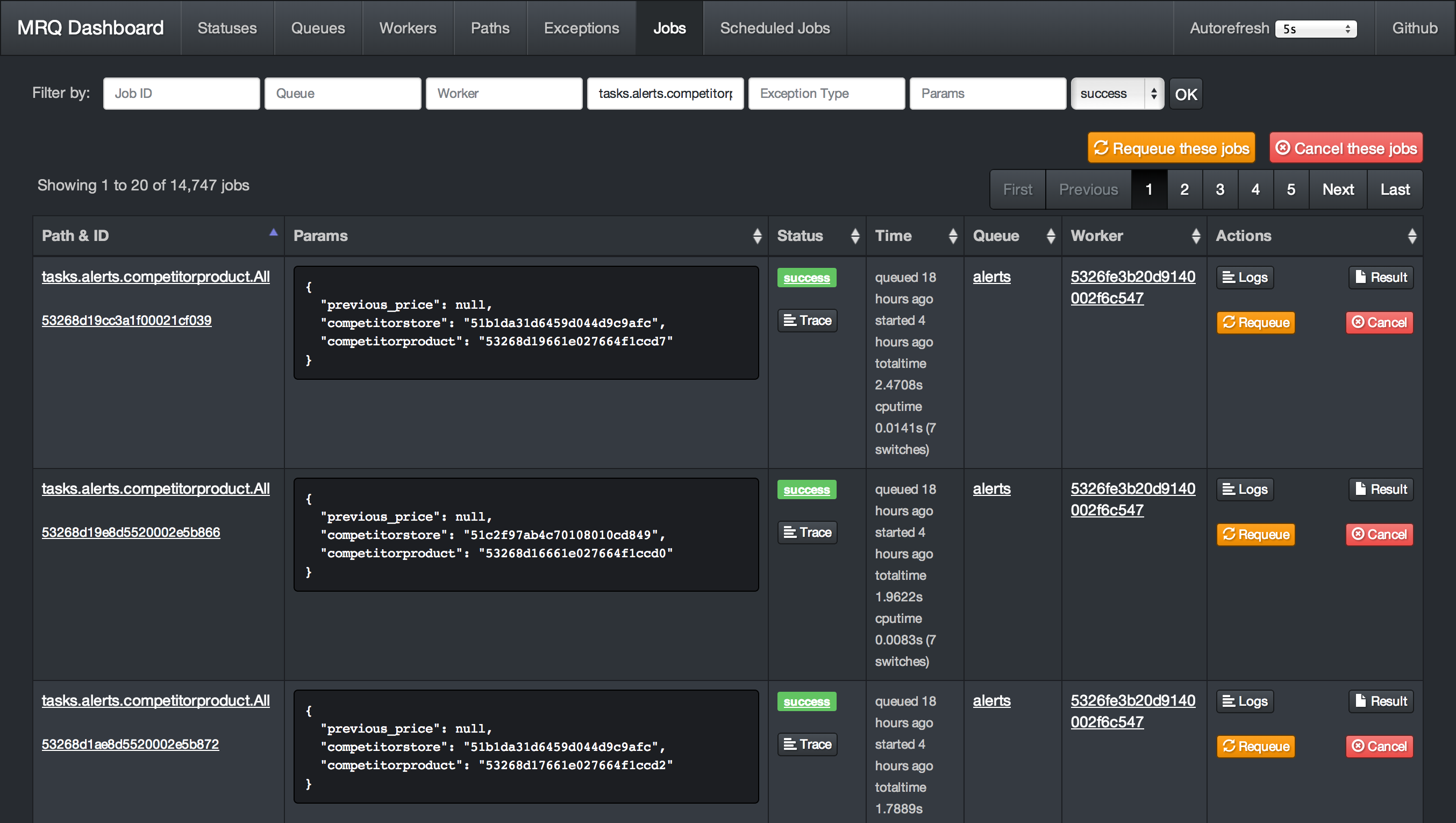
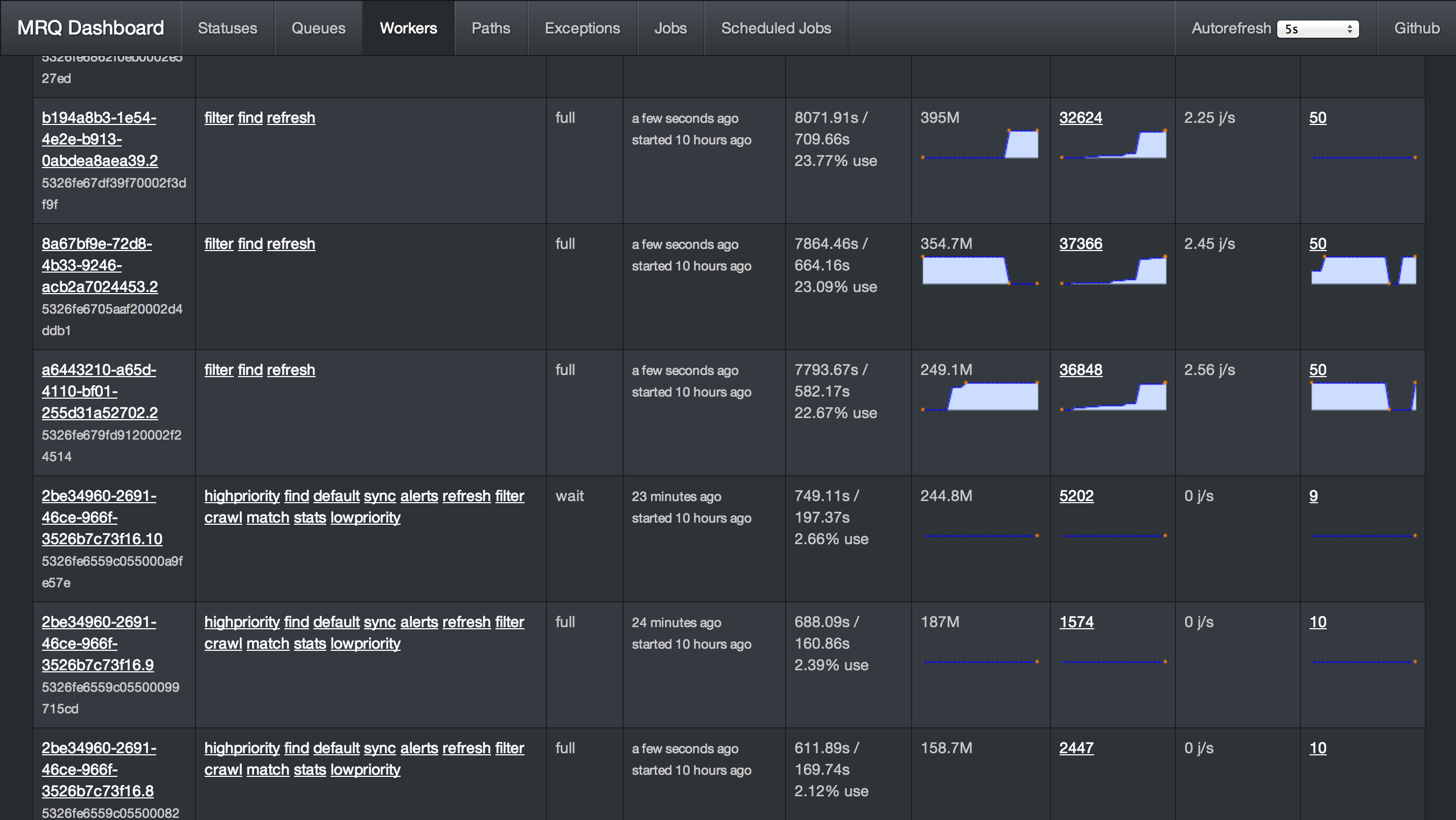
- Great dashboard: Have visibility and control on everything: queued jobs, current jobs, worker status, ...
- Per-job logs: Get the log output of each task separately in the dashboard
- Gevent worker: IO-bound tasks can be done in parallel in the same UNIX process for maximum throughput
- Supervisord integration: CPU-bound tasks can be split across several UNIX processes with a single command-line flag
- Job management: You can retry, requeue, cancel jobs from the code or the dashboard.
- Performance: Bulk job queueing, easy job profiling
- Easy configuration: Every aspect of MRQ is configurable through command-line flags or a configuration file
- Job routing: Like Celery, jobs can have default queues, timeout and ttl values.
- Builtin scheduler: Schedule tasks by interval or by time of the day
- Strategies: Sequential or parallel dequeue order, also a burst mode for one-time or periodic batch jobs.
- Subqueues: Simple command-line pattern for dequeuing multiple sub queues, using auto discovery from worker side.
- Thorough testing: Edge-cases like worker interrupts, Redis failures, ... are tested inside a Docker container.
- Greenlet tracing: See how much time was spent in each greenlet to debug CPU-intensive jobs.
- Integrated memory leak debugger: Track down jobs leaking memory and find the leaks with objgraph.
Dashboard Screenshots
Get Started
This 5-minute tutorial will show you how to run your first jobs with MRQ.
Installation
- Make sure you have installed the dependencies : Redis and MongoDB
- Install MRQ with
pip install mrq - Start a mongo server with
mongod & - Start a redis server with
redis-server &
Write your first task
Create a new directory and write a simple task in a file called tasks.py :
$ mkdir test-mrq && cd test-mrq
$ touch __init__.py
$ vim tasks.py
from mrq.task import Task
import urllib2


class Fetch(Task):

    def run(self, params):

        with urllib2.urlopen(params["url"]) as f:
          t = f.read()
          return len(t)
Run it synchronously
You can now run it from the command line using mrq-run:
$ mrq-run tasks.Fetch url http://www.google.com

2014-12-18 15:44:37.869029 [DEBUG] mongodb_jobs: Connecting to MongoDB at 127.0.0.1:27017/mrq...
2014-12-18 15:44:37.880115 [DEBUG] mongodb_jobs: ... connected.
2014-12-18 15:44:37.880305 [DEBUG] Starting tasks.Fetch({'url': 'http://www.google.com'})
2014-12-18 15:44:38.158572 [DEBUG] Job None success: 0.278229s total
17655
Run it asynchronously
Let's schedule the same task 3 times with different parameters:
$ mrq-run --queue fetches tasks.Fetch url http://www.google.com &&
  mrq-run --queue fetches tasks.Fetch url http://www.yahoo.com &&
  mrq-run --queue fetches tasks.Fetch url http://www.wordpress.com

2014-12-18 15:49:05.688627 [DEBUG] mongodb_jobs: Connecting to MongoDB at 127.0.0.1:27017/mrq...
2014-12-18 15:49:05.705400 [DEBUG] mongodb_jobs: ... connected.
2014-12-18 15:49:05.729364 [INFO] redis: Connecting to Redis at 127.0.0.1...
5492f771520d1887bfdf4b0f
2014-12-18 15:49:05.957912 [DEBUG] mongodb_jobs: Connecting to MongoDB at 127.0.0.1:27017/mrq...
2014-12-18 15:49:05.967419 [DEBUG] mongodb_jobs: ... connected.
2014-12-18 15:49:05.983925 [INFO] redis: Connecting to Redis at 127.0.0.1...
5492f771520d1887c2d7d2db
2014-12-18 15:49:06.182351 [DEBUG] mongodb_jobs: Connecting to MongoDB at 127.0.0.1:27017/mrq...
2014-12-18 15:49:06.193314 [DEBUG] mongodb_jobs: ... connected.
2014-12-18 15:49:06.209336 [INFO] redis: Connecting to Redis at 127.0.0.1...
5492f772520d1887c5b32881
You can see that instead of executing the tasks and returning their results right away, mrq-run has added them to the queue named fetches and printed their IDs.
Now start MRQ's dasbhoard with mrq-dashboard & and go check your newly created queue and jobs on localhost:5555
They are ready to be dequeued by a worker. Start one with mrq-worker and follow it on the dashboard as it executes the queued jobs in parallel.
$ mrq-worker fetches

2014-12-18 15:52:57.362209 [INFO] Starting Gevent pool with 10 worker greenlets (+ report, logs, adminhttp)
2014-12-18 15:52:57.388033 [INFO] redis: Connecting to Redis at 127.0.0.1...
2014-12-18 15:52:57.389488 [DEBUG] mongodb_jobs: Connecting to MongoDB at 127.0.0.1:27017/mrq...
2014-12-18 15:52:57.390996 [DEBUG] mongodb_jobs: ... connected.
2014-12-18 15:52:57.391336 [DEBUG] mongodb_logs: Connecting to MongoDB at 127.0.0.1:27017/mrq...
2014-12-18 15:52:57.392430 [DEBUG] mongodb_logs: ... connected.
2014-12-18 15:52:57.523329 [INFO] Fetching 1 jobs from ['fetches']
2014-12-18 15:52:57.567311 [DEBUG] Starting tasks.Fetch({u'url': u'http://www.google.com'})
2014-12-18 15:52:58.670492 [DEBUG] Job 5492f771520d1887bfdf4b0f success: 1.135268s total
2014-12-18 15:52:57.523329 [INFO] Fetching 1 jobs from ['fetches']
2014-12-18 15:52:57.567747 [DEBUG] Starting tasks.Fetch({u'url': u'http://www.yahoo.com'})
2014-12-18 15:53:01.897873 [DEBUG] Job 5492f771520d1887c2d7d2db success: 4.361895s total
2014-12-18 15:52:57.523329 [INFO] Fetching 1 jobs from ['fetches']
2014-12-18 15:52:57.568080 [DEBUG] Starting tasks.Fetch({u'url': u'http://www.wordpress.com'})
2014-12-18 15:53:00.685727 [DEBUG] Job 5492f772520d1887c5b32881 success: 3.149119s total
2014-12-18 15:52:57.523329 [INFO] Fetching 1 jobs from ['fetches']
2014-12-18 15:52:57.523329 [INFO] Fetching 1 jobs from ['fetches']
You can interrupt the worker with Ctrl-C once it is finished.
Going further
This was a preview on the very basic features of MRQ. What makes it actually useful is that:
- You can run multiple workers in parallel. Each worker can also run multiple greenlets in parallel.
- Workers can dequeue from multiple queues
- You can queue jobs from your Python code to avoid using
mrq-runfrom the command-line.
These features will be demonstrated in a future example of a simple web crawler.
How to compile a new version of MRQ
- Go to mrq/version.py file and update from 0.9.28.1 to 0.9.29 (for example)
- Commit and pushes the last changes
- Go to in the master branch (after merge pull request)
- Execute the command
python setup.py sdist - Make sure you have installed the python twine package (
pip install twine). - Execute the twine command to upload the new version of mrq to pypi.org (
twine upload dist/mrq-custom-0.9.29.tar.gz) - In the previous step you will be asked for the pypi.org credentials are in 1password, you must request them in #password_requests
- Update all applications that use MRQ with this version in their requirements.txt
More
Full documentation is available on readthedocs
1 maintainer

Metadata
1 maintainer
Release files for mrq-custom 0.10.1.0
For a detailed explanation of source distributions (sdists) and built distributions (wheels), please see the package formats documentation.
Source distribution (sdist)
| File | Size | Uploaded | Provenance | |
|---|---|---|---|---|
| mrq-custom-0.10.1.0.tar.gz | 538.9 kB | Without provenance | Details |
Release files / mrq-custom-0.10.1.0.tar.gz
| Download URL | mrq-custom-0.10.1.0.tar.gz |
|---|---|
| Size | 538.9 kB |
| Tags | Source |
|
SHA-256 checksum How to use checksums |
186e22fd8e3642495c4e07f29fc8cc6716798831b367db4492c8a85dc74b653a
|
|
BLAKE2b-256 checksum How to use checksums |
e59e5e24598c94d42ff3f6f976c50e38a2bd1b55097eba37b365434a077f9489
|
| Upload date | |
|
Uploaded using Trusted Publishing? What is trusted publishing? |
No |
| Uploaded via |
twine/4.0.2 CPython/3.11.3
|
Security for mrq-custom 0.10.1.0
Provenance
Provenance describes where a file came from. On PyPI, provenance is shared via attestations, which provide a verifiable record of the build or publishing details. View details, limitations and caveats.
No provenance found
None of the files in this release were uploaded with provenance metadata.
A note on package security
PyPI is a repository for distributing packages, not a service for auditing them. While third-party security researchers and our staff do their best to detect and remove malicious packages, PyPI cannot guarantee the quality, security or suitability of any given package.














