




muextensions
Overview
This project is still in alpha. Expect backwards compatibility breaking changes.
Adds ditaa and PlantUML directives to reStructuredText, and hopefully Markdown in the future. muextensions does this by providing plugins for projects like Hovercraft! and Pelican, and simplifies registering the directives with other Docutils projects.
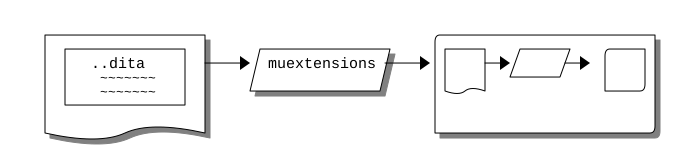
It allows for adding a reStructuredText block like the following:
.. ditaa-image::

    +---------------+                      /---------------------+
    | +-----------+ |    +------------+    |+---+  +----+   /---+|
    | | ..dita::  | +--->+muextensions+--->+|   +->+{io}+-> +   ||
    | |   ~~~~~~~ | |    |        {io}|    ||{d}|  +----+   |   ||
    | |   ~~~~~~~ | |    +------------+    |+---+           +---/|
    | +-----------+ |                      |                     |
    |            {d}|                      |                     |
    +---------------+                      +---------------------/
And having it embedded in the Docutils generated document as an image:
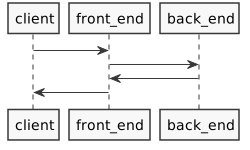
In the case of PlantUML, a block like:
.. plantuml-image::

  skinparam monochrome true
  skinparam shadowing false

  client -> front_end
  front_end -> back_end
  back_end -> front_end
  front_end -> client
Would be rendered as:
Usage
Prerequisites
Install PlantUML and have a wrapper script with the name plantuml that executes it installed in your path for PlantUML support. A sample wrapper script is included in contrib/scripts/plantuml of this project.
For ditaa support, install as described in the Getting it section of the ditaa documentation.
Pelican
muextensions provides a plugin for Pelican in muextensions.contrib.pelican.
If everything is configured correctly, integrating muextensions into Pelican should be as simple as:
Installing muextensions in the Python virtual environment that Pelican is installed in with:
pip install muextensionsAppending 'muextensions.contrib.pelican' to PLUGINS in your pelicanconf.py:
PLUGINS = ['muextensions.contrib.pelican',]
For more information on how to configure plugins in Pelican, refer to the How to use plugins section in their documentation.
Hovercraft!
Support for Hovercraft! is currently pending pull request regebro/hovercraft#196 which adds the --directive-plugin argument to the hovercraft command. The source code introducing --directive-plugin can be found in pedrohdz/hovercraft under the directives branch.
Here is a quick example to see muextensions, make sure to complete the Prerequisites first. We will utilize the demo presentation in docs/examples/hovercraft/.
cd docs/examples/hovercraft/
python3.7 -m venv .venv
source .venv/bin/activate
pip install -U pip
pip install muextensions \
    https://github.com/pedrohdz/hovercraft/archive/directives.zip
hovercraft --directive-plugin muextensions.contrib.hovercraft demo.rst
Open http://localhost:8000/ in a web browser to see the Hovercraft! presentation.
Other docutils projects
The muextensions reStructuredText directives can be added to any Docutils project by way of Docutils connectors in muextensions.connector.docutils.
from pathlib import Path
from muextensions.connector.docutils import plantuml, ditaa

output_path = Path('.')
plantuml.register(output_path)
ditaa.register(output_path)
The plantuml and ditaa register() functions in muextensions.connector.docutils handle registering the reStructuredText directives as described in the Register the Directive section on the Docutils of the documentation.
Development
Setting up for development:
git clone git@github.com:pedrohdz/muextensions.git
cd muextensions
python3.5 -m venv .venv
source .venv/bin/activate
pip install -U pip
pip install -e .[ci,test]
Make sure you have a good baseline by running tox. Executing tox from within a venv (Python virtual environments) will cause pip related errors during the tests, either exit the venv via the deactivate command, or execute tox from a new terminal.
deactivate
tox
source .venv/bin/activate
To execute the unit tests:
pytestTo execute and view the unit test code coverage:
pytest --cov-report=html --cov
open htmlcov/index.html
To run the integration tests, assuming both ditaa and plantuml are installed on the system, use the --run-integration option. To save the output of the integration tests for examination, add the --save-integration-output-to option:
pytest --run-integration
pytest --run-integration --save-integration-output-to=./tmp
Contribution
When contributing, please keep in mind the following before submitting the pull request:
Make sure that the tox checks complete without failure.
When making code changes, add relevant unit tests.
If fixing a bug, please try and add a regression test. It should fail before the fix is applies, and pas after.
This project conforms to Semantic Versioning 2.0.0.
Appendix
Todo list
[X] Add Pelican support.
[X] Add Ditaa support.
[-] Spread the word:
[-] Try and get it listed in getpelican/pelican-plugins (getpelican/pelican-plugins#1165).
[-] Try and get it listed in stathissideris/ditaa (stathissideris/ditaa#55).
[-] Finish adding plugin support to Hovercraft! (regebro/hovercraft#196).
[ ] Add GitHub tickets for each of the following.
[ ] Add caching.
[ ] Add a plantuml-text directive. This should generate and embed ASCII art by way of plantuml -ttxt.
[ ] Add a ditaa-text directive. This should embed ASCII art in the directive contents directly as a code block.
[ ] Add ditaa-figure and plantuml-figure directives the inherit from figure.
[ ] Add REST callers for execs to speed things up even more.
[ ] Finish removing the deprecated uml directive.
[ ] Look into https://pypi.org/project/pbr/
[ ] Add Markdown support.
References
TODO
1 maintainer

Metadata
1 maintainer
Release files for muextensions 0.0.18
For a detailed explanation of source distributions (sdists) and built distributions (wheels), please see the package formats documentation.
Source distribution (sdist)
| File | Size | Uploaded | |
|---|---|---|---|
| muextensions-0.0.18.tar.gz | 13.8 kB | Details |
Release files / muextensions-0.0.18.tar.gz
| Download URL | muextensions-0.0.18.tar.gz |
|---|---|
| Size | 13.8 kB |
| Tags | Source |
|
SHA-256 checksum How to use checksums |
3dd6757e63b04d3e43ac15d52fda7667aaf83144b1aa5ffc2f98b45b9652c6c4
|
|
BLAKE2b-256 checksum How to use checksums |
be3c378696a62418a87e0de940cfcc0b75ae57bb9121807d2646180667f21978
|
| Upload date | |
|
Uploaded using Trusted Publishing? What is trusted publishing? |
No |
| Uploaded via |
twine/1.13.0 pkginfo/1.5.0.1 requests/2.22.0 setuptools/41.2.0 requests-toolbelt/0.9.1 tqdm/4.35.0 CPython/3.7.1
|














