
About The Project
myFitnesspal's premium "Export your Information" feature exports a CSV file of your progress meal data into 4 categories being Breakfast, Lunch, Dinner and Snacks.
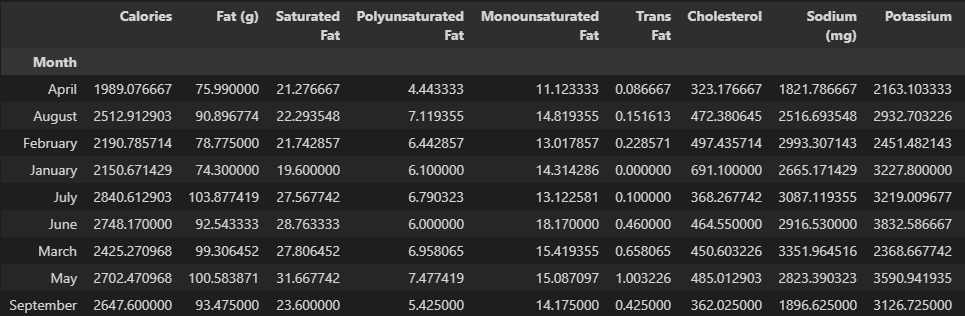
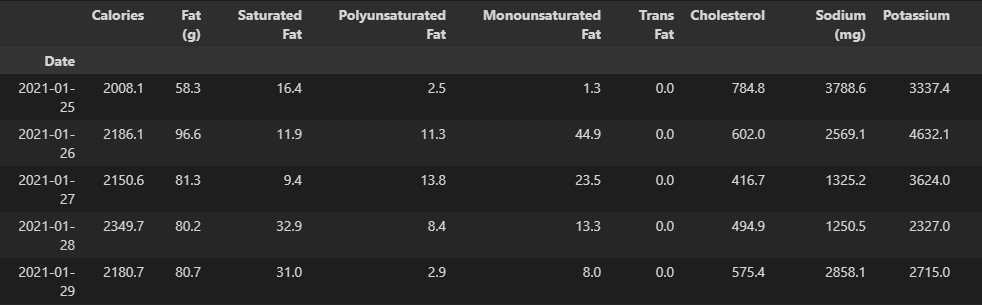
This project is a Python package created to show the average of those 4 categories to add up towards the whole day to be able to see total Macronutrients and Micronutrients for the day or month instead of total Macronutrients and Micronutrients for Breakfast, Lunch, Dinner, and Snacks.
This was created to be able to see the average Macronutrients and Micronutrients including vitamins and other data pieces as a whole/all-in-one per day or month in a CSV instead of the total being split up per Breakfast, Lunch, Dinner and Snacks by default.
Seeing this data as a whole helps understand progress better and allows for better visualization and data analysis depending on the use case.
This converter produces two new .csv files from the original .csv file you provide. (Disclaimer: The csv you provide is received in an email from myFitnessPal when using the export function if you have a premium membership)
Example conversion:
By Month
By Day
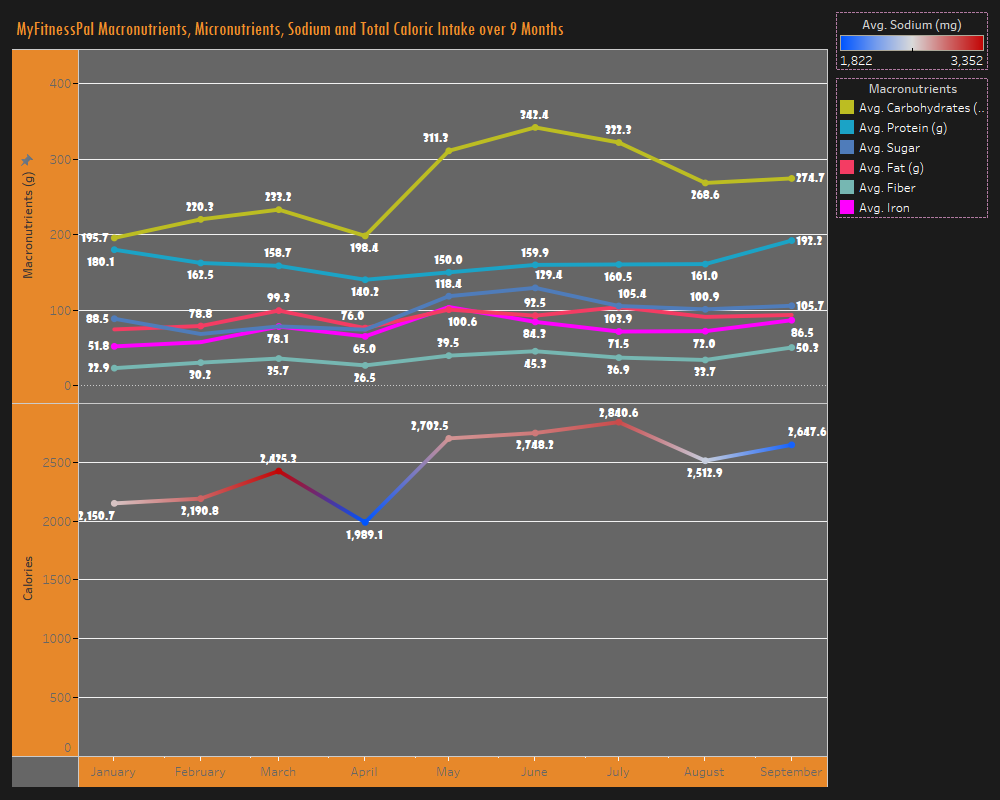
Example dashboard that can be derived from using this package:
Built With
Getting Started
pip install myFitnessPal-Converter
from mfp_converter.convert import convert
convert(r"\Directory\Of\myFitnessPalExport.csv")
More information on the project
Contributing
Contributions are what make the open source community such an amazing place to learn, inspire, and create. Any contributions you make are greatly appreciated.
- Fork the Project
- Create your Feature Branch (
git checkout -b feature/AmazingFeature) - Commit your Changes (
git commit -m 'Add some AmazingFeature') - Push to the Branch (
git push origin feature/AmazingFeature) - Open a Pull Request
Change Log
0.0.1 (11/20/21)
- First Release 0.0.2 (11/21/21)
- Fixed description 0.0.3 (11/21/21)
- fixed package support
1 maintainer

Metadata
1 maintainer
Release files for myFitnessPal-Converter 0.0.3
For a detailed explanation of source distributions (sdists) and built distributions (wheels), please see the package formats documentation.
Source distribution (sdist)
| File | Size | Uploaded | Provenance | Actions |
|---|---|---|---|---|
| myFitnessPal_Converter-0.0.3.tar.gz | 3.4 kB | Without provenance | Details for myFitnessPal_Converter-0.0.3.tar.gz |
Release files / myFitnessPal_Converter-0.0.3.tar.gz
| Download URL | myFitnessPal_Converter-0.0.3.tar.gz |
|---|---|
| Size | 3.4 kB |
| Tags | Source |
|
SHA-256 checksum How to use checksums |
86dcfafd5f3822ad36a6dece05630b6b2b8cdba3ed535b595ddb655acf1c8989
|
|
BLAKE2b-256 checksum How to use checksums |
fb6435030efea1b2fa8c4d6ba6785815e70ea934b207079af23f32bb01601ee2
|
| Upload date | |
|
Uploaded using Trusted Publishing? What is trusted publishing? |
No |
| Uploaded via |
twine/3.6.0 importlib_metadata/4.8.1 pkginfo/1.8.1 requests/2.26.0 requests-toolbelt/0.9.1 tqdm/4.61.2 CPython/3.9.0
|
Security for myFitnessPal-Converter 0.0.3
Provenance
Provenance describes where a file came from. On PyPI, provenance is shared via attestations, which provide a verifiable record of the build or publishing details. View details, limitations and caveats.
No provenance found
None of the files in this release were uploaded with provenance metadata.
A note on package security
PyPI is a repository for distributing packages, not a service for auditing them. While third-party security researchers and our staff do their best to detect and remove malicious packages, PyPI cannot guarantee the quality, security or suitability of any given package.
To learn more about protecting yourself from malicious actors, visit our package security documentation.














