
Easily create terminal user interface containing menus, text boxes and input fields for your projects

Project description
Copyright (c) 2022 Paulin-Dev.
Contact (Discord) : Pekkos#9809
MyTUI simplies for both users and developers terminal experience. It is inspired by the interface of the Rasberry Pi Software Configuration Tool (raspi-config). It is fully responsive to work with any terminals' size. It provides quick-to-implement functions to create interfaces such as :
- Text Boxes
- Menus
- Input Fields
- Yes/No Choice
Please note that it is still in development. There is no guarantee that everything will perfectly work.
If you have issues or ideas for this package, please contact the author.
Requirements
Python 3 (not tested under version 3.6)
getkey Package to get user's input
Getting started
You won't need to import extra modules to make it work, simply import the MyTUI class and use its methods to create interfaces. These methods will return the output if there is one. You can then use the user's response to do whatever you want.
Examples
As already mentioned, there are 4 different types of interface available at the moment plus the configuration. Here is how to use them.
Config
You can use the config method to configure some options.
from mytui import MyTUI

MyTUI.config(
    text_center=True,
    can_quit=True,
    quit_key='q'
)
You can always change this later
The quit key will exit the program. The "back" string will be returned if the user presses escape.
Text Box
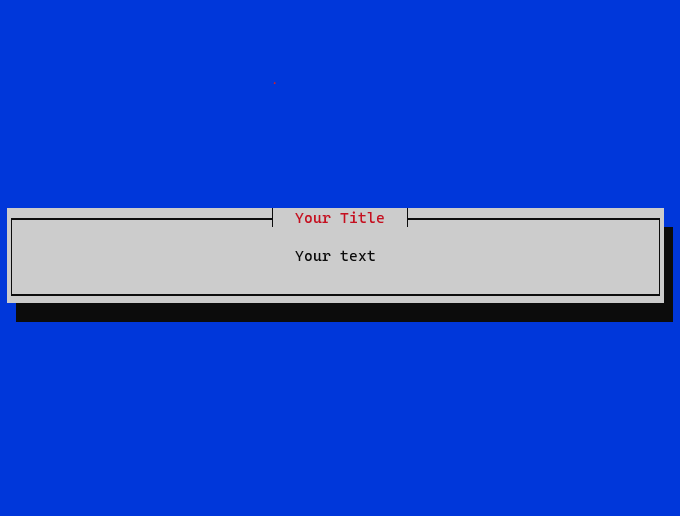
This is the most basic interface, it creates a simple text box with its title and text. Press Enter to exit.
It returns None.
from mytui import MyTUI

MyTUI.textbox(title="Your Title", text="Your text")
you can use \n in the text fields
Output :
Menu
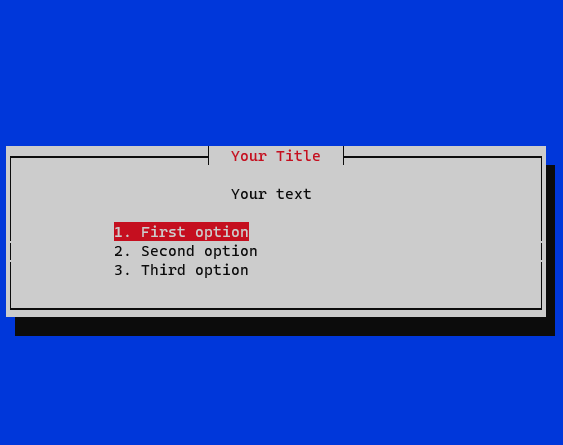
You can use menus to create a list of options. Use the up and down arrows to navigate.
It returns the name (str) of the selected option.
from mytui import MyTUI

options = [
    '1. First option',
    '2. Second option',
    '3. Third option'
]

selected = MyTUI.menu(title="Your Title", text="Your text", options=options)

if selected == options[0]:
    # do stuff
Output :
Yes/No Choice
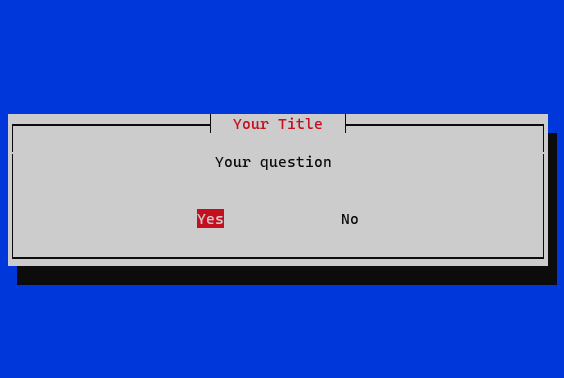
The yes/no interface is basically used to ask yes/no questions to the targeted user. Use the left and right arrows or tab to navigate.
It returns True (bool) if the selected answer is "yes" else False.
from mytui import MyTUI

if MyTUI.yesno(title="Your Title", text="Your question"):
    # do stuff
else:
    # do other stuff
Output :
Input
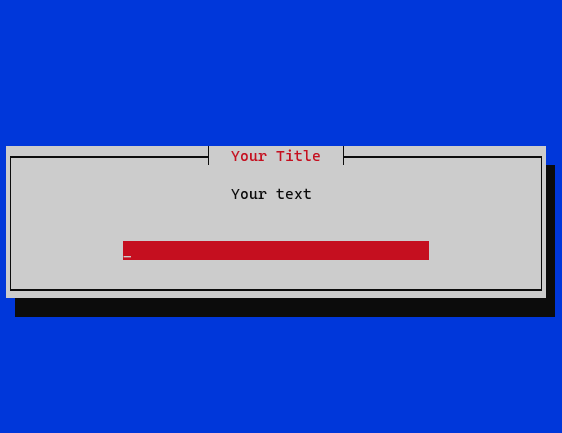
Last interface but not least : input fields. You can create input fields to recover a value from your user. All parameters are optional. Press Enter to submit your answer.
It returns the value (str) inside the input field.
from mytui import MyTUI

output = MyTUI.input(
    title="Your Title",
    text="Your text",
    default_text="",
    input_size=60,
    max_length=50,
    min_length=0,
    can_delete_default_text=False,
    allow_spaces=True,
    only_numeric=False,
    only_alpha=False
)
Output :
Copyright
MIT License
Copyright (c) 2022 Paulin-Dev
Permission is hereby granted, free of charge, to any person obtaining a copy of this software and associated documentation files (the "Software"), to deal in the Software without restriction, including without limitation the rights to use, copy, modify, merge, publish, distribute, sublicense, and/or sell copies of the Software, and to permit persons to whom the Software is furnished to do so, subject to the following conditions:
The above copyright notice and this permission notice shall be included in all copies or substantial portions of the Software.
THE SOFTWARE IS PROVIDED "AS IS", WITHOUT WARRANTY OF ANY KIND, EXPRESS OR IMPLIED, INCLUDING BUT NOT LIMITED TO THE WARRANTIES OF MERCHANTABILITY, FITNESS FOR A PARTICULAR PURPOSE AND NONINFRINGEMENT. IN NO EVENT SHALL THE AUTHORS OR COPYRIGHT HOLDERS BE LIABLE FOR ANY CLAIM, DAMAGES OR OTHER LIABILITY, WHETHER IN AN ACTION OF CONTRACT, TORT OR OTHERWISE, ARISING FROM, OUT OF OR IN CONNECTION WITH THE SOFTWARE OR THE USE OR OTHER DEALINGS IN THE SOFTWARE.
Release history Release notifications | RSS feed


Download files
Download the file for your platform. If you're not sure which to choose, learn more about installing packages.
Source Distribution
Built Distribution
Filter files by name, interpreter, ABI, and platform.
If you're not sure about the file name format, learn more about wheel file names.
Copy a direct link to the current filters
File details
Details for the file MyTUI-1.0.9.tar.gz.
File metadata
- Download URL: MyTUI-1.0.9.tar.gz
- Upload date:
- Size: 9.2 kB
- Tags: Source
- Uploaded using Trusted Publishing? No
- Uploaded via: twine/4.0.2 CPython/3.9.2
File hashes
| Algorithm | Hash digest | |
|---|---|---|
| SHA256 |
cf5ee9aaab2a06d13a1f193758fc08ab1b896f06307da2a75c56a6852281ab51
|
|
| MD5 |
727879ead9fc2171a630ec959482fc16
|
|
| BLAKE2b-256 |
b5f5721787741a125124c1a7094cc8f7a8b0d648093a3fcf98523b1ad343405b
|
File details
Details for the file MyTUI-1.0.9-py3-none-any.whl.
File metadata
- Download URL: MyTUI-1.0.9-py3-none-any.whl
- Upload date:
- Size: 10.7 kB
- Tags: Python 3
- Uploaded using Trusted Publishing? No
- Uploaded via: twine/4.0.2 CPython/3.9.2
File hashes
| Algorithm | Hash digest | |
|---|---|---|
| SHA256 |
48a290f533b5f5d4e44ea8270e29a46d2aeb19870025835ff9f0d5f867a4efd1
|
|
| MD5 |
51b6c5a2963584e7640be6bd4f62d649
|
|
| BLAKE2b-256 |
d8164cdcac16e75f8f5ce58527c9c21fae14bf24911f090c8adb7ced2f3298c4
|






