
nbinteract



nbinteract is a Python package that creates interactive webpages from Jupyter
notebooks. nbinteract also has built-in support for interactive plotting.
These interactions are driven by data, not callbacks, allowing authors to focus
on the logic of their programs.
nbinteract is most useful for:
- Data scientists that want to create simple interactive blog posts without having to know / work with Javascript.
- Instructors that want to include interactive examples in their textbooks.
- Students that want to publish data analysis that contains interactive demos.
Currently, nbinteract is in an alpha stage because of its quickly-changing
API.
Examples
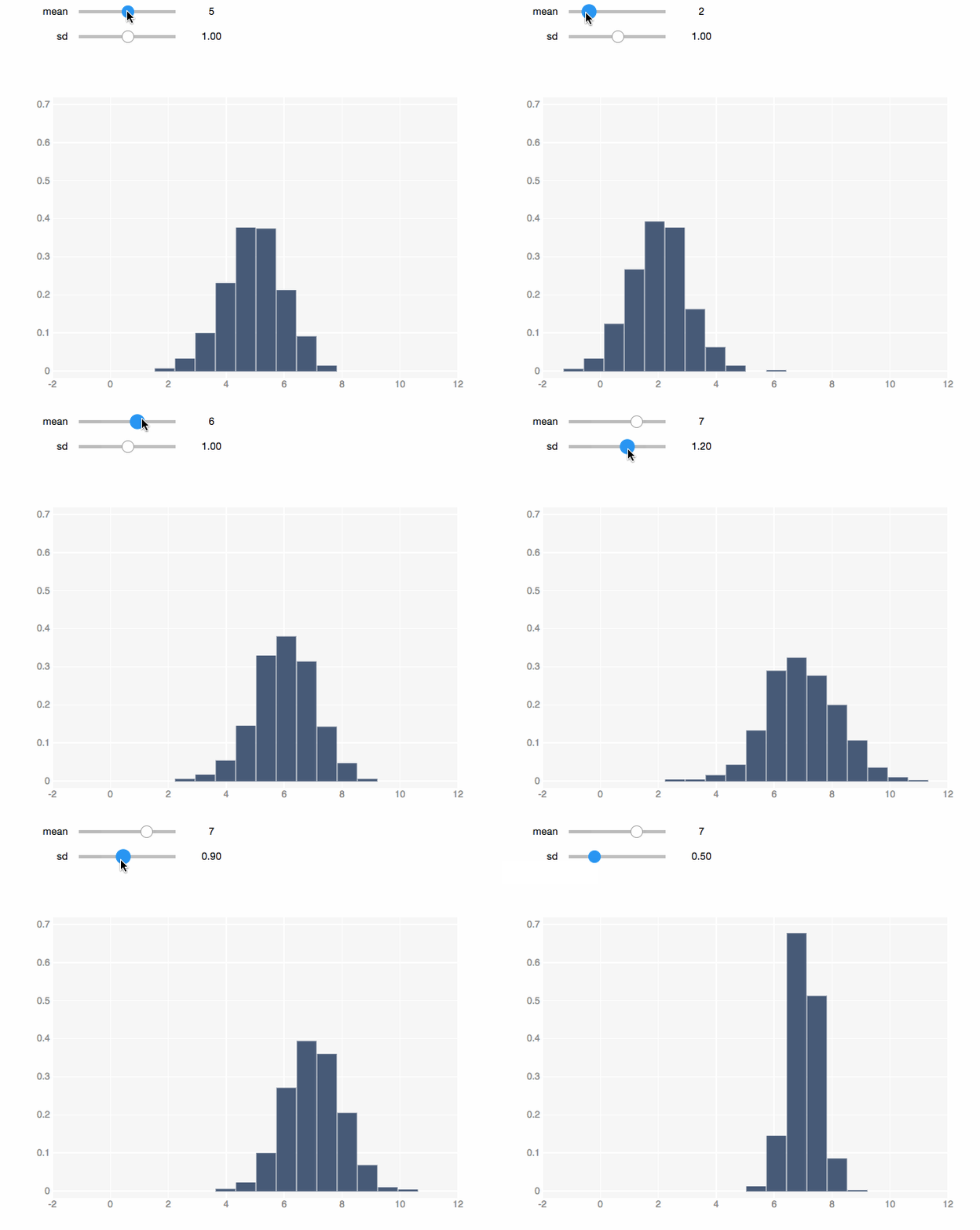
Most plotting functions from other libraries (e.g. matplotlib) take data as
input. nbinteract's plotting functions take functions as input.
import numpy as np
import nbinteract as nbi

def normal(mean, sd):
    '''Returns 1000 points drawn at random fron N(mean, sd)'''
    return np.random.normal(mean, sd, 1000)

# Pass in the `normal` function and let user change mean and sd.
# Whenever the user interacts with the sliders, the `normal` function
# is called and the returned data are plotted.
nbi.hist(normal, mean=(0, 10), sd=(0, 2.0), options=options)
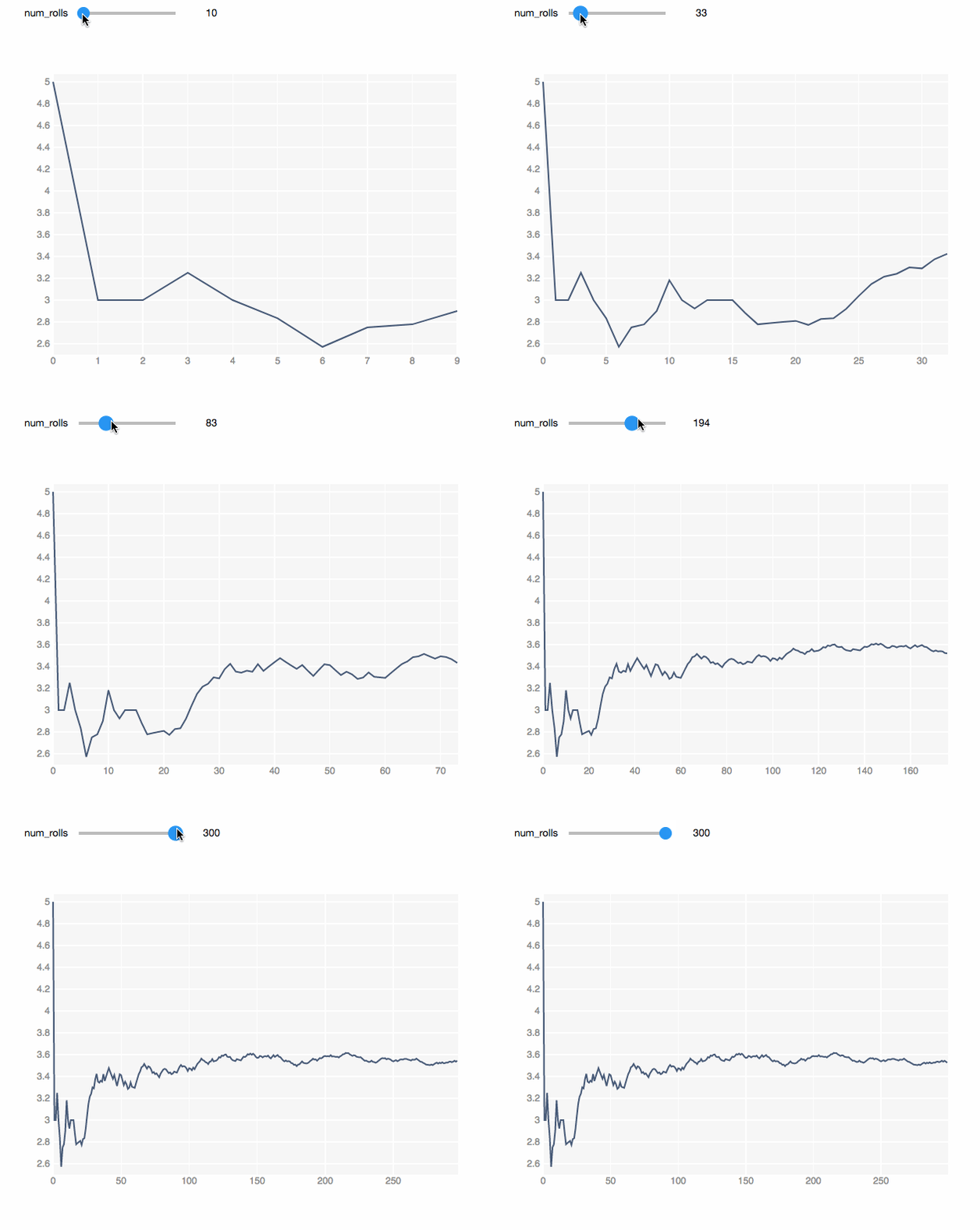
Simulations are easy to create using nbinteract. In this simulation, we roll
a die and plot the running average of the rolls. We can see that with more
rolls, the average gets closer to the expected value: 3.5.
rolls = np.random.choice([1, 2, 3, 4, 5, 6], size=300)
averages = np.cumsum(rolls) / np.arange(1, 301)

def x_vals(num_rolls):
    return range(num_rolls)

# The function to generate y-values gets called with the
# x-values as its first argument.
def y_vals(xs):
    return averages[:len(xs)]

nbi.line(x_vals, y_vals, num_rolls=(1, 300))
Publishing
From a notebook cell:
# Run in a notebook cell to convert the notebook into a publishable HTML page:
#
# nbi.publish('my_binder_spec', 'my_notebook.ipynb')
#
# Replace my_binder_spec with a Binder spec in the format
# {username}/{repo}/{branch} (e.g. SamLau95/nbinteract-image/master).
#
# Replace my_notebook.ipynb with the name of the notebook file to convert.
#
# Example:
nbi.publish('SamLau95/nbinteract-image/master', 'homepage.ipynb')
From the command line:
# Run on the command line to convert the notebook into a publishable HTML page.
#
# nbinteract my_binder_spec my_notebook.ipynb
#
# Replace my_binder_spec with a Binder spec in the format
# {username}/{repo}/{branch} (e.g. SamLau95/nbinteract-image/master).
#
# Replace my_notebook.ipynb with the name of the notebook file to convert.
#
# Example:
nbinteract SamLau95/nbinteract-image/master homepage.ipynb
For more information on publishing, see the tutorial which has a complete walkthrough on publishing a notebook to the web.
Installation
Using pip:
pip install nbinteract

# The next two lines can be skipped for notebook version 5.3 and above
jupyter nbextension enable --py --sys-prefix widgetsnbextension
jupyter nbextension enable --py --sys-prefix bqplot
You may now import the nbinteract package in Python code and use the
nbinteract CLI command to convert notebooks to HTML pages.
Tutorial and Documentation
Here's a link to the tutorial and docs for this project.
Developer Install
If you are interested in developing this project locally, run the following:
git clone https://github.com/SamLau95/nbinteract
cd nbinteract

# Installs the nbconvert exporter
pip install -e .

# To export a notebook to interactive HTML format:
jupyter nbconvert --to interact notebooks/Test.ipynb

pip install -U ipywidgets
jupyter nbextension enable --py --sys-prefix widgetsnbextension

brew install yarn
yarn install

# Start notebook and webpack servers
make -j2 serve
Feedback
If you have any questions or comments, send us a message on the Gitter channel. We appreciate your feedback!
Contributors
nbinteract is originally developed by Sam Lau and Caleb Siu as part of
a Masters project at UC Berkeley. The code lives under a BSD 3 license and we
welcome contributions and pull requests from the community.
1 maintainer

Release files for nbinteract 0.2.6
For a detailed explanation of source distributions (sdists) and built distributions (wheels), please see the package formats documentation.
Built distribution (wheel)
| File | Interpreter | ABI | Platform | Reset |
|---|---|---|---|---|
| nbinteract-0.2.6-py3-none-any.whl | Python 3 | none | any | Details |
Release files / nbinteract-0.2.6-py3-none-any.whl
| Download URL | nbinteract-0.2.6-py3-none-any.whl |
|---|---|
| Size | 29.6 kB |
| Tags | Python 3 |
|
SHA-256 checksum How to use checksums |
07ec89860afe02b375f9a85efa16af8082cffc38b3314ec00ac6a77fe69cc046
|
|
BLAKE2b-256 checksum How to use checksums |
3896b13a1ea099948c817c95991f6117c937a72b71bf4771fc73b54988cc0fc2
|
| Upload date | |
|
Uploaded using Trusted Publishing? What is trusted publishing? |
No |
| Uploaded via |
twine/3.3.0 pkginfo/1.5.0.1 requests/2.24.0 setuptools/49.2.0.post20200714 requests-toolbelt/0.9.1 tqdm/4.47.0 CPython/3.8.3
|














