
NEExT
Network Embedding Experimentation Toolkit
An open-source Python framework for network science and graph machine learning.





Documentation · Website · Issues
What is NEExT?
NEExT is an experimentation framework for graph and network data. It takes you from a collection of graphs to predictive and scientific results through one pipeline you can inspect and reproduce at every step:
Graphs → Features → Embeddings → Evidence
Load graphs from CSV, pandas, or NetworkX into a unified GraphCollection; compute
structural node features (or write your own in plain Python); turn them into graph-level
embeddings with Wasserstein/Sinkhorn optimal transport or a GNN; then train classifiers
or regressors and read feature importance to see which structure drives the result. It's
built on the standard scientific Python stack — NumPy, pandas, scikit-learn, XGBoost,
NetworkX, iGraph — and works the same in a script, a notebook, or the Workbench.
There are two ways to use NEExT:
- The Library — a lightweight Python package for scripting and notebook workflows.
- The Workbench — a local, desktop-style GUI over the same NEExT workflows, with
versioned artifacts and job tracking. It runs entirely on your machine (
127.0.0.1, no accounts, no uploads) and is MCP-native, so an agent like Claude can drive it.
Installation
pip install NEExT
Optional extras:
pip install "NEExT[gnn]"            # Graph Neural Network embeddings (pure PyTorch)
pip install "NEExT[workbench-mcp]"  # local Workbench + MCP integration
See the docs for the full list of extras.
Quick start
from NEExT import NEExT

nxt = NEExT()

# Load a collection of graphs from CSV
graph_collection = nxt.read_from_csv(
    edges_path="edges.csv",
    node_graph_mapping_path="node_graph_mapping.csv",
    graph_label_path="graph_labels.csv",
)

# Features → Embeddings → Evidence
features = nxt.compute_node_features(graph_collection, feature_list=["all"])
embeddings = nxt.compute_graph_embeddings(
    graph_collection, features, embedding_algorithm="approx_wasserstein"
)
results = nxt.train_ml_model(graph_collection, embeddings, model_type="classifier")
Custom features, GNN embeddings, large-graph sampling, feature importance, and the full API are covered in the documentation.
The Workbench
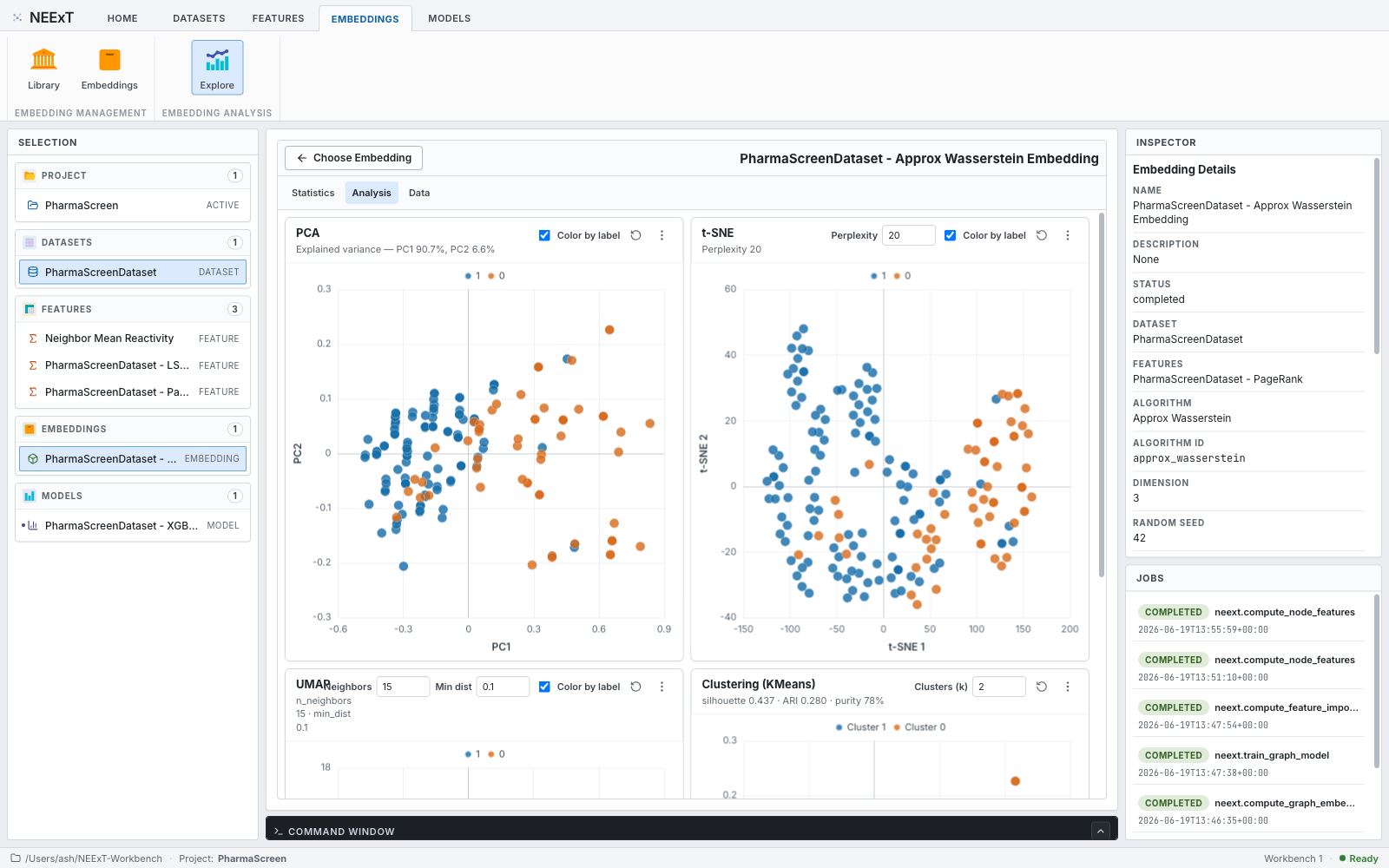
The NEExT Workbench is a local, single-user FastAPI + React application that exposes the NEExT workflows — datasets, features, embeddings, models, and analysis — as a desktop-style UI. Everything stays on your machine, and it speaks MCP, so you can drive the whole pipeline from an MCP client.
neext-workbench          # installed package
make neext-workbench     # from a development checkout
Then open http://127.0.0.1:8765. Projects are stored under ~/NEExT-Workbench by
default (override with NEEXT_WORKBENCH_HOME or neext-workbench --workspace <path>).
The full Workbench tour, including MCP client setup, lives in the
documentation.
Learn more
- 📚 Documentation — guides, API reference, and the Workbench tour: neext.app/docs
- 🌐 Website — neext.app
- 🐛 Issues & support — github.com/ashdehghan/NEExT/issues
Supporting NEExT
NEExT is free and open source, and stays that way. If it's useful to your work, the best support is free: star the repo, cite the paper, and tell colleagues. You can also contribute or help fund maintenance — see neext.app/support. Universities and organizations can also invite a talk or workshop there.
Citing NEExT
If you use NEExT in your research, please cite it. The primary, open-access reference is the arXiv paper:
@article{dehghan2025neext,
  title   = {Network Embedding Exploration Tool (NEExT)},
  author  = {Dehghan, Ashkan and Pra{\l}at, Pawe{\l} and Th{\'e}berge, Fran{\c{c}}ois},
  journal = {arXiv preprint arXiv:2503.15853},
  year    = {2025},
  url     = {https://arxiv.org/abs/2503.15853}
}
A peer-reviewed version appeared at the 19th Workshop on Algorithms and Models for the Web Graph (WAW 2024):
@inproceedings{dehghan2024neext,
  title     = {Network Embedding Exploration Tool (NEExT)},
  author    = {Dehghan, Ashkan and Pra{\l}at, Pawe{\l} and Th{\'e}berge, Fran{\c{c}}ois},
  booktitle = {Modelling and Mining Networks (WAW 2024)},
  series    = {Lecture Notes in Computer Science},
  pages     = {65--79},
  year      = {2024},
  publisher = {Springer},
  doi       = {10.1007/978-3-031-59205-8_5}
}
- 📄 arXiv (open access): arxiv.org/abs/2503.15853
- 📄 Springer (peer-reviewed): doi.org/10.1007/978-3-031-59205-8_5
Acknowledgements
NEExT is created, maintained, and owned by Ash Dehghan. The NEExT paper is co-authored with Paweł Prałat and François Théberge. Thanks to the contributors who have helped build NEExT, including Kamil Kulesza and Lourens Touwen.
The community-aware βstar feature is based on Kamiński, Prałat, Théberge, and Zając, "Predicting Properties of Nodes via Community-Aware Features" (arXiv:2311.04730, doi:10.1007/s13278-024-01281-2).
License
NEExT is released under the MIT License. Created and maintained by Ash Dehghan.


Release files for NEExT 0.3.10
For a detailed explanation of source distributions (sdists) and built distributions (wheels), please see the package formats documentation.
Source distribution (sdist)
| File | Size | Uploaded | |
|---|---|---|---|
| neext-0.3.10.tar.gz | 718.6 kB | Details |
Built distribution (wheel)
| File | Interpreter | ABI | Platform | Reset |
|---|---|---|---|---|
| neext-0.3.10-py3-none-any.whl | Python 3 | none | any | Details |
Total release size: 1.4 MB
Release files / neext-0.3.10.tar.gz
| Download URL | neext-0.3.10.tar.gz |
|---|---|
| Size | 718.6 kB |
| Tags | Source |
|
SHA-256 checksum How to use checksums |
80fe58f708805aa3f57d0de88bbc4ba9a3beae2deb714a212de8ac195ac48b5b
|
|
BLAKE2b-256 checksum How to use checksums |
d53379420e7666bd539b546166fd50f2a87682244b4af4b1cb3e2c3e3e7fad30
|
| Upload date | |
|
Uploaded using Trusted Publishing? What is trusted publishing? |
No |
| Uploaded via |
uv/0.8.15
|
Release files / neext-0.3.10-py3-none-any.whl
| Download URL | neext-0.3.10-py3-none-any.whl |
|---|---|
| Size | 690.0 kB |
| Tags | Python 3 |
|
SHA-256 checksum How to use checksums |
79e976be4925556434b6afa3b77d58020bd003957de3fd2eb59c9a044ca5e7b5
|
|
BLAKE2b-256 checksum How to use checksums |
619db4461b43098a464c57798bb6cc9d6b96eee8438910c297daa7eb82b07e5d
|
| Upload date | |
|
Uploaded using Trusted Publishing? What is trusted publishing? |
No |
| Uploaded via |
uv/0.8.15
|














