
Named Entity Recognition Annotator
This repository contains a NER utility to annotate text, given some entities.
| Dark GUI | Light GUI |
|---|---|
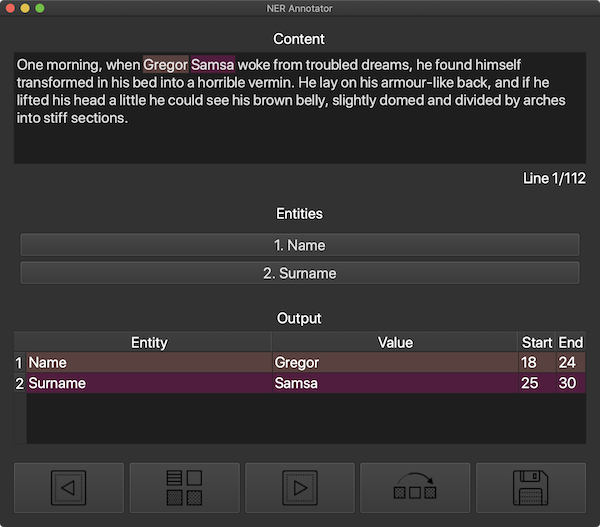 |
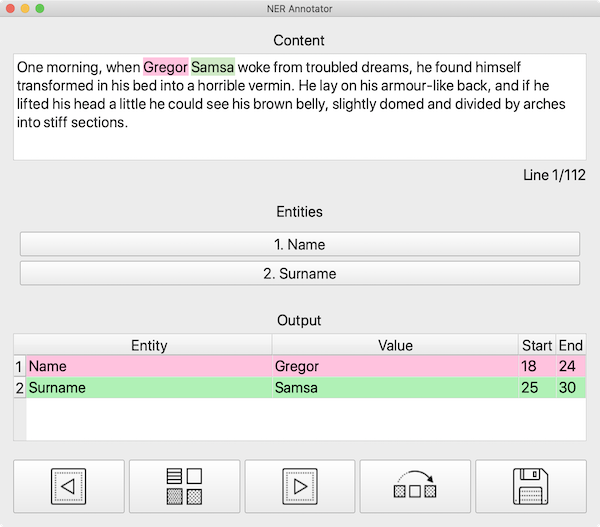 |
Installation
To install this GUI you need to make sure that you have Python 3 on your system.
Then, cd into the project's root and run:
pip install .
This will install the ner_annotator package and its required dependencies (mainly PyQt5).
Usage
To run this utility, execute the following command:
ner_annotator <input> -o <output> -e <entities>
Here, <input> is the path to the input text file, which should contain your training text lines, separated by newlines; <output> is the path to where you would like to save the .json output file (if not given, it defaults to the same directory as the input file); <entities> is the list of entities you would like to annotate.
For example, I could run the program like this:
ner_annotator '~/Desktop/train.txt' -e 'BirthDate' 'Name'
You can also optionally pass an existing NER model to the annotator, so as to identify entities using that model (button between previous and next line controls in the GUI) and eventually modify/add/remove them. For example:
ner_annotator '~/Desktop/train.txt' -e 'BirthDate' 'Name' -m '~/Desktop/NER'
Currently, only SpaCy models are supported, but you can contribute to the project and add compatibility with other NER models, by checking the model.py file inside the ner_annotator package.
The great thing about this package is that it is able to automagically identify the correct library for the given model (i.e. you don't have to specify that your model should be loaded with SpaCy or any other NLP library).
Config file
In order to have a faster annotation experience, you can save your model entities names to reuse them the next time you are going to need this tool.
To do that, you need to create a .json file (see assets/json/config.json), with a schema like the following:
{
	"models": [
		{
			"name": "example-1",
			"entities": ["entity-1-1", "entity-1-2", "entity-1-3"]
		},
		{
			"name": "example-2",
			"entities": ["entity-2-1", "entity-2-2"]
		}
	]
}
To use the entities of the model example-1, for example, you can run:
python3 annotator.py '~/Desktop/train.txt' -c '~/Desktop/config.json' -n 'example-1'
Here, ~/Desktop/config.json is the path to the .json file mentioned above.
This bash command will be the equivalent in this example:
python3 annotator.py '~/Desktop/train.txt' -e 'entity-1-1' 'entity-1-2' 'entity-1-3'
Output
The utility software will output a .json file with the following schema:
[
	{
		"content": "text",
		"entities": [[0, 1, "entity"]]
	}
]
You can convert this output into the specific format required by your NER model by passing the -p option to the ner_annotator tool. In this way, on your output folder you will also find a pickle file (with the same name as the given .json output file, but with no extension), which can then be used to load entities in another program with the requested NLP library. To load the saved pickle file, you can do something along these lines:
import pickle
pickle.load(open("~/Desktop/output", 'rb'))
In this example, ner_annotator was either called with -o ~/Desktop/output.json or without the -o option but with -i ~/Desktop/train.txt or similar.
Currently, only SpaCy models conversion is provided.
Distribution
This package is available on PyPy, so you can also install it by simply running:
pip install ner-annotator
You can also install extra packages, like SpaCy:
pip install ner-annotator[spacy]
Personal note: In order to upload a new version of the package to PyPy, just execute scripts/deploy.sh, insert __token__ as Twine username and the saved API token as Twine password.
Thanks to
- GUI icons are provided by Icons8
1 maintainer

Metadata
1 maintainer
Release files for ner-annotator 0.1.1
For a detailed explanation of source distributions (sdists) and built distributions (wheels), please see the package formats documentation.
Source distribution (sdist)
| File | Size | Uploaded | Provenance | Actions |
|---|---|---|---|---|
| ner_annotator-0.1.1.tar.gz | 16.7 kB | Without provenance | Details for ner_annotator-0.1.1.tar.gz |
Built distribution (wheel)
| File | Interpreter | ABI | Platform | Actions Reset |
|---|---|---|---|---|
| ner_annotator-0.1.1-py3-none-any.whl | Python 3 | none | any | Details for ner_annotator-0.1.1-py3-none-any.whl |
Total release size: 33.8 kB
Release files / ner_annotator-0.1.1.tar.gz
| Download URL | ner_annotator-0.1.1.tar.gz |
|---|---|
| Size | 16.7 kB |
| Tags | Source |
|
SHA-256 checksum How to use checksums |
963a0ddde8c520504e5d0b38dd33ae0ad0e36bfef9ed173fd8540cf651da71ca
|
|
BLAKE2b-256 checksum How to use checksums |
6b1d4c695e757afdb0cb2ac2b7aa657dcbfdfcde1b3372997293df97b561cb8a
|
| Upload date | |
|
Uploaded using Trusted Publishing? What is trusted publishing? |
No |
| Uploaded via |
twine/3.2.0 pkginfo/1.5.0.1 requests/2.23.0 setuptools/41.2.0 requests-toolbelt/0.9.1 tqdm/4.45.0 CPython/3.8.5
|
Release files / ner_annotator-0.1.1-py3-none-any.whl
| Download URL | ner_annotator-0.1.1-py3-none-any.whl |
|---|---|
| Size | 17.2 kB |
| Tags | Python 3 |
|
SHA-256 checksum How to use checksums |
0eda681923a5c479f2a794471e2ca3c363a6942ed1eabd431f3f7f2f99dd12a7
|
|
BLAKE2b-256 checksum How to use checksums |
557f7fdf0498bbe63abd221ebd4886c65b960a8fe9a377114b4f3ef12f3d3dcb
|
| Upload date | |
|
Uploaded using Trusted Publishing? What is trusted publishing? |
No |
| Uploaded via |
twine/3.2.0 pkginfo/1.5.0.1 requests/2.23.0 setuptools/41.2.0 requests-toolbelt/0.9.1 tqdm/4.45.0 CPython/3.8.5
|
Security for ner-annotator 0.1.1
Provenance
Provenance describes where a file came from. On PyPI, provenance is shared via attestations, which provide a verifiable record of the build or publishing details. View details, limitations and caveats.
No provenance found
None of the files in this release were uploaded with provenance metadata.
A note on package security
PyPI is a repository for distributing packages, not a service for auditing them. While third-party security researchers and our staff do their best to detect and remove malicious packages, PyPI cannot guarantee the quality, security or suitability of any given package.
To learn more about protecting yourself from malicious actors, visit our package security documentation.














