
Nerd-Color
A simple CLI colorizer.
Description
Nerd-Color can be used as command line interface application or as a library to colorize text using the standard 16 colors (ANSI escape codes) or using true colors.
The former uses colors such as "red", "green, "blue" and will respect the terminal color scheme.
The latter uses colors such as "#FF0000" "00FF00" "#0000FF" and will display them regardless of the terminal color scheme.
More info here:
Prerequisites
-
Linux
-
To use the true color option a terminal that supports true colors is required.
More info here:
Installation
pip install Nerd-Color
Usage
CLI
Basic usage:
<text> | nerdcolor <parameters>
Example:
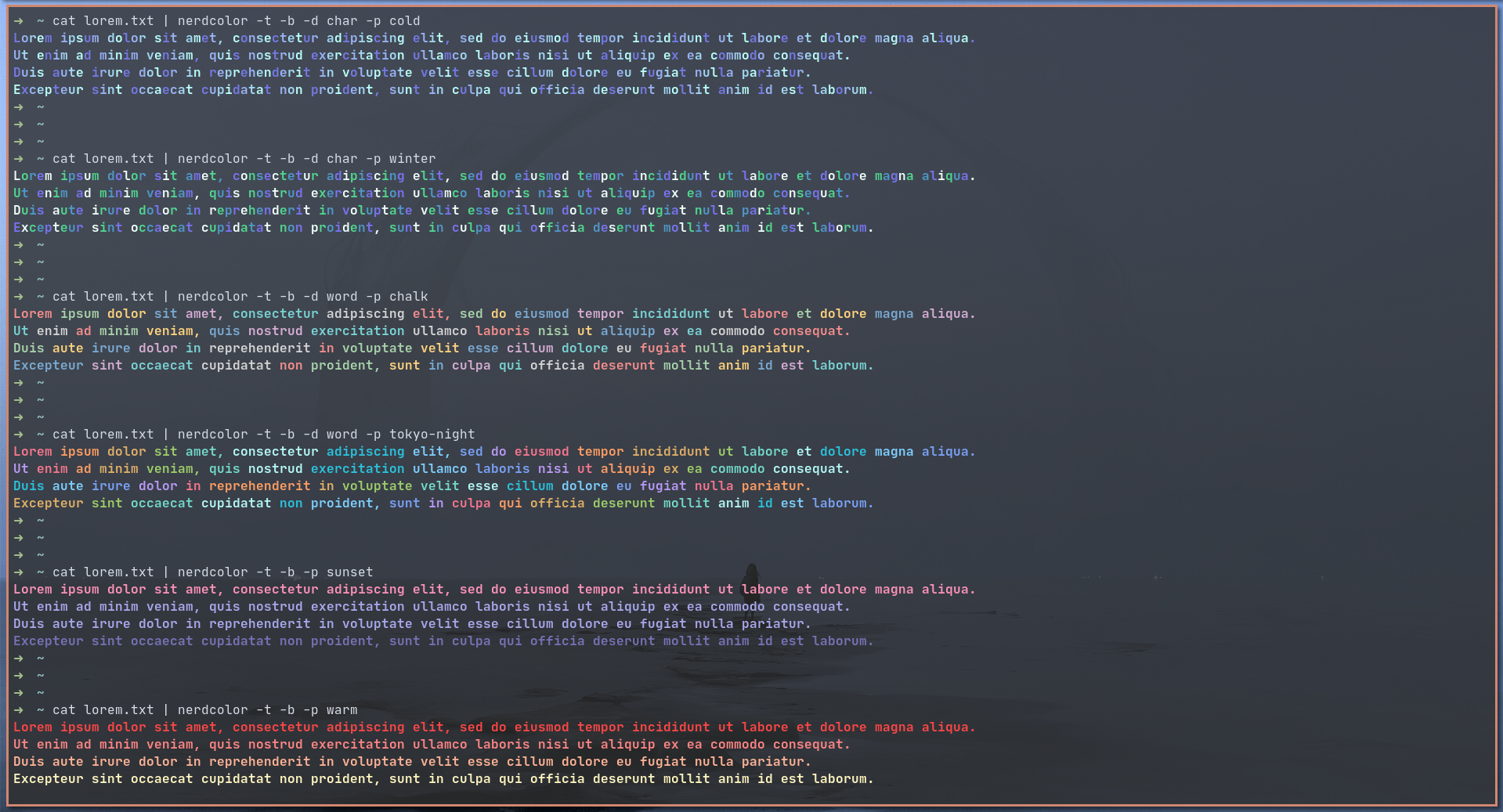
cat dummy.txt | nerdcolor -t -d word -p dracula
Other examples:
Full versions:

	1) nerdcolor --ansi --delimiter line --bold --palette red green blue
	2) nerdcolor --true --delimiter word --palette dracula
	3) nerdcolor --true --delimiter char --palette "#8FBCBB" "#88C0D0" "#81A1C1" "#5E81AC"

Shortened versions:

	1) nerdcolor -a -b -p red green blue
	2) nerdcolor -t -d word -p dracula
	3) nerdcolor -t -d char -p "#8FBCBB" "#88C0D0" "#81A1C1" "#5E81AC"
Library
Full usage: usage.py
from nerdcolor.nerdcolor import Colorscheme

string = """Lorem ipsum dolor sit amet, consectetur adipiscing elit, sed do eiusmod tempor incididunt ut labore et dolore magna aliqua.
Ut enim ad minim veniam, quis nostrud exercitation ullamco laboris nisi ut aliquip ex ea commodo consequat.
Duis aute irure dolor in reprehenderit in voluptate velit esse cillum dolore eu fugiat nulla pariatur.
Excepteur sint occaecat cupidatat non proident, sunt in culpa qui officia deserunt mollit anim id est laborum."""

scheme_1 = Colorscheme(["red", "green", "blue"], "ansi", delimiter="line")
scheme_2 = Colorscheme(["dracula"], "true", delimiter="word", bold=True)

colors = [
    "#EFFFFB",
    "#50D890",
    "#4F98CA",
    "#7874F2",
]

scheme_3 = Colorscheme(colors, "true", delimiter="char", bold=True)

print(scheme_1.colorize(string), "\n")
print(scheme_2.colorize(string), "\n")
print(scheme_3.colorize(string))
Config
To add custom color schemes the user has to add them to the SCHEMES dictionary in nerdcolor.py.
This command will output the full path of the file:
pip show Nerd-Color | grep 'Location' | grep -o -E '[/].+' | xargs printf '%s/nerdcolor/nerdcolor.py\n'
Color schemes
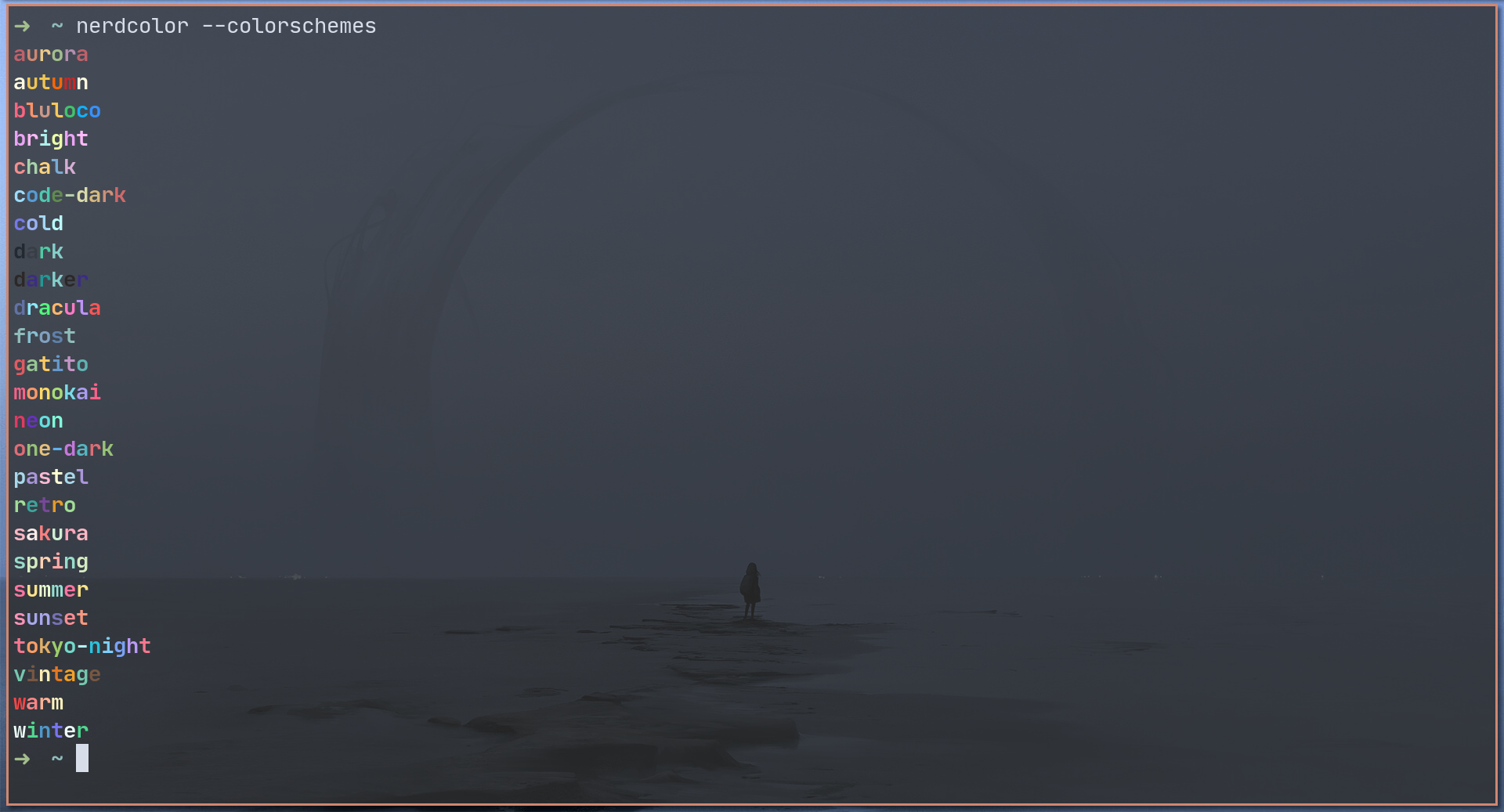
Nerd-Color currently has 25 predefined color schemes.
You can print them using this snippet:
from nerdcolor.nerdcolor import SCHEMES, Colorscheme

for key in SCHEMES.keys():
    scheme = Colorscheme([key], "true", delimiter="word")
    string = f"{key}: {SCHEMES[key]}"
    print(scheme.colorize(string))
Links
github.com/uloco/theme-bluloco-dark
github.com/dracula/dracula-theme
github.com/pawelgrzybek/gatito-theme
github.com/arcticicestudio/nord
github.com/Binaryify/OneDark-Pro
github.com/enkia/tokyo-night-vscode-theme
github.com/tomasiser/vim-code-dark
License
This project uses the following license: GPLv3.
1 maintainer

Metadata
1 maintainer
Release files for Nerd-Color 0.1.0
For a detailed explanation of source distributions (sdists) and built distributions (wheels), please see the package formats documentation.
Source distribution (sdist)
| File | Size | Uploaded | Provenance | Actions |
|---|---|---|---|---|
| Nerd-Color-0.1.0.tar.gz | 2.7 MB | Without provenance | Details for Nerd-Color-0.1.0.tar.gz |
Built distribution (wheel)
| File | Interpreter | ABI | Platform | Actions Reset |
|---|---|---|---|---|
| Nerd_Color-0.1.0-py3-none-any.whl | Python 3 | none | any | Details for Nerd_Color-0.1.0-py3-none-any.whl |
Total release size: 2.7 MB
Release files / Nerd-Color-0.1.0.tar.gz
| Download URL | Nerd-Color-0.1.0.tar.gz |
|---|---|
| Size | 2.7 MB |
| Tags | Source |
|
SHA-256 checksum How to use checksums |
7e234e89ee016cf5a592cc8cf8e01c1ed42eae3c38b82236e18525180b4a2864
|
|
BLAKE2b-256 checksum How to use checksums |
4873bc73dc0b44afb695c30e7fc1512f02237fb1382b542e76f912ff0b8ef8c5
|
| Upload date | |
|
Uploaded using Trusted Publishing? What is trusted publishing? |
No |
| Uploaded via |
twine/3.4.1 importlib_metadata/4.0.0 pkginfo/1.7.0 requests/2.25.1 requests-toolbelt/0.9.1 tqdm/4.60.0 CPython/3.9.5
|
Release files / Nerd_Color-0.1.0-py3-none-any.whl
| Download URL | Nerd_Color-0.1.0-py3-none-any.whl |
|---|---|
| Size | 19.1 kB |
| Tags | Python 3 |
|
SHA-256 checksum How to use checksums |
fffa53bb21d68d4b3b1a91e07cbbe13e92a5fabd123934f321029a04b71ab756
|
|
BLAKE2b-256 checksum How to use checksums |
55fbb8c999455ba8ac571416fbd77a3c002f9774fb66d631fe91f68f78a66015
|
| Upload date | |
|
Uploaded using Trusted Publishing? What is trusted publishing? |
No |
| Uploaded via |
twine/3.4.1 importlib_metadata/4.0.0 pkginfo/1.7.0 requests/2.25.1 requests-toolbelt/0.9.1 tqdm/4.60.0 CPython/3.9.5
|
Security for Nerd-Color 0.1.0
Provenance
Provenance describes where a file came from. On PyPI, provenance is shared via attestations, which provide a verifiable record of the build or publishing details. View details, limitations and caveats.
No provenance found
None of the files in this release were uploaded with provenance metadata.
A note on package security
PyPI is a repository for distributing packages, not a service for auditing them. While third-party security researchers and our staff do their best to detect and remove malicious packages, PyPI cannot guarantee the quality, security or suitability of any given package.
To learn more about protecting yourself from malicious actors, visit our package security documentation.













