
NetBox Catalyst Center Plugin
A NetBox plugin that integrates Cisco Catalyst Center (formerly DNA Center) with NetBox, displaying network device details, wireless client information, compliance status, and security advisories.





Features
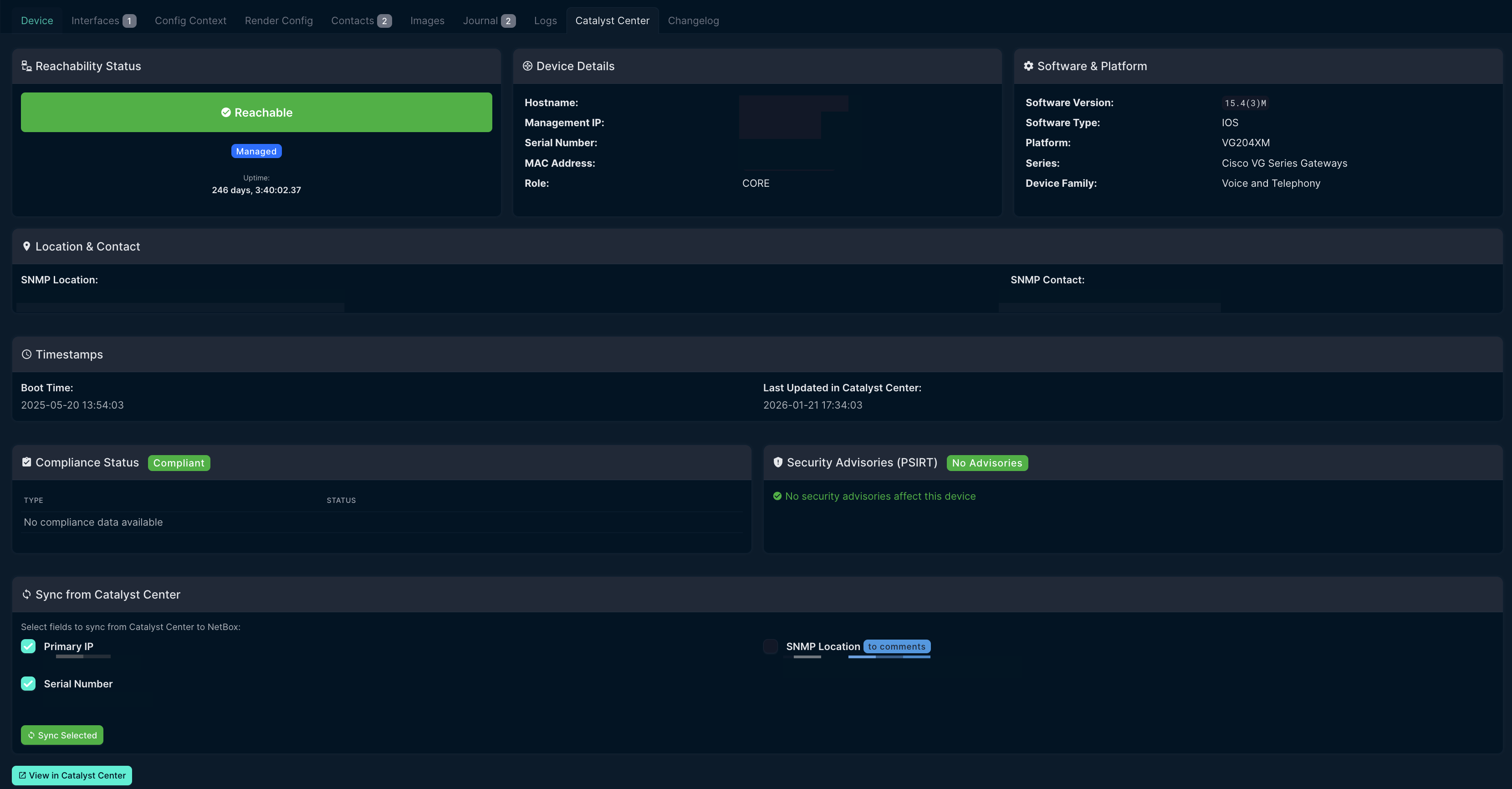
Network Device Integration
- Device Details Tab: Adds a "Catalyst Center" tab to Device detail pages
- Reachability Status: Shows device reachability and collection status
- Software Information: Displays software version, platform, and series
- Compliance Status: Shows PSIRT, IMAGE, CONFIG, and EOX compliance
- Security Advisories: Lists PSIRT advisories with links to Cisco security portal
- Sync to NetBox: Sync IP address, serial number, and SNMP location from Catalyst Center
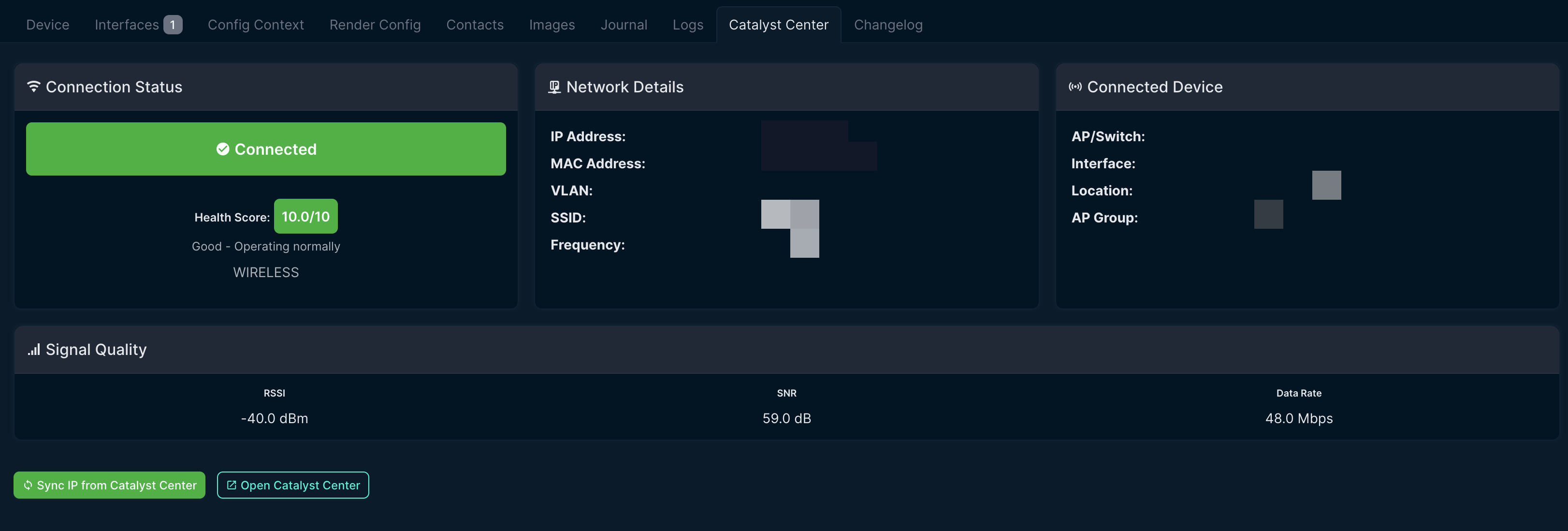
Wireless Client Support
- Real-time IP Lookup: Shows current IP address for wireless clients
- Connection Status: Displays connected/disconnected state with health score
- AP Information: Shows connected access point, SSID, and location
- Signal Quality: Displays RSSI, SNR, and data rate for wireless clients
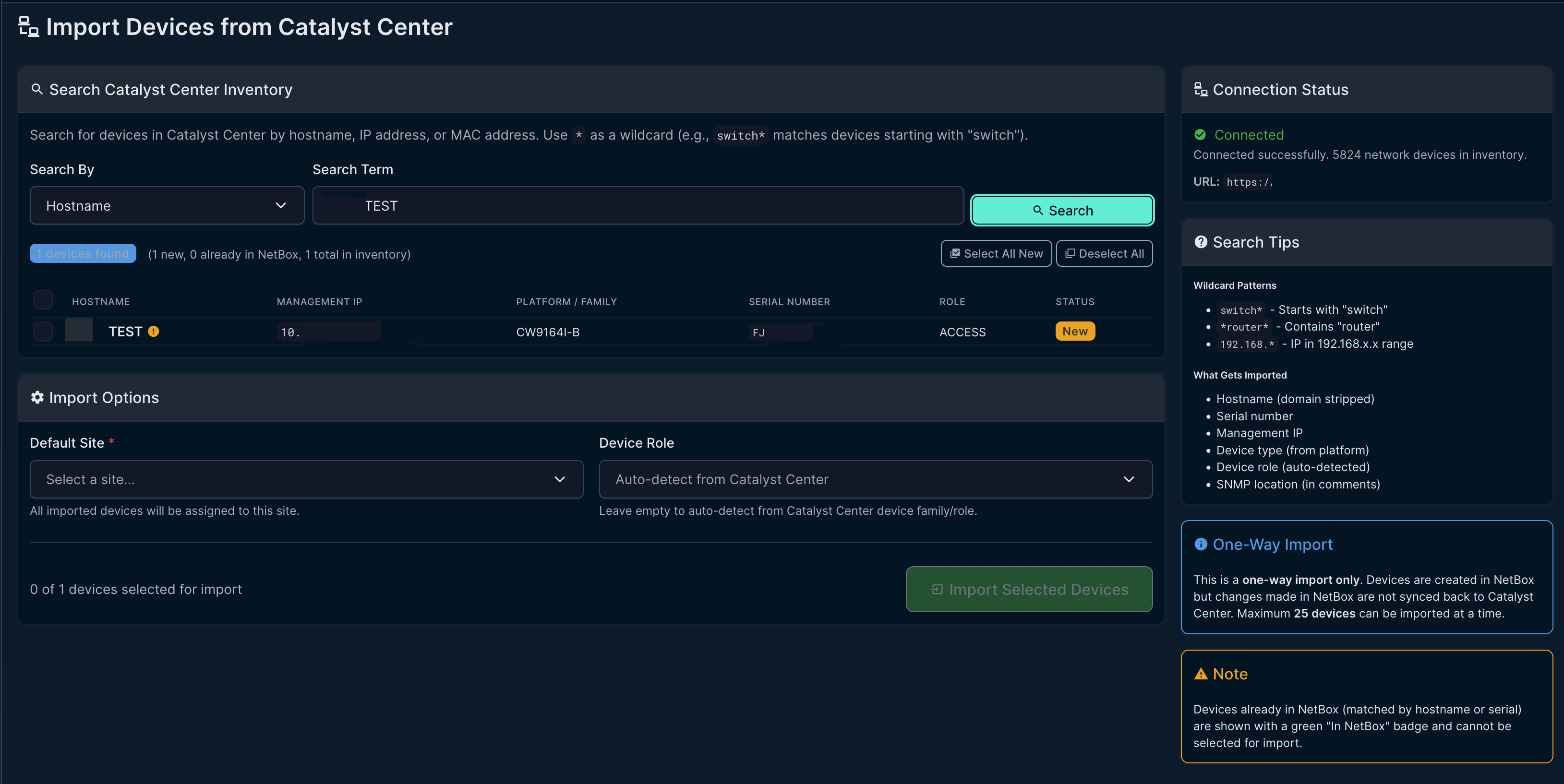
Device Import
- Search Catalyst Center: Search by hostname, IP address, or MAC address with wildcard support
- One-Way Import: Import devices from Catalyst Center into NetBox (one-way only)
- Auto-detect Device Role: Automatically maps Catalyst Center device family to NetBox roles
- Duplicate Detection: Shows which devices already exist in NetBox
- Interface Sync: Import all interfaces with type mapping, LAG membership, and IP addresses
- POE Sync: Sync POE mode and type (802.3af/at/bt) for switch interfaces
Virtual Chassis Support
- Stacked Switch Import: Import switch stacks as NetBox Virtual Chassis
- Member Devices: Creates one device per stack member (hostname.1, hostname.2, etc.)
- Interface Assignment: Physical interfaces assigned to correct member by slot number
- Configurable: Enable via
enable_virtual_chassissetting (default: disabled)
General Features
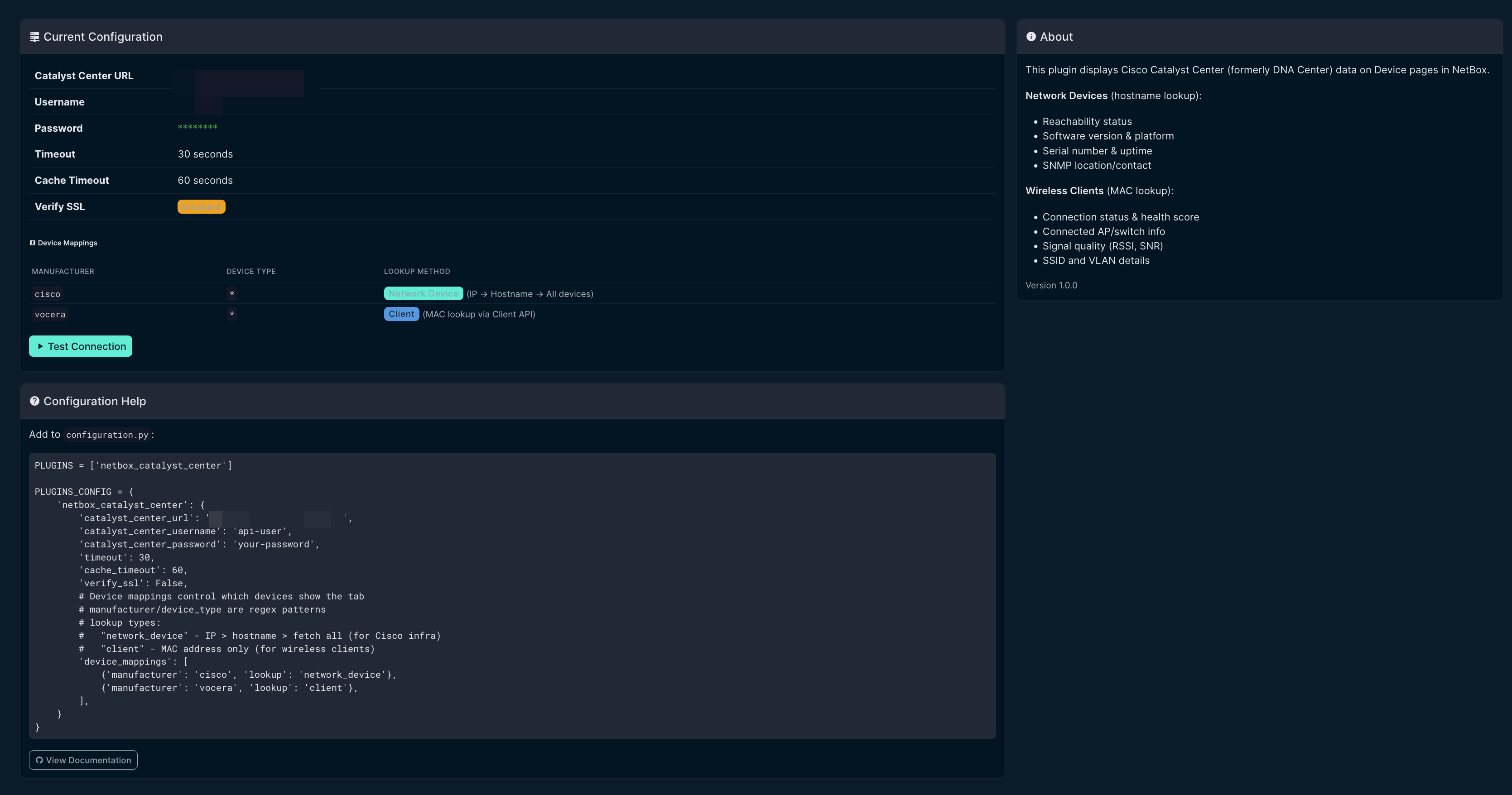
- Configurable Device Mappings: Control which devices show the tab and lookup method
- Multi-strategy Lookup: IP address → hostname → fetch all with local filtering
- Caching: Caches API responses to reduce load on Catalyst Center
Screenshots
Device Tab - Network Device View
Device Tab - Wireless Client View
Import Devices from Catalyst Center
Settings Page
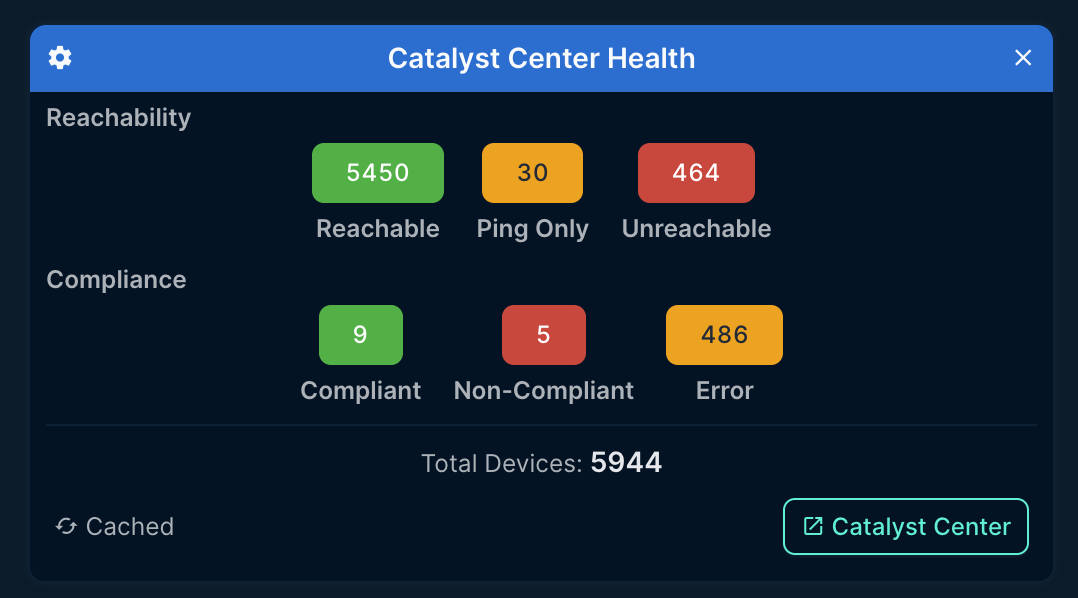
Dashboard Widget
Catalyst Center health widget showing device reachability and compliance summary.
Requirements
- NetBox 4.0 or higher (tested on NetBox 4.x only)
- Cisco Catalyst Center (DNA Center) 2.x or higher
- Python 3.10+
Note: This plugin is developed and tested exclusively on NetBox 4.x. It is not compatible with NetBox 3.x due to API and model changes.
Installation
From PyPI (recommended)
pip install netbox-catalyst-center
From Source
git clone https://github.com/sieteunoseis/netbox-catalyst-center.git
cd netbox-catalyst-center
pip install -e .
Docker Installation
Add to your NetBox Docker requirements file:
# requirements-extra.txt
netbox-catalyst-center
Or for development:
# In docker-compose.override.yml, mount the plugin:
volumes:
  - /path/to/netbox-catalyst-center:/opt/netbox/netbox/netbox_catalyst_center
Configuration
Add the plugin to your NetBox configuration:
# configuration.py or plugins.py

PLUGINS = [
    'netbox_catalyst_center',
]

PLUGINS_CONFIG = {
    'netbox_catalyst_center': {
        # Required: Catalyst Center URL
        'catalyst_center_url': 'https://dnac.example.com',

        # Required: API credentials
        'catalyst_center_username': 'api-user',
        'catalyst_center_password': 'your-password',

        # Optional settings
        'timeout': 30,           # API timeout in seconds (default: 30)
        'cache_timeout': 60,     # Cache duration in seconds (default: 60)
        'verify_ssl': False,     # Verify SSL certificates (default: False)

        # Virtual Chassis: Import stacked switches as virtual chassis (default: False)
        # When enabled, stacks create one device per member with interfaces assigned by slot
        'enable_virtual_chassis': False,

        # Device mappings (REQUIRED) - Controls which devices show the Catalyst Center tab
        # Each mapping specifies:
        #   - manufacturer: Regex pattern to match device manufacturer (slug or name)
        #   - device_type: Optional regex pattern to match device type (slug or model)
        #   - lookup: How to find the device in Catalyst Center:
        #       "network_device" - Uses IP → hostname → fetch all (for switches, routers, APs)
        #       "client" - Uses MAC address via Client API (for wireless clients)
        'device_mappings': [
            # All Cisco devices - lookup as network devices
            {'manufacturer': 'cisco', 'lookup': 'network_device'},

            # Vocera badges - lookup by MAC address as wireless clients
            {'manufacturer': 'vocera', 'lookup': 'client'},

            # Example: Specific device type only
            # {'manufacturer': 'cisco', 'device_type': 'catalyst-9300', 'lookup': 'network_device'},
        ],
    }
}
Note: The
device_mappingsconfiguration is required. Without it, the Catalyst Center tab will not appear on any devices.
Catalyst Center API User
Create an API user in Catalyst Center with these permissions:
- Network Services > Read - For client lookups
- System > Read - For device inventory
Usage
Once installed and configured:
- Navigate to any Device in NetBox
- Click the Catalyst Center tab
- View real-time client details from Catalyst Center
Device Name as MAC Address
The plugin uses the device name as the MAC address for lookups. This works well for:
- Vocera badges (serial number = MAC address)
- Other wireless devices where name matches MAC
For devices where the name doesn't match the MAC, consider:
- Using a custom field for MAC address
- Naming devices with their MAC address
What's Displayed
| Field | Description |
|---|---|
| Connection Status | Connected/Disconnected with health score |
| IP Address | Current IPv4 address |
| MAC Address | Client MAC address |
| SSID | Connected wireless network |
| VLAN | Assigned VLAN ID |
| Connected AP | Access point name and interface |
| Location | Physical location from Catalyst Center |
| Signal Quality | RSSI, SNR, and data rate |
Troubleshooting
Client not found
- Verify the device name in NetBox matches the client MAC address in Catalyst Center
- Check that the client has connected to the network recently
- MAC format should be
xxxxxxxxxxxx(no colons) orxx:xx:xx:xx:xx:xx
Connection errors
- Verify
catalyst_center_urlis accessible from NetBox container - Check that the API credentials are correct
- For self-signed certificates, set
verify_ssl: False
Authentication errors
- Verify the API user has required permissions
- Check that the password hasn't expired
Development
Setup
git clone https://github.com/sieteunoseis/netbox-catalyst-center.git
cd netbox-catalyst-center
pip install -e ".[dev]"
Code Style
black netbox_catalyst_center/
flake8 netbox_catalyst_center/
Documentation
Full documentation is available in the GitHub Wiki.
Changelog
See CHANGELOG.md for release history and breaking changes.
License
Apache License 2.0 - See LICENSE for details.
Contributing
Contributions are welcome! Please:
- Fork the repository
- Create a feature branch
- Submit a pull request
Support
If you find this plugin helpful, consider supporting development:

Related Projects
- netbox-graylog - Display Graylog logs in NetBox
1 maintainer

Release files for netbox-catalyst-center 1.9.0
For a detailed explanation of source distributions (sdists) and built distributions (wheels), please see the package formats documentation.
Source distribution (sdist)
| File | Size | Uploaded | |
|---|---|---|---|
| netbox_catalyst_center-1.9.0.tar.gz | 96.7 kB | Details |
Built distribution (wheel)
| File | Interpreter | ABI | Platform | Reset |
|---|---|---|---|---|
| netbox_catalyst_center-1.9.0-py3-none-any.whl | Python 3 | none | any | Details |
Total release size: 204.7 kB
Release files / netbox_catalyst_center-1.9.0.tar.gz
| Download URL | netbox_catalyst_center-1.9.0.tar.gz |
|---|---|
| Size | 96.7 kB |
| Tags | Source |
|
SHA-256 checksum How to use checksums |
6fe947a40d4323466218f919fc1dca56bc541be69581ace5ca248788196d05c0
|
|
BLAKE2b-256 checksum How to use checksums |
2094782c302a1a71cb7302a81dcef0dd83a17d199284db23451df7803443c6ea
|
| Upload date | |
|
Uploaded using Trusted Publishing? What is trusted publishing? |
Yes |
| Uploaded via |
twine/6.1.0 CPython/3.13.12
|
Provenance
Provenance describes where a file came from. On PyPI, provenance is shared via attestations, which provide a verifiable record of the build or publishing details. View details, limitations and caveats.


PyPI Publish Attestation
PyPI verified that this artifact, at this checksum, originated from the publisher listed below.
Signed by GitHub Actions, verified by PyPI on May 5, 2026.
Transparency logRelease files / netbox_catalyst_center-1.9.0-py3-none-any.whl
| Download URL | netbox_catalyst_center-1.9.0-py3-none-any.whl |
|---|---|
| Size | 108.0 kB |
| Tags | Python 3 |
|
SHA-256 checksum How to use checksums |
e7d4b16c2ae7b491a8c6663446a64658c74b70109fe70df21c204cb861279819
|
|
BLAKE2b-256 checksum How to use checksums |
e6222e93b223c878e34a5c53f12f5aaca408328292d556494223cde1f45314af
|
| Upload date | |
|
Uploaded using Trusted Publishing? What is trusted publishing? |
Yes |
| Uploaded via |
twine/6.1.0 CPython/3.13.12
|
Provenance
Provenance describes where a file came from. On PyPI, provenance is shared via attestations, which provide a verifiable record of the build or publishing details. View details, limitations and caveats.
PyPI Publish Attestation
PyPI verified that this artifact, at this checksum, originated from the publisher listed below.
Signed by GitHub Actions, verified by PyPI on May 5, 2026.
Transparency log













