
一、框架介绍
此框架最主要是,是要对tornado进行一个封装的web框架,当然其中也包括了很多的常用的工具在根项目的utils下,以及一些 libs库项目。
版本更新说明
0.1.17
crypto加密模块新增私钥加密数据,公钥进行验证私钥签名,这种方式常常被用在区块链中。
0.1.16
新增openai chatgpt 程序位置nlecloud_framework\libs\chatgpt\open_chat_gpt.py
新增在windows的cmd下输出颜色文字
新增时间模块帮助类
二、配置文件介绍
对于配置文件我们进行了单例模式,之后朋友你要使用框架,只要在根目录创建client_config.py作为你的配置文件。
然后就可以在整个项目中使用from nlecloud_framework import config 去导入你的配置信息。放心这个配置只会被加载一次。
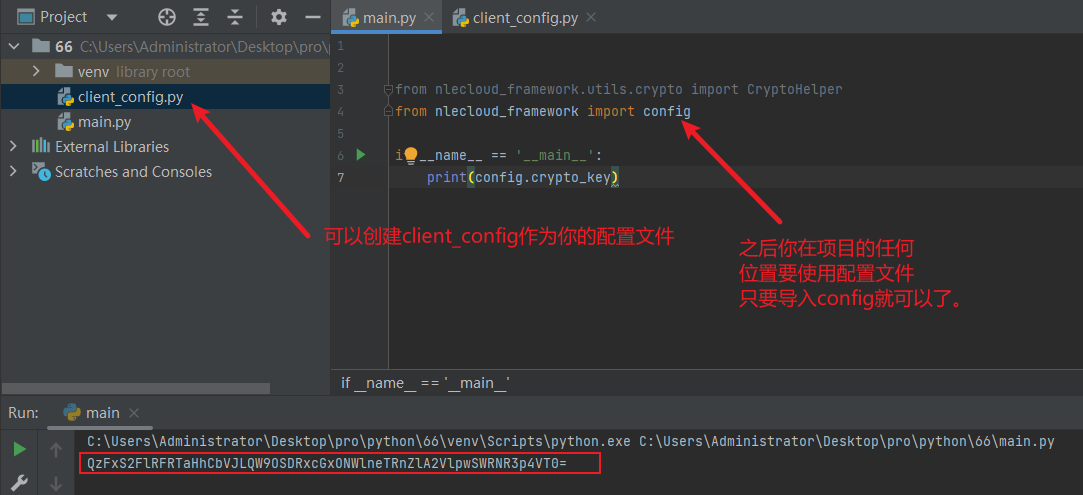
其中client_config.py你可以这样写:
import threading
import time
import os

class OSS_config(object):
    ak_id = "FlRFRTaHhCbVJLQW9OSDR"
    ak_secret = "FlRFRTaHhCbVJLQW9OSDRW9OSDRx"
    bucket_name = "hezi-he"
    demain = "https://hezi.oss-cn-zhangjiakou.aliyuncs.com/"
    end_point = "oss-cn-hezi.aliyuncs.com"


class client_config:
    # 单例模式需要加锁判断
    _instance = None
    _lock = threading.RLock()

    # 项目的跟目录
    project_path = os.path.dirname(os.path.abspath(__file__))
    # 加密秘钥,可以使用nlecloud_framework\utils\crypto.py 进行生成
    crypto_key = "QzFxS2FlRFRTaHhCbVJLQW9OSDRxcGxONWlneTRnZlA2VlpwSWRNR3p4VT0="
    # 文件的临时位置
    temp_path = os.path.join(project_path,"temp_file")
    if not os.path.exists(temp_path):
        os.mkdir(temp_path)
    # oss的配置信息
    oss_config = OSS_config()

    def __new__(cls, *args, **kwargs):
        """
        实现单例模式
        :param args:
        :param kwargs:
        """
        if cls._instance:
            return cls._instance

        with cls._lock:
            if cls._instance:
                return cls._instance

            cls._instance = object.__new__(cls)
            return cls._instance
三、工具类介绍
3.1:加密库
nlecloud_framework\utils\crypto.py
- 可以使用genRandomKey方法生成一个秘钥,后期可以使用plain_to_ciphert和cipher_to_plain进行数据加解密
- 可以使用create_rsa_pair去创建一个2048位的非对称加密,后期使用encryption和decryption进行加解密
if __name__ == '__main__':
    # 1、获取加密秘钥
    key = CryptoHelper.genRandomKey()
    ciphertext = CryptoHelper.plain_to_ciphert(key,plaintext="明文信息")
    plaintext = CryptoHelper.cipher_to_plain(key,ciphertext=ciphertext)
    print("密文:",ciphertext)
    print("明文:",plaintext)

    # 2、非对称加密
    # 生成秘钥对
    public_key, private_key = CryptoHelper.create_rsa_pair(is_save=False)
    # 读取公钥信息
    public_key = CryptoHelper.read_public_key("crypto_public_key.pem")
    # 加密
    text = '123456'
    text_encrypted_base64 = CryptoHelper.encryption(text, public_key)
    print('密文:', text_encrypted_base64)

    # 解密
    text_decrypted = CryptoHelper.decryption(text_encrypted_base64, private_key)
    print('明文:', text_decrypted)
3.2:nlecommon库
- 可以将多行一大串字符,变成一个列表如下面这样格式
if __name__ == '__main__':
    a = """
    aliyun-python-sdk-core==2.13.36
aliyun-python-sdk-kms==2.16.0
    """
    stringTextLine_to_list(a,is_print=True)

    # 输出信息,输出转换好的文本信息
    # ['aliyun-python-sdk-core==2.13.36', 'aliyun-python-sdk-kms==2.16.0']
3.3:阿里云的OSS封装
阿里官网:https://www.aliyun.com/product/oss
当然了你要自己去购买服务,然后对client_config.py中OSS_config进行替换。
- 上传文件
from nlecloud_framework.utils.oss import OSSHelper
from nlecloud_framework import config

if __name__ == '__main__':
    file_name, resource_path = OSSHelper.oss_upload(r"assets\Snipaste_2023-03-03_08-59-48.png", oss_config=config.oss_config,file_folder="framework")
    print(file_name, resource_path)
    # 输出信息
    # file_name :framework/e6b8d3185.png
    # resource_path :https://hezi.oss-cn-zhangjiakou.aliyuncs.com/framework/e6b8d3185.png
3.4:自动试卷
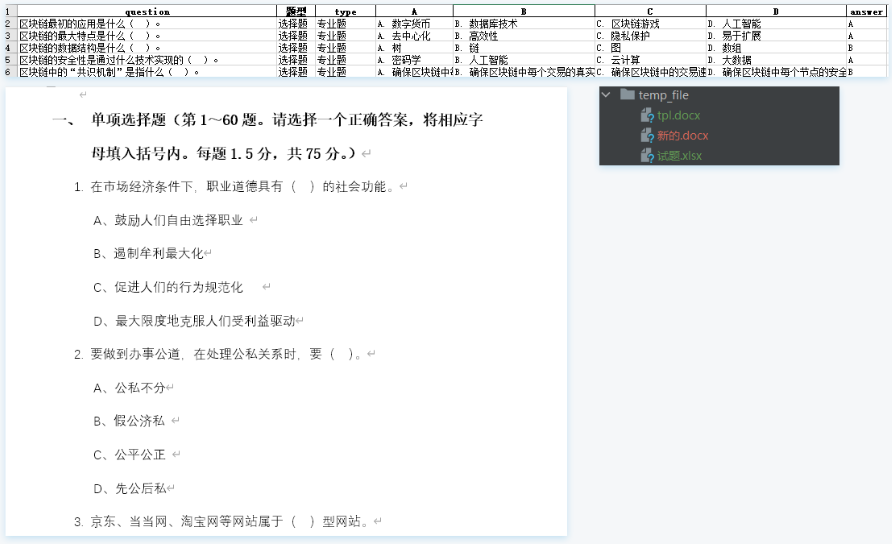
主要是将Excel的的题库,转化为word的格式的试卷比如像这样的转换:
from nlecloud_framework.libs.exam.exam_paper import ExamPaperHelper
from nlecloud_framework import config

if __name__ == '__main__':
    obj = ExamPaperHelper()
    # 数据Excel文件名和要保存的试卷文件名
    obj.run(excel_name="试题.xlsx",word_name="新的试卷")
    # 输出程序如何使用
    obj.usage()
1 maintainer

Release files for nlecloud-framework 0.1.17
For a detailed explanation of source distributions (sdists) and built distributions (wheels), please see the package formats documentation.
Source distribution (sdist)
| File | Size | Uploaded | |
|---|---|---|---|
| nlecloud_framework-0.1.17.tar.gz | 19.2 kB | Details |
Release files / nlecloud_framework-0.1.17.tar.gz
| Download URL | nlecloud_framework-0.1.17.tar.gz |
|---|---|
| Size | 19.2 kB |
| Tags | Source |
|
SHA-256 checksum How to use checksums |
5ee3648158ff07d28db3f301054fd65c98b117a8f0d14d81f96c14ace063cead
|
|
BLAKE2b-256 checksum How to use checksums |
2c791ab30b9cd7562ad3cbd41d56844d14f265259ee4bf192b28f4635628016a
|
| Upload date | |
|
Uploaded using Trusted Publishing? What is trusted publishing? |
No |
| Uploaded via |
twine/4.0.2 CPython/3.11.2
|














