




开发者信息
- nikiss,个人QQ 1299577815,插件反馈QQ群 226462236,插件有问题到群里反馈响应更快哦
-

简介
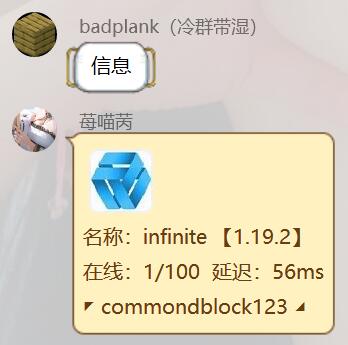
使用mcstatus库,支持Java和Bedrock服务器的服务器查询。
安装
使用nb-cli安装
nb plugin install nonebot_plugin_mc_server_status
或者
直接把插件clone下来放进去plugins文件夹,记得把依赖装上 pip install mcstatus
使用
添加了服务器信息后,会在bot根目录下的data目录创建一个mc_status_data.json文件,用于存储插件信息
在bot对应的.env文件修改
# 管理员的QQ号(别问我为什么要另外写)
mc_status_admin_qqnum = [1234, 5678, 6666]

# 可选配置
# 机器人的QQ号列表,如果有多个bot连接,会按照填写的list,左边的机器人QQ优先级最高 1234 > 5678 > 6666,会自动切换
# 如果不填该配置则由第一个连上的bot响应
mc_status_bot_qqnum_list = [1234, 5678, 6666]
插件命令
| 指令 | 说明 |
|---|---|
| 信息 | 所有人都能使用,查看当前群添加的服务器状态,需要加命令前缀,默认/ |
| 信息数据 | 查看已添加的群和服务器信息,bot超级管理员用,需要加命令前缀,默认/ |
| 添加服务器 | 字面意思,bot超级管理员用,一个群可以添加多个服务器 |
| 删除服务器 | 字面意思,bot超级管理员用 |
更新日志
2026/2/14 [v0.3.2]
- 增加对ipv6地址支持
2024/8/18 [v0.3.1]
- 管理员配置支持多个
2024/7/30 [v0.3.0]
- 增加匿名玩家的判断
2024/6/25 [v0.2.20]
- 更新插件元数据
2023/2/11 [v0.2.9]
- 信息和信息数据的增加命令前缀
2023/1/24 [v0.2.8]
- 修复多bot处理bug
2023/1/20 [v0.2.7]
- gocq插件版不支持base64图片发送,改为BytesIO发送服务器图标
2023/1/17 [v0.2.4]
- 又忘记删东西导致无法运行,已修复
2023/1/16 [v0.2.3]
- 最低python版本兼容至3.8
2023/1/15 [v0.2.2]
- 优化多bot逻辑,机器人qq号配置改为可选
2023/1/15 [v0.2.1]
- 插件重构
1 maintainer

Metadata
1 maintainer
Release files for nonebot_plugin_mc_server_status 0.4.2
For a detailed explanation of source distributions (sdists) and built distributions (wheels), please see the package formats documentation.
Source distribution (sdist)
| File | Size | Uploaded | Provenance | Actions |
|---|---|---|---|---|
| nonebot_plugin_mc_server_status-0.4.2.tar.gz | 6.1 kB | Without provenance | Details for nonebot_plugin_mc_server_status-0.4.2.tar.gz |
Built distribution (wheel)
| File | Interpreter | ABI | Platform | Actions Reset |
|---|---|---|---|---|
| nonebot_plugin_mc_server_status-0.4.2-py3-none-any.whl | Python 3 | none | any | Details for nonebot_plugin_mc_server_status-0.4.2-py3-none-any.whl |
Total release size: 13.2 kB
Release files / nonebot_plugin_mc_server_status-0.4.2.tar.gz
| Download URL | nonebot_plugin_mc_server_status-0.4.2.tar.gz |
|---|---|
| Size | 6.1 kB |
| Tags | Source |
|
SHA-256 checksum How to use checksums |
58f4187a8a6fbe932a5f27273468ccca90be560bed9c905f467e3f59b640bc27
|
|
BLAKE2b-256 checksum How to use checksums |
3ff484dc51ae87e1ec48281353cb41401bd529f5493c2a3ec2638cd82c29976d
|
| Upload date | |
|
Uploaded using Trusted Publishing? What is trusted publishing? |
No |
| Uploaded via |
poetry/2.1.2 CPython/3.12.9 Windows/11
|
Release files / nonebot_plugin_mc_server_status-0.4.2-py3-none-any.whl
| Download URL | nonebot_plugin_mc_server_status-0.4.2-py3-none-any.whl |
|---|---|
| Size | 7.1 kB |
| Tags | Python 3 |
|
SHA-256 checksum How to use checksums |
ad035edc78f5f3a50ec3d812558bcb880000af85ab5dfe507180c39f031aefed
|
|
BLAKE2b-256 checksum How to use checksums |
67aace1732513d5f0118942dd433b8ef44057f6ba0d46174a18e180014b254f4
|
| Upload date | |
|
Uploaded using Trusted Publishing? What is trusted publishing? |
No |
| Uploaded via |
poetry/2.1.2 CPython/3.12.9 Windows/11
|
Security for nonebot_plugin_mc_server_status 0.4.2
Provenance
Provenance describes where a file came from. On PyPI, provenance is shared via attestations, which provide a verifiable record of the build or publishing details. View details, limitations and caveats.
No provenance found
None of the files in this release were uploaded with provenance metadata.
A note on package security
PyPI is a repository for distributing packages, not a service for auditing them. While third-party security researchers and our staff do their best to detect and remove malicious packages, PyPI cannot guarantee the quality, security or suitability of any given package.
To learn more about protecting yourself from malicious actors, visit our package security documentation.














