
Not1MM





What and why is Not1MM
Not1MM's interface is a blantent ripoff of N1MM. It is NOT N1MM and any problem you have with this software should in no way reflect on their software.
If you use Windows(tm) you should run their, or some other, program.
I personally don't. While it may be possible to get N1MM working under Wine, I haven't checked, I'd rather not have to jump thru the hoops.
Currently this exists for my own personal amusement. Something to do in my free time. While I'm not watching TV, Right vs Left political 'News' programs, mind numbing 'Reality' TV etc...
What it is not
Working.
The current state is "Not Working". I literally just dragged some widgets out on a Qt Designer window, and wrote a couple stubs to display the interface. Next to nothing is working or useful.
What it probably never will be
Feature complete.
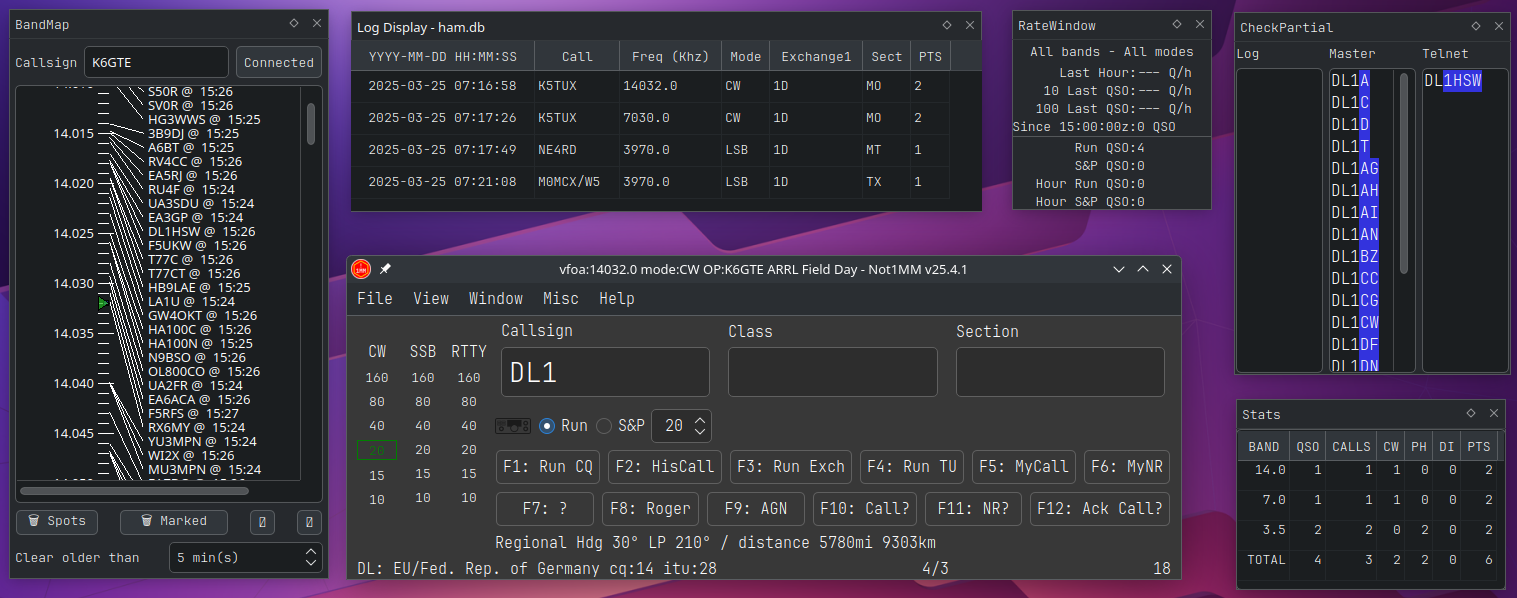
Changes of note
- [23-3-23] Added most of Cabrillo generation. Plan to test it this weekends CQ WPX SSB.
- [23-3-22] Add prefill of serial nr. set OP call on startup. Set IsMultiplier1 new unique wpx. Add OP and contest name to window title. and stuff.
- [23-3-21] Worked on CQ WPX SSB plugin.
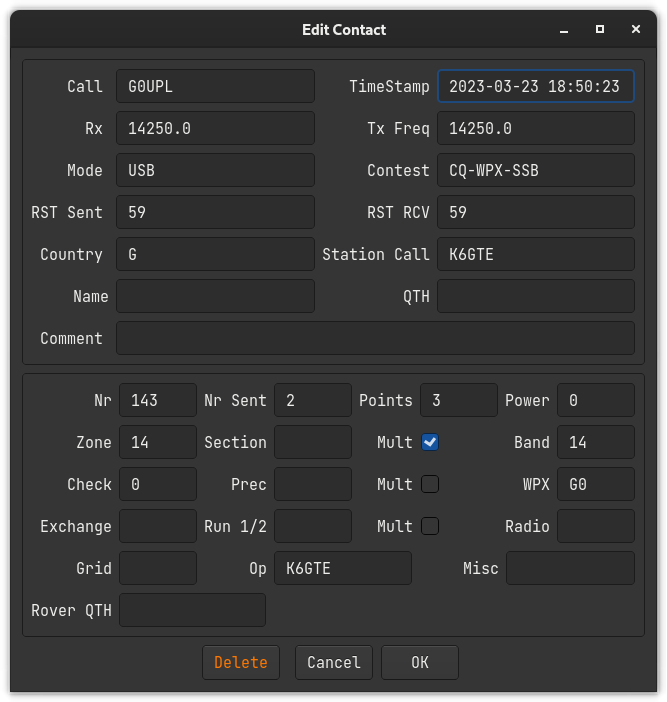
- [23-3-20] Added a contact edit dialog. RightClick to edit contact. Changed placeholder text color in settings dialog. Hooked up CW speedchange widget. PgUp/PgDn to change speed.
- [23-3-17] Added multicast UDP messages to update the log window when new contact made. You can now edit existing contacts in the log window. You can't delete them yet. Got rid of watchdog. Isolated common multicast code to it's own class.
- [23-3-15] Added a rudimentary log view window.
- [23-3-10] Started work on saving contacts to the DB. Added a claculate_wpx_prefix routine.
- [23-3-9] Placed network call lookup in a thread. Display freq/mode for non CAT radios. Hooked up the CW macros to cwdaemon.
- [23-3-8] Band/Frequency/Mode indicators. Direct frequency/mode entry in call field.
- [23-3-7] Changed dxlog table column names.
- [23-3-1] Add shift tab for field movement.
- [23-2-23] Dialogs now do darkmode, Add settings dialog. App remembers window size and location.
- [23-2-22] Added cty.dat file.
- [23-2-21] Added edit macro dialog.
- [23-2-20] Save view states. fixed debug messages. Started coding plugins/stubs.
- [23-2-15] Added qss stylesheet. Connected Run and S&P radio buttons. Reads in cwmacros.
- [23-2-12] Added View menu to show/hide macro buttons, command buttons, and the band/mode indicator on the left. Added OpOn dialog. Added a dark mode. QRZ lookup added but needs work.
- [23-2-9] Initial post and name squatting.
Running from source
Since this is packaged for PyPi, if you want to work on your own source branch, after cloning from github you would:
pip install --upgrade pip
pip install setuptools
pip install build
source rebuild.sh
from the root directory. This installs a build chain and a local editable copy of not1mm.
There's two ways to launch the program from the local editable copy.
You can either be in the root of the source directory and type:
python not1mm
or be in some other directory and just type:
not1mm
Hiding screen elements
You can show or hide certain buttons/indicators by checking and unchecking their boxes under the view menu. You can then resize the screen to make it more compact.
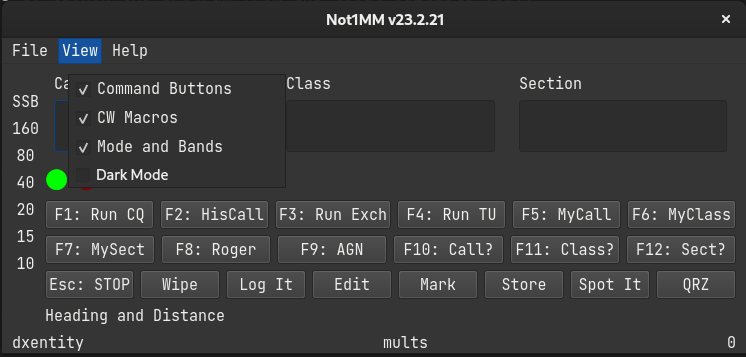
The your choices will be remembered when you relaunch the program.
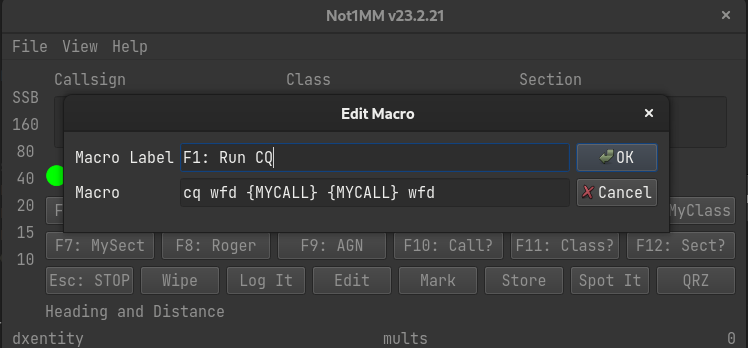
Editing function key macros
You can edit the CW macros by right clicking on the buttons and filling out the dialog.
cty.dat and QRZ lookups for distance and bearing
When a callsign is entered, a look up is first done in a cty.dat file to determin the country of origin, geographic center, cq zone and ITU region. Great circle calculations are done to determin the heading and distance from your gridsquare to the grographic center. This information then displayed at the bottom left.

After this, a request is made to QRZ for the gridsquare of the callsign. If there is a response the information is recalculated and displayed. You'll know is this has happened, since the gridsquare will replace the word "Regional".

Settings dialog
Added a settings screen.
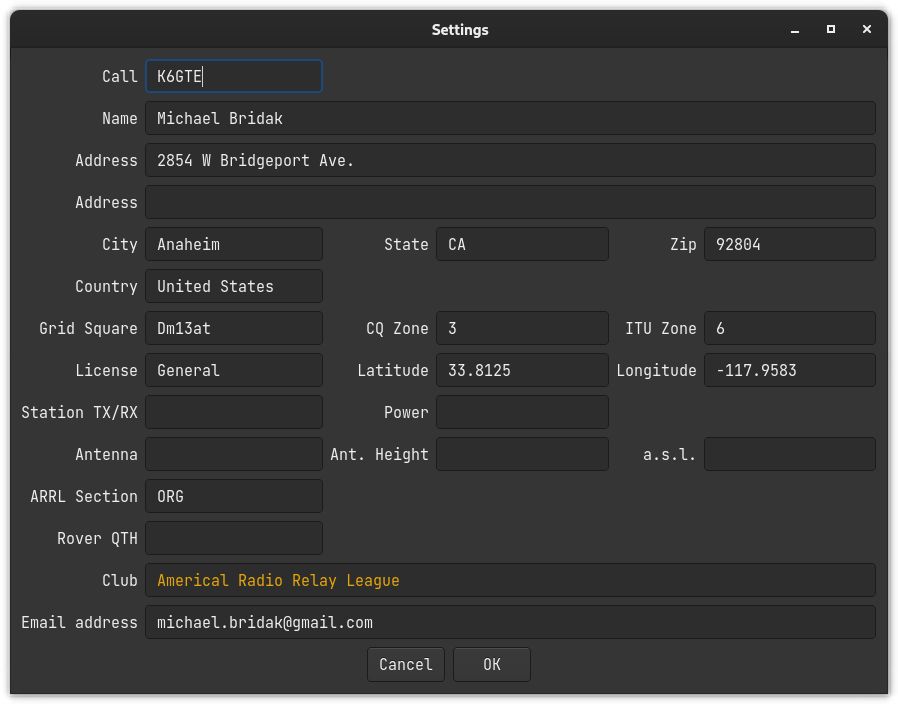
You can fill it out if you want to. You can leave our friends behind. 'Cause your friends don't fill, and if they don't fill. Well, they're no friends of yours.
You can fill. You can fill. Everyone look at your keys.
I forgot my hat today.
Other uses for the call field
- [Freqnency] You can enter a frequency in kilohertz. This will change the band you're logging on. If you have CAT control, this will change the frequency of the radio as well.
- [CW, SSB, RTTY] You can set the mode logged. If you have CAT control this will also change the mode on the radio.
- [OPON] Change the operator currently logging.
You must press the SPACE bar after entering any of the above.
Log Display
The Log display gets updated automatically when a contact is entered. The top half is a list of all contacts.
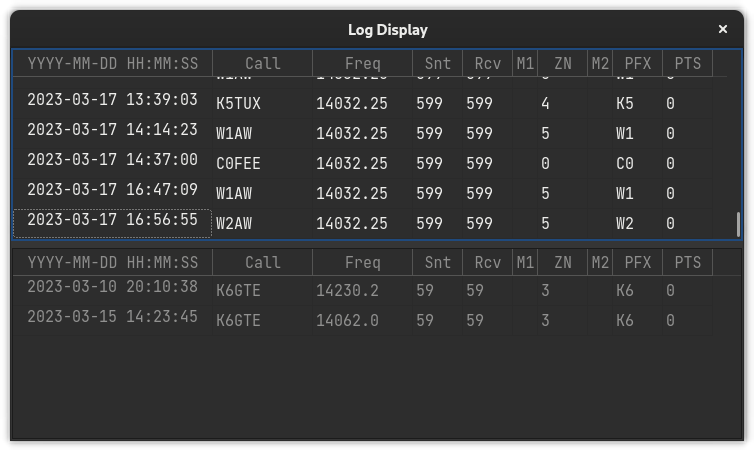
The bottom half of the log displays contacts sorted by what's currently in the call entry field.
Editing a contact
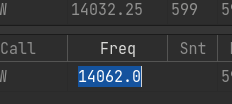
You can double click a cell in the log window and edit its contents.
You can also Right-Click on a cell to bring up the edit dialog.
1 maintainer

Metadata
1 maintainer
Release files for not1mm 23.3.23
For a detailed explanation of source distributions (sdists) and built distributions (wheels), please see the package formats documentation.
Source distribution (sdist)
| File | Size | Uploaded | Provenance | Actions |
|---|---|---|---|---|
| not1mm-23.3.23.tar.gz | 501.2 kB | Without provenance | Details for not1mm-23.3.23.tar.gz |
Built distribution (wheel)
| File | Interpreter | ABI | Platform | Actions Reset |
|---|---|---|---|---|
| not1mm-23.3.23-py3-none-any.whl | Python 3 | none | any | Details for not1mm-23.3.23-py3-none-any.whl |
Total release size: 1.0 MB
Release files / not1mm-23.3.23.tar.gz
| Download URL | not1mm-23.3.23.tar.gz |
|---|---|
| Size | 501.2 kB |
| Tags | Source |
|
SHA-256 checksum How to use checksums |
16cb5b523e15e0d329755707646e3662096ac746d07125b09b4740fd295cfaed
|
|
BLAKE2b-256 checksum How to use checksums |
e44bde62774cfb311c2843750b9da97c8c8ee87989122c73478cfe202a74b144
|
| Upload date | |
|
Uploaded using Trusted Publishing? What is trusted publishing? |
No |
| Uploaded via |
twine/4.0.2 CPython/3.11.2
|
Release files / not1mm-23.3.23-py3-none-any.whl
| Download URL | not1mm-23.3.23-py3-none-any.whl |
|---|---|
| Size | 521.8 kB |
| Tags | Python 3 |
|
SHA-256 checksum How to use checksums |
a4ed8aee35b544d7299724f63faa682a112c8f7db7353641ad88e32de72c4f27
|
|
BLAKE2b-256 checksum How to use checksums |
d12ef20c0cda3e7fe260c008694784107e8adca138f1669489ad321e75c1b6fa
|
| Upload date | |
|
Uploaded using Trusted Publishing? What is trusted publishing? |
No |
| Uploaded via |
twine/4.0.2 CPython/3.11.2
|
Security for not1mm 23.3.23
Provenance
Provenance describes where a file came from. On PyPI, provenance is shared via attestations, which provide a verifiable record of the build or publishing details. View details, limitations and caveats.
No provenance found
None of the files in this release were uploaded with provenance metadata.
A note on package security
PyPI is a repository for distributing packages, not a service for auditing them. While third-party security researchers and our staff do their best to detect and remove malicious packages, PyPI cannot guarantee the quality, security or suitability of any given package.
To learn more about protecting yourself from malicious actors, visit our package security documentation.














