




Notion Export Enhancer
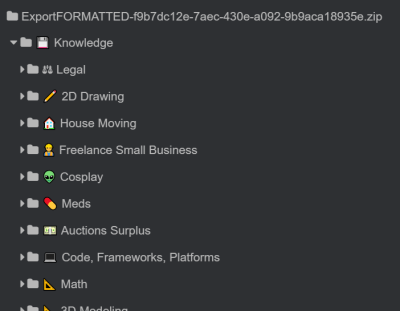
Takes a Notion.so export .zip and enhances it by:
- Removing all Notion IDs from the end of folders and files
- Adds Unicode Emoji to start of folder/file names if it was in your Notion notes
- Retruncates note titles to 200 characters instead of 50
- Applies Notion's modification time to the file data itself
- Moves root md files into the folder with their name, giving them a name like
!index.mdinstead so they sort to the top.
TODO:
- Remove empty notes (ones with only links)?
- Rewrite csv + md tables into md tables where appropriate?
- .exe instead of .py?
- Image captions should become MD alt image text, not a separate paragraph
- Would require exporting everything ourselves, paragraph after image is ambiguous
Supports Python 3.6+
Usage from CLI
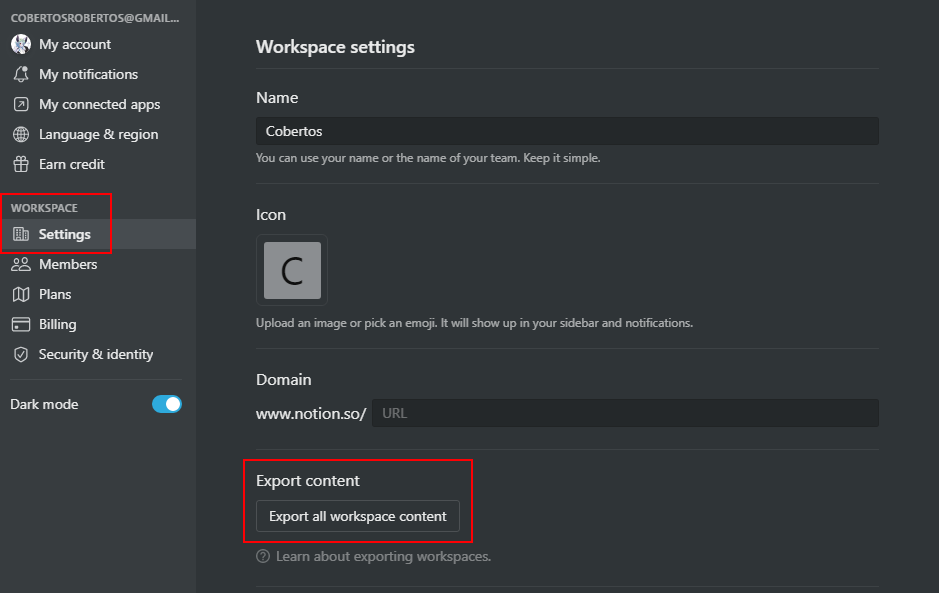
- Export your notion workspace
- You can export a single workspace from
Settings > [Workspace] Settings > Export Content > Export all workspace content
- You can export a single workspace from
- Choose export option
"Markdown & CSV" pip install notion_export_enhancer- Then run like
python -m notion_export_enhancer [token_v2] [path_to_zip]token_v2is your Notion.so token, which can be obtained by inspecting your browser cookies on a logged-in (non-guest) session on Notion.so
There are also some configuration options:
--output-path: Optionally set an output path, otherwise uses the current working directory--remove-title: Removes the title that Notion adds. H1s at the top of every file (default false)--rewrite-paths: Rewrite the paths in the Markdown files themselves to match file renaming (default true)
Contributing
See CONTRIBUTING.md
1 maintainer

Metadata
1 maintainer
Release files for notion-export-enhancer 0.0.7
For a detailed explanation of source distributions (sdists) and built distributions (wheels), please see the package formats documentation.
Source distribution (sdist)
| File | Size | Uploaded | Provenance | Actions |
|---|---|---|---|---|
| notion_export_enhancer-0.0.7.tar.gz | 8.7 kB | Without provenance | Details for notion_export_enhancer-0.0.7.tar.gz |
Built distribution (wheel)
| File | Interpreter | ABI | Platform | Actions Reset |
|---|---|---|---|---|
| notion_export_enhancer-0.0.7-py3-none-any.whl | Python 3 | none | any | Details for notion_export_enhancer-0.0.7-py3-none-any.whl |
Total release size: 17.7 kB
Release files / notion_export_enhancer-0.0.7.tar.gz
| Download URL | notion_export_enhancer-0.0.7.tar.gz |
|---|---|
| Size | 8.7 kB |
| Tags | Source |
|
SHA-256 checksum How to use checksums |
12955dbd418e266a876afba7ff5cde623568d8864d5f984fd5c76cf822e4fdda
|
|
BLAKE2b-256 checksum How to use checksums |
c4dae05471e5b0eaca85e66ae0f0d3365b8cd7ca8717ff51e96f136eb9e7cbc9
|
| Upload date | |
|
Uploaded using Trusted Publishing? What is trusted publishing? |
No |
| Uploaded via |
twine/3.4.1 importlib_metadata/4.6.1 pkginfo/1.7.1 requests/2.26.0 requests-toolbelt/0.9.1 tqdm/4.61.2 CPython/3.8.7
|
Release files / notion_export_enhancer-0.0.7-py3-none-any.whl
| Download URL | notion_export_enhancer-0.0.7-py3-none-any.whl |
|---|---|
| Size | 9.1 kB |
| Tags | Python 3 |
|
SHA-256 checksum How to use checksums |
2816f837feae2aa6d7939cd907e54a486e645eccc54b903cbc104dbe738722aa
|
|
BLAKE2b-256 checksum How to use checksums |
1c5aacc3dda7a5a8f64d7bfbca4e6a1b0835342927a98b62d96c6b3e07c75e56
|
| Upload date | |
|
Uploaded using Trusted Publishing? What is trusted publishing? |
No |
| Uploaded via |
twine/3.4.1 importlib_metadata/4.6.1 pkginfo/1.7.1 requests/2.26.0 requests-toolbelt/0.9.1 tqdm/4.61.2 CPython/3.8.7
|
Security for notion-export-enhancer 0.0.7
Provenance
Provenance describes where a file came from. On PyPI, provenance is shared via attestations, which provide a verifiable record of the build or publishing details. View details, limitations and caveats.
No provenance found
None of the files in this release were uploaded with provenance metadata.
A note on package security
PyPI is a repository for distributing packages, not a service for auditing them. While third-party security researchers and our staff do their best to detect and remove malicious packages, PyPI cannot guarantee the quality, security or suitability of any given package.
To learn more about protecting yourself from malicious actors, visit our package security documentation.














