
NovelForge AI
⚠️ Work in Progress — NovelForge is actively under development. Features may change, break, or be incomplete. Not production-ready.
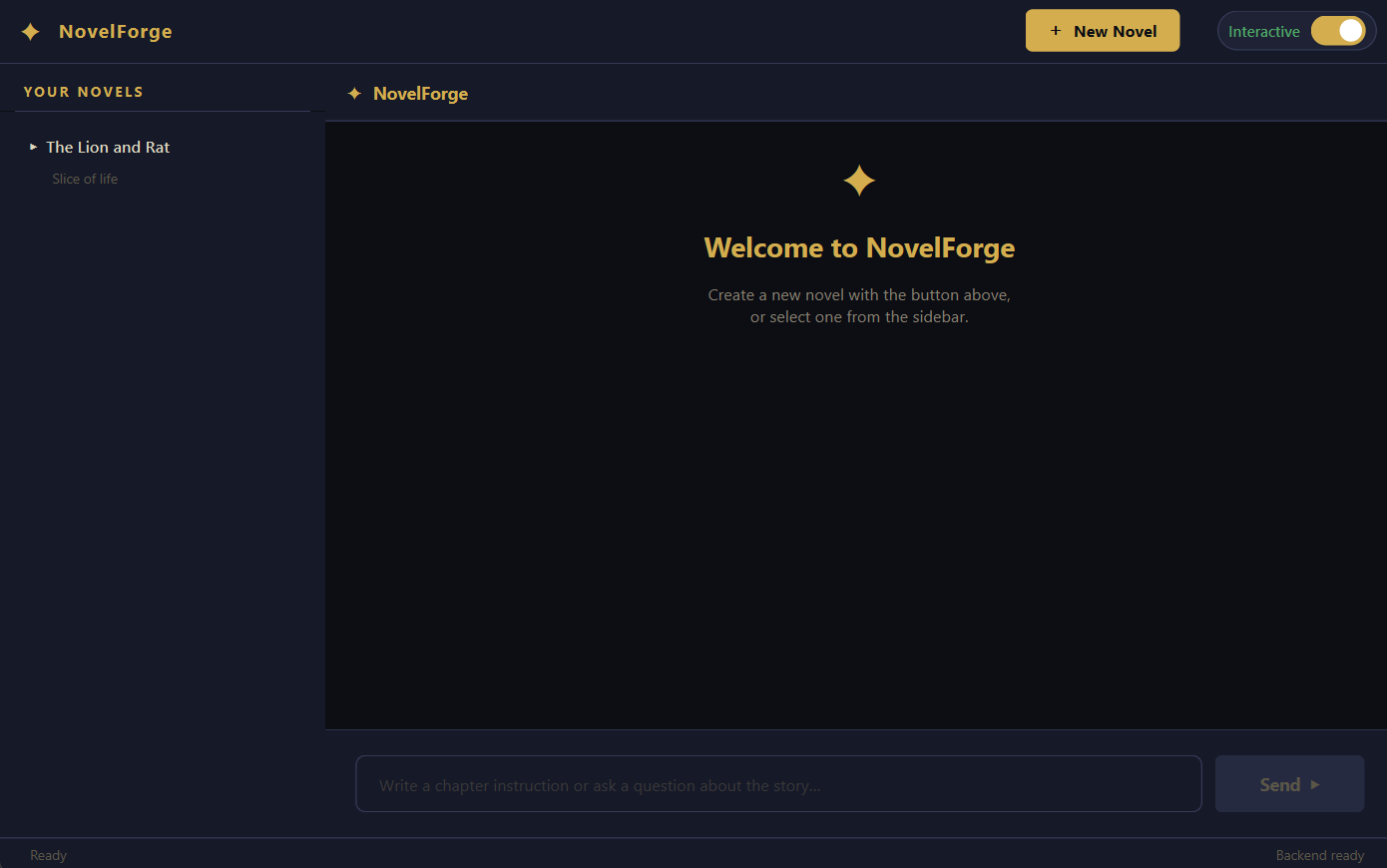
NovelForge is an AI-powered desktop novel writer that runs entirely on your local machine. Give it a title, genre, and premise — it writes Chapter 1, remembers everything, and keeps writing with full narrative continuity across as many chapters as you want. Ask it questions about your story and it searches its vector memory to answer accurately.
Built on three local services: Ollama for LLM inference, Endee for vector memory, and PyQt6 for the desktop UI.
What Makes This Different
Most AI writing tools forget everything after each message. NovelForge doesn't. Every chapter you generate is broken into chunks, embedded, and stored across four dedicated Endee vector indexes — story, characters, lore, and summaries. When the next chapter is generated, the RAG layer retrieves the most semantically relevant chunks from all four indexes and feeds them into the prompt. Characters stay consistent. Locations don't move. Plot threads don't get dropped.
Powered by Endee
Endee is the vector database that makes NovelForge's memory work. It runs locally via Docker, stores all embeddings on disk, and serves queries over HTTP — no cloud, no API keys, no data leaving your machine.
Why Endee for this project:
- Multi-index architecture — NovelForge uses four separate indexes (
story_memory,character_memory,lore_memory,summary_memory). Endee makes it trivial to create, manage, and query multiple indexes independently, so character recall and lore recall don't interfere with each other. - Filtered queries — Every vector is tagged with a
novel_idfilter. Endee's$eqfilter operator means queries are always scoped to the active novel — no cross-contamination between your different stories. - INT8 precision — All indexes use
Precision.INT8quantization. This halves the memory footprint of stored vectors with negligible quality loss, which matters when you're embedding hundreds of chunks across long novels. - Cosine similarity — The embedding model (
nomic-embed-text) and cosine space type are a natural fit; semantic similarity is what you want when searching story memory by meaning, not distance. - Persistent Docker volume — Everything written to Endee survives restarts. Your novel memory is durable.
- Zero-latency cold start — Indexes are lazily initialized; the first query creates the index if it doesn't exist, so there's no setup ceremony.
Endee docs: https://docs.endee.io/quick-start
Features
- Create novels — title, genre, and premise is all you need; Chapter 1 is written and saved automatically
- Continue stories — type a chapter instruction; the RAG layer retrieves relevant memory before writing
- Ask questions — query any detail about your story; answers are grounded in stored chapter memory
- Interactive / Read-only toggle — switch between writing mode and read-only browsing at any time
- Collapsible sidebar — novel tree with per-chapter navigation; click any chapter to load its full text and summary
- Per-context chat history — separate conversation thread per novel and per chapter
- Story Bible — characters, locations, factions, and lore auto-extracted from every chapter and saved to the novel's JSON metadata
- GPU-accelerated inference — all Ollama calls (generation + embeddings) are configured to use full GPU offload
- Fully local — Ollama, Endee, and the app all run on your machine; no data leaves it
Minimum Requirements
NovelForge runs heavy local inference. These are the minimum tested specs:
| Component | Minimum |
|---|---|
| GPU | NVIDIA RTX 4050 6 GB VRAM (or equivalent) |
| RAM | 16 GB |
| CPU | AMD Ryzen 7 (or equivalent 8-core) |
| Storage | ~10 GB free (models + novel data) |
| OS | Windows 10/11, Ubuntu 20.04+, macOS 12+ |
Expected generation time: 1–3 minutes per chapter or query, depending on GPU and chapter length. The
qwen3:8bmodel runs at roughly 20–40 tokens/sec on an RTX 4050 with full GPU offload.
Prerequisites
You need Ollama and Endee running locally before launching NovelForge.
1. Start Ollama
Download and install Ollama from https://ollama.ai, then pull the two required models:
ollama pull qwen3:8b
ollama pull nomic-embed-text
Ollama starts automatically on install and runs at http://localhost:11434. Verify it's running:
ollama list
You should see both qwen3:8b and nomic-embed-text listed.
2. Start Endee (Docker)
Endee runs as a Docker container. Install Docker Desktop from https://www.docker.com/products/docker-desktop first, then run:
docker run \
  --ulimit nofile=100000:100000 \
  -p 8080:8080 \
  -v ./endee-data:/data \
  --name endee-server \
  --restart unless-stopped \
  endeeio/endee-server:latest
What each flag does:
| Flag | Purpose |
|---|---|
--ulimit nofile=100000:100000 |
Raises the file descriptor limit — required for Endee's index files under load |
-p 8080:8080 |
Exposes Endee's HTTP API on localhost port 8080 |
-v ./endee-data:/data |
Mounts a local folder so all vector data persists across restarts |
--name endee-server |
Names the container so you can stop/start it easily |
--restart unless-stopped |
Auto-restarts Endee if Docker restarts |
Verify Endee is running by visiting http://localhost:8080 in your browser — you should see the Endee API response.
To stop and restart later:
docker stop endee-server
docker start endee-server
Full Endee documentation: https://docs.endee.io/quick-start
Installation
Once Ollama and Endee are both running:
pip install novelforge
Launch
novelforge
Or from Python:
from novelforge import launch
launch()
Usage
- Click + New Novel in the top bar
- Enter a title, genre, and premise — then click Generate Chapter 1
- Wait 1–3 minutes while the chapter is generated, embedded, and saved
- The chapter appears in the chat area and the sidebar updates with Chapter 1
- Type a chapter instruction (e.g. "The lion and rat discover an abandoned village") and press Send or Ctrl+Enter to generate the next chapter
- Ask questions about your story at any time (e.g. "What does the rat look like?")
- Use the Interactive / Read-only toggle in the top-right to switch to browse mode
- Click any chapter in the sidebar to read its full text and summary
Project Layout
novelforge/
├── pyproject.toml
├── README.md
├── LICENSE
│
├── novelforge/
│   ├── __init__.py              # public API — exposes launch()
│   ├── __main__.py              # python -m novelforge entry point
│   │
│   ├── core/                    # backend — no UI dependency
│   │   ├── __init__.py
│   │   ├── prompts.py           # all LLM prompt templates
│   │   ├── generators.py        # Ollama calls + GPU options
│   │   ├── memory.py            # Endee vector DB layer (lazy init)
│   │   ├── novel_manager.py     # JSON metadata + flat-file chapter storage
│   │   └── rag.py               # RAG orchestration layer
│   │
│   └── ui/                      # PyQt6 frontend
│       ├── __init__.py
│       ├── style.py             # full QSS stylesheet + colour palette
│       ├── widgets.py           # ToggleSwitch, Spinner, LoaderOverlay, MessageBubble
│       ├── workers.py           # QThread workers (CreateNovelWorker, SendMessageWorker)
│       ├── dialogs.py           # New Novel dialog
│       ├── sidebar.py           # collapsible novel/chapter tree
│       ├── chat_panel.py        # chat area (header, scroll, bubbles, input bar)
│       └── app.py               # MainWindow + run() entry point
How the Memory System Works
Chapter generated
       │
       ▼
  chunk_text()          splits chapter into 400-word chunks
       │
       ▼
  get_embedding()       nomic-embed-text via Ollama (GPU accelerated)
       │
       ├──▶ story_memory index      full chapter chunks
       ├──▶ summary_memory index    compressed continuity summary
       ├──▶ character_memory index  extracted character data
       └──▶ lore_memory index       locations, factions, world rules

Next chapter generation:
  query = user instruction
       │
       ▼
  retrieve_all_memory()
       ├── story_memory.query(top_k=8)
       ├── character_memory.query(top_k=6)
       ├── lore_memory.query(top_k=6)
       └── summary_memory.query(top_k=8)
                 │
                 ▼
         context injected into LLM prompt
                 │
                 ▼
         consistent chapter generated
Known Limitations
- Generation time is 1–3 minutes — there is no streaming output yet; the full chapter appears when complete
- The app has been tested on Windows 11 with an RTX 4050; other configurations may need tuning
- Endee must be running before the app starts; there is no auto-start or connection retry yet
- Chapter deletion is not yet implemented in the UI
- Export to EPUB/PDF is not yet implemented
License
MIT — see LICENSE for details.
1 maintainer

Metadata
1 maintainer
Release files for novelforge 1.0.2
For a detailed explanation of source distributions (sdists) and built distributions (wheels), please see the package formats documentation.
Source distribution (sdist)
| File | Size | Uploaded | Provenance | Actions |
|---|---|---|---|---|
| novelforge-1.0.2.tar.gz | 28.2 kB | With provenance | Details for novelforge-1.0.2.tar.gz |
Built distribution (wheel)
| File | Interpreter | ABI | Platform | Actions Reset |
|---|---|---|---|---|
| novelforge-1.0.2-py3-none-any.whl | Python 3 | none | any | Details for novelforge-1.0.2-py3-none-any.whl |
Total release size: 57.4 kB
Release files / novelforge-1.0.2.tar.gz
| Download URL | novelforge-1.0.2.tar.gz |
|---|---|
| Size | 28.2 kB |
| Tags | Source |
|
SHA-256 checksum How to use checksums |
22f3894a73c93532a4a1d11c9bca645000e5dfc99994c8ced3f9a97a6cd48bde
|
|
BLAKE2b-256 checksum How to use checksums |
63f5f94d63f4ed0232923e7c3b7eea334a752037dc24fcb6f01b0932fff3b9fd
|
| Upload date | |
|
Uploaded using Trusted Publishing? What is trusted publishing? |
Yes |
| Uploaded via |
twine/6.1.0 CPython/3.13.12
|
Provenance
Provenance describes where a file came from. On PyPI, provenance is shared via attestations, which provide a verifiable record of the build or publishing details. View details, limitations and caveats.


PyPI Publish Attestation
PyPI verified that this artifact, at this checksum, originated from the publisher listed below.
Signed by GitHub Actions, verified by PyPI on Jun 15, 2026.
Transparency logRelease files / novelforge-1.0.2-py3-none-any.whl
| Download URL | novelforge-1.0.2-py3-none-any.whl |
|---|---|
| Size | 29.2 kB |
| Tags | Python 3 |
|
SHA-256 checksum How to use checksums |
b9d16d395de34458d0f26908fa71f935eee7d053e4b062fdc2c1358d3b560619
|
|
BLAKE2b-256 checksum How to use checksums |
7057b143adca81ded156158826d2cfe7550d691622481bf6e1c5867371012640
|
| Upload date | |
|
Uploaded using Trusted Publishing? What is trusted publishing? |
Yes |
| Uploaded via |
twine/6.1.0 CPython/3.13.12
|
Provenance
Provenance describes where a file came from. On PyPI, provenance is shared via attestations, which provide a verifiable record of the build or publishing details. View details, limitations and caveats.
PyPI Publish Attestation
PyPI verified that this artifact, at this checksum, originated from the publisher listed below.
Signed by GitHub Actions, verified by PyPI on Jun 15, 2026.
Transparency logSecurity for novelforge 1.0.2
Provenance
Provenance describes where a file came from. On PyPI, provenance is shared via attestations, which provide a verifiable record of the build or publishing details. View details, limitations and caveats.
Full provenance
All 2 files in this release have been uploaded with provenance metadata.
Attestation for novelforge-1.0.2.tar.gz
PyPI Publish Attestation
PyPI verified that this artifact, at this checksum, originated from the publisher listed below.
Signed by GitHub Actions, verified by PyPI on Jun 15, 2026.
Transparency logA note on package security
PyPI is a repository for distributing packages, not a service for auditing them. While third-party security researchers and our staff do their best to detect and remove malicious packages, PyPI cannot guarantee the quality, security or suitability of any given package.
To learn more about protecting yourself from malicious actors, visit our package security documentation.














