

Auto Backup Fs File





This module enhances the database backup functionality in Odoo by introducing support for storing backups as files using the fsspec library. It is designed to address the need for reliable and flexible backup solutions, enabling businesses to safeguard their data by storing backups on various filesystems, including cloud storage providers, network drives, and local secure storage.
By integrating with the fs_file addon from the OCA storage repository, this module allows users to automate the backup process and store the resulting files in a configured filesystem. It provides an easy-to-use interface for configuring backup methods, managing stored backups, and ensuring data integrity for disaster recovery or multi-environment setups.
Table of contents
Use Cases / Context
BUSINESS NEED: This module addresses the critical need for safeguarding Odoo instance data by enabling automated backups to a filesystem supported by the fsspec library. Businesses often require reliable and accessible backup solutions to ensure data integrity and recovery in case of system failures or data loss. This module is particularly useful in contexts where organizations need to store backups on cloud storage, network drives, or other custom filesystems supported by fsspec.
Practical examples include:
Backing up Odoo data to cloud storage providers like AWS S3, Google Cloud Storage, or Azure Blob Storage.
Storing backups on a secure local or remote filesystem for disaster recovery purposes.
Automating backup processes in multi-environment setups, such as multi-company or multi-website configurations.
APPROACH: The module extends the backup functionality from the auto_backup module by introducing a method that allows storing the resulting backup using an fsspec implementation. This is achieved through the integration of the fs_file from storage repository. The module leverages the fsspec library to provide a flexible and extensible interface for interacting with various filesystems. It automates the backup process by exporting Odoo instance data and storing it in the specified filesystem. Additionally, it allows users to download the backups for local storage or further processing.
USEFUL INFORMATION:
Dependencies: This module depends on the fsspec library, its relevant filesystem implementations, and the fs_file addon from OCA/storage. Ensure the required fsspec plugins are installed for your target filesystem.
Installation
This addon itself does not introduce any dependencies, but its dependencies may require additional packages.:wa
Configuration
Review Documentation for Dependencies Before configuring the module, ensure you have reviewed the documentation for the following modules:
fs_attachment
fs_storage These modules provide the necessary setup for file storage and attachment handling.
Configure File Storage
Navigate to Settings > Technical > FS Storage.
Create or select an existing storage configuration.
Ensure the storage is properly set up and tested for accessibility.
Link Backup File field to Storage
While configuring the file storage in Settings > Technical > FS Storage, ensure that the backup_file from the db.backup.fs.file model is listed under the Field field.
This step is part of the storage configuration process.
Save the changes after verifying the setup.

Verify Configuration
Perform a test backup to ensure the files are being stored in the correct location.
Check the logs for any errors or warnings.
By following these steps, you will ensure that the module is properly configured for storing backups in the desired file storage system.
Usage
This module extends the functionality of the database backup system in Odoo by introducing a new backup method: Fs File. This method allows storing database backups as files using an FSSPEC implementation.
How to Use the Module
1. Configure the Backup Method
Navigate to Settings > Technical > Database Structure > Automated Backups.
Create or edit a backup configuration.
In the Backup Method field, select Fs File.
Configure other fields as needed, such as the backup format and retention settings.
Save the configuration.
2. Perform a Backup
From the list of backup configurations, select the one configured with the Fs File method.
Click the Backup Now button to initiate the backup process.
The backup will be stored as a file in the configured FSSPEC storage.
3. View Fs File Backups
Open the backup configuration form view.
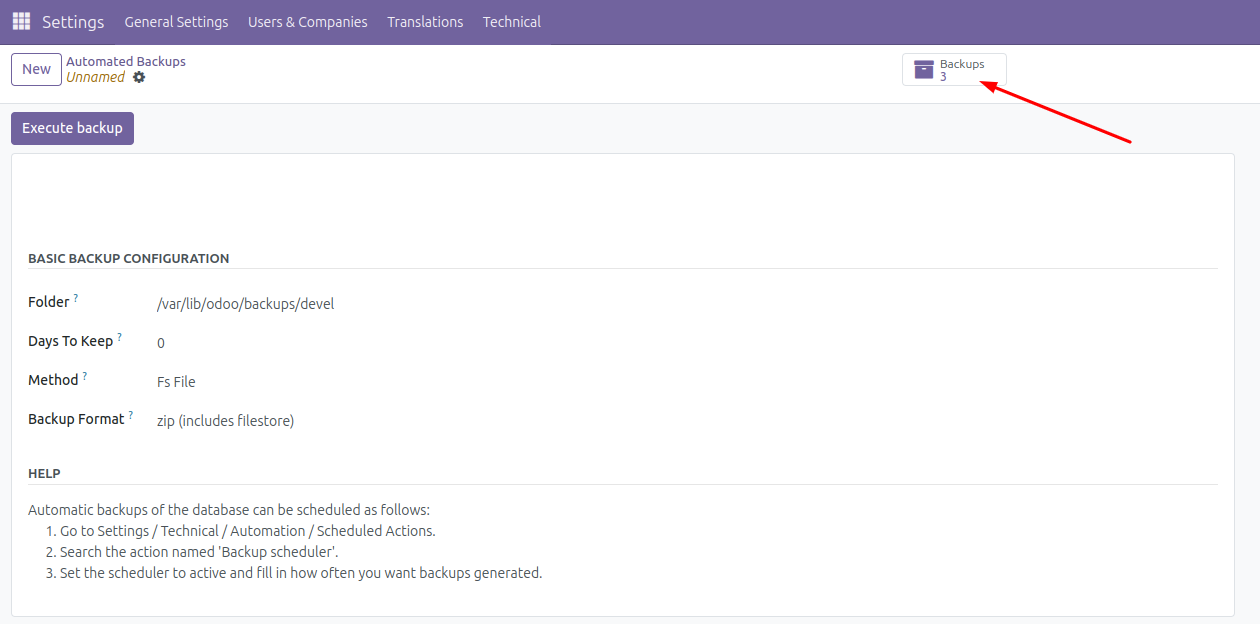
In the top-right corner, you will see a Backups stat button (if backups exist).
Click the Backups button to view the list of Fs File backups associated with the configuration.
4. Manage Fs File Backups
In the Fs File backups list view, you can see details such as the backup filename and associated database backup configuration.
Use this view to manage or download backups as needed.
Screenshots
Backup Configuration Form View
Fs File Backups List View

Notes
Ensure that the FSSPEC storage is properly configured before using the Fs File method.
This module adds a new stat button in the backup configuration form view to quickly access Fs File backups.
Known issues / Roadmap
Folder field behavior: The folder field on the db.backup model specifies the backup storage directory. For records using the fs_file method, storage is actually controlled by the fs_file field’s settings. However, since folder is currently a required non-computed field in the auto_backup addon, modifications to sync these two fields are not performed. Future versions may add this synchronization support.
Design limitation: The current implementation has a design constraint due to fs_storage addon limitations. Since storage setting targets the db.backup.fs.file model, only one storage backend can effectively be used.
Bug Tracker
Bugs are tracked on GitHub Issues. In case of trouble, please check there if your issue has already been reported. If you spotted it first, help us to smash it by providing a detailed and welcomed feedback.
Do not contact contributors directly about support or help with technical issues.
Credits
Contributors
Rolando Pérez Rebollo r.perez@binhex.cloud
Other credits
The development of this module has been financially supported by:
Binhex
Maintainers
This module is maintained by the OCA.

OCA, or the Odoo Community Association, is a nonprofit organization whose mission is to support the collaborative development of Odoo features and promote its widespread use.
This module is part of the OCA/server-tools project on GitHub.
You are welcome to contribute. To learn how please visit https://odoo-community.org/page/Contribute.
1 maintainer

Metadata
1 maintainer
Release files for odoo-addon-auto-backup-fs-file 17.0.1.0.0.4
For a detailed explanation of source distributions (sdists) and built distributions (wheels), please see the package formats documentation.
Built distribution (wheel)
| File | Interpreter | ABI | Platform | Actions Reset |
|---|---|---|---|---|
| odoo_addon_auto_backup_fs_file-17.0.1.0.0.4-py3-none-any.whl | Python 3 | none | any | Details for odoo_addon_auto_backup_fs_file-17.0.1.0.0.4-py3-none-any.whl |
Release files / odoo_addon_auto_backup_fs_file-17.0.1.0.0.4-py3-none-any.whl
| Download URL | odoo_addon_auto_backup_fs_file-17.0.1.0.0.4-py3-none-any.whl |
|---|---|
| Size | 259.0 kB |
| Tags | Python 3 |
|
SHA-256 checksum How to use checksums |
11c282eb973bc7f3db3fe59c3f7fb5709e60dc821c983051fdd26ecaa0cfe125
|
|
BLAKE2b-256 checksum How to use checksums |
8c49bbbc7a17cdf7abce6045e308bf0de8a2931822165db9d5eccdbf0963a6f5
|
| Upload date | |
|
Uploaded using Trusted Publishing? What is trusted publishing? |
No |
| Uploaded via |
twine/6.2.0 CPython/3.12.3
|
Security for odoo-addon-auto-backup-fs-file 17.0.1.0.0.4
Provenance
Provenance describes where a file came from. On PyPI, provenance is shared via attestations, which provide a verifiable record of the build or publishing details. View details, limitations and caveats.
No provenance found
None of the files in this release were uploaded with provenance metadata.
A note on package security
PyPI is a repository for distributing packages, not a service for auditing them. While third-party security researchers and our staff do their best to detect and remove malicious packages, PyPI cannot guarantee the quality, security or suitability of any given package.
To learn more about protecting yourself from malicious actors, visit our package security documentation.














