

Sale Blanket Orders





A blanket order is a pre-agreement to sell a certain number of quantities of products at a specific price. From a confirmed blanket order, the users can create new sale orders at such price during the blanket order validity period, until the blanket order expires, either due to reaching the validity end date or exhausting all the quantities of products.
Table of contents
Use Cases / Context
Others modules provide similar features. The module (sale_order_blanket_order)[https://pypi.org/project/odoo-addon-sale-order-blanket-order] also defines the concept of sale blanket order. The main differences are:
This module integrates Blanket Orders and Call-Off Orders into the sale.blanket.order object, whereas the other module extends the sale.order object. This means that any extensions made to the sale order model can also apply to blanket orders.
In the other module, you can deliver and invoice directly from the blanket order. You can also create a separate call-off order to partially deliver the blanket order.
Usage
A new menu in the Sales area is created, allowing users to create new blanket orders.
To create a new Sale Blanket Order go to the sale menu in the Sales section:

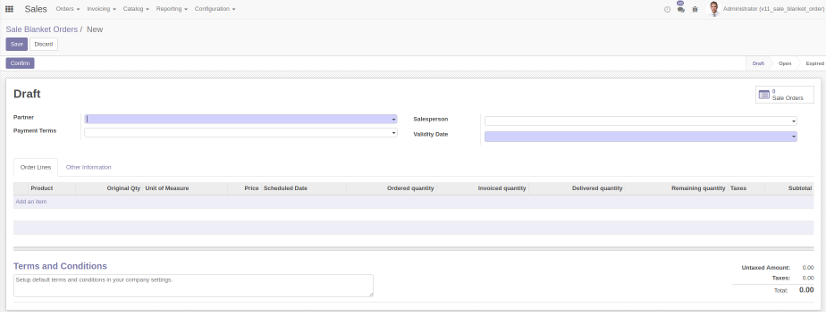
Hitting the button create will open the form view in which we can introduce the following information:
Vendor
Salesperson
Payment Terms
Validity period
Order lines:
Product
Accorded price
Original, Ordered, Invoiced, Received and Remaining quantities
Terms and Conditions of the Blanket Order
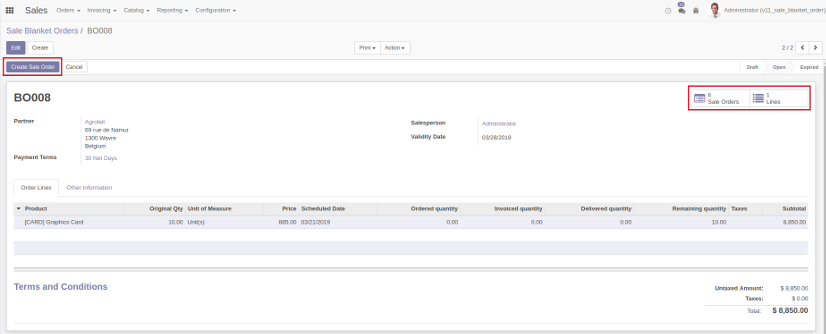
From the form, once the Blanket Order has been confirmed and its state is open and the validity period has started, the user can create a Sale Order, check the Sale Orders associated to the Blanket Order and/or see the Blanket Order lines associated to the BO.
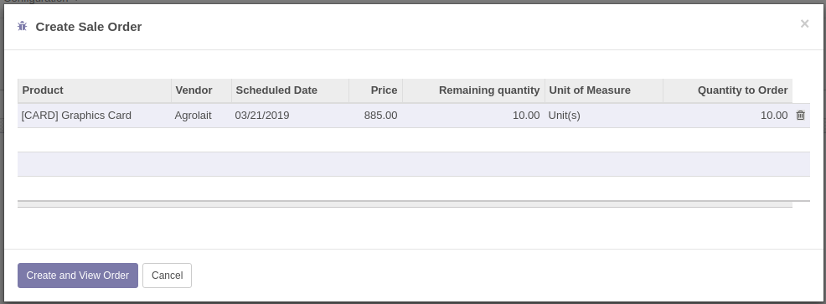
Hitting the button Create Sale Order will open a wizard that will ask for the amount of each product in the BO lines for which the Sale Order will be created.
Installing this module will add an additional menu which will show all the blanket order lines currently defined in the system, including the customer for each line. From this list the user can create customized Sale Orders selecting the lines for which the PO (or POs if the customers are different) is (are) created.

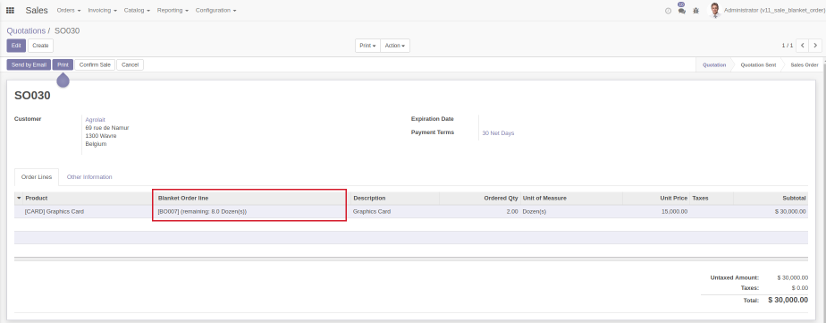
In the Sale Order form one field is added in the PO lines, the Blanket Order line field. This field keeps track to which Blanket Order line the PO line is associated. Upon adding a new product in a newly created Sale Order a blanket order line will be suggested depending on the following factors:
Started validity period
Closer scheduled date
Remaining quantity > Quantity introduced in the Sale Order line
Bug Tracker
Bugs are tracked on GitHub Issues. In case of trouble, please check there if your issue has already been reported. If you spotted it first, help us to smash it by providing a detailed and welcomed feedback.
Do not contact contributors directly about support or help with technical issues.
Credits
Contributors
André Pereira <github@andreparames.com> (https://www.acsone.eu/)
Adrià Gil Sorribes <adria.gil@eficent.com> (https://www.eficent.com/)
Jordi Ballester Alomar <jordi.ballester@eficent.com>
Alex Comba <alex.comba@agilebg.com> (https://www.agilebg.com/)
Codeforward (https://www.codeforward.nl/):
Jasper Jumelet <jasper.jumelet@codeforward.nl>
Chris Bergman <chris.bergman@codeforward.nl>
-
Nguyễn Minh Chiến <chien@trobz.com>
-
Maksym Yankin <maksym.yankin@camptocamp.com>
Other credits
The migration of this module from 15.0 to 16.0 was financially supported by Camptocamp
Maintainers
This module is maintained by the OCA.

OCA, or the Odoo Community Association, is a nonprofit organization whose mission is to support the collaborative development of Odoo features and promote its widespread use.
This module is part of the OCA/sale-blanket project on GitHub.
You are welcome to contribute. To learn how please visit https://odoo-community.org/page/Contribute.
1 maintainer

Metadata
1 maintainer
Release files for odoo-addon-sale-blanket-order 19.0.1.1.3.2
For a detailed explanation of source distributions (sdists) and built distributions (wheels), please see the package formats documentation.
Built distribution (wheel)
| File | Interpreter | ABI | Platform | Actions Reset |
|---|---|---|---|---|
| odoo_addon_sale_blanket_order-19.0.1.1.3.2-py3-none-any.whl | Python 3 | none | any | Details for odoo_addon_sale_blanket_order-19.0.1.1.3.2-py3-none-any.whl |
Release files / odoo_addon_sale_blanket_order-19.0.1.1.3.2-py3-none-any.whl
| Download URL | odoo_addon_sale_blanket_order-19.0.1.1.3.2-py3-none-any.whl |
|---|---|
| Size | 288.5 kB |
| Tags | Python 3 |
|
SHA-256 checksum How to use checksums |
a039786a49adcd8e6907431024c754b5201dcc4aafb1a9ee99dd70ad1ccc8aa8
|
|
BLAKE2b-256 checksum How to use checksums |
cc9d543baf12daa32019838348a1d1b40adf2a0075506833deee155e47e4eb47
|
| Upload date | |
|
Uploaded using Trusted Publishing? What is trusted publishing? |
No |
| Uploaded via |
twine/6.2.0 CPython/3.12.3
|
Security for odoo-addon-sale-blanket-order 19.0.1.1.3.2
Provenance
Provenance describes where a file came from. On PyPI, provenance is shared via attestations, which provide a verifiable record of the build or publishing details. View details, limitations and caveats.
No provenance found
None of the files in this release were uploaded with provenance metadata.
A note on package security
PyPI is a repository for distributing packages, not a service for auditing them. While third-party security researchers and our staff do their best to detect and remove malicious packages, PyPI cannot guarantee the quality, security or suitability of any given package.
To learn more about protecting yourself from malicious actors, visit our package security documentation.














