





This module allows to show an x2many field with 3-tuples ($x_value, $y_value, $value) in a table
$x_value1 |
$x_value2 |
|
|---|---|---|
$y_value1 |
$value(1/1) |
$value(2/1) |
$y_value2 |
$value(1/2) |
$value(2/2) |
where value(n/n) is editable.
An example use case would be: Select some projects and some employees so that a manager can easily fill in the planned_hours for one task per employee. The result could look like this:
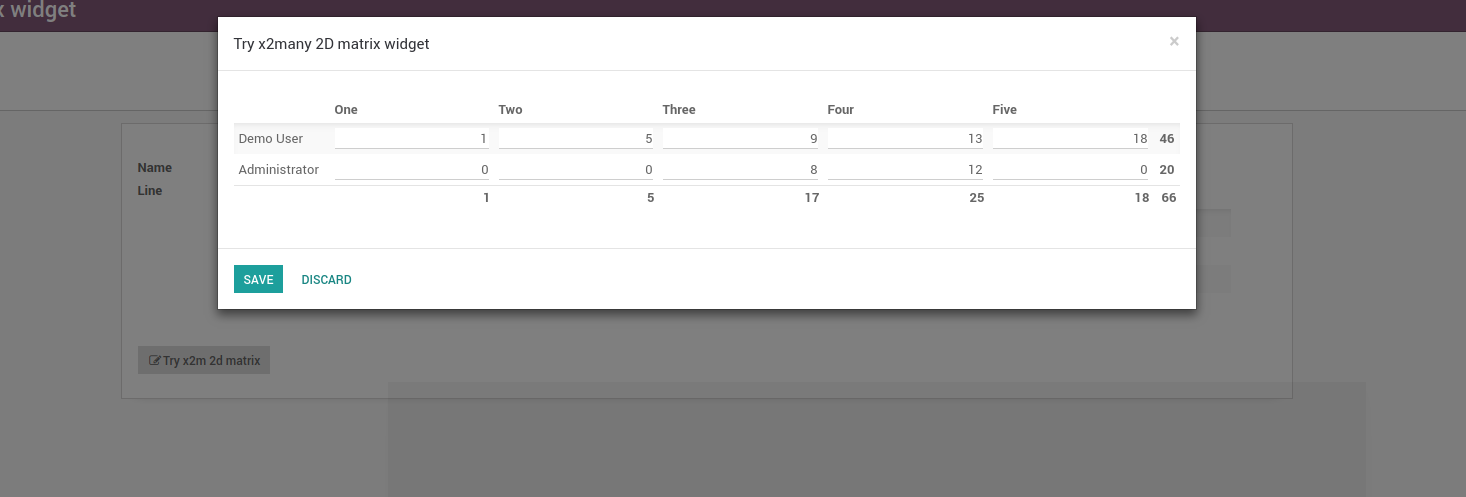
The beauty of this is that you have an arbitrary amount of columns with this widget, trying to get this in standard x2many lists involves some quite ugly hacks.
Table of contents
Usage
Use this widget by saying:
<field name="my_field" widget="x2many_2d_matrix" />
This assumes that my_field refers to a model with the fields x, y and value. If your fields are named differently, pass the correct names as attributes:
<field name="my_field" widget="x2many_2d_matrix" field_x_axis="my_field1" field_y_axis="my_field2" field_value="my_field3">
    <tree>
        <field name="my_field"/>
        <field name="my_field1"/>
        <field name="my_field2"/>
        <field name="my_field3"/>
    </tree>
</field>
You can pass the following parameters:
- field_x_axis
The field that indicates the x value of a point
- field_y_axis
The field that indicates the y value of a point
- field_label_x_axis
Use another field to display in the table header
- field_label_y_axis
Use another field to display in the table header
- field_value
Show this field as value
- show_row_totals
If field_value is a numeric field, it indicates if you want to calculate row totals. True by default
- show_column_totals
If field_value is a numeric field, it indicates if you want to calculate column totals. True by default
- field_att_<name>
Declare disabled or hidden options prefixed with this string as you need for binding a field value with an HTML node attribute called as the <name> passed in the option.
Example
You need a data structure already filled with values. Let’s assume we want to use this widget in a wizard that lets the user fill in planned hours for one task per project per user. In this case, we can use project.task as our data model and point to it from our wizard. The crucial part is that we fill the field in the default function:
from odoo import fields, models

class MyWizard(models.TransientModel):
    _name = 'my.wizard'

    def _default_task_ids(self):
        # your list of project should come from the context, some selection
        # in a previous wizard or wherever else
        projects = self.env['project.project'].browse([1, 2, 3])
        # same with users
        users = self.env['res.users'].browse([1, 2, 3])
        return [
            (0, 0, {
                'name': 'Sample task name',
                'project_id': p.id,
                'user_id': u.id,
                'planned_hours': 0,
                'message_needaction': False,
                'date_deadline': fields.Date.today(),
            })
            # if the project doesn't have a task for the user,
            # create a new one
            if not p.task_ids.filtered(lambda x: x.user_id == u) else
            # otherwise, return the task
            (4, p.task_ids.filtered(lambda x: x.user_id == u)[0].id)
            for p in projects
            for u in users
        ]

    task_ids = fields.Many2many('project.task', default=_default_task_ids)
Now in our wizard, we can use:
<field name="task_ids" widget="x2many_2d_matrix" field_x_axis="project_id" field_y_axis="user_id" field_value="planned_hours">
    <tree>
        <field name="task_ids"/>
        <field name="project_id"/>
        <field name="user_id"/>
        <field name="planned_hours"/>
    </tree>
</field>
Note that all values in the matrix must exist, so you need to create them previously if not present, but you can control visually the editability of the fields in the matrix through field_att_disabled option with a control field.
Known issues / Roadmap
Support extra attributes on each field cell via field_extra_attrs param. We could set a cell as not editable, required or readonly for instance. The readonly case will also give the ability to click on m2o to open related records.
Support limit total records in the matrix. Ref: https://github.com/OCA/web/issues/901
Support cell traversal through keyboard arrows.
Entering the widget from behind by pressing Shift+TAB in your keyboard will enter into the 1st cell until https://github.com/odoo/odoo/pull/26490 is merged.
Support extra invisible fields inside each cell.
Support kanban mode. Current behaviour forces list mode.
Changelog
12.0.1.0.1 (2018-12-07)
[FIX] Cells are unable to render property. (#1126)
12.0.1.0.0 (2018-11-20)
[12.0][MIG] web_widget_x2many_2d_matrix (#1101)
Bug Tracker
Bugs are tracked on GitHub Issues. In case of trouble, please check there if your issue has already been reported. If you spotted it first, help us smashing it by providing a detailed and welcomed feedback.
Do not contact contributors directly about support or help with technical issues.
Credits
Contributors
Holger Brunn <hbrunn@therp.nl>
Pedro M. Baeza <pedro.baeza@tecnativa.com>
Artem Kostyuk <a.kostyuk@mobilunity.com>
Simone Orsi <simone.orsi@camptocamp.com>
Timon Tschanz <timon.tschanz@camptocamp.com>
Jairo Llopis <jairo.llopis@tecnativa.com>
Dennis Sluijk <d.sluijk@onestein.nl>
-
Alexey Pelykh <alexey.pelykh@corphub.eu>
Adrià Gil Sorribes <adria.gil@forgeflow.com>
Maintainers
This module is maintained by the OCA.

OCA, or the Odoo Community Association, is a nonprofit organization whose mission is to support the collaborative development of Odoo features and promote its widespread use.
This module is part of the OCA/web project on GitHub.
You are welcome to contribute. To learn how please visit https://odoo-community.org/page/Contribute.
1 maintainer

Metadata
1 maintainer
Release files for odoo14-addon-web-widget-x2many-2d-matrix 14.0.1.1.1
For a detailed explanation of source distributions (sdists) and built distributions (wheels), please see the package formats documentation.
Built distribution (wheel)
| File | Interpreter | ABI | Platform | Actions Reset |
|---|---|---|---|---|
| odoo14_addon_web_widget_x2many_2d_matrix-14.0.1.1.1-py3-none-any.whl | Python 3 | none | any | Details for odoo14_addon_web_widget_x2many_2d_matrix-14.0.1.1.1-py3-none-any.whl |
Release files / odoo14_addon_web_widget_x2many_2d_matrix-14.0.1.1.1-py3-none-any.whl
| Download URL | odoo14_addon_web_widget_x2many_2d_matrix-14.0.1.1.1-py3-none-any.whl |
|---|---|
| Size | 67.0 kB |
| Tags | Python 3 |
|
SHA-256 checksum How to use checksums |
9902557af42022acafd02405dbebabd37a4224429420067d18a6761c4ea58d62
|
|
BLAKE2b-256 checksum How to use checksums |
cd2c8289711bc414b3fc40f2f24bc2929b777911bdb9432de7b487f80789df43
|
| Upload date | |
|
Uploaded using Trusted Publishing? What is trusted publishing? |
No |
| Uploaded via |
twine/4.0.1 CPython/3.8.5
|
Security for odoo14-addon-web-widget-x2many-2d-matrix 14.0.1.1.1
Provenance
Provenance describes where a file came from. On PyPI, provenance is shared via attestations, which provide a verifiable record of the build or publishing details. View details, limitations and caveats.
No provenance found
None of the files in this release were uploaded with provenance metadata.
A note on package security
PyPI is a repository for distributing packages, not a service for auditing them. While third-party security researchers and our staff do their best to detect and remove malicious packages, PyPI cannot guarantee the quality, security or suitability of any given package.
To learn more about protecting yourself from malicious actors, visit our package security documentation.














