





omni-usage is a terminal-native token consumption dashboard for OmniRoute — the open-source AI gateway. It reads OmniRoute's local call logs from disk and presents your token usage in a live auto-refreshing TUI, a one-shot terminal report, or a teeny single-line peek for your shell prompt.
No API calls, no network, no extra LLM cost. Just your logs, your terminal.
✨ Features
| Feature | Description |
|---|---|
| 🖥️ Live TUI Widget | Auto-refreshing dashboard that fits in 24 lines — no scrolling |
| 📋 One-Shot Reports | Terminal-formatted or JSON output for scripts and pipelines |
| 🔍 Shell-Prompt Peek | Single-line summary for $PS1, tmux status, or Conky |
| 🤖 Per-Model Breakdown | Token volume, request count, and error rate per model |
| 🎯 Route Combo Analysis | See which routing combos consume the most tokens |
| 🔥 Cache Savings Tracking | Prompt cache hit ratio shown in real time |
| 🕒 Session / Today / All Time | Three time windows at once: last 5 min, today, cumulative |
| ⚡ Current Active Model | Bottom bar shows the last-used model/combo |
| 🧩 Zero External Dependencies | Pure Python stdlib — works out of the box |
| 💻 Cross-Platform | macOS, Linux, Windows — any terminal with ANSI support |
📦 Install
pip install omni-usage

# or with uv (fastest):
uv tool install omni-usage

# or from source:
git clone https://github.com/SpinachDigital/omni-usage
cd omni-usage
pip install -e ".[dev]"
Requires Python 3.10+. That's it — the dashboard is built on Python's standard library (plus rich for future display enhancements). No database, no web server, no API keys.
🚀 Usage
🖥️ Live TUI Widget (default command)
# Launch the dashboard with default 30-second refresh
omni-usage widget

# Custom refresh interval (seconds)
omni-usage widget --interval 60

# Shorthand
omni-usage widget -i 15
Press Ctrl+C to exit.
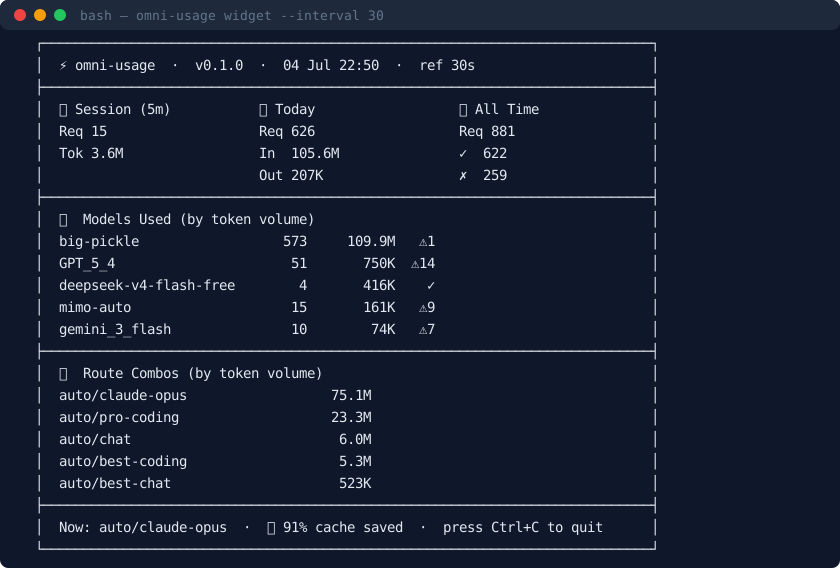
What you'll see
┌──────────────────────────────────────────────────────────────┐
│  ⚡ omni-usage  ·  v0.1.0  ·  05 Jul 14:32  ·  ref 30s      │
├──────────────────────────────────────────────────────────────┤
│  ⏳ Session (5m)    📅 Today           📊 All Time           │
│  Req 12             Req 112            Req 367               │
│  Tok 1.5M           In  8.7M           ✓  222                │
│                     Out 40K            ✗  145                │
├──────────────────────────────────────────────────────────────┤
│  🤖  Models Used (by token volume)                          │
│  big-pickle                 165        13.1M     ✓           │
│  GPT_5_4                    49         751K      ⚠12         │
│  deepseek-v4_…               2          96K      ✓           │
│  gemini_3_flash              8          75K      ⚠3          │
│  claude-opus-4              11          42K      ✓           │
├──────────────────────────────────────────────────────────────┤
│  🎯  Route Combos (by token volume)                         │
│  auto/best-coding                           5.3M             │
│  auto/claude-opus                           4.7M             │
│  auto/chat                                  3.2M             │
│  auto/code-gen                              1.1M             │
│  auto/deep-research                         890K             │
├──────────────────────────────────────────────────────────────┤
│  Now: auto/best-coding  ·  🔥 89% cache saved  ·  Ctrl+C    │
└──────────────────────────────────────────────────────────────┘
The widget fits in 24 lines on any standard terminal — no scrolling needed. Three stats columns side-by-side, top models and combos ranked by token volume, and a footer showing what model or combo is active right now plus your cache savings rate.
📋 One-Shot Report
# Terminal-formatted report
omni-usage report

# JSON output (pipe into jq, feed to scripts, log to file)
omni-usage report --json
Example output:
omni-usage report  ·  2026-07-05 14:32:00 UTC
────────────────────────────────────────────────────────
  Requests:      367  ✓   222  ✗   145
  Input:       8.7M
  Output:       40K
  Cache read:  7.8M
  Total:      14.2M

  Model                              Req     Tokens
  ──────────────────────────────────────────────────────
  big-pickle                         165     13.1M
  GPT_5_4                             49      751K
  deepseek-v4_1                        2       96K
  gemini_3_flash                       8       75K
  claude-opus-4                       11       42K
🔍 Quick Peek (for shell prompts)
omni-usage peek
# → ⚡ 14.2M total  ·  8.7M today  ·  367 requests
Integrate it anywhere you have a shell:
| Location | How |
|---|---|
| Bash/Zsh prompt | PS1='\u@\h $(omni-usage peek) \$ ' |
| tmux status bar | set -g status-right '#(omni-usage peek)' |
| Conky / desktop widget | ${exec omni-usage peek} |
| Hermes Agent slash command | hermes skill install path/to/omni-usage |
📊 What the Dashboard Shows
Column headers — three time windows side by side
| Column | Window | What it measures |
|---|---|---|
| ⏳ Session | Last 5 minutes | Recent spikes, active model, current throughput |
| 📅 Today | Current UTC day | Daily burn rate, budget tracking |
| 📊 All Time | Entire log history | Cumulative totals, success/error counts |
Section breakdown
| Section | Content |
|---|---|
| 🤖 Models | Top 5 models ranked by total tokens (input + output), with request count, token volume, and error indicators |
| 🎯 Combos | Top 5 route combos ranked by input-token volume — shows which routing strategies are costing you |
| 🔥 Footer | Last-used model or combo name, prompt cache savings percentage, refresh interval |
Cache savings
The 🔥 X% cache saved metric in the footer compares tokens.cacheRead against total input tokens. Higher is better — it means OmniRoute's prompt caching is doing its job, saving you money on repeated context.
🤔 Why omni-usage?
The problem
You run an AI gateway. You know you're spending money on tokens. But the only way to see usage is to log into a cloud dashboard, query an API, or grep through thousands of JSON files. Every extra API call for "just check usage" costs you more tokens.
The approach
omni-usage inverts the model. Instead of polling a remote API, it reads the call logs that OmniRoute already writes to disk for every proxied request. This means:
- Zero token overhead — no API calls, no hidden costs
- Offline-first — works without internet
- Sub‑second startup — no network latency, no auth handshake
- Local privacy — your usage data never leaves your machine
How it compares
| Feature | omni-usage | LangSmith / Weights & Biases | Cloud dashboards |
|---|---|---|---|
| Network required | ❌ No | ✅ Yes | ✅ Yes |
| Extra token cost | ❌ Zero | ✅ Yes (API calls) | ✅ Yes (API calls) |
| Startup time | ~50ms | Seconds+ | Seconds+ |
| Live TUI | ✅ Yes | ❌ Web only | ❌ Web only |
| Shell integration | ✅ peek subcommand |
❌ | ❌ |
| Offline capable | ✅ Yes | ❌ No | ❌ No |
| Zero dependencies | ✅ Python stdlib | ❌ Heavy SDK | ❌ N/A |
| Open source | ✅ MIT | ❌ Proprietary | ❌ Proprietary |
Who is it for?
- OmniRoute users who want instant usage visibility
- Solo devs & small teams who don't want to add another SaaS dashboard
- Terminal lovers who live in their shell and want data at a glance
- Budget-conscious teams tracking token spend without paying for monitoring tools
🔧 How It Works
- OmniRoute logs every proxied request as a JSON file to
~/.omniroute/call_logs/<YYYY-MM-DD>/<uuid>.json - Each log contains: model name, provider, combo name, status code, timestamps, and a
tokensobject (in,out,cacheRead,reasoning) omni-usagescans these files, aggregates the counts, and renders them
The aggregation is a single linear pass — O(n) in the number of log files. For 10,000 records it completes in under 50ms.
🧩 Examples & Integrations
Track token budget in CI
# Fail a build if today's tokens exceed a threshold
TODAY=$(omni-usage report --json | python -c "import json,sys; d=json.load(sys.stdin)['today']; print(d['in']+d['out'])")
if [ "$TODAY" -gt 10000000 ]; then
  echo "⚠️  Token budget exceeded: $TODAY"
  exit 1
fi
Log daily usage to a file
# Cron: every day at 9 AM
0 9 * * * omni-usage report >> ~/token-usage.log
Export to CSV
omni-usage report --json | python -c "
import json, sys
d = json.load(sys.stdin)
for model, stats in d['models']:
    print(f'{model},{stats[\"req\"]},{stats[\"in\"]},{stats[\"out\"]},{stats[\"cache\"]}')
"
Watch usage in a tmux pane
tmux new-session -d 'omni-usage widget -i 10' \; \
     split-window -h 'tail -f ~/.omniroute/call_logs/*/*.json'
🧪 Development
git clone https://github.com/SpinachDigital/omni-usage
cd omni-usage
pip install -e ".[dev]"
Code style
- Python 3.10+ type hints everywhere (
|union syntax,list[str]etc.) rufffor linting and formatting- Keep the widget dependency-light — stdlib is preferred
PR checklist
- Tested against real OmniRoute call logs
-
omni-usage widgetlaunches without error -
omni-usage report --jsonproduces valid JSON -
omni-usage peekprints a single line - Type hints are complete
See CONTRIBUTING.md for full guidelines.
📁 Project Structure
omni-usage/
├── src/
│   └── omni_usage/
│       ├── __init__.py       # Package entry, re-exports
│       ├── __about__.py      # Version metadata
│       ├── __main__.py       # `python -m omni_usage` support
│       ├── cli.py            # CLI argument parsing, report/peek commands
│       ├── collector.py      # Call log parser + aggregation engine
│       └── widget.py         # Live TUI renderer + refresh loop
├── pyproject.toml            # Hatchling build config + metadata
├── CONTRIBUTING.md
├── LICENSE
└── README.md                 # ← you are here
📄 License
MIT — see LICENSE.
Built with ❤️ for the OmniRoute community.
⭐ Star the repo if you find it useful — it helps others discover it.
1 maintainer

Metadata
1 maintainer
Release files for omni-usage 0.1.0
For a detailed explanation of source distributions (sdists) and built distributions (wheels), please see the package formats documentation.
Source distribution (sdist)
| File | Size | Uploaded | |
|---|---|---|---|
| omni_usage-0.1.0.tar.gz | 13.9 kB | Details |
Built distribution (wheel)
| File | Interpreter | ABI | Platform | Reset |
|---|---|---|---|---|
| omni_usage-0.1.0-py3-none-any.whl | Python 3 | none | any | Details |
Total release size: 26.8 kB
Release files / omni_usage-0.1.0.tar.gz
| Download URL | omni_usage-0.1.0.tar.gz |
|---|---|
| Size | 13.9 kB |
| Tags | Source |
|
SHA-256 checksum How to use checksums |
11dc41307e5b7a95ac0483c247fe7095ba73f850c4ee63069229f9914ae874ea
|
|
BLAKE2b-256 checksum How to use checksums |
4b1fdb952f976e9f0efb3ceaad5e9bb833098aa7af981229cd319dcd92af6079
|
| Upload date | |
|
Uploaded using Trusted Publishing? What is trusted publishing? |
No |
| Uploaded via |
twine/6.1.0 CPython/3.13.12
|
Release files / omni_usage-0.1.0-py3-none-any.whl
| Download URL | omni_usage-0.1.0-py3-none-any.whl |
|---|---|
| Size | 12.9 kB |
| Tags | Python 3 |
|
SHA-256 checksum How to use checksums |
fd3149df38d061cee65e7ba20f2d996ab5f3af96de03b8f42b1b821b8f848ed2
|
|
BLAKE2b-256 checksum How to use checksums |
84afb524e2b2635536dc2b90bee539a66491efb1e2494808dbb9bb7ae05925fd
|
| Upload date | |
|
Uploaded using Trusted Publishing? What is trusted publishing? |
No |
| Uploaded via |
twine/6.1.0 CPython/3.13.12
|













