
oneprint
oneprint is a uniform print library. It use XML to define print data. Now it can convert XML to ESC/POS data or Pillow Image object.
Install Dependencies
pip install requests qrcode pillow pystrich python-escpos
Install oneprint
pip install oneprint
XML define syntax
<!-- define a paper -->
<xml width="384|576|...">
    <!-- show text -->
    <text align="left|right|center" font="A|B">Hello</text>
    <!-- show a horizontal line -->
    <hr char="-|*|+..."/>
    <!--  show image  -->
    <img align="left|right|center" src="https://xxx"/>
    <!--  show QRCode  -->
    <qrcode native="false|true" align="left|right|center">Hello</qrcode>
    <!--  show barcode  -->
    <barcode align="left|right|center" type="code128|ean13">123456789012</barcode>

    <!--  show table  -->
    <table border="1|2|3...">
        <tr border="1|2|3...">
            <td align="center" colspan="1|2|3..." width="1|2|3...">Time</td>
            <td align="center" width="1|2|3...">Content</td>
            <td align="center" width="1|2|3...">Remark</td>
        </tr>
    </table>
</xml>
XML define demo
<xml>
    <!-- text -->
    <text align="center">oneprint is a uniform print library, support ESC/POS printer.</text>
    <!-- table -->
    <hr/>
    <text/>
    <table>
        <tr>
            <td align="left">日期:2021-04-28</td>
            <td align="right">编号:0001</td>
        </tr>
    </table>
    <text/>
    <table border="1">
        <tr border="1">
            <th colspan="3" align="center" width="8">Title</th>
        </tr>
        <tr border="1">
            <th align="center" width="8">Time</th>
            <th align="center" width="20">Content</th>
            <th align="center" width="20">Remark</th>
        </tr>
        <tr border="1">
            <td>18:00</td>
            <td>This is content field! Just test!</td>
            <td align="center">Empty</td>
        </tr>
        <tr border="1">
            <td>19:00</td>
            <td colspan="2">Content 2</td>
        </tr>
    </table>
    <text>A Image</text>
    <!-- image -->
    <img align="center" src="https://img3.doubanio.com/dae/accounts/resources/527f922/sns/assets/lg_main@2x.png"/>
    <text>A Qrcode</text>
    <!-- qrcode -->
    <qrcode align="center">Hello</qrcode>
    <text>A Barcode</text>
    <!-- ean13 barcode -->
    <barcode align="center" type="ean13">123456789012</barcode>
    <!-- cur the page -->
    <cut/>
</xml>
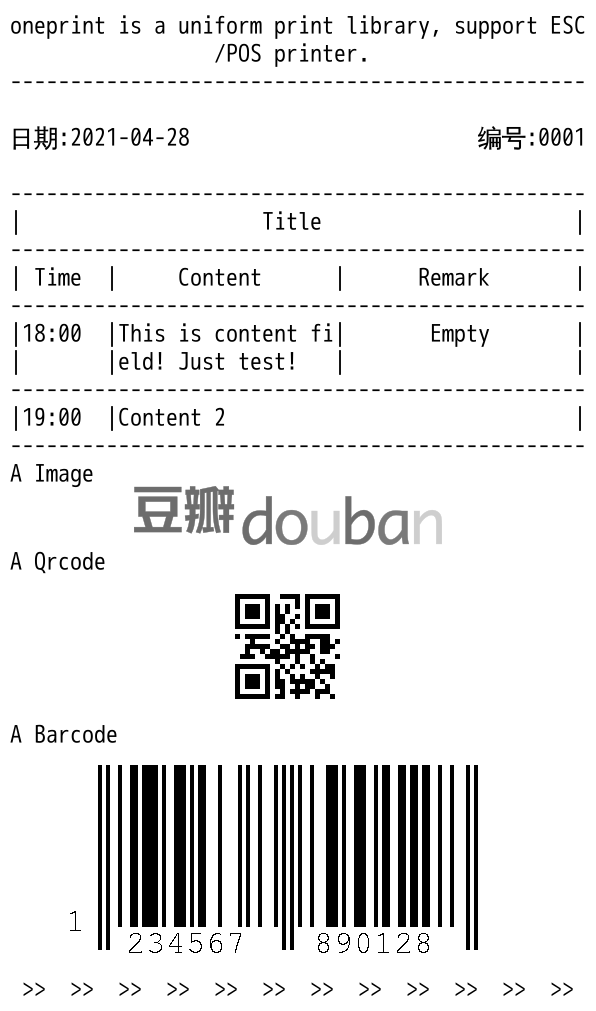
The result:
Usage
# print to a image and show
data = '''
<text>Hello World</text>
<qrcode>Hello World</qrcode>
'''
from oneprint import ImageDrawPrint
pt = ImageDrawPrint()
pt.auto_print(data)
pt.show() # use Pillow Image.show()
# save to file
pt.get_image().save('/tmp/tt.jpeg')

# or print with python-escpos
from oneprint import EscPosPrint
ep = EscPosPrint()
ep.auto_print(data)

from escpos.printer import Serial
p = Serial(devfile='/dev/tty.usbserial',
           baudrate=9600,
           bytesize=8,
           parity='N',
           stopbits=1,
           timeout=1.00,
           dsrdtr=True)
p._raw(ep.get_data())
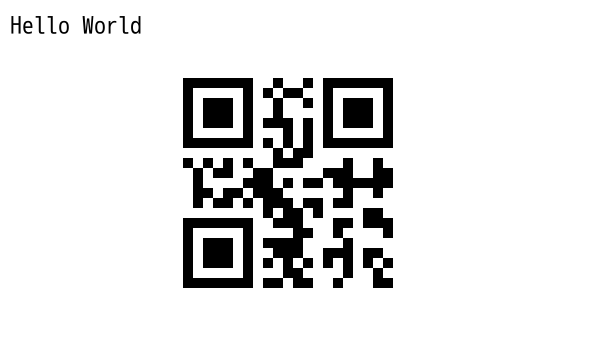
The result:
Click to view more information!
CHANGES
1.0.0
- first version
1.0.6
- support
<hr/>in table
1.2.0
- support align attribute in
<text>node with ImageDrawPrint
1.3.0
- EscPosPrint auto convert zh-hant to zh-hans when encode with gbk or gb2312.
- EscPosPrint ignore encode error.
1 maintainer

Metadata
1 maintainer
Release files for oneprint 1.3.0
For a detailed explanation of source distributions (sdists) and built distributions (wheels), please see the package formats documentation.
Source distribution (sdist)
| File | Size | Uploaded | |
|---|---|---|---|
| oneprint-1.3.0.tar.gz | 8.2 kB | Details |
Release files / oneprint-1.3.0.tar.gz
| Download URL | oneprint-1.3.0.tar.gz |
|---|---|
| Size | 8.2 kB |
| Tags | Source |
|
SHA-256 checksum How to use checksums |
e6e765249c54161ae9e4ed7415565d00ed1bcfb708d26c9410fd8e6fe0b6d9b1
|
|
BLAKE2b-256 checksum How to use checksums |
9a17bb3ca44e17ad723e4dec74a0b0b338e187dc533f2814956acd223d46d5ce
|
| Upload date | |
|
Uploaded using Trusted Publishing? What is trusted publishing? |
No |
| Uploaded via |
twine/1.15.0 pkginfo/1.8.2 requests/2.27.1 setuptools/44.1.1 requests-toolbelt/0.9.1 tqdm/4.64.0 CPython/2.7.16
|














