

Open Codex UI
Open Codex UI is a browser workspace for continuing Codex work wherever you are. It gives your existing Codex sessions a practical home across desktop and mobile devices, without asking you to leave the Codex ecosystem behind.
Use it beside ChatGPT Desktop when that is where a task begins, then keep the same work moving from a browser, phone, tablet, or another computer. It is an independent project and is not affiliated with OpenAI or ChatGPT.
What It Gives You
- A familiar Codex workspace: browse projects and recent threads, resume prior work, create new sessions, and keep the conversation history available from one responsive interface.
- Continuity with your Codex setup: work with the sessions, projects, and local Codex installation you already use rather than adopting another agent runtime or conversation format.
- SSH remote workspaces: connect a remote machine, select its project
directories, and work with Codex where the code and tools actually live.
Existing
~/.ssh/confighosts can be discovered from the UI. - Voice input: dictate prompts in the composer with local streaming speech recognition. The bundled workflow supports a bilingual Chinese-English sherpa-onnx model and keeps model configuration in Settings.
- A mobile-friendly experience: session navigation, project switching, and chat remain usable on a phone or tablet, so a running task is not tied to a desk.
- Private or shareable access: use it on your local network, expose it through a Cloudflare Tunnel, and protect a shared instance with application authentication.
Preview
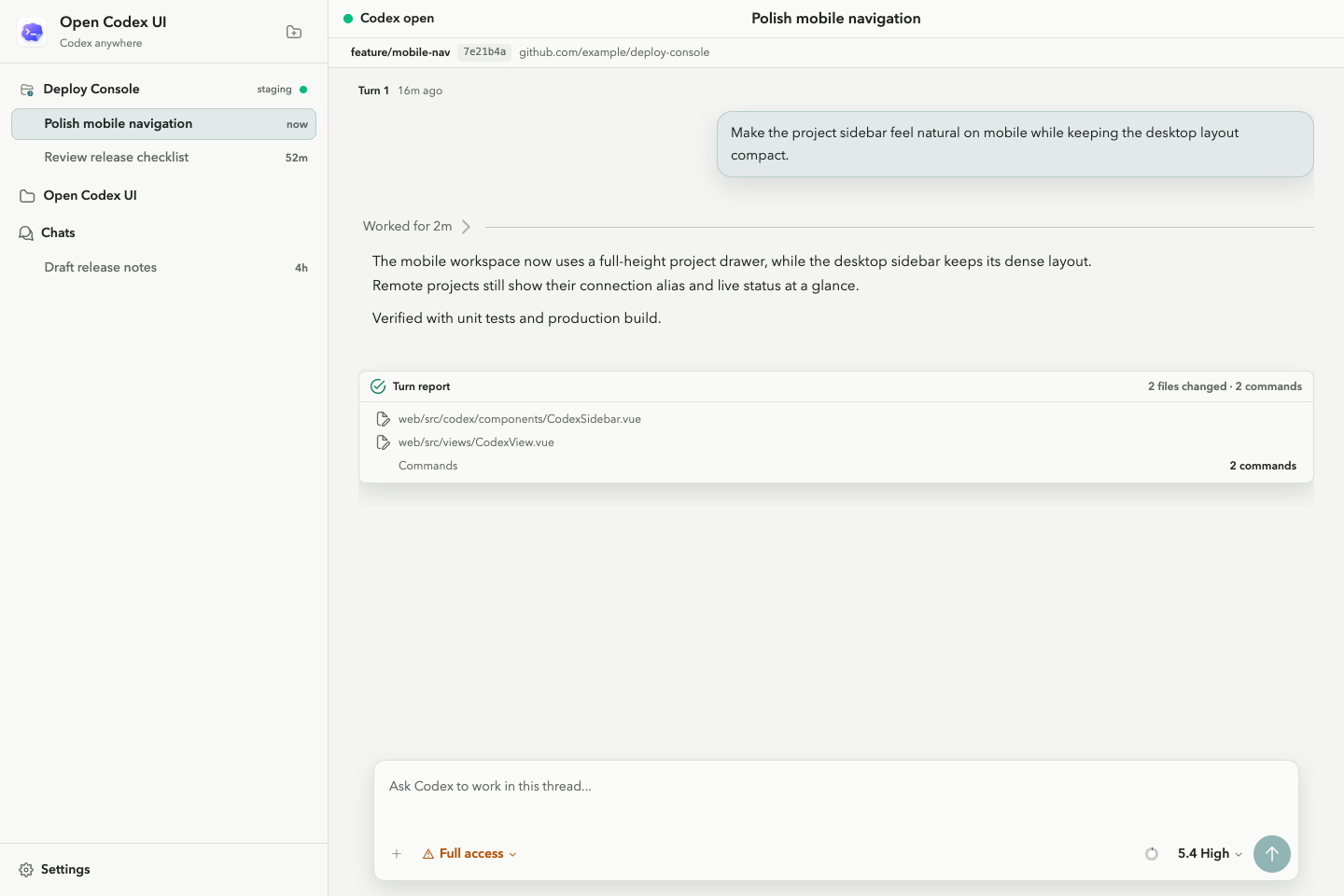
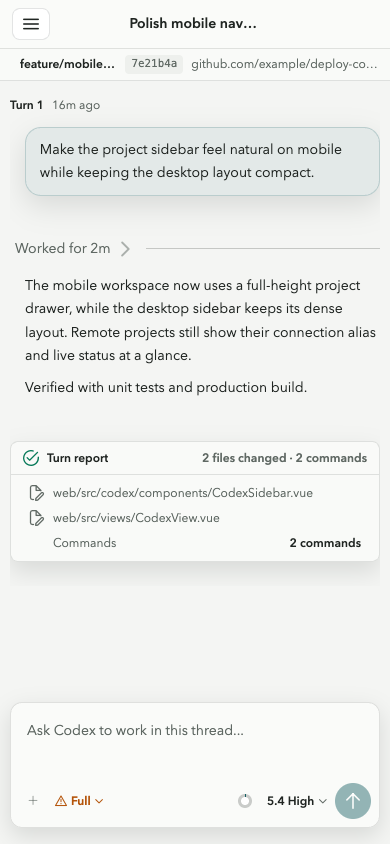
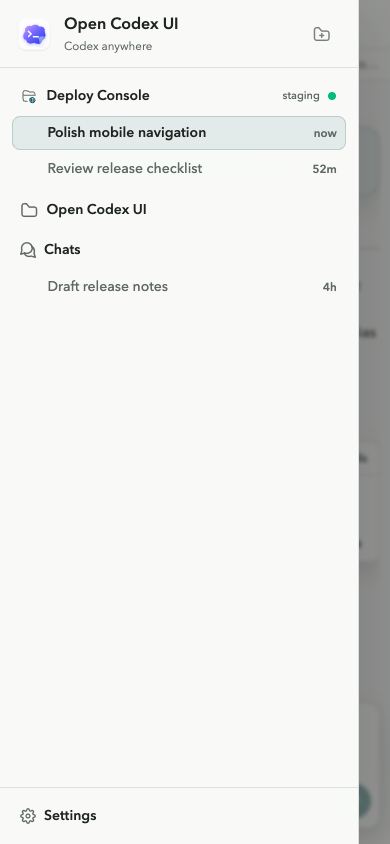
Start Here
Launch the packaged app with Node.js:
npx open-codex-ui
Or use uv directly:
uvx open-codex-ui
Open http://127.0.0.1:13140, then add a project or resume a recent Codex
thread. The server listens on 0.0.0.0 by default, making it reachable from
other devices on your local network. For a local-only instance:
uvx open-codex-ui serve --host 127.0.0.1 --port 13140
Work From Anywhere
Remote Machines Over SSH
Add an SSH connection from the sidebar, verify that Codex is available on the
remote host, and create remote projects from its filesystem. Connections can
use a hostname, user, port, identity file, or an alias already defined in
~/.ssh/config.
Mobile and Voice
The layout is built for narrow screens as well as desktop. On supported browsers, hold the microphone control in the composer to dictate a prompt. Install the local speech model once:
open-codex-ui speech install
Model location, execution provider, and decoder threads are configurable from
Settings -> Voice. Remote mobile browsers need HTTPS for microphone access;
localhost is treated as secure by modern browsers.
Share Securely
For a temporary public URL, start a Cloudflare Quick Tunnel:
open-codex-ui tunnel start
For an always-on personal workspace, install the login service:
open-codex-ui daemon install
Turn on password protection from Settings -> Authentication before exposing
the app beyond a trusted network. The UI stores the password as a hash and
persists its settings under ~/.yier/web/settings.json.
Configuration Notes
Most personal configuration is available from Settings and is stored in
~/.yier/web/settings.json. Environment variables remain useful for
deployment, automation, and settings that should take precedence over the UI.
| Variable | Use |
|---|---|
YIER_AUTH_PASSWORD |
Login password for a managed deployment |
YIER_AUTH_PASSWORD_HASH |
Hashed login password instead of plaintext |
YIER_AUTH_SECRET |
Session-cookie signing secret |
YIER_AUTH_SESSION_TTL_HOURS |
Login duration, defaulting to 168 hours |
YIER_CODEX_EMBED_TOKEN |
Token for unauthenticated iframe embedding |
YIER_SHERPA_ONNX_MODEL_DIR |
Local speech model directory |
YIER_SHERPA_ONNX_PROVIDER |
sherpa-onnx execution provider |
YIER_SHERPA_ONNX_NUM_THREADS |
Speech decoder thread count |
daemon install preserves the relevant YIER_* variables, HOME, PATH,
and CODEX_HOME in its user-only environment file. See IFRAME.md
for iframe authentication, setup, and the postMessage API.
Development
Source development requires Python 3.12+, Node.js 20+, uv, and pnpm:
uv sync
pnpm --dir web install
Start the frontend and backend in separate terminals:
pnpm --dir web dev
uv run python main.py --debug --reload --host 127.0.0.1 --port 13140
Useful checks:
uv run --all-packages pytest
pnpm --dir web test:unit
pnpm --dir web type-check
pnpm --dir web build
Codex integration is provided by the published
open-codex-bridge package.
License
Copyright 2026 Sube (zhangluguang). Licensed under the PolyForm Noncommercial License 1.0.0. Commercial use is not permitted without separate written authorization from the copyright holder.
1 maintainer

Metadata
1 maintainer
Release files for open-codex-ui 0.1.20
For a detailed explanation of source distributions (sdists) and built distributions (wheels), please see the package formats documentation.
Source distribution (sdist)
| File | Size | Uploaded | Provenance | Actions |
|---|---|---|---|---|
| open_codex_ui-0.1.20.tar.gz | 914.6 kB | With provenance | Details for open_codex_ui-0.1.20.tar.gz |
Built distribution (wheel)
| File | Interpreter | ABI | Platform | Actions Reset |
|---|---|---|---|---|
| open_codex_ui-0.1.20-py3-none-any.whl | Python 3 | none | any | Details for open_codex_ui-0.1.20-py3-none-any.whl |
Total release size: 1.8 MB
Release files / open_codex_ui-0.1.20.tar.gz
| Download URL | open_codex_ui-0.1.20.tar.gz |
|---|---|
| Size | 914.6 kB |
| Tags | Source |
|
SHA-256 checksum How to use checksums |
d8b14f6c26b6281610e5205b0432909eb9260347ab46b680bc74b4691e6278a4
|
|
BLAKE2b-256 checksum How to use checksums |
cc1782a7a467dc5c053cc277075fc1ecfa11ff0d60849bf36a1eefca6ed8ce23
|
| Upload date | |
|
Uploaded using Trusted Publishing? What is trusted publishing? |
Yes |
| Uploaded via |
twine/7.0.0 CPython/3.13.14
|
Provenance
Provenance describes where a file came from. On PyPI, provenance is shared via attestations, which provide a verifiable record of the build or publishing details. View details, limitations and caveats.


PyPI Publish Attestation
PyPI verified that this artifact, at this checksum, originated from the publisher listed below.
Signed by GitHub Actions, verified by PyPI on Aug 25, 2026.
Transparency logRelease files / open_codex_ui-0.1.20-py3-none-any.whl
| Download URL | open_codex_ui-0.1.20-py3-none-any.whl |
|---|---|
| Size | 900.7 kB |
| Tags | Python 3 |
|
SHA-256 checksum How to use checksums |
d77a0e83c06ddb518c4d137737475cb085c16770e1222889c7dda49f52f3b24c
|
|
BLAKE2b-256 checksum How to use checksums |
23b370b1ea38c624f4385391447b09abf2e8821fd782248c8354a89a28008f43
|
| Upload date | |
|
Uploaded using Trusted Publishing? What is trusted publishing? |
Yes |
| Uploaded via |
twine/7.0.0 CPython/3.13.14
|
Provenance
Provenance describes where a file came from. On PyPI, provenance is shared via attestations, which provide a verifiable record of the build or publishing details. View details, limitations and caveats.
PyPI Publish Attestation
PyPI verified that this artifact, at this checksum, originated from the publisher listed below.
Signed by GitHub Actions, verified by PyPI on Aug 25, 2026.
Transparency logSecurity for open-codex-ui 0.1.20
Provenance
Provenance describes where a file came from. On PyPI, provenance is shared via attestations, which provide a verifiable record of the build or publishing details. View details, limitations and caveats.
Full provenance
All 2 files in this release have been uploaded with provenance metadata.
Attestation for open_codex_ui-0.1.20.tar.gz
PyPI Publish Attestation
PyPI verified that this artifact, at this checksum, originated from the publisher listed below.
Signed by GitHub Actions, verified by PyPI on Aug 25, 2026.
Transparency logA note on package security
PyPI is a repository for distributing packages, not a service for auditing them. While third-party security researchers and our staff do their best to detect and remove malicious packages, PyPI cannot guarantee the quality, security or suitability of any given package.
To learn more about protecting yourself from malicious actors, visit our package security documentation.














