





openapi-cli-tool
OpenAPI (Swagger 3.x) CLI Tool.
- Supports multiple file extensions (json|yaml|yml).
- Can list up defined API paths.
- Display an API specification which is resolved (
$ref). - Bundle multi-file into one (output to json|yaml|html).
- OAS interactive scaffolding.
Requirements
Python 2.7, 3.4 <=.
Installation
With pip:
$ pip install openapi-cli-tool
Manually:
Clone the repository and execute the Python installation command on your machine.
$ pip -r requirements.txt install
$ python setup.py install
Then openapi-cli-tool command is installed.
Usage
$ openapi-cli-tool --help
Usage: openapi-cli-tool [OPTIONS] COMMAND [ARGS]...

Options:
  --help  Show this message and exit.

Commands:
  bundle    Bundle multiple files into one.
  list      List up API paths in a file or directory.
  resolve   Display `$ref` resolved API specification.
  scaffold  Interactively create a simple OpenAPI Specification.
Bundle
Bundle multi-file specifications into one, regardless of file extension (json|yaml|yml).
$ openapi-cli-tool bundle --help
Usage: openapi-cli-tool bundle [OPTIONS] FILE_PATHS

  Bundle multiple files into one.

Options:
  -f, --file TEXT  Load common objects such as info and servers from a
                   specific file. Default is a file which is the top of list
                   command result.
  -t, --type TEXT  Export data type. {json|yaml|html}  [default: json]
  --help           Show this message and exit.
example:
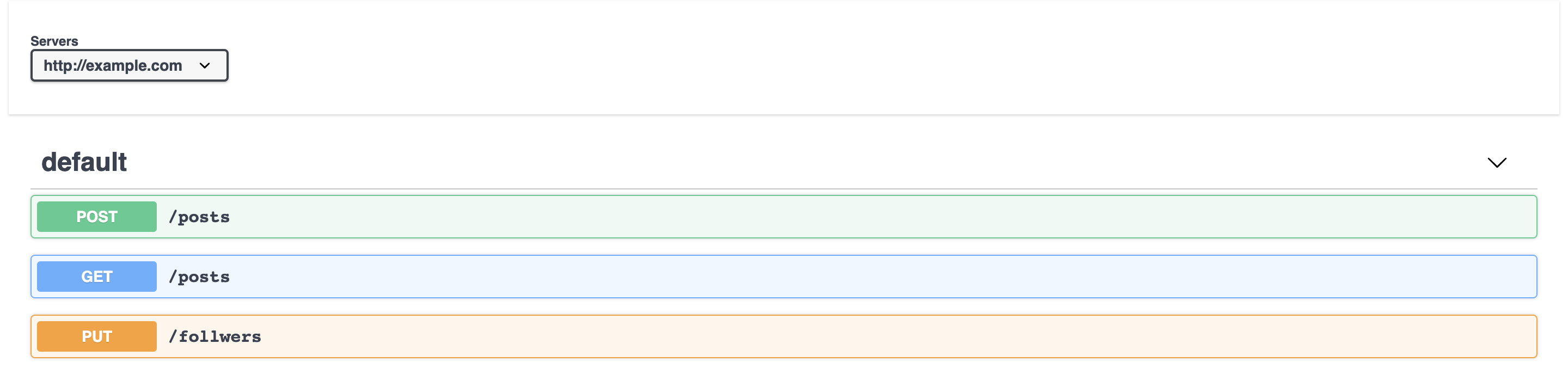
$ openapi-cli-tool bundle -t html file1.json file2.yaml` > ./specification.html
In the html file, an unpkg version of swagger-ui is embedded. Rendered screenshot below:
List
List up API paths from a file/directory regardless of the file extension (json|yaml|yml).
$ openapi-cli-tool list `find ./spec`

Method    Path       File
--------  ---------  ------------------------------------------
PUT       /avatar    ./tests/resources/spec/sample.yml
GET       /follwers  ./tests/resources/spec/folder1/sample2.yaml
POST      /follwers  ./tests/resources/spec/folder1/sample2.yaml
PUT       /follwers  ./tests/resources/spec/folder1/sample2.yaml
POST      /pets      ./tests/resources/spec/sample.yml
GET       /posts     ./tests/resources/spec/folder1/sample.json
POST      /posts     ./tests/resources/spec/folder1/sample.json
GET       /users     ./tests/resources/spec/folder1/sample.json
POST      /users     ./tests/resources/spec/folder1/sample.json
Resolve
Display an API specification which is resolved from a multi-file API specification via $ref pointers.
Usage: openapi-cli-tool resolve [OPTIONS] METHOD PATH FILE_PATHS

  Display `$ref` resolved API specification.

Options:
  -t, --type TEXT  Export data type. {json|yaml}  [default: json]
  --help           Show this message and exit.
example:
$ openapi-cli-tool resolve post /cats `find ./tests/resources/spec`
Scaffold
Interactively input information of your API.
A simple OpenAPI Specification is generated from your prompt.
$ openapi-cli-tool scaffold

Please enter title [""]: sample
Please enter version [v1.0]:
Please enter license [Apache 2.0]:
Please enter server url [http://example.com]:
Please enter path [/]: /example
Please enter method for /example [get|post|put|delete|head|option|trace]: get
Please enter description for get /example [""]: sample get endpoint
Please enter response code for get /example [200]:
1 maintainer

Metadata
1 maintainer
Release files for openapi-cli-tool 0.2.0
For a detailed explanation of source distributions (sdists) and built distributions (wheels), please see the package formats documentation.
Source distribution (sdist)
| File | Size | Uploaded | |
|---|---|---|---|
| openapi-cli-tool-0.2.0.tar.gz | 7.3 kB | Details |
Built distributions (wheels)
| File | Interpreter | ABI | Platform | Reset |
|---|---|---|---|---|
| openapi_cli_tool-0.2.0-py3-none-any.whl | Python 3 | none | any | Details |
| openapi_cli_tool-0.2.0-py2-none-any.whl | Python 2 | none | any | Details |
Total release size: 28.4 kB
Release files / openapi-cli-tool-0.2.0.tar.gz
| Download URL | openapi-cli-tool-0.2.0.tar.gz |
|---|---|
| Size | 7.3 kB |
| Tags | Source |
|
SHA-256 checksum How to use checksums |
b1c104a11e65a75ed24a15ea5382df36758aaf041cc7eb7cb6612bf1f9e82170
|
|
BLAKE2b-256 checksum How to use checksums |
187f899e698ed2f0c375febcafe7d3f8a31a16858230776c87cafc50939de707
|
| Upload date | |
|
Uploaded using Trusted Publishing? What is trusted publishing? |
No |
| Uploaded via |
twine/1.15.0 pkginfo/1.5.0.1 requests/2.22.0 setuptools/41.2.0 requests-toolbelt/0.9.1 tqdm/4.36.1 CPython/3.5.6
|
Release files / openapi_cli_tool-0.2.0-py3-none-any.whl
| Download URL | openapi_cli_tool-0.2.0-py3-none-any.whl |
|---|---|
| Size | 10.5 kB |
| Tags | Python 3 |
|
SHA-256 checksum How to use checksums |
6ac7e7b5236729cbf4fb85a6b9f31eff42744f47b14e2543c77004130575802b
|
|
BLAKE2b-256 checksum How to use checksums |
9cbbd97ba1d4eb7ce8ac880bcc936492f2f20b48e9fd38f33d455c2cc3b6c29e
|
| Upload date | |
|
Uploaded using Trusted Publishing? What is trusted publishing? |
No |
| Uploaded via |
twine/1.15.0 pkginfo/1.5.0.1 requests/2.22.0 setuptools/41.2.0 requests-toolbelt/0.9.1 tqdm/4.36.1 CPython/3.5.6
|
Release files / openapi_cli_tool-0.2.0-py2-none-any.whl
| Download URL | openapi_cli_tool-0.2.0-py2-none-any.whl |
|---|---|
| Size | 10.5 kB |
| Tags | Python 2 |
|
SHA-256 checksum How to use checksums |
509d0af3dd82939a466fc444d774bac98a99d1ef4a3f51f938b278b0bb469d29
|
|
BLAKE2b-256 checksum How to use checksums |
8dc572b27db90e492454e99c06537804e58814415eb70ce522d2dee598049fae
|
| Upload date | |
|
Uploaded using Trusted Publishing? What is trusted publishing? |
No |
| Uploaded via |
twine/1.15.0 pkginfo/1.5.0.1 requests/2.22.0 setuptools/41.2.0 requests-toolbelt/0.9.1 tqdm/4.36.1 CPython/2.7.15
|














