
opencv-log


OpenCV based visual logger for debugging, logging and testing image processing code
Installation
Use the package manager pip to install foobar.
pip install opencv-log
Usage
Log \ Debug
import cvlog as log

# Set default mode and level
# If we dont set, then default mode is NONE
# and the default level is ERROR

log.set_mode(log.Mode.LOG)
log.set_level(log.Level.TRACE)

# image read using opencv

img = cv2.imread("sample.png")

# log or show the image or do nothing based on
# the current mode and current level

log.image(log.Level.INFO, img)

log.image(log.Level.ERROR, img)

log.image(log.Level.TRACE, img)
Test Report
import cvtest as test

# Process Image from image path
def process_image(imagepath):
    if imagepath == "error.png":
        raise Exception("Some exception in processing image")
    img = cv2.imread(imagepath)
    return img

test_image_paths=["example1.png","example1.png","error.png"]

# This shows image using cv2.imshow,
# On presssing 'y' key, it report it as PASS
# On pressing any other key, it report it as FAIL and save output image for verification
# On any exception, it report it as ERROR with exception stack
test.report(test_image_paths, process_image)
Log Modes
import cvlog as log
log.set_mode(log.Mode.DEBUG)
Set mode using ENV variable
os.environ['CVLOG_MODE'] = "DEBUG"
Mode.NONE (Default)
This is the default mode if we don't set mode.
Used in production. It neither creates HTML file nor shows an image.
Mode.LOG
Logs the image to interactive HTML to analyze the issue offline.
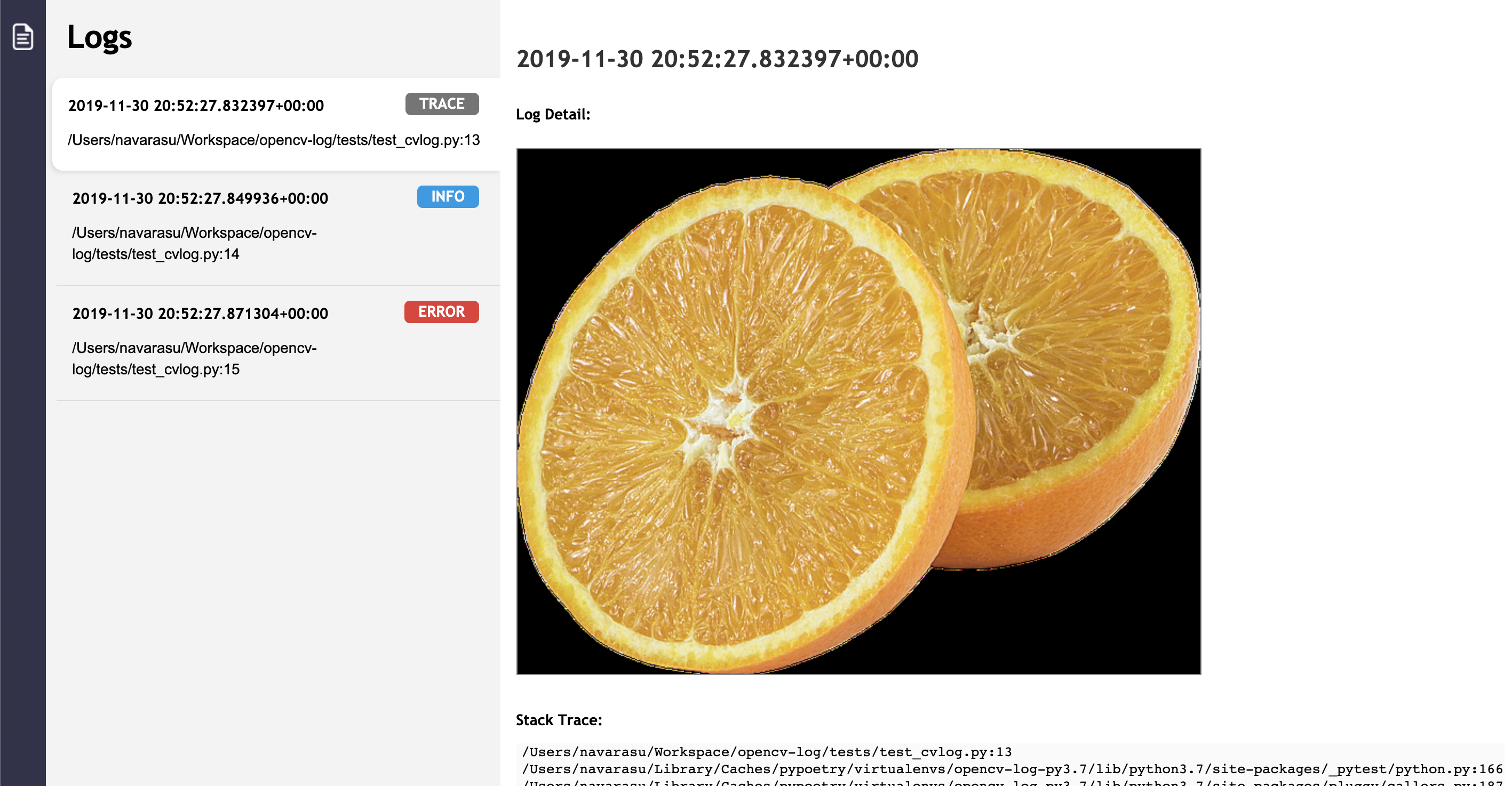
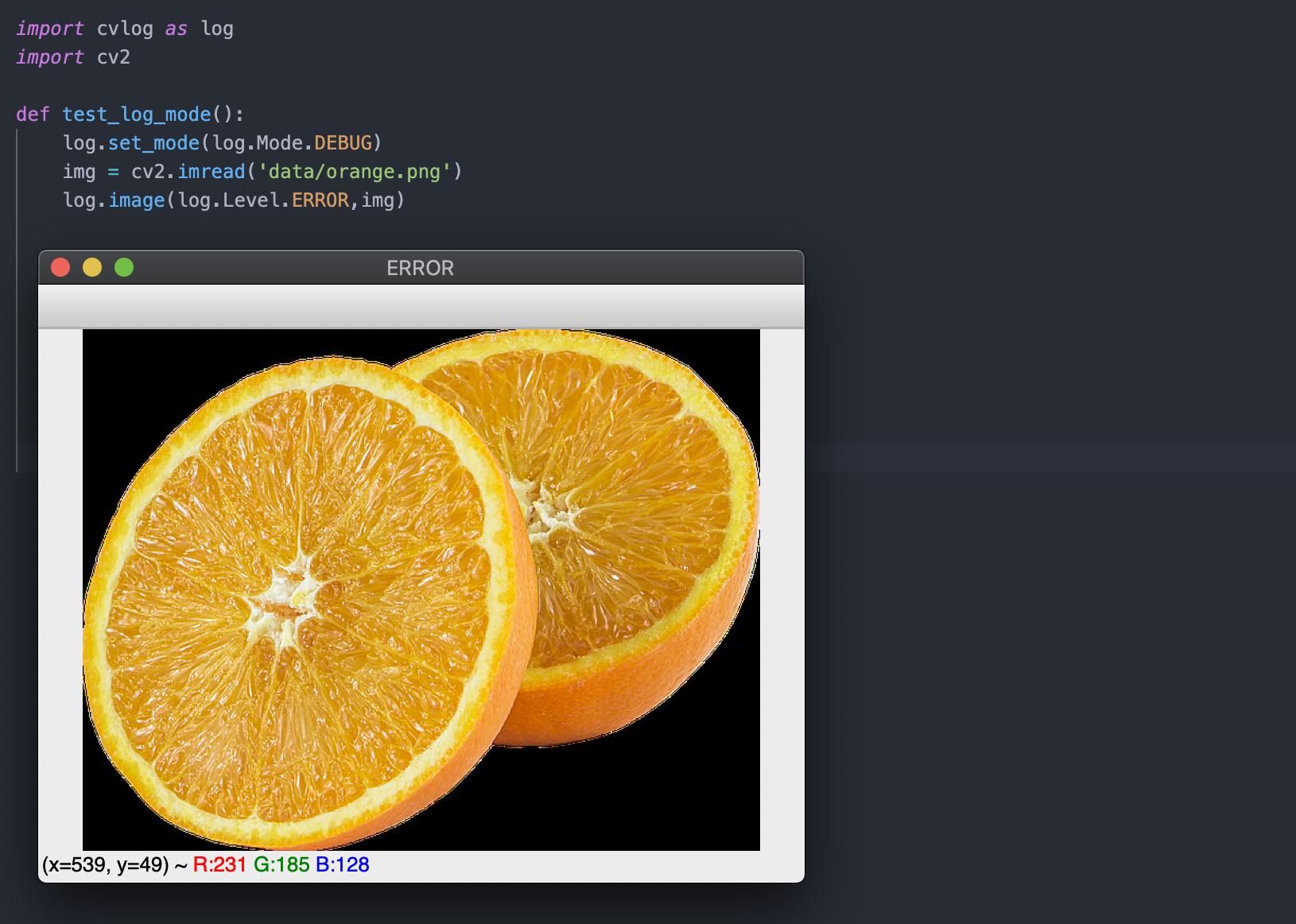
Mode.DEBUG
Shows the image using cv2.imshow instead of logging to debug steps in the development.
It on move on to next log step on pressing any key and exit the code on pressing ESC
Log Levels
import cvlog as log
log.set_level(log.Level.TRACE)
or
os.environ['CVLOG_MODE'] = "TRACE"
- Level.ERROR (Default) - Log or Show only ERROR level
- Level.INFO - Log or Show INFO and ERROR level
- Level.TRACE - Log or Show TRACE, INFO and ERROR level steps
Level valid for DEBUG and LOG mode
Contributing
Pull requests are welcome. For major changes, please open an issue first to discuss what you would like to change.
Please make sure to update tests as appropriate.
License
1 maintainer

Metadata
1 maintainer
Release files for opencv-log 1.1.0
For a detailed explanation of source distributions (sdists) and built distributions (wheels), please see the package formats documentation.
Source distribution (sdist)
| File | Size | Uploaded | |
|---|---|---|---|
| opencv-log-1.1.0.tar.gz | 7.4 kB | Details |
Built distribution (wheel)
| File | Interpreter | ABI | Platform | Reset |
|---|---|---|---|---|
| opencv_log-1.1.0-py3-none-any.whl | Python 3 | none | any | Details |
Total release size: 15.3 kB
Release files / opencv-log-1.1.0.tar.gz
| Download URL | opencv-log-1.1.0.tar.gz |
|---|---|
| Size | 7.4 kB |
| Tags | Source |
|
SHA-256 checksum How to use checksums |
5667855d40b5fe2b4bb80649d3b84edcff37cf0457ad3592bf75db39c32f4149
|
|
BLAKE2b-256 checksum How to use checksums |
78eddc892582deb928f21ca0967406db12d8adccff30cef295d511241a6b2587
|
| Upload date | |
|
Uploaded using Trusted Publishing? What is trusted publishing? |
No |
| Uploaded via |
poetry/0.12.17 CPython/3.6.8 Linux/4.15.0-1052-aws
|
Release files / opencv_log-1.1.0-py3-none-any.whl
| Download URL | opencv_log-1.1.0-py3-none-any.whl |
|---|---|
| Size | 7.9 kB |
| Tags | Python 3 |
|
SHA-256 checksum How to use checksums |
db367a2eae6eab1e94031574d93e0358e6468b70b287a33b6f9ca514e57e2074
|
|
BLAKE2b-256 checksum How to use checksums |
fefbf1fb1aff47672aac12eb2fb733e4322de9f3439a48e07a82bd78f55af9d5
|
| Upload date | |
|
Uploaded using Trusted Publishing? What is trusted publishing? |
No |
| Uploaded via |
poetry/0.12.17 CPython/3.6.8 Linux/4.15.0-1052-aws
|














