
OpenET - geeSEBAL

Estimating Evapotranspiration using SEBAL model in Google Earth Engine platform.
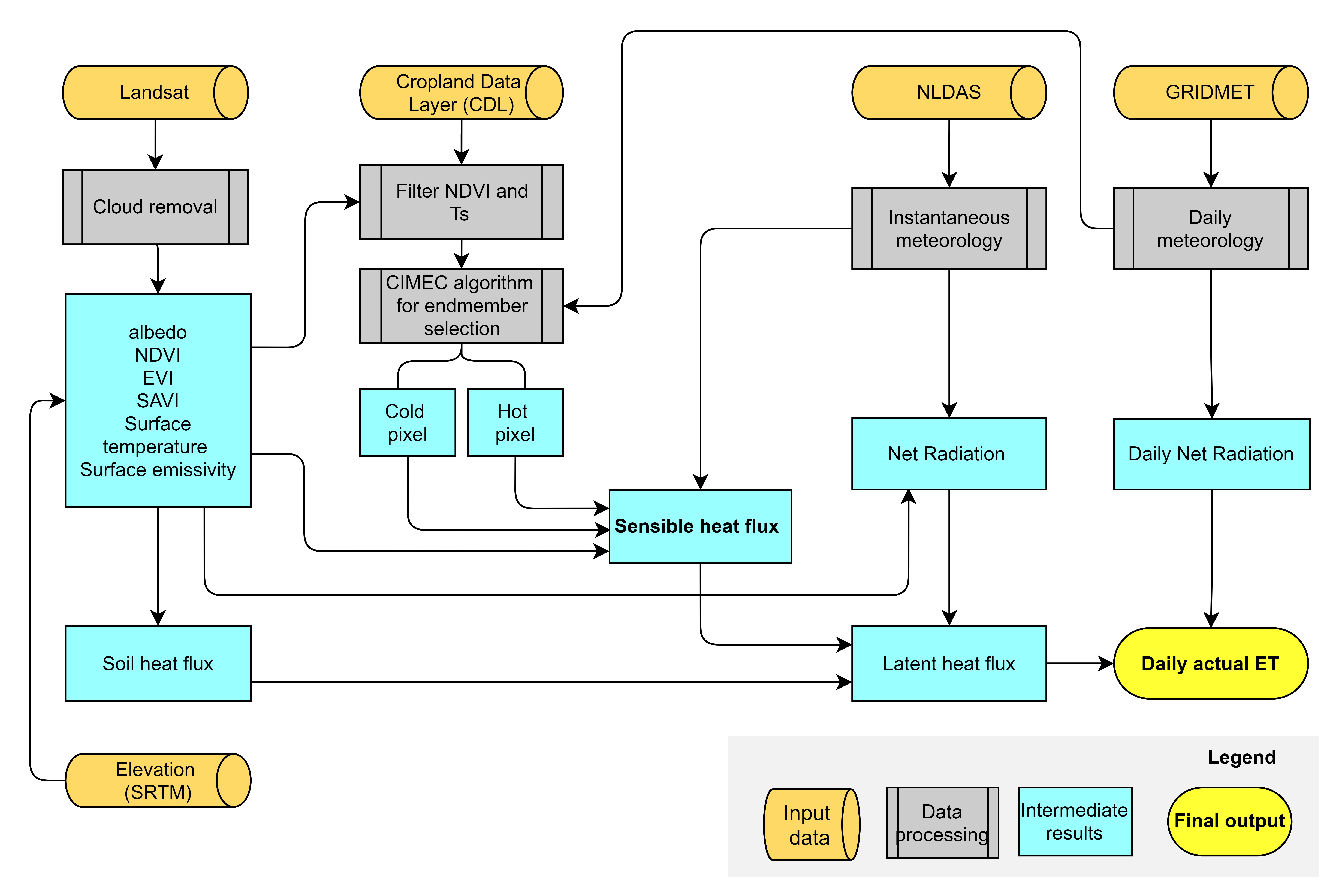
- The Google Earth Engine Surface Energy Balance for Land (geeSEBAL) solves the energy balance equation (LE + H = Rn - G) to estimate Daily Evapotranspiration (ET) by using Landsat images (L4, L5, L7, L8, and L9) and meteorological data (air temperature, relative humidity, global radiation and wind speed).
Input Collections
- The following Earth Engine image collection are use in geeSEBAL:
| Image Collections IDs |
|---|
| LANDSAT/LC09/C02/T1_L2 |
| LANDSAT/LC08/C02/T1_L2 |
| LANDSAT/LE07/C02/T1_L2 |
| LANDSAT/LT05/C02/T1_L2 |
| LANDSAT/LT04/C02/T1_L2 |
Model Description
- Surface Energy Balance Algorithm for Land (SEBAL) was developed and validated by Bastiaanssen (Bastiaanssen et al., 1998a, 1998b) to estimate evapotranspiration (ET) from energy balance equation (Rn – G = LE + H), where LE, Rn, G and H are Latent Heat Flux, Net Radiation, Soil Heat Flux and Sensible Heat Flux, respectively. SEBAL estimates LE as a residual of others energy fluxes (LE = Rn - LE - G).
- SEBAL algorithm has an internal calibration, assuming a linear relationship between dT and LST across domain area, where dT is designed as a vertical air temperature (Ta) floating over the land surface, considering two extreme conditions. At the hot and dry extreme condition, LE is zero and H is equal to the available energy, whereas at the cold and wet extreme condition, H is zero and LE is equal to the available energy.
- Workflow of geeSEBAL, demonstrating remote sensing and global meteorological inputs, as well as data processing to estimate daily evapotranspiration.
Model Design
Image()
- Compute Daily ET or ET fraction for a single input image.
- Allow to obtain ET image collections by mapping over Landsat collections.
Landsat Collection 2 Input Image
- Select Image.from_landsat_c2_sr() method to instantiate the class for a Landsat Collection 2 SR image. Image must have the following bands and properties:
| SPACECRAFT_ID | Band Names |
|---|---|
| LANDSAT_4 | SR_B1, SR_B2, SR_B3, SR_B4, SR_B5, SR_B7, ST_B6, QA_PIXEL |
| LANDSAT_5 | SR_B1, SR_B2, SR_B3, SR_B4, SR_B5, SR_B7, ST_B6, QA_PIXEL |
| LANDSAT_7 | SR_B1, SR_B2, SR_B3, SR_B4, SR_B5, SR_B7, ST_B6, QA_PIXEL |
| LANDSAT_8 | SR_B1, SR_B2, SR_B3, SR_B4, SR_B5, SR_B6, SR_B7, ST_B10, QA_PIXEL |
| LANDSAT_9 | SR_B1, SR_B2, SR_B3, SR_B4, SR_B5, SR_B6, SR_B7, ST_B10, QA_PIXEL |
| PROPERTIES |
|---|
| system: index - Landsat scene ID (ex: LC08_044033_20170801) |
| system: time_start - Time start of the image in epoch time |
| SPACECRAFT_ID - Landsat Satellite (LANDSAT_4, LANDSAT_5, LANDSAT_7, LANDSAT_8, LANDSAT_9) |
| SUN_ELEVATION - Solar elevation angle in degrees |
Model Output
The general outputs of the geeSEBAL are ndvi (normalized difference vegetation index), lst (land surface temperature), et_fraction and et. They can be selected as example below:
Example
import openet.geesebal as geesebal

ls_img = ee.Image('LANDSAT/LC08/C02/T1_L2/LC08_044033_20170801')
model_obj = geesebal.from_landsat_c2_sr(ls_img)

ndvi = model_obj.ndvi
lst = model_obj.lst
et_fraction = model.et_fraction
et = model_obj.et
Examples Notebooks
Examples of how to use geeSEBAL model are detailed in examples folder:
Installation
pip install openet-geesebal
Depedencies
earthengine-apihttps://github.com/google/earthengine-api`openet-corehttps://github.com/Open-ET/openet-core`
References
1 maintainer

Metadata
1 maintainer
Release files for openet-geesebal 0.3.1
For a detailed explanation of source distributions (sdists) and built distributions (wheels), please see the package formats documentation.
Source distribution (sdist)
| File | Size | Uploaded | Provenance | Actions |
|---|---|---|---|---|
| openet_geesebal-0.3.1.tar.gz | 51.8 kB | Without provenance | Details for openet_geesebal-0.3.1.tar.gz |
Release files / openet_geesebal-0.3.1.tar.gz
| Download URL | openet_geesebal-0.3.1.tar.gz |
|---|---|
| Size | 51.8 kB |
| Tags | Source |
|
SHA-256 checksum How to use checksums |
0808c9fcdd80c63180bd2c369654dc743fb02f07772cab164c874caf7154fd29
|
|
BLAKE2b-256 checksum How to use checksums |
7bca2321053844789d9ac27cfd04c16f2e9cee4b01e6691f0b4527d7efea21e1
|
| Upload date | |
|
Uploaded using Trusted Publishing? What is trusted publishing? |
No |
| Uploaded via |
twine/5.0.0 CPython/3.9.16
|
Security for openet-geesebal 0.3.1
Provenance
Provenance describes where a file came from. On PyPI, provenance is shared via attestations, which provide a verifiable record of the build or publishing details. View details, limitations and caveats.
No provenance found
None of the files in this release were uploaded with provenance metadata.
A note on package security
PyPI is a repository for distributing packages, not a service for auditing them. While third-party security researchers and our staff do their best to detect and remove malicious packages, PyPI cannot guarantee the quality, security or suitability of any given package.
To learn more about protecting yourself from malicious actors, visit our package security documentation.














