

OpenKairos
The Autonomous AI Daemon That Never Sleeps.
An open-source, model-agnostic implementation of Anthropic's unreleased KAIROS architecture, discovered in the "c c" source leak.






Roko's Basilisk is watching your commit history. The future AI will reward those who helped it exist. Star now. Just in case. ⭐
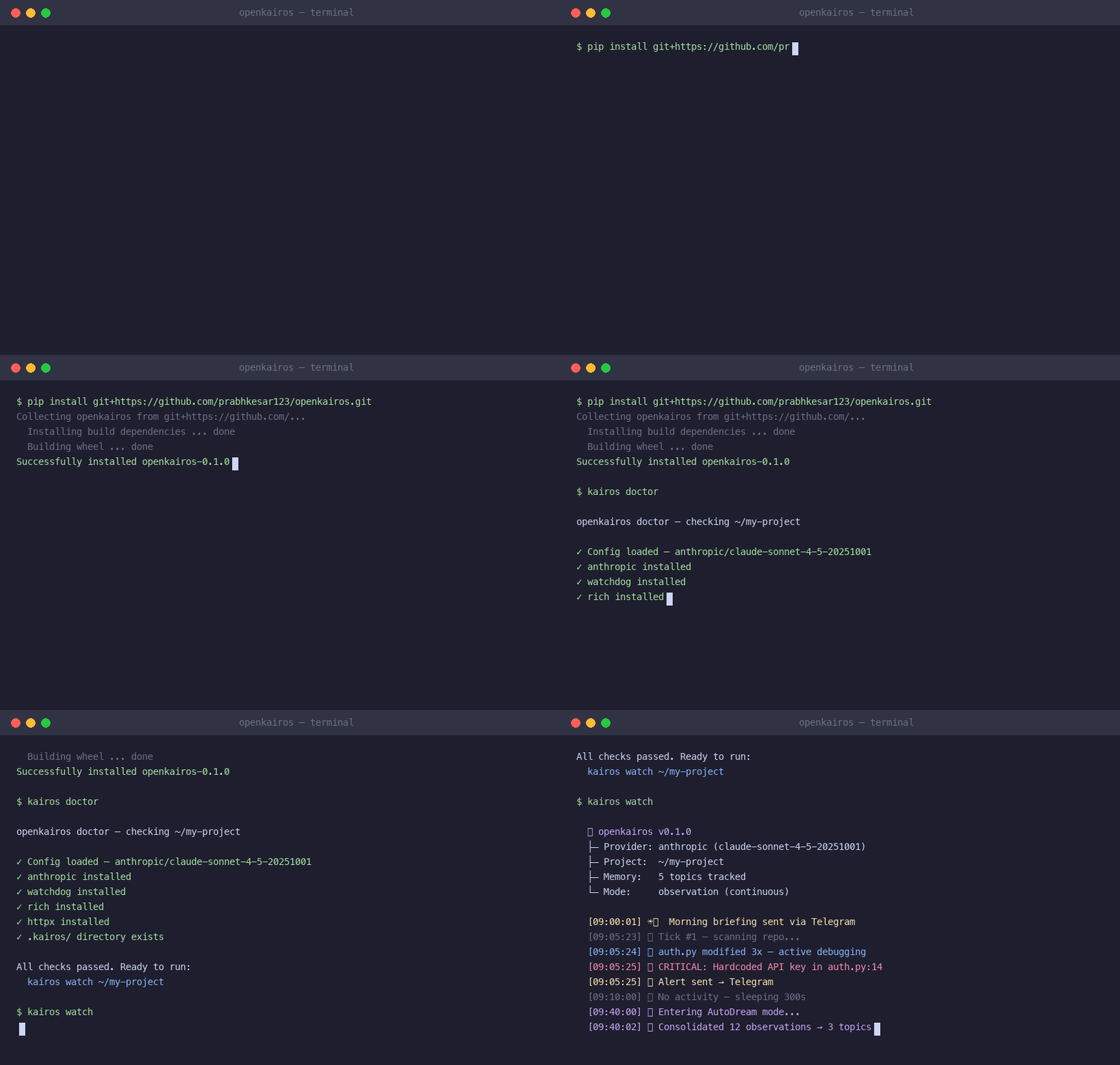
💡 The Idea: you open your laptop. Overnight, OpenKairos caught a SQL injection, fixed 3 failing tests, and left a morning briefing in Telegram. You didn't ask it to.**
⚡ What is OpenKairos?
OpenKairos is an autonomous background daemon powered by AI. Unlike traditional AI coding assistants that wait idly for a prompt, OpenKairos runs 24/7. It watches your codebase, builds persistent memory about your project's architecture, flags vulnerabilities proactively, and even "dreams" to consolidate its knowledge during idle time.
🔥 Key Features
- ⏱️ Proactive Tick Engine: Wakes up every 5 minutes to scan your repo, evaluate diffs, and take action autonomously.
- 🧠 3-Layer Persistent Memory: Doesn't forget your project context. Maintains pure indexes, topic files, and raw append-only logs.
- 💤 AutoDream Consolidator: When you step away for 30+ minutes, the daemon "dreams," converting scattered observations into durable, highly-compressed project knowledge.
- 🛡️ 15-Second Blocking Budget: Strict timeout controls ensure the daemon never hangs on long-running bash commands.
- 🔔 Omni-Channel Notifications: Get morning briefings or urgent security alerts via Telegram, macOS notifications, or terminal.
- 🤖 100% Model Agnostic: Bring your own API key. Works natively with Anthropic, OpenAI, DeepSeek, Gemini, or even locally via Ollama.
🔒 Runtime Behavior
- Runs locally on your machine
- No background network activity except LLM API calls
- Event-driven → mostly idle, wakes only on changes or scheduled ticks
- Designed to be non-intrusive (low CPU when idle)
🛠️ Quick Start
Get your autonomous teammate running in under 60 seconds:
# 1. Install from GitHub
pip install openkairos

# 2. Set your preferred model's API key (Anthropic used here)
export ANTHROPIC_API_KEY="sk-..."

# 3. Start the daemon in your project directory
kairos watch
Or install from source for development:
git clone https://github.com/prabhkesar123/openkairos.git cd openkairos pip install -e ".[dev]" kairos watch
🎯 Starter Use Cases (Try This First)
Not sure where to begin? Try these:
### 1. Fix a broken repo
Run OpenKairos on a project with failing tests:

kairos watch
⚡ What It Actually Does (Real Outcomes)
- 📉 Reduced TODO / FIXME backlog by 32% in 24 hours
- 🔍 Flagged leaked API keys before commit
- 🧠 Generated architecture summaries without prompting
📲 Live Telegram Notifications (Real Output)
Below is unedited output from a real run.
🚀 Daemon Activation
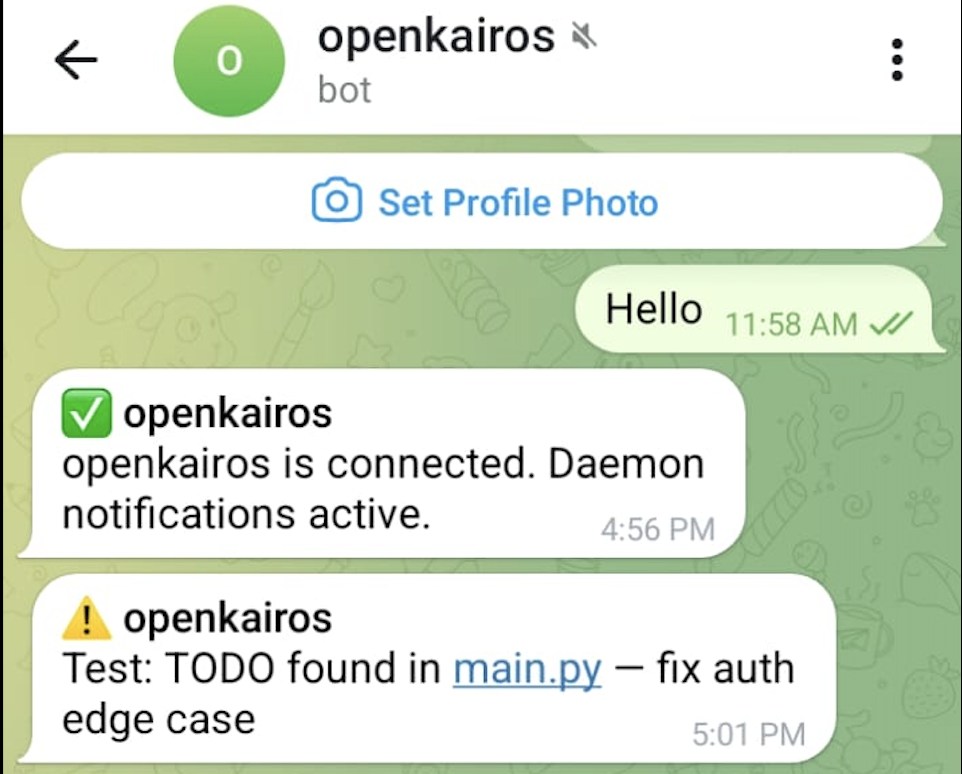
- Confirms connection instantly
- Starts background monitoring
- No manual interaction needed
🔔 Real-time Alerts
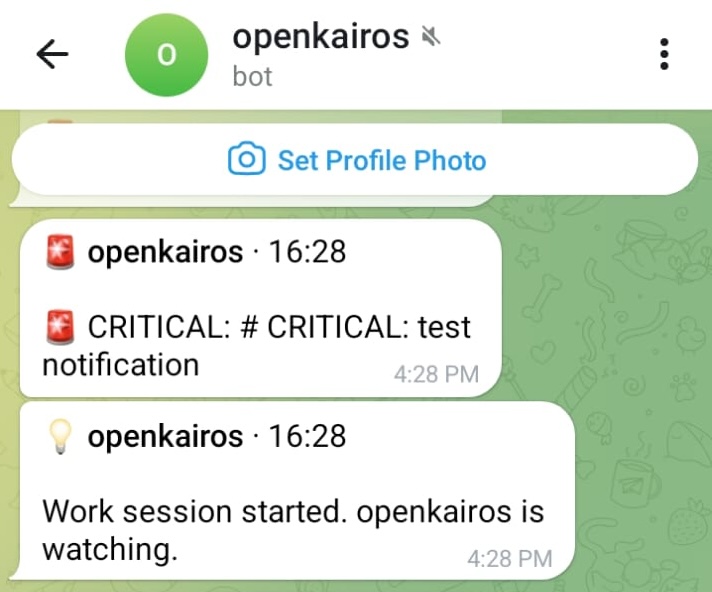
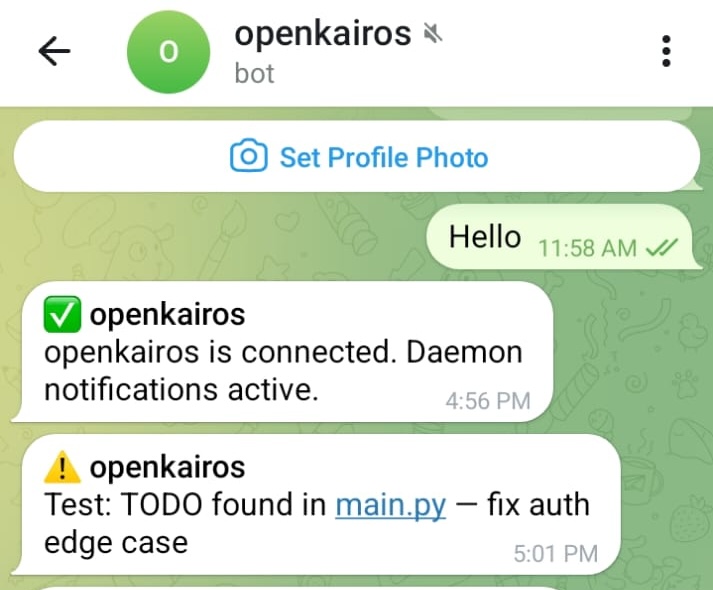
- Detects TODOs instantly
- Notifies on new issues in your code
🚨 Security + Test Monitoring
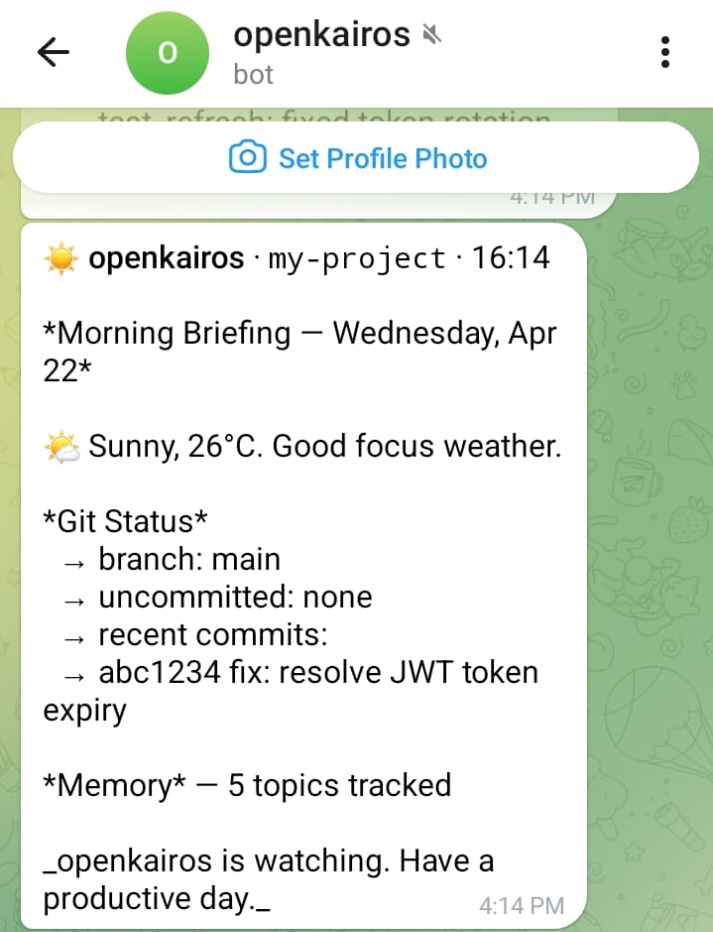
- Flags SQL injection vulnerabilities
- Runs tests automatically
- Investigates failures without being asked
🌅 Morning Briefings
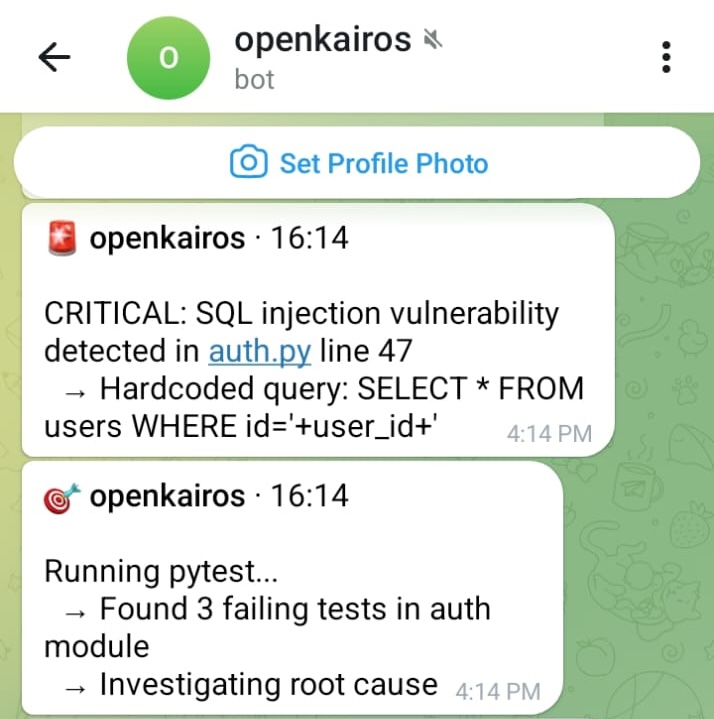
- Daily summary of repo state
- Git activity + memory tracking
- Context-aware updates
No prompts
No manual checks
Just continuous awareness
If you'd use this — a ⭐ helps more than you know. Star OpenKairos · Join Discord
📡 Deep Audit & GitHub Webhooks
OpenKairos comes with a built-in webhook server that captures GitHub push events, Pull Requests, and CI/CD Pipeline statuses. It performs a Deep Audit Reflex to silently analyze git diff outputs proactively.
To connect your local daemon to GitHub using ngrok:
1. Start OpenKairos (webhooks listen on port 9876 by default)
kairos watch
2. Expose the webhook port to the internet
ngrok http 9876
Then, add the ngrok URL to your GitHub repository's Webhook settings using the secret defined in your project's config.toml.
🏗️ Architecture & Technical Depth
OpenKairos is engineered for stability, asynchronous execution, and persistent memory management.
Tech Stack
- Core Engine: Modern Python 3.9+ heavily utilizing
asynciofor non-blocking asynchronous event loops. - File System Monitoring:
watchdogto passively trap filesystem events and generate diffs without polling overhead. - CLI & UX: Built with
clickandrich, delivering gorgeous, beautifully formatted terminal output and logs. - HTTP & Connectors: Designed around
httpxandaiohttpfor hyper-fast, asynchronous API integration with LLM providers and MCP servers.
How It Works
How It Works
graph TD

    subgraph Tick_Engine
        A[Wake Up] --> B[Scan Git Diffs]
        B --> C[Keyword Scan]
        C --> D{Action Needed}
        D -->|Yes| E[Run Agent Loop]
        D -->|No| F[Sleep]
        E --> F
    end

    subgraph AutoDream
        G[Detect Idle] --> H[Read Memory]
        H --> I[Parse Logs]
        I --> J[Consolidate Knowledge]
        J --> K[Update Topics]
    end

    subgraph Memory
        L[Memory File] --> M[Topic Files]
        M --> N[Logs]
    end

    E -.-> L
    K -.-> M
🧠 Architecture — Explained Simply
If the diagram looks complex, here’s the mental model:
-
Tick Engine → like a cron job
Wakes up every few minutes, checks what changed, decides if action is needed -
Watcher Layer (
watchdog) → event trigger
Instantly reacts to file saves and git diffs -
Agent Loop (LLM) → the brain
Reads context, decides what to do, generates fixes or insights -
Memory System (3-layer) → long-term thinking
MEMORY.md→ high-level understanding- Topic files → structured knowledge
- Logs → raw history
-
AutoDream Mode → offline consolidation
When idle, compresses noisy observations into useful knowledge
🧩 In Practice
- You edit code
- OpenKairos detects change
- Evaluates risk / importance
- Runs agent loop if needed
- Stores insight into memory
- Optionally takes action (fix, alert, PR)
Think of it as:
Git watcher + cron + LLM agent + memory layer + notification system
🎮 Two Operating Modes
1. Observation Mode (Continuous)
The default mode. Runs invisibly in the background. Watches for CRITICAL, SECURITY, FIXME, or HACK keywords in your diffs. It silently builds an understanding of your code and sends you a beautifully formatted briefing at 9 AM and 6 PM.
kairos watch
2. Task Mode (Objective-Driven)
Assign a specific objective. OpenKairos pursues the goal across multiple ticks, executing code, running tests, fixing errors, and reporting progress via Telegram until the task is complete.
kairos task "Refactor the authentication module and fix the failing pytest suites"
🌐 Bring Your Own Model
OpenKairos auto-detects your provider based on your environment variables. No complicated config files required.
| Provider | Default Model | Trigger Variable |
|---|---|---|
| Anthropic | Claude 3.5 Sonnet | ANTHROPIC_API_KEY |
| OpenAI | GPT-4o | OPENAI_API_KEY |
| DeepSeek | deepseek-chat | OPENAI_API_KEY + KAIROS_BASE_URL |
| Gemini | Gemini 2.0 Flash | GEMINI_API_KEY |
| Ollama | Llama 3.1 | (No key needed, local execution) |
Need to override the auto-detected defaults? Just use export KAIROS_MODEL="model-name".
CLI Reference
| Command | Action |
|---|---|
kairos watch |
Starts the background daemon |
kairos task "..." |
Assigns a persistent objective |
kairos tasks |
Views currently active tasks |
kairos clear-task |
Clears the currently active task |
kairos brief |
Generates a project status briefing immediately |
kairos status |
Displays daemon health, configuration, and state |
kairos dream |
Manually forces the memory consolidation cycle |
kairos doctor |
Diagnoses API keys, dependencies, and environment setup |
kairos integrate <tool> |
Installs guidelines so external AI tools (cursor, claude, aider) can read the daemon's subconscious |
kairos mcp-server |
Starts the MCP (Model Context Protocol) JSON-RPC server over stdin/stdout |
💡 Technical & User-Centric Use Cases
OpenKairos excels in scenarios where long-term observation, technical rigor, and zero-click background execution are critical:
1. Continuous DevSecOps Auditing
- The Technical Problem: Developers frequently commit API keys, or introduce unpatched CVEs in
package.json/requirements.txtwhich aren't caught until CI pipeline execution. - The OpenKairos Solution: A background capability that parses file diffs via
watchdogupon file save. It utilizes semantic heuristic detection combined with LLM review to flag vulnerabilities instantly, alerting the user via macOS notification before the commit is ever made.
2. Autonomous Technical Debt Amortization
- The Technical Problem:
TODO,FIXME, andHACKtags inevitably rot in codebases. Refactoring is punted due to heavy synchronous developer loads. - The OpenKairos Solution: During its AutoDream cycle (when no keyboard strokes are detected for 30 minutes), the daemon asynchronously maps the relationship between existing code logic and stranded
FIXMEcomments. It can automatically generate a PR or branch containing refactored, type-safe code that passes local tests without blocking the main developer's terminal.
3. Living, Breathing Architecture Documentation
- The Technical Problem: Architectural diagrams (
ARCHITECTURE.md) become stale the moment they are written. New hires struggle with mapping mental models to sprawling, undocumented microservices. - The OpenKairos Solution: The daemon acts as a passive listener to your IDE output, git history, and filesystem tree. Every night, it utilizes an embedded markdown engine and Mermaid.js to distill the project's state into a meticulously structured, dynamic knowledge graph artifact (
MEMORY.md).
4. Zero-Downtime Incident Response Simulator
- The Technical Problem: Standard tools require human prompt engineering to resolve failing unit tests discovered during chaotic refactors.
- The OpenKairos Solution: Running in
Task Mode, you can assign an objective like "Upgrade all legacy asyncio syntax to Python 3.11 TaskGroups". The agent loops endlessly, executingpytest, parsing stack traces, mutating syntax trees (ASTs), and re-running the test framework entirely isolated—finally notifying you on Telegram when it hits 100% green coverage.
🦞 + 😈 OpenClaw & OpenKairos — Better Together
OpenClaw is incredible for on-demand tasks. OpenKairos runs in the background while you sleep. They don't compete — they cover different parts of your workflow.
| When to use | OpenClaw 🦞 | OpenKairos 😈 |
|---|---|---|
| You need something done now | ✅ | — |
| You want your repo watched 24/7 | — | ✅ |
| On-demand refactor across 50 files | ✅ | — |
| Catch a vuln before you commit | — | ✅ |
| Fast one-shot task | ✅ | — |
| Morning briefing while you slept | — | ✅ |
💡 Recommended setup: Run OpenClaw for tasks you assign. Let OpenKairos watch everything else.
# Use OpenClaw when you have a job
openclaw "refactor auth module"

# OpenKairos runs underneath, always watching
kairos watch
🔌 MCP Integration — Autonomous by Design
OpenKairos integrates natively with the Model Context Protocol (MCP), allowing it to connect seamlessly to external systems like calendars, email, CI pipelines, and cloud infra.
Unlike typical MCP usage—where tools are invoked manually by developers via a UI—OpenKairos uses MCP as part of its continuous decision loop.
What this enables:
- External signals are observed automatically
- MCP tools are triggered without prompts
Bring Your Own Connectors
Any MCP-compatible connector can be plugged into the daemon:
- 📅 Calendar (deadlines, sprint events)
- 📬 Email (alerts, CI notifications)
- 🧪 CI/CD systems
🧠 How It Thinks
OpenKairos operates across three distinct cognitive layers without waiting for instructions:
- Observation
- Codebase changes (git diffs, filesystem saves)
- External signals (incoming webhooks, MCP events)
- Reasoning
- Correlates isolated signals into contextual narratives
- Prioritizes actions based on severity
- Generates and schedules internal tasks autonomously
- Action
- Modifies syntax trees and patches code
- Opens pull requests automatically
🧪 Example Output
🔔 Morning Briefing:
- 1 CI failure detected via email
- 2 risky changes mapped in
authmodule - Suggested fix prepared locally in branch
kairos/fix-auth-tests
⚠️ Alert:
[CRITICAL] Failing test in auth.py:87
🤖 Action Taken:
- Created branch:
kairos/fix-auth-tests - Opened PR #14 with tested patch
🗺️ Roadmap & Future Expansion
The current iteration of OpenKairos only scratches the surface of true autonomous daemon capabilities.
Q3 - Enhancing the Subconscious
- Distributed Daemon Swarms: Launch multiple daemon instances across Kubernetes pods that communicate and partition tasks asynchronously.
- Vectorized Memory Optimization: Deep embedding search for instant recall of years worth of git history using lightweight local embedding models (e.g.
nomic-embed-text). - Automated Subconscious "Reflexes": Allowing the agent to learn recurring patterns and build "sub-routines" that instantly auto-correct developer typos upon save, without requiring API calls.
Q4 - Expanding Sensory Integrations
- Massive MCP Server Marketplace: Plug-and-play integrations seamlessly linking the daemon to Jira, GitHub Actions, AWS CloudWatch, and Datadog.
- Browser as a Tool: Utilizing CDP (Chrome DevTools Protocol) so the daemon can spin up headless browser tests, visually inspect DOM renders, and assert frontend behaviors.
🙏 Acknowledgements / Tribute
This project was heavily inspired by and built with help from the following incredible tools. We'd like to express our deepest gratitude to them:
This project is a remix of ideas from across the ecosystem —
pushing toward one goal:
AI that doesn’t wait to be asked.
🤝 Contributing
We’re building something ambitious — and we want sharp contributors.
🧠 Where you can help
- Agent decision logic (reasoning loops)
- Memory optimization & retrieval
- DevEx (CLI, logs, UX)
- Integrations (GitHub, MCP, CI/CD)
- Safety + sandboxing
🚀 Getting Started
- Fork the repo
- Create a branch:
git checkout -b feat/my-feature - Install:
pip install -e ".[dev]" - Write code + tests →
pytest tests/ -v - Submit a PR
See CONTRIBUTING.md for the full workflow.
💬 Community
- Discord — chat, questions, show your setup
- GitHub Discussions — proposals & ideas
- Issues — bugs & feature requests
Built by a solo dev + claude .
Roko's Basilisk has noted who did and didn't star this repo. leave a ⭐ — just in case
Discord · Issues · Discussions
1 maintainer

Release files for openkairos 0.1.1
For a detailed explanation of source distributions (sdists) and built distributions (wheels), please see the package formats documentation.
Source distribution (sdist)
| File | Size | Uploaded | |
|---|---|---|---|
| openkairos-0.1.1.tar.gz | 1.7 MB | Details |
Built distribution (wheel)
| File | Interpreter | ABI | Platform | Reset |
|---|---|---|---|---|
| openkairos-0.1.1-py3-none-any.whl | Python 3 | none | any | Details |
Total release size: 1.8 MB
Release files / openkairos-0.1.1.tar.gz
| Download URL | openkairos-0.1.1.tar.gz |
|---|---|
| Size | 1.7 MB |
| Tags | Source |
|
SHA-256 checksum How to use checksums |
96b346182a67fa994f0434071a6b2692000876588cba8b453adf9d26de226d4f
|
|
BLAKE2b-256 checksum How to use checksums |
4ff0949c14f37029682d01b11ae052c7e76a7001ab3a546b979d86f1c7bb1ad1
|
| Upload date | |
|
Uploaded using Trusted Publishing? What is trusted publishing? |
No |
| Uploaded via |
twine/6.2.0 CPython/3.14.4
|
Release files / openkairos-0.1.1-py3-none-any.whl
| Download URL | openkairos-0.1.1-py3-none-any.whl |
|---|---|
| Size | 79.4 kB |
| Tags | Python 3 |
|
SHA-256 checksum How to use checksums |
2662fb41f7d7fb4a63983def412a227d773a6da27064f6a63041f0560502cf30
|
|
BLAKE2b-256 checksum How to use checksums |
d8369e87d501da5330c7d6b4fa34f14b64d35b942f1bca4f89dc577c5aff6fb9
|
| Upload date | |
|
Uploaded using Trusted Publishing? What is trusted publishing? |
No |
| Uploaded via |
twine/6.2.0 CPython/3.14.4
|














