
OpenVCAD

Learn more about the OpenVCAD project at https://matterassembly.org/openvcad.
OpenVCAD is an open-source volumetric geometry compiler for the design and fabrication of functionally graded, multi-material objects.
It brings advanced implicit modeling and programmable parametric design into the world of additive manufacturing, enabling designers to create objects with continuous material gradients, lattice structures, and simulation-informed material distributions.
With OpenVCAD, you can:
- Express geometry and multi-material composition using implicit functions.
- Create complex gradients and digital alloys using functional material nodes.
- Design algorithmically in Python using
pyvcad(including in this package) — integrate with NumPy, SciPy, optimization, or simulation workflows. - Compile directly for inkjet, FFF, and other AM processes, with export to slicing and simulation-ready formats.
Gallery
Here are a few examples of what OpenVCAD can produce:
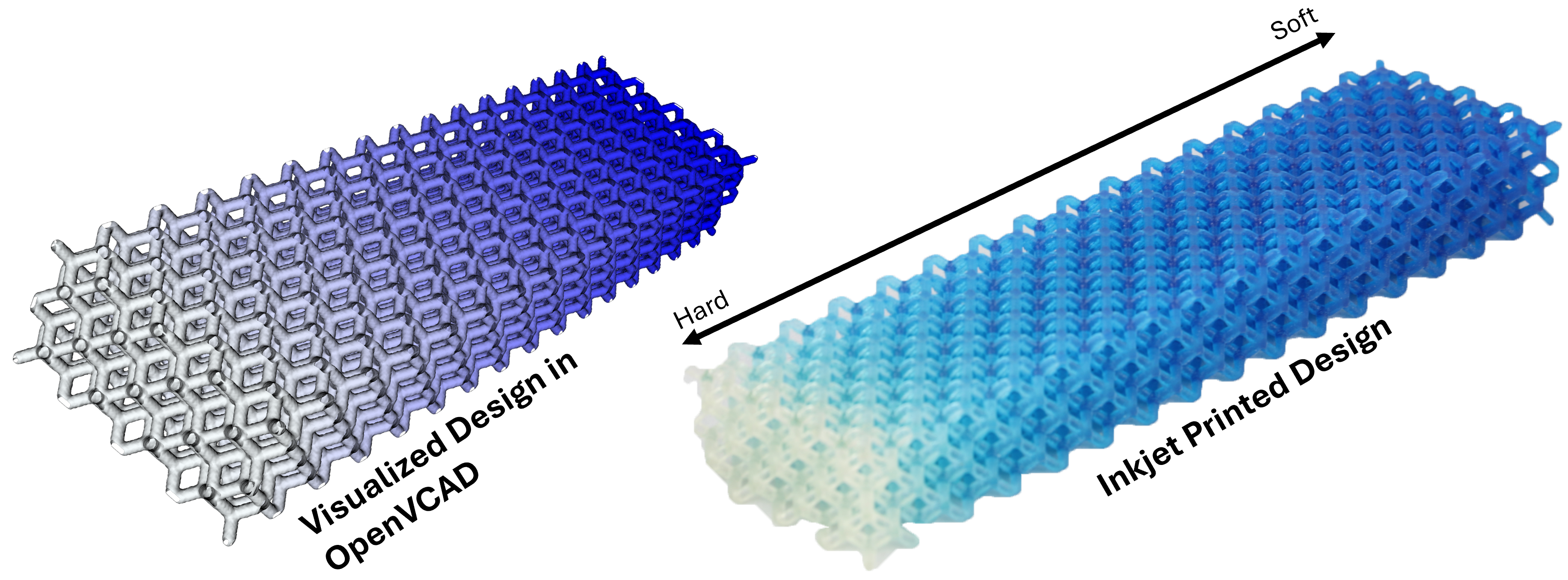
Functionally graded lattice
Multi-material graded lattice structure made with soft, rigid, and non-curing liquid.
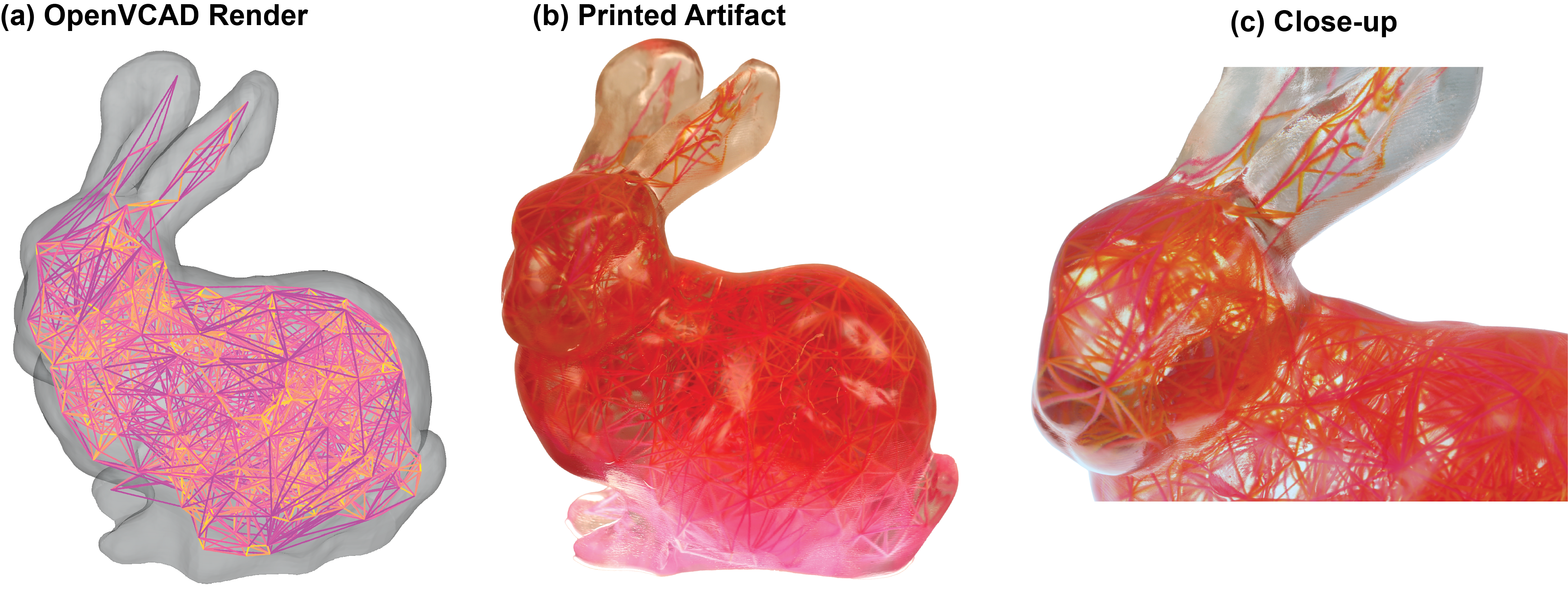
Multi-material Stanford Bunny
(a) OpenVCAD software render of the multi-material lattice-filled Stanford Bunny; (b) physical artifact printed on a Stratasys J750 printer; and (c) close-up view detailing graded internal lattice structures. Strut color is a function of strut length. The bunny is comprised of 3,289 unique struts.
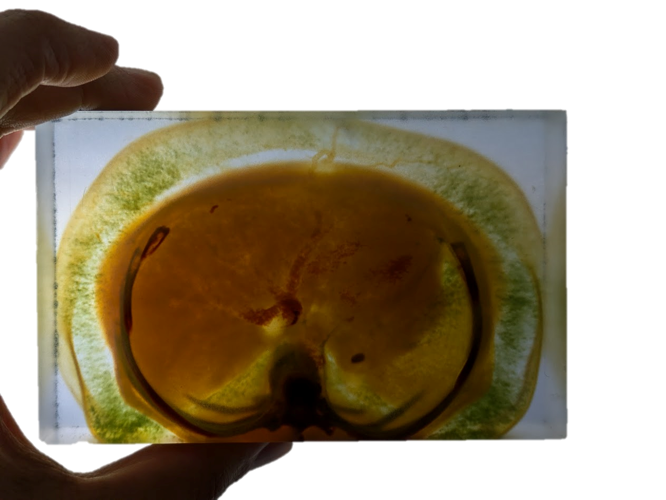
Inkjet 3D Printed Medical Scan
Real world patient scan ata processed with OpenVCAD and printed on Inkjet 3D Printer
How OpenVCAD Works
- Modeling – Use the
pyvcadPython package to create a hierarchical tree of geometry + material nodes. - Compilation – Run an OpenVCAD compiler module to convert the model into volumetric data.
- Export – Output formats include PNG stacks for inkjet printing, FEA meshes for simulation, and meshes for FFF printing.
Key capabilities:
- Material transitions – Gradual changes in material properties within one object.
- Fully implicit representation – Geometry and material are expressed implicitly, scaling to hundreds of billions of voxels.
- Digital alloying – Combine materials at a fine scale for intricate compositions.
- Blending – Convolution-based smoothing across complex material interfaces.
- Image-based processing – Drive material distributions from images (e.g., medical scans).
Getting Started
The code below shows how you can create a basic OpenVCAD design, render it, and export a PNG stack for Inkjet 3D Printing.
# pyvcad is the main library and pyvcad_rendering is the visualization library
import pyvcad as pv
import pyvcad_rendering as viz

# Load some material definitions
materials = pv.default_materials
red = materials.id("red")
blue = materials.id("blue")

# Create a simple rectangular prism as our geometry
# Don't care about material here, we will replace it with a gradient
bar = pv.RectPrism(pv.Vec3(0,0,0), pv.Vec3(100,50,10), red)

# A functional gradient that is 100% blue at x=-50 and 100% at x=50
graded_bar = pv.FGrade(["x/100 + 0.5", "-x/100 + 0.5"],
                       [red, blue], False)
graded_bar.set_child(bar) # Nest the bar inside the gradient to apply the gradient to it

# Render the object, note that this is a blocking call and
# will not continue until the window is closed
viz.Render(graded_bar, materials)

# Export the object for 3D printing or simulation.
# This brings up a wizard to guide you through the export process
viz.Export(graded_bar, materials)
Supported Inputs
| Category | Supported Inputs |
|---|---|
| Geometry | • Meshes • STEP CAD files • FEA simulation results • DICOM medical scans • Implicit surfaces • Voxels (OpenVDB, NanoVDB) |
| Materials | • Math expressions • Custom C++ / Python functions • Blending • DICOM medical scans • Voxels (OpenVDB, NanoVDB) |
Supported Outputs
| Category | Output Types |
|---|---|
| 3D Printing | PNG stacks (inkjet) |
| Simulation | FEA input files with material assignments (ABAQUS) |
| Voxel-based Outputs | Voxel grids (OpenVDB, NanoVDB) |
| Visualization | Surface and volumetric previews |
Issues
If you run into any issues, please submit a report here.
Note: We now support Windows, Mac, and Linux!
Getting the Code
The OpenVCAD source code is open-source under a non-commercial license.
You can request access to the private GitHub repository here:
License
OpenVCAD is released under a non-commercial open-source license. By using any of the OpenVCAD libraries you agree to the LICENSE. OpenVCAD is free for academic and hobbyist use.
What OpenVCAD Is Not
OpenVCAD is not a voxel-by-voxel design tool. While it can emit voxel data, design is done implicitly with high-level math expressions that scale to extremely large builds (e.g. Inkjet 3D printing).
Publications
OpenVCAD is an active research project developed by the Matter Assembly Computation Lab at CU Boulder.
-
OpenVCAD: An open‑source volumetric multi‑material geometry compiler (2024)
Core framework; implicit volumetric design; inkjet/PolyJet workflows.
Read our paper here (Additive Manufacturing) -
Implicit Toolpath Generation for Functionally Graded Additive Manufacturing via Gradient‑Aware Slicing (2025)
Extends VCAD to toolpath‑based systems (e.g., FFF) with gradient‑aware slicing.
Read our paper here (Additive Manufacturing) -
Implicit Modeling for 3D‑Printed Multi‑Material Computational Object Design via Python (2025)
Python‑first API (pyvcad), enhanced lattice workflows, and simulation‑informed design/export.
Read our paper here (Proceedings of the 10th ACM Symposium on Computational Fabrication)
Cite Us (BibTeX)
@article{wade2024openvcad,
  title={OpenVCAD: An open source volumetric multi-material geometry compiler},
  author={Wade, Charles and Williams, Graham and Connelly, Sean and Kopec, Braden and MacCurdy, Robert},
  journal={Additive Manufacturing},
  volume={79},
  pages={103912},
  year={2024},
  publisher={Elsevier}
}
@article{wade2025toolpaths,
  title = {Implicit Toolpath Generation for Functionally Graded Additive Manufacturing via Gradient-Aware Slicing},
  author = {Wade, Charles and Beck, Devon and MacCurdy, Robert},
  journal = {Additive Manufacturing},
  year = {2025},
  doi = {https://doi.org/10.1016/j.addma.2025.104963},
}
@article{wade2025pyvcad,
  title = {Implicit Modeling for 3D-printed Multi-material Computational Object Design via Python},
  author = {Wade, Charles and Beck, Devon and MacCurdy, Robert},
  journal = {Proceedings of the 10th ACM Symposium on Computational Fabrication},
  year = {2025},
  doi = {https://doi.org/10.48550/arXiv.2509.15562},
}
1 maintainer

Metadata
1 maintainer
Release files for OpenVCAD 2.3.1
For a detailed explanation of source distributions (sdists) and built distributions (wheels), please see the package formats documentation.
Built distributions (wheels)
Total release size: 528.1 MB
Release files / openvcad-2.3.1-cp313-cp313-win_amd64.whl
| Download URL | openvcad-2.3.1-cp313-cp313-win_amd64.whl |
|---|---|
| Size | 35.0 MB |
| Tags | CPython 3.13 Windows x86-64 |
|
SHA-256 checksum How to use checksums |
a6d4c91064af2744a75dd27b58c8f5f561a8571bc6bb93c2a19ce8d675df2160
|
|
BLAKE2b-256 checksum How to use checksums |
8f55dba70c001d1c6fb6f5568c163ee8ac94707e0725ab1f34258793c07069a6
|
| Upload date | |
|
Uploaded using Trusted Publishing? What is trusted publishing? |
No |
| Uploaded via |
twine/6.2.0 CPython/3.12.10
|
Release files / openvcad-2.3.1-cp313-cp313-musllinux_1_2_x86_64.whl
| Download URL | openvcad-2.3.1-cp313-cp313-musllinux_1_2_x86_64.whl |
|---|---|
| Size | 37.5 MB |
| Tags | CPython 3.13 Linux musl 1.2+ x86-64 |
|
SHA-256 checksum How to use checksums |
69cfae26a14c96171f70a4a5c745f6d735d0ee28acecc355f9cd74ef6987ee4a
|
|
BLAKE2b-256 checksum How to use checksums |
eedaceac8c4efc096bdf525ce76274e8291f7af45b7376891476a5116af33072
|
| Upload date | |
|
Uploaded using Trusted Publishing? What is trusted publishing? |
No |
| Uploaded via |
twine/6.2.0 CPython/3.12.10
|
Release files / openvcad-2.3.1-cp313-cp313-manylinux_2_28_x86_64.whl
| Download URL | openvcad-2.3.1-cp313-cp313-manylinux_2_28_x86_64.whl |
|---|---|
| Size | 37.2 MB |
| Tags | CPython 3.13 Linux glibc 2.28+ x86-64 |
|
SHA-256 checksum How to use checksums |
ee09fc611218f06c56be7ffe9ac40c691ceb35e09d058c234d5193f1dfed6691
|
|
BLAKE2b-256 checksum How to use checksums |
9fd0fd66e0b06bad05886a7616eab95efa352c97b72d9ac743765a3cd7fe07d1
|
| Upload date | |
|
Uploaded using Trusted Publishing? What is trusted publishing? |
No |
| Uploaded via |
twine/6.2.0 CPython/3.12.10
|
Release files / openvcad-2.3.1-cp313-cp313-macosx_15_0_arm64.whl
| Download URL | openvcad-2.3.1-cp313-cp313-macosx_15_0_arm64.whl |
|---|---|
| Size | 66.3 MB |
| Tags | CPython 3.13 macOS 15.0+ ARM64 |
|
SHA-256 checksum How to use checksums |
7f712973507e7995d5ef0930fe02c0d80792289630432b7161e952035ad5697e
|
|
BLAKE2b-256 checksum How to use checksums |
19948aabb564597d78c5f7db2c425e1b953469dd806f6dfd0102a09bc159eed3
|
| Upload date | |
|
Uploaded using Trusted Publishing? What is trusted publishing? |
No |
| Uploaded via |
twine/6.2.0 CPython/3.12.10
|
Release files / openvcad-2.3.1-cp312-cp312-win_amd64.whl
| Download URL | openvcad-2.3.1-cp312-cp312-win_amd64.whl |
|---|---|
| Size | 35.0 MB |
| Tags | CPython 3.12 Windows x86-64 |
|
SHA-256 checksum How to use checksums |
c9b2c14daee4b8e23f8c34fa41d1160d124a02e6ee3f3d9d934ab9cce4c6cad2
|
|
BLAKE2b-256 checksum How to use checksums |
3e3226cabd4651383d9915cc8c0aab6f23b27f60fb3ce3241532f9fc74adea8f
|
| Upload date | |
|
Uploaded using Trusted Publishing? What is trusted publishing? |
No |
| Uploaded via |
twine/6.2.0 CPython/3.12.10
|
Release files / openvcad-2.3.1-cp312-cp312-musllinux_1_2_x86_64.whl
| Download URL | openvcad-2.3.1-cp312-cp312-musllinux_1_2_x86_64.whl |
|---|---|
| Size | 37.5 MB |
| Tags | CPython 3.12 Linux musl 1.2+ x86-64 |
|
SHA-256 checksum How to use checksums |
1e9c2e78eadfa4b5f77274a2a910327f93fadba98b606cc645c5d6d5687c7636
|
|
BLAKE2b-256 checksum How to use checksums |
5c2125b939987f0170e10cacdd6595a6119888ae3c67e825478b521b969e286c
|
| Upload date | |
|
Uploaded using Trusted Publishing? What is trusted publishing? |
No |
| Uploaded via |
twine/6.2.0 CPython/3.12.10
|
Release files / openvcad-2.3.1-cp312-cp312-manylinux_2_28_x86_64.whl
| Download URL | openvcad-2.3.1-cp312-cp312-manylinux_2_28_x86_64.whl |
|---|---|
| Size | 37.2 MB |
| Tags | CPython 3.12 Linux glibc 2.28+ x86-64 |
|
SHA-256 checksum How to use checksums |
9ac196e7766c907bf55538d366aa71beed5e8c2a0fc97513c9eacd1e8280dd25
|
|
BLAKE2b-256 checksum How to use checksums |
0ffc1fe1b282ef507318760e093baa53decbd789c7e912c71d45371836bf6947
|
| Upload date | |
|
Uploaded using Trusted Publishing? What is trusted publishing? |
No |
| Uploaded via |
twine/6.2.0 CPython/3.12.10
|
Release files / openvcad-2.3.1-cp312-cp312-macosx_15_0_arm64.whl
| Download URL | openvcad-2.3.1-cp312-cp312-macosx_15_0_arm64.whl |
|---|---|
| Size | 66.3 MB |
| Tags | CPython 3.12 macOS 15.0+ ARM64 |
|
SHA-256 checksum How to use checksums |
5490941aa608cd43b79366e480792b06d5024134440a8d1ae9822a37fa7ecc3d
|
|
BLAKE2b-256 checksum How to use checksums |
90b5be9889e4c71ac494a9281449c4afc483ea416aa14bdb1c88ec749211daf3
|
| Upload date | |
|
Uploaded using Trusted Publishing? What is trusted publishing? |
No |
| Uploaded via |
twine/6.2.0 CPython/3.12.10
|
Release files / openvcad-2.3.1-cp311-cp311-win_amd64.whl
| Download URL | openvcad-2.3.1-cp311-cp311-win_amd64.whl |
|---|---|
| Size | 35.0 MB |
| Tags | CPython 3.11 Windows x86-64 |
|
SHA-256 checksum How to use checksums |
34d5f2d5ae53641836c929bc49d7317d63b1bc1ea9af33dcd091451a90f59abb
|
|
BLAKE2b-256 checksum How to use checksums |
3aaaf5ecb325dc1a96d1d278a05b4c6d47b394cbb4a0b2ffe8f9c672f7c84cc5
|
| Upload date | |
|
Uploaded using Trusted Publishing? What is trusted publishing? |
No |
| Uploaded via |
twine/6.2.0 CPython/3.12.10
|
Release files / openvcad-2.3.1-cp311-cp311-musllinux_1_2_x86_64.whl
| Download URL | openvcad-2.3.1-cp311-cp311-musllinux_1_2_x86_64.whl |
|---|---|
| Size | 37.5 MB |
| Tags | CPython 3.11 Linux musl 1.2+ x86-64 |
|
SHA-256 checksum How to use checksums |
8706fa6b23360e1d62c8cf918ae6ababb0932763b3f41054eb62615b2722929e
|
|
BLAKE2b-256 checksum How to use checksums |
a8fe2370f9f124ec7df45ea9b4d79fc918a3863ced3ebd36ddd3afd14009f241
|
| Upload date | |
|
Uploaded using Trusted Publishing? What is trusted publishing? |
No |
| Uploaded via |
twine/6.2.0 CPython/3.12.10
|
Release files / openvcad-2.3.1-cp311-cp311-manylinux_2_28_x86_64.whl
| Download URL | openvcad-2.3.1-cp311-cp311-manylinux_2_28_x86_64.whl |
|---|---|
| Size | 37.2 MB |
| Tags | CPython 3.11 Linux glibc 2.28+ x86-64 |
|
SHA-256 checksum How to use checksums |
63ee2332765432b7aed3bfa0adfb752b82de1d29bce457c6f2c2b16a42fda002
|
|
BLAKE2b-256 checksum How to use checksums |
8dfe018c9b3c8a7122a59cd5a8cdb45d4e39268521d987069387300229d5d48f
|
| Upload date | |
|
Uploaded using Trusted Publishing? What is trusted publishing? |
No |
| Uploaded via |
twine/6.2.0 CPython/3.12.10
|
Release files / openvcad-2.3.1-cp311-cp311-macosx_15_0_arm64.whl
| Download URL | openvcad-2.3.1-cp311-cp311-macosx_15_0_arm64.whl |
|---|---|
| Size | 66.3 MB |
| Tags | CPython 3.11 macOS 15.0+ ARM64 |
|
SHA-256 checksum How to use checksums |
9510591942da64cead449a22c4b4ee70dddee69f6a152e19f93fd69192e79f2d
|
|
BLAKE2b-256 checksum How to use checksums |
3306708e80f21fef63d0b337b453a44d6d31760cf81435b12cf50a51ea91839e
|
| Upload date | |
|
Uploaded using Trusted Publishing? What is trusted publishing? |
No |
| Uploaded via |
twine/6.2.0 CPython/3.12.10
|
Security for OpenVCAD 2.3.1
Provenance
Provenance describes where a file came from. On PyPI, provenance is shared via attestations, which provide a verifiable record of the build or publishing details. View details, limitations and caveats.
No provenance found
None of the files in this release were uploaded with provenance metadata.
A note on package security
PyPI is a repository for distributing packages, not a service for auditing them. While third-party security researchers and our staff do their best to detect and remove malicious packages, PyPI cannot guarantee the quality, security or suitability of any given package.
To learn more about protecting yourself from malicious actors, visit our package security documentation.














