
openvpn-monitor
Summary
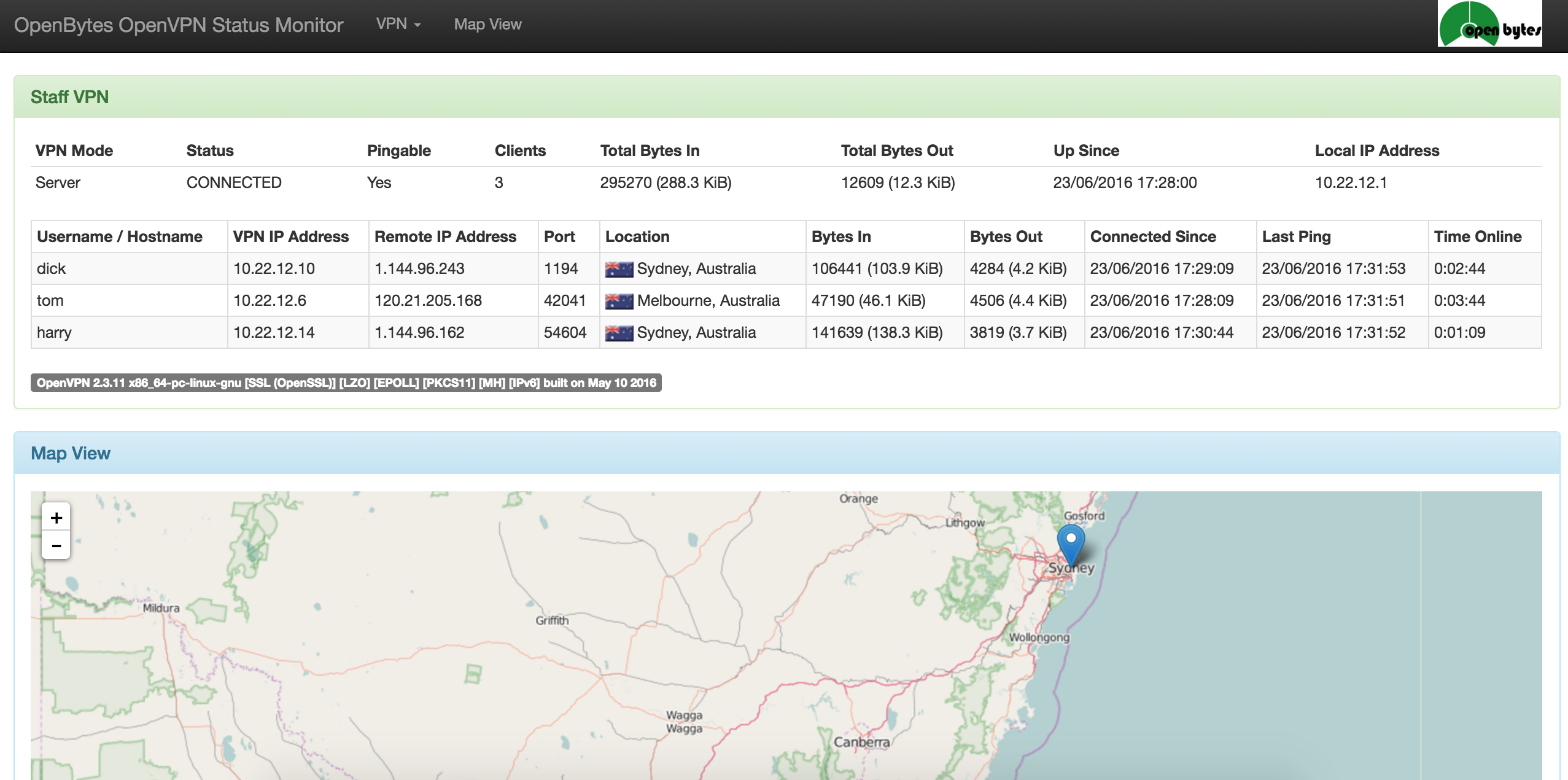
openvpn-monitor is a flask app that displays the status of OpenVPN servers, including all current connections. It uses the OpenVPN management console. It typically runs on the same host as the OpenVPN server, but it can also manage remote servers.
Supported Operating Systems
- Ubuntu 24.04 LTS (noble)
- Debian 11 (bullseye)
- CentOS / Rocky / Alma / RHEL 9
Installation Options
N.B. all CentOS / Rocky / Alma / RHEL instructions assume the EPEL repository has been installed:
dnf -y install epel-release
dnf makecache
If selinux is enabled the following changes are required for host/port to work:
dnf -y install policycoreutils-python-utils
semanage port -a -t openvpn_port_t -p tcp 5555
setsebool -P httpd_can_network_connect 1
Source
Checkout the code:
cd /var/www/html
git clone https://github.com/furlongm/openvpn-monitor
cd openvpn-monitor
yarnpkg --prod --modules-folder openvpn_monitor/static/dist install
python3 -m venv .venv
. venv/bin/activate
pip install -r requirements.txt
Run the development server in debug mode:
flask --app openvpn_monitor/app run --debug
deb/rpm
Ubuntu 24.04 (noble)
curl -sS https://repo.openbytes.ie/openbytes.gpg > /usr/share/keyrings/openbytes.gpg
echo "deb [signed-by=/usr/share/keyrings/openbytes.gpg] https://repo.openbytes.ie/openvpn-monitor/ubuntu noble main" > /etc/apt/sources.list.d/openvpn-monitor.list
apt update
apt -y install python3-openvpn-monitor
Debian 12 (bookworm)
curl -sS https://repo.openbytes.ie/openbytes.gpg > /usr/share/keyrings/openbytes.gpg
echo "deb [signed-by=/usr/share/keyrings/openbytes.gpg] https://repo.openbytes.ie/openvpn-monitor/debian bookworm main" > /etc/apt/sources.list.d/openvpn-monitor.list
apt update
apt -y install python3-openvpn-monitor
CentOS / Rocky / Alma / RHEL 9
curl -sS https://repo.openbytes.ie/openbytes.gpg > /etc/pki/rpm-gpg/RPM-GPG-KEY-openbytes
cat <<EOF >> /etc/yum.repos.d/openvpn-monitor.repo
[openbytes]
name=openbytes
baseurl=https://repo.openbytes.ie/openvpn-monitor/el9
enabled=1
gpgcheck=1
gpgkey=file:///etc/pki/rpm-gpg/RPM-GPG-KEY-openbytes
EOF
update-crypto-policies --set DEFAULT:SHA1
dnf -y install epel-release
dnf makecache
dnf -y install python3-openvpn-monitor
See configuration for details on configuring openvpn-monitor.
apache
Install dependencies and configure apache
These instructions assume a source checkout to /var/www/html/openvpn-monitor
Debian / Ubuntu
apt -y install git apache2 libapache2-mod-wsgi-py3 python3-geoip2 python3-humanize python3-flask python3-flaskext.wtf python3-semver yarnpkg
cp /var/www/html/openvpn-monitor/etc/openvpn-monitor/apache.conf.example /etc/apache2/conf-available/openvpn-monitor.conf
sed -i -e "s#^\(Define openvpn_monitor_pythonpath\).*#\1 /var/www/html/openvpn-monitor#" /etc/apache2/conf-available/openvpn-monitor.conf
a2enconf openvpn-monitor

systemctl restart apache2
CentOS / Rocky / Alma / RHEL
dnf -y install git httpd mod_wsgi python3-geoip2 python3-humanize python3-flask python3-flask-wtf python3-semver geolite2-city yarnpkg
cp /var/www/html/openvpn-monitor/etc/openvpn-monitor/apache.conf.example /etc/httpd/conf.d/openvpn-monitor.conf
sed -i -e "s#^\(Define openvpn_monitor_pythonpath\).*#\1 /var/www/html/openvpn-monitor#" /etc/httpd/conf.d/openvpn-monitor.conf
systemctl restart httpd
See configuration for details on configuring openvpn-monitor.
docker
docker run -p 80:80 ruimarinho/openvpn-monitor
Read the docker installation instructions for details on how to generate a dynamic configuration using only environment variables.
virtualenv + pip + gunicorn
apt -y install python3-venv           # (debian/ubuntu)
dnf -y install python3 geolite2-city  # (rocky/alma/rhel)
mkdir /srv/openvpn-monitor
cd /srv/openvpn-monitor
python3 -m venv .venv
. venv/bin/activate
pip install openvpn-monitor gunicorn
gunicorn openvpn_monitor.app -b 0.0.0.0:80
See configuration for details on configuring openvpn-monitor.
nginx + uwsgi
Install openvpn-monitor
apt -y install git gcc nginx uwsgi uwsgi-plugin-python3 python3-dev python3-venv libgeoip-dev yarnpkg  # (debian/ubuntu)
dnf -y install git gcc nginx uwsgi uwsgi-plugin-python3 python3-devel geolite2-city yarnpkg            # (centos/rhel)
cd /srv
git clone https://github.com/furlongm/openvpn-monitor
cd openvpn-monitor
python3 -m venv .venv
. .venv/bin/activate
pip install -r requirements.txt
yarnpkg --prod --modules-folder openvpn_monitor/static/dist install
uWSGI app config
Create a uWSGI config: /etc/uwsgi/apps-available/openvpn-monitor.ini
[uwsgi]
base = /srv
project = openvpn-monitor
logto = /var/log/uwsgi/app/%(project).log
plugins = python3
chdir = %(base)/%(project)
virtualenv = %(chdir)/.venv
module = openvpn-monitor:application
manage-script-name = true
mount=/openvpn-monitor=openvpn_monitor/app.py
Nginx site config
Create an Nginx config: /etc/nginx/sites-available/openvpn-monitor
server {
    listen 80;
    location /openvpn-monitor/ {
        uwsgi_pass unix:///run/uwsgi/app/openvpn-monitor/socket;
        include uwsgi_params;
    }
}
Enable uWSGI app and Nginx site, and restart services
ln -s /etc/uwsgi/apps-available/openvpn-monitor.ini /etc/uwsgi/apps-enabled/
systemctl restart uwsgi
ln -s /etc/nginx/sites-available/openvpn-monitor /etc/nginx/sites-enabled/
rm /etc/nginx/sites-enabled/default
systemctl restart nginx
See configuration for details on configuring openvpn-monitor.
Configuration
Configure OpenVPN
Add the following line to your OpenVPN server configuration to run the management console on 127.0.0.1 port 5555, with the management password in /etc/openvpn/pw-file:
management 127.0.0.1 5555 pw-file
To run the management console on a socket, with the management password in /etc/openvpn/pw-file:
management socket-name unix pw-file
Refer to the OpenVPN documentation for further information on how to secure access to the management interface.
Configure openvpn-monitor
Copy the example configuration file openvpn-monitor.conf.example to the same
directory as app.py or to /etc/openvpn-monitor/openvpn-monitor.conf
cp openvpn-monitor.conf.example openvpn_monitor/openvpn-monitor.conf
or
mkdir -p /etc/openvpn-monitor
cp openvpn-monitor.conf.example /etc/openvpn_monitor/openvpn-monitor.conf
In this file you can set site name, add a logo, set the default map location (latitude and longitude). If not set, the default location is New York, USA.
Once configured, navigate to http://myipaddress/openvpn-monitor/
License
openvpn-monitor is licensed under the GPLv3, a copy of which can be found in the COPYING file.
Acknowledgements
Flags are created by Matthias Slovig (flags@slovig.de) and are licensed under Creative Commons License Deed Attribution-ShareAlike 3.0 Unported (CC BY-SA 3.0). See http://flags.blogpotato.de/ for more details.
1 maintainer

Metadata
1 maintainer
Release files for openvpn-monitor 2.0.4
For a detailed explanation of source distributions (sdists) and built distributions (wheels), please see the package formats documentation.
Source distribution (sdist)
| File | Size | Uploaded | Provenance | Actions |
|---|---|---|---|---|
| openvpn_monitor-2.0.4.tar.gz | 2.3 MB | With provenance | Details for openvpn_monitor-2.0.4.tar.gz |
Built distribution (wheel)
| File | Interpreter | ABI | Platform | Actions Reset |
|---|---|---|---|---|
| openvpn_monitor-2.0.4-py3-none-any.whl | Python 3 | none | any | Details for openvpn_monitor-2.0.4-py3-none-any.whl |
Total release size: 4.9 MB
Release files / openvpn_monitor-2.0.4.tar.gz
| Download URL | openvpn_monitor-2.0.4.tar.gz |
|---|---|
| Size | 2.3 MB |
| Tags | Source |
|
SHA-256 checksum How to use checksums |
5e97c35694e37296a85af27157029a9ce886d6e3d881e14757cff62bcc0dbb4f
|
|
BLAKE2b-256 checksum How to use checksums |
5f0768327716eeb0653ae1c7b5035b8a211fb77db48a68bf8fb63aed3442e6fc
|
| Upload date | |
|
Uploaded using Trusted Publishing? What is trusted publishing? |
Yes |
| Uploaded via |
twine/6.0.1 CPython/3.12.8
|
Provenance
Provenance describes where a file came from. On PyPI, provenance is shared via attestations, which provide a verifiable record of the build or publishing details. View details, limitations and caveats.


PyPI Publish Attestation
PyPI verified that this artifact, at this checksum, originated from the publisher listed below.
Signed by GitHub Actions, verified by PyPI on Jan 2, 2025.
Transparency logRelease files / openvpn_monitor-2.0.4-py3-none-any.whl
| Download URL | openvpn_monitor-2.0.4-py3-none-any.whl |
|---|---|
| Size | 2.6 MB |
| Tags | Python 3 |
|
SHA-256 checksum How to use checksums |
c76e997799b98b43b207a8e29f26bd2783e324a127fdef001c6d1a219ebfc639
|
|
BLAKE2b-256 checksum How to use checksums |
93eaea6306d4b7e44d4dcf6b612437cbf290f9b3f23bb324b0651b90c7083962
|
| Upload date | |
|
Uploaded using Trusted Publishing? What is trusted publishing? |
Yes |
| Uploaded via |
twine/6.0.1 CPython/3.12.8
|
Provenance
Provenance describes where a file came from. On PyPI, provenance is shared via attestations, which provide a verifiable record of the build or publishing details. View details, limitations and caveats.
PyPI Publish Attestation
PyPI verified that this artifact, at this checksum, originated from the publisher listed below.
Signed by GitHub Actions, verified by PyPI on Jan 2, 2025.
Transparency logSecurity for openvpn-monitor 2.0.4
Provenance
Provenance describes where a file came from. On PyPI, provenance is shared via attestations, which provide a verifiable record of the build or publishing details. View details, limitations and caveats.
Full provenance
All 2 files in this release have been uploaded with provenance metadata.
Attestation for openvpn_monitor-2.0.4.tar.gz
PyPI Publish Attestation
PyPI verified that this artifact, at this checksum, originated from the publisher listed below.
Signed by GitHub Actions, verified by PyPI on Jan 2, 2025.
Transparency logA note on package security
PyPI is a repository for distributing packages, not a service for auditing them. While third-party security researchers and our staff do their best to detect and remove malicious packages, PyPI cannot guarantee the quality, security or suitability of any given package.
To learn more about protecting yourself from malicious actors, visit our package security documentation.














