



OPTCONVERT
Converter for mathematical optimization formats: .mpl, .lp, .xa, .sim, .mpl, .gms, .mod, .xml, .mat.
Table of Contents
About The Project
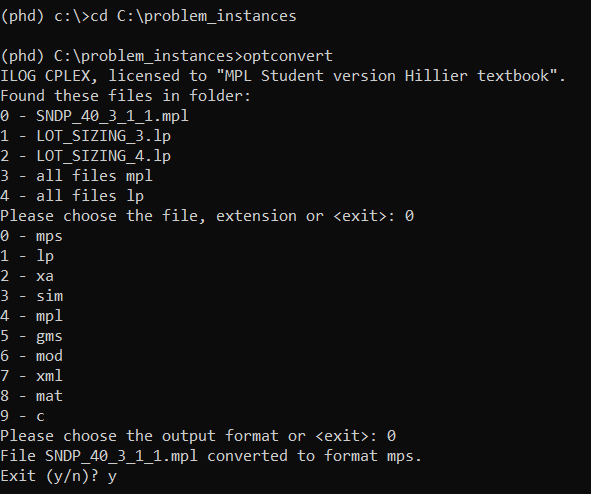
Everyone who works with mathematical optimization problems knows what pain in the *** it can be to convert problems from one file format into another. Often ad-hoc solutions for the specific test set must be created to read the instances.
This packages provides the unified interface for converting optimization models between popular formats:
- .mps (incl. smps as three files: .cor, .sto, .tim)
- .lp (CPLEX format)
- .xa
- .sim
- .mpl
- .gms
- .mod
- .xml
- .mat
- .c
Package can be used as the module in Python or as the command line interface (CLI).
Built With
Getting Started
To get a local copy up and running follow these simple steps.
Prerequisites
- python 3.6
- scipy
- matplotlib
- wxpython
- mplpy
Installation from PyPI
-
Install scipy, matplotlib and wxpython
pip install scipy, matplotlib, wxpython -
Install mplpy
- Download and install the full/academic or student version of MPL
- Install OptiMax Library. On Windows installation file is located in C:\Mplwin\50\setup\Python
-
Install optconvert
pip install optconvert
Installation from GitHub repo
-
Install scipy, matplotlib and wxpython
pip install scipy, matplotlib, wxpython -
Install mplpy
- Download and install the full/academic or student version of MPL
- Install OptiMax Library. On Windows installation file is located in C:\Mplwin\50\setup\Python
-
Clone the repo
git clone https://github.com/pashtetgp/optconvert.git -
cd to project folder and install the package
cd C:\optconvert
pip install ..\optconvert
Uninstall
run in command line pip uninstall optconvert
Usage
As Python module
See class docstrings for details.
from optconvert import Model
from pathlib import Path

in_file = Path('Dakota_det.mpl')
model = Model(in_file)
print('Solution: ' + str(model.solve()))
out_file = in_file.with_suffix('lp')
model.export(out_file)
Via CLI
Change the directory to the folder with model files and run optconvert.
One or multiple files can be converted at once.
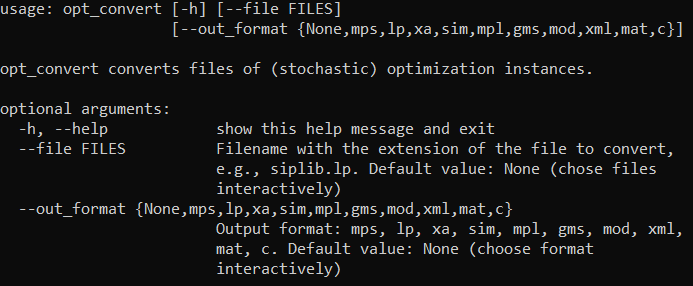
CLI mode accepts --file and --out_format arguments
Roadmap
See the open issues for a list of proposed features (and known issues).
Contributing
Any contributions you make are greatly appreciated.
- Fork the Project
- Create your Feature Branch (
git checkout -b feature/AmazingFeature) - Commit your Changes (
git commit -m 'Add some AmazingFeature') - Push to the Branch (
git push origin feature/AmazingFeature) - Open a Pull Request
License
Distributed under the MIT License. See LICENSE for more information.
Contact
Pavlo Glushko
Project Link: https://github.com/pashtetgp/optconvert
Acknowledgements
- Icons by Freepik from www.flaticon.com
- Readme template from othneildrew
1 maintainer

Release files for optconvert 0.0.1
For a detailed explanation of source distributions (sdists) and built distributions (wheels), please see the package formats documentation.
Source distribution (sdist)
| File | Size | Uploaded | |
|---|---|---|---|
| optconvert-0.0.1.tar.gz | 21.4 kB | Details |
Release files / optconvert-0.0.1.tar.gz
| Download URL | optconvert-0.0.1.tar.gz |
|---|---|
| Size | 21.4 kB |
| Tags | Source |
|
SHA-256 checksum How to use checksums |
76839849c1c4257770dd3f1048c5eea42ecb257caff181223aa4b550808df2b7
|
|
BLAKE2b-256 checksum How to use checksums |
bfde204d8b58e7ca2e8ddd9e98df1d2b2adc36dba7448bd369ab9056b9234d7a
|
| Upload date | |
|
Uploaded using Trusted Publishing? What is trusted publishing? |
No |
| Uploaded via |
twine/3.2.0 pkginfo/1.5.0.1 requests/2.24.0 setuptools/49.6.0.post20200814 requests-toolbelt/0.9.1 tqdm/4.48.2 CPython/3.6.10
|













