
OptiLog: A Framework for SAT-based Systems
OptiLog is a Python framework for rapid prototyping of SAT-based systems. OptiLog includes functionality for loading and creating formulas, state-of-the-art SAT solvers, high level formula modelling, pseudo boolean and cardinality encodings, automatic configuration and experiment running and parsing.
OptiLog is designed to be simple and efficient. OptiLog can be used by field experts for tasks such as algorithm design, research and benchmarking, but it has also been successfully deployed in undergraduate Computational Logic courses. Moreover, OptiLog has been designed from the ground up to be modular and extensible through the abstract iSAT C++ interface.
Installation
OptiLog requires Python 3.8 to 3.11, and a Linux installation (currently supports x86_64). Wheels are distributed on PyPi.
To install OptiLog run:
$ pip install optilog
Why OptiLog
OptiLog has a fully modular dynamic Python binding generator for SAT solvers. This means that integrating new SAT solvers into OptiLog is as simple as implementing a C++ interface, and doesn't require any Python C API knowledge.
On top of that, OptiLog provides all the functionality required to develop and deploy complete SAT-based systems. We provide access to state-of-the-art automatic configuration tools to configure any kind of algorithm (not limited to SAT) as well as experiment-running and log-parsing modules.
Architecture
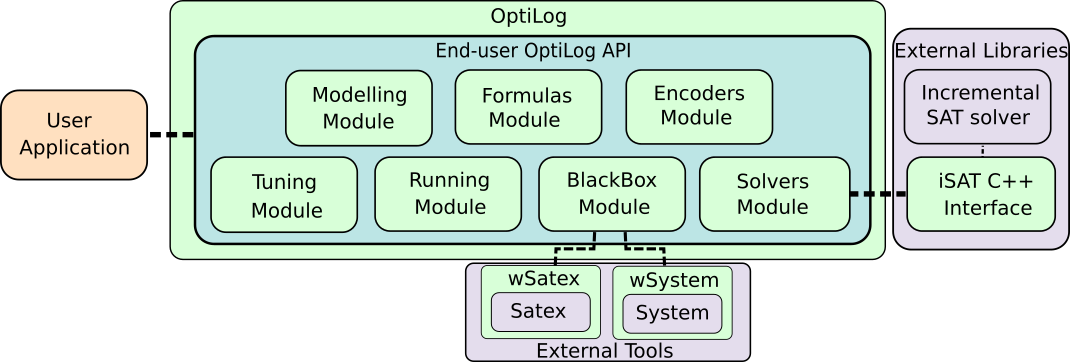
The main architecture of OptiLog is composed of the five main modules of the end-user OptiLog API that supports the creation of SAT based systems and the iSAT interface for SAT solver developers.
-
The Modelling module: The Modelling module provides a rich and compact formalism to model problems. In particular, this module allows modelling problems with non-CNF Boolean and Pseudo Boolean expressions that can be automatically transformed into the SAT formula provided by the Formulas module.
-
The Formula module: The Formulas module provides tools to load and manipulate SAT, MaxSAT, and QBF formulas.
-
The Solvers module: The Solvers module provides dynamic Python bindings for Python. It currently supports Solvers through the PyiSAT. These SAT solvers implement the iSAT interface.
-
The Encoders module: The Encoders module provides access to a set of encoders that can be used to translate constraints from one language to another. This module is currently composed of encoders for Pseudo-Boolean and Cardinality constraints into SAT.
-
The Tuning module: The Tuning module provides support to automatically configure Python functions.
-
The Running module: The Running module provides support to automatically generate execution scenarios that run experiments and collect logs.
-
The BlackBox module: The Blackbox module allows to encapsulate external applications into Python objects, which enables its interaction with the other modules from Optilog such as the Running module or the Tuning module.
SAT solver Examples
OptiLog deals with boolean variables represented by positive integers (DIMACS).
Here is an example using the well known Glucose41:
>>> from optilog.sat import Glucose41
>>> solver = Glucose41()
>>> solver.add_clause([1, 3])
>>> solver.add_clause([-1, -2])
>>> solver.solve(assumptions=[1])
True
>>> solver.model()
[1, -2, -3]
All SAT solvers are incremental, which means new clauses can be added after a solver has found a model:
>>> from optilog.sat import Glucose41
>>> solver = Glucose41()
>>> solver.add_clause([1, -2])
>>> solver.solve(assumptions=[1, 2])
True
>>> solver.model()
[1, 2]
>>> solver.add_clause([-1, -2])
>>> solver.solve(assumptions=[1, 2])
False
>>> solver.core()
[1]
CNF and WCNF formulas can also be directly loaded in to the solver:
>>> from optilog.sat import Glucose41
>>> solver = Glucose41()
>>> solver.load_cnf('./path/to/file')
Integrating a SAT solver
Adding a new SAT solver to OptiLog is super easy. Just create a class that implements your desired method of the iSAT
interface. Here you can see an example of the Cadical wrapper implementing the addClause and solve methods:
CadicalWrapper::CadicalWrapper()
{
    solver = new CaDiCaL::Solver;
}

CadicalWrapper::~CadicalWrapper()
{
    delete solver;
}

void CadicalWrapper::addClause(const std::vector<int>& literals)
{
    for (auto i = literals.begin(); i != literals.end(); ++i)
    {
        solver->add(*i);
    }
    solver->add(0);
}

E_STATE CadicalWrapper::solve(const std::vector<int>& assumptions)
{
    for (auto i = assumptions.begin(); i != assumptions.end(); ++i)
    {
        solver->assume(*i);
    }
    return (solver->solve() == 10 ? E_STATE::SAT : E_STATE::UNSAT);
}

OPTILOG_C_INTERFACE(CadicalWrapper, "Cadical")
Then, the solver is compiled as a shared library and integrated into OptiLog by copying the library on the
~/.optilog_solvers/ directory. Please
check the documentation
for more details on how to integrate a SAT solver and add configurable parameters.
Documentation is available online
License & Documentation
OptiLog is free to use for academic use cases.
SatexBlackBox module depends on SAT Heritage and their docker images. If you use that module, you must also comply with their license.
For industrial use please contact the authors.
For more information you can find the full license for OptiLog here: License
Cite
@InProceedings{alos_et_al:LIPIcs.SAT.2022.25,
    author =	{Al\`{o}s, Josep and Ans\'{o}tegui, Carlos and Salvia, Josep M. and Torres, Eduard},
    title =	{{OptiLog V2: Model, Solve, Tune and Run}},
    booktitle =	{25th International Conference on Theory and Applications of Satisfiability Testing (SAT 2022)},
    pages =	{25:1--25:16},
    series =	{Leibniz International Proceedings in Informatics (LIPIcs)},
    ISBN =	{978-3-95977-242-6},
    ISSN =	{1868-8969},
    year =	{2022},
    volume =	{236},
    editor =	{Meel, Kuldeep S. and Strichman, Ofer},
    publisher =	{Schloss Dagstuhl -- Leibniz-Zentrum f{\"u}r Informatik},
    address =	{Dagstuhl, Germany},
    URL =		{https://drops.dagstuhl.de/opus/volltexte/2022/16699},
    URN =		{urn:nbn:de:0030-drops-166996},
    doi =		{10.4230/LIPIcs.SAT.2022.25},
    annote =	{Keywords: Tool framework, Satisfiability, Modelling, Solving}
}
1 maintainer

Metadata
1 maintainer
Release files for optilog 0.6.1
For a detailed explanation of source distributions (sdists) and built distributions (wheels), please see the package formats documentation.
Built distributions (wheels)
| File | Reset | |||
|---|---|---|---|---|
| optilog-0.6.1-cp312-cp312-manylinux_2_17_x86_64.manylinux2014_x86_64.whl | CPython 3.12 | CPython 3.12 | Linux glibc 2.17+ x86-64 | Details |
| optilog-0.6.1-cp311-cp311-manylinux_2_17_x86_64.manylinux2014_x86_64.whl | CPython 3.11 | CPython 3.11 | Linux glibc 2.17+ x86-64 | Details |
| optilog-0.6.1-cp310-cp310-manylinux_2_17_x86_64.manylinux2014_x86_64.whl | CPython 3.10 | CPython 3.10 | Linux glibc 2.17+ x86-64 | Details |
| optilog-0.6.1-cp39-cp39-manylinux_2_17_x86_64.manylinux2014_x86_64.whl | CPython 3.9 | CPython 3.9 | Linux glibc 2.17+ x86-64 | Details |
| optilog-0.6.1-cp38-cp38-manylinux_2_17_x86_64.manylinux2014_x86_64.whl | CPython 3.8 | CPython 3.8 | Linux glibc 2.17+ x86-64 | Details |
Total release size: 21.4 MB
Release files / optilog-0.6.1-cp312-cp312-manylinux_2_17_x86_64.manylinux2014_x86_64.whl
| Download URL | optilog-0.6.1-cp312-cp312-manylinux_2_17_x86_64.manylinux2014_x86_64.whl |
|---|---|
| Size | 4.5 MB |
| Tags | CPython 3.12 Linux glibc 2.17+ x86-64 |
|
SHA-256 checksum How to use checksums |
db5746ed38a8e6190d89d32559f39d127c746df702bfb60ad29195584698c045
|
|
BLAKE2b-256 checksum How to use checksums |
c9635880a03298f3546ab160032a3d6deff6a7f094fff5440a8e4c0b126c706f
|
| Upload date | |
|
Uploaded using Trusted Publishing? What is trusted publishing? |
No |
| Uploaded via |
twine/5.1.1 CPython/3.12.4
|
Release files / optilog-0.6.1-cp311-cp311-manylinux_2_17_x86_64.manylinux2014_x86_64.whl
| Download URL | optilog-0.6.1-cp311-cp311-manylinux_2_17_x86_64.manylinux2014_x86_64.whl |
|---|---|
| Size | 4.3 MB |
| Tags | CPython 3.11 Linux glibc 2.17+ x86-64 |
|
SHA-256 checksum How to use checksums |
1c75aed83c4c428e31cd340ae74c6025c9216906f2b187214cb9495efed74da3
|
|
BLAKE2b-256 checksum How to use checksums |
24ecd745d596114dee157afebeebc4adeedb15cf380881758f1aa362c884e85a
|
| Upload date | |
|
Uploaded using Trusted Publishing? What is trusted publishing? |
No |
| Uploaded via |
twine/5.1.1 CPython/3.12.4
|
Release files / optilog-0.6.1-cp310-cp310-manylinux_2_17_x86_64.manylinux2014_x86_64.whl
| Download URL | optilog-0.6.1-cp310-cp310-manylinux_2_17_x86_64.manylinux2014_x86_64.whl |
|---|---|
| Size | 4.2 MB |
| Tags | CPython 3.10 Linux glibc 2.17+ x86-64 |
|
SHA-256 checksum How to use checksums |
4950e5c97f0292435f809b214f20a6bcebca8876975307c6d73956fcc1b29ab4
|
|
BLAKE2b-256 checksum How to use checksums |
f9b95783bf6ad17da10652437d4da25e226fd054edce3113be0db0737163bb26
|
| Upload date | |
|
Uploaded using Trusted Publishing? What is trusted publishing? |
No |
| Uploaded via |
twine/5.1.1 CPython/3.12.4
|
Release files / optilog-0.6.1-cp39-cp39-manylinux_2_17_x86_64.manylinux2014_x86_64.whl
| Download URL | optilog-0.6.1-cp39-cp39-manylinux_2_17_x86_64.manylinux2014_x86_64.whl |
|---|---|
| Size | 4.2 MB |
| Tags | CPython 3.9 Linux glibc 2.17+ x86-64 |
|
SHA-256 checksum How to use checksums |
15f3dc1a86222bd5c481673d1597ffaeb612a2633012e8b1568c7c420953111c
|
|
BLAKE2b-256 checksum How to use checksums |
3ea3f169f0c4968ce6f97977bc1143cf73b61be518e9d91ea1bbb082d67aa30c
|
| Upload date | |
|
Uploaded using Trusted Publishing? What is trusted publishing? |
No |
| Uploaded via |
twine/5.1.1 CPython/3.12.4
|
Release files / optilog-0.6.1-cp38-cp38-manylinux_2_17_x86_64.manylinux2014_x86_64.whl
| Download URL | optilog-0.6.1-cp38-cp38-manylinux_2_17_x86_64.manylinux2014_x86_64.whl |
|---|---|
| Size | 4.2 MB |
| Tags | CPython 3.8 Linux glibc 2.17+ x86-64 |
|
SHA-256 checksum How to use checksums |
a798ddf3e6b94279d49e4052c820c2c7848b1fb4195531dacf6e211fafa1b672
|
|
BLAKE2b-256 checksum How to use checksums |
ad88f2a4ca8e8be4f60055808939e4802d0ae6e8bb51640c7949a11a0ed7821f
|
| Upload date | |
|
Uploaded using Trusted Publishing? What is trusted publishing? |
No |
| Uploaded via |
twine/5.1.1 CPython/3.12.4
|














