
OSW-CTkMessagebox
OSW-CTkMessagebox is a revised version of the CTkMessagebox library.




Features
- Customize all elements inside the messagebox
- Add custom icons or images
- Add multiple options according to your wish
- No ugly looking header or borders
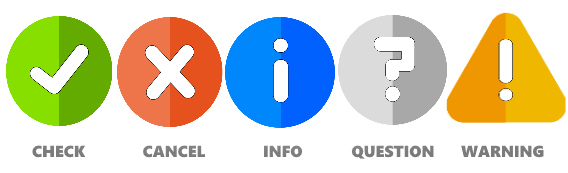
- Comes with 5 default icons
- Spawns at center of the screen/app
- Draggable window
- Fade-in/Fade-out window effect
Installation
pip install OSW-CTkMessagebox

How it looks?
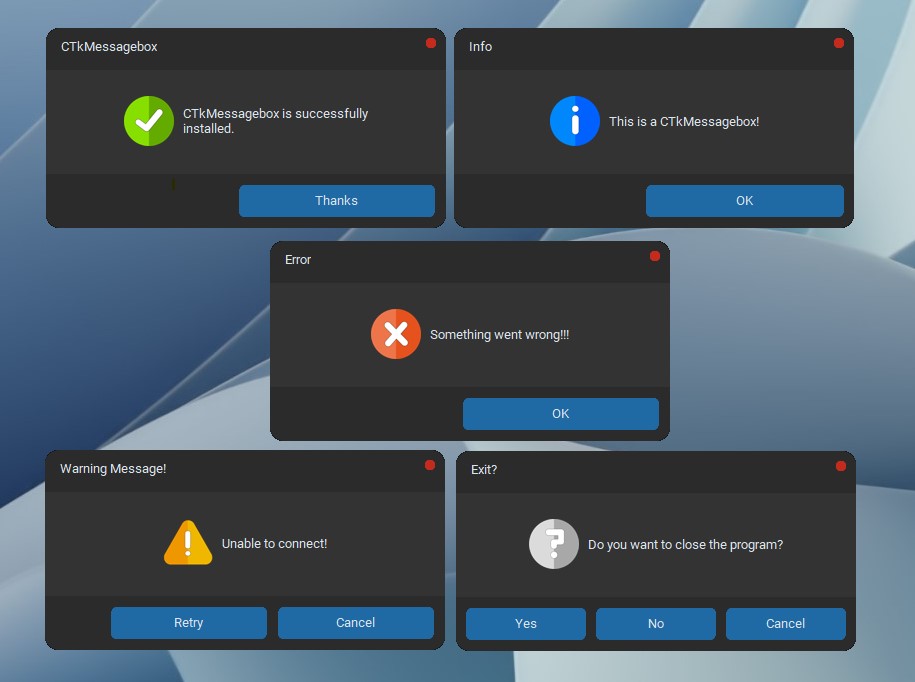
Example
from OSWCTkMessagebox import CTkMessagebox
import customtkinter

def show_info():
    # Default messagebox for showing some information
    CTkMessagebox(title="Info", message="This is a CTkMessagebox!", custom_sound_path="your_sound_path/", sound_name="your_sound", sound_extension=".sound_extension")

def show_checkmark():
    # Show some positive message with the checkmark icon
    CTkMessagebox(message="CTkMessagebox is successfully installed.",
                  icon="check", option_1="Thanks", sound=True)

def show_error():
    # Show some error message
    CTkMessagebox(title="Error", message="Something went wrong!!!", icon="cancel", sound=True)

def show_warning():
    # Show some retry/cancel warnings
    msg = CTkMessagebox(title="Warning Message!", message="Unable to connect!",
                  icon="warning", option_1="Cancel", option_2="Retry")

    if msg.get()=="Retry":
        show_warning()

def ask_question():
    # get yes/no answers
    msg = CTkMessagebox(title="Exit?", message="Do you want to close the program?",
                        icon="question", option_1="Cancel", option_2="No", option_3="Yes")
    response = msg.get()

    if response=="Yes":
        app.destroy()
    else:
        print("Click 'Yes' to exit!")

app = customtkinter.CTk()
app.rowconfigure((0,1,2,3,4,5), weight=1)
app.columnconfigure(0, weight=1)
app.minsize(200,250)

customtkinter.CTkLabel(app, text="CTk Messagebox Examples").grid(padx=20)
customtkinter.CTkButton(app, text="Check CTkMessagebox", command=show_checkmark).grid(padx=20, pady=10, sticky="news")
customtkinter.CTkButton(app, text="Show Info", command=show_info).grid(padx=20, pady=10, sticky="news")
customtkinter.CTkButton(app, text="Show Error", command=show_error).grid(padx=20, pady=10, sticky="news")
customtkinter.CTkButton(app, text="Show Warning", command=show_warning).grid(padx=20, pady=10, sticky="news")
customtkinter.CTkButton(app, text="Ask Question", command=ask_question).grid(padx=20, pady=(10,20), sticky="news")

app.mainloop()
OPTIONS
| Parameter | Description |
|---|---|
| master | Parent window (optional). The messagebox will be centered relative to the parent window. |
| width | Width of the messagebox in pixels. |
| height | Height of the messagebox in pixels. |
| fg_color | Foreground color of the messagebox (middle section). |
| bg_color | Background color of the messagebox. |
| title | Title displayed at the top of the messagebox. |
| message | Main message displayed in the center of the messagebox. |
| option_1 | Text of the first button. Default is "OK". |
| option_2 | Text of the second button. |
| option_3 | Text of the third button. |
| options | Pass a list of button labels instead of using option_1, option_2, and option_3. |
| button_color | Background color of the buttons. |
| text_color | Color of the message text. |
| title_color | Color of the title text. |
| button_text_color | Color of the button text. |
| button_hover_color | Hover color of the buttons. |
| button_width | Width of each button in pixels. |
| button_height | Height of each button in pixels. |
| border_width | Width of the border around the messagebox. Default is 1. |
| border_color | Border color of the messagebox. |
| cancel_button | Type of the close button. Available values: circle, cross, or None. |
| cancel_button_color | Color of the close button. Set to "transparent" to hide it. |
| icon | Icon displayed in the messagebox. Default is "info". |
| icon_ver | Icon pack/version to use. Default is "icons". |
| icon_visibility | Show or hide the icon. Default is True. |
| icon_size | Custom size of the icon as a tuple (width, height). |
| custom_sound_path | Path to a custom sound file to play when the messagebox appears. |
| sound_name | Name of the bundled system/custom sound to play. |
| sound_extension | Extension of the sound file (for example: "wav" or "mp3"). |
| corner_radius | Corner radius of the messagebox window. Not supported on Linux. |
| font | Font of the message text as a tuple. |
| header | Show the native window title bar instead of using overrideredirect. |
| topmost | Keep the messagebox above all other windows. Default is True. |
| sound | Play the system notification sound when the messagebox appears. |
| justify | Alignment of the buttons: left, center, or right. |
| wraplength | Maximum line width before the message text wraps. |
| option_focus | Default focused button (1, 2, or 3) when the Enter key is pressed. |
| fade_in_duration | Duration of the fade-in/fade-out animation in milliseconds. Default is 0. |
Icons
1 maintainer

Release files for OSW-CTkMessagebox 1.0
For a detailed explanation of source distributions (sdists) and built distributions (wheels), please see the package formats documentation.
Source distribution (sdist)
| File | Size | Uploaded | |
|---|---|---|---|
| osw_ctkmessagebox-1.0.tar.gz | 13.8 kB | Details |
Built distribution (wheel)
| File | Interpreter | ABI | Platform | Reset |
|---|---|---|---|---|
| osw_ctkmessagebox-1.0-py3-none-any.whl | Python 3 | none | any | Details |
Total release size: 28.1 kB
Release files / osw_ctkmessagebox-1.0.tar.gz
| Download URL | osw_ctkmessagebox-1.0.tar.gz |
|---|---|
| Size | 13.8 kB |
| Tags | Source |
|
SHA-256 checksum How to use checksums |
e6b33b7c4db6de15b3423fec8dc94b7b9628688211060a6b8be31d192f964a72
|
|
BLAKE2b-256 checksum How to use checksums |
fee1aaca7a9a501fda0708f1c7f4bbc430eb4f8f533e0adfba677a10b9af190f
|
| Upload date | |
|
Uploaded using Trusted Publishing? What is trusted publishing? |
No |
| Uploaded via |
twine/6.2.0 CPython/3.12.3
|
Release files / osw_ctkmessagebox-1.0-py3-none-any.whl
| Download URL | osw_ctkmessagebox-1.0-py3-none-any.whl |
|---|---|
| Size | 14.3 kB |
| Tags | Python 3 |
|
SHA-256 checksum How to use checksums |
5f1f35f6323ea3217f1f39f233a3a5dbffd9871aa0972ee06c78ed6bb062955f
|
|
BLAKE2b-256 checksum How to use checksums |
c7195f9ab679af801dc2a01b641a00ec09d7fc7385b1aa922360e797fd3a1516
|
| Upload date | |
|
Uploaded using Trusted Publishing? What is trusted publishing? |
No |
| Uploaded via |
twine/6.2.0 CPython/3.12.3
|













