
This release is a pre-release and may not be stable for production use.
PHAL Sensors
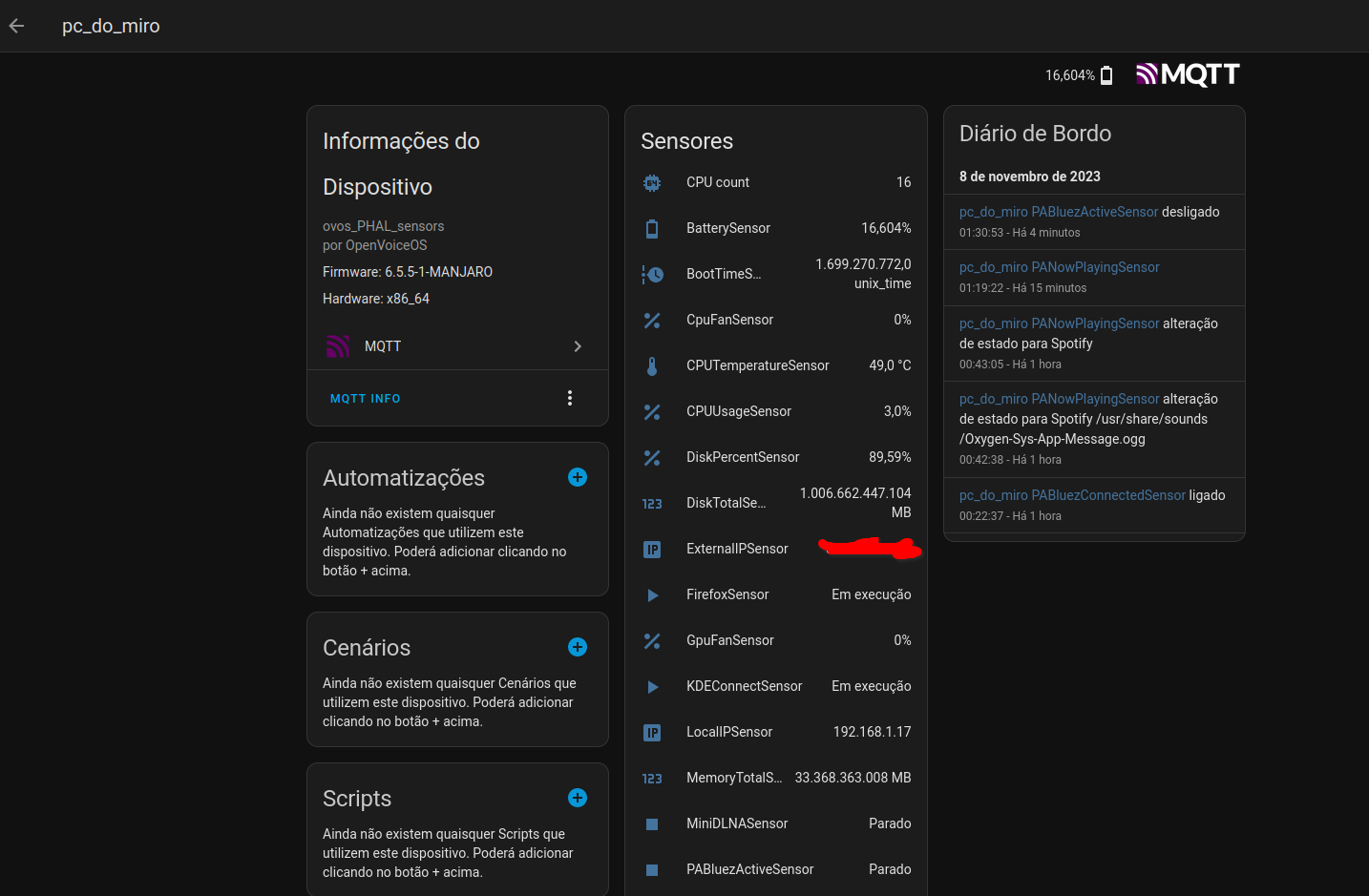
Read hardware and OS sensors from an OVOS device — CPU, memory, disk, temperature, fans, battery, network, running apps and more — and publish them.
The OVOS messagebus is the always-on output. With a plain install the plugin
emits every reading on the bus as ovos.phal.sensor / ovos.phal.binary_sensor,
with no extra dependencies. Any OVOS component can subscribe to those messages to
show device diagnostics.
Home Assistant (REST and MQTT) and a file log are optional integrations, enabled in config and installed as extras. They are never required — importing or running the plugin never pulls their dependencies.
Each sensor gets a unique identifier in the format sensor.ovos_{name}_{sensor_id}.
Install
pip install ovos-PHAL-sensors
That is all the bus output needs. Optional integrations and hardware sensors pull extra packages — install only the ones you use:
pip install ovos-PHAL-sensors[ha]          # Home Assistant REST logger (requests)
pip install ovos-PHAL-sensors[mqtt]        # Home Assistant MQTT discovery (ha-mqtt-discoverable)
pip install ovos-PHAL-sensors[pulse]       # PulseAudio sensors (pulsectl)
pip install ovos-PHAL-sensors[bluetooth]   # Bluetooth presence sensors (pybluez2)
pip install ovos-PHAL-sensors[screen]      # screen brightness (screen-brightness-control)
pip install ovos-PHAL-sensors[extras]      # everything above
A sensor whose extra is not installed is simply skipped; the bus output keeps working.
Config
{
  "PHAL": {
    "ovos-PHAL-sensors": {
      "name": "my_phal_device",
      "time_between_checks": 15,
      "screen_sensors": true,
      "battery_sensors": true,
      "cpu_sensors": true,
      "memory_sensors": true,
      "network_sensors": true,
      "fan_sensors": true,
      "os_sensors": true,
      "apps_sensors": true,
      "pulseaudio_sensors": true,
      "bluetooth_sensors": true,
      "disable_bus": false,
      "disable_ha": false,
      "disable_filelog": true,
      "mqtt_config": {"host":  "192.168.1.8", "port": 1883},
      "ha_host": "http://192.168.1.8:8123",
      "ha_token": "eyJhbGciOiJIUzI1NiIsInR5cCI6IkpXVCJ9.eyJpc3MiOiI2NGZmODYxY2M3ZDE0ZDZmODQ5..."
    }
  }
}
name: the device name the sensors belong totime_between_checks: time to wait between sensor readingsdisable_bus: set totrueto stop sending readings to the messagebusdisable_ha: set totrueto stop sending readings to Home Assistantdisable_filelog: set totrueto stop logging readings to a fileha_host(optional): the Home Assistant URL. Defaults to the host set in ovos-PHAL-plugin-homeassistant, if configured there.ha_token(optional): the Home Assistant long-lived access token. Defaults to the token set in ovos-PHAL-plugin-homeassistant, if configured there.mqtt_config(optional):
        host: str
        port: Optional[int] = 1883
        username: Optional[str] = None
        password: Optional[str] = None
        client_name: Optional[str] = None
        tls_key: Optional[str] = None
        tls_certfile: Optional[str] = None
        tls_ca_cert: Optional[str] = None

        discovery_prefix: str = "homeassistant"
        """The root of the topic tree where HA is listening for messages"""
        state_prefix: str = "hmd"
        """The root of the topic tree ha-mqtt-discovery publishes its state messages"""
Bus API (always on)
Every reading is emitted on the OVOS messagebus. This is the default, dependency-free
output and the one other OVOS components should consume. Numeric and string readings
go out as ovos.phal.sensor; on/off readings as ovos.phal.binary_sensor:
Message("ovos.phal.sensor",
         {"state": sensor.value,           # the reading (number / string)
          "sensor_id": f"{name}_{unique_id}",  # stable id, e.g. "mydevice_cpu_temperature"
          "device_name": name,             # the configured device name
          "name": unique_id,               # the sensor's own id, e.g. "temperature"
          "attributes": sensor.attrs})     # unit_of_measurement, icon, device_class, ...

Message("ovos.phal.binary_sensor",
         {"state": sensor.value,           # bool
          "sensor_id": f"{name}_{unique_id}",
          "device_name": name,
          "name": unique_id,
          "attributes": sensor.attrs})
Readings are pushed on the configured time_between_checks cadence — there is no
request/response topic. A consumer subscribes to both topics and keeps the latest
value per sensor_id. Set disable_bus: true only if you want to turn this off.
Optional integrations
Beyond the always-on bus output, readings can also be forwarded to:
- Home Assistant (REST) — enable with
disable_ha: falseand setha_host/ha_token. Needs the[ha]extra. - Home Assistant (MQTT discovery) — enable by setting
mqtt_config. Needs the[mqtt]extra. Use this or the REST logger, not both. - File log — enable with
disable_filelog: false; writes to~/.local/state/sensors/readings.log.
All three are off by default and their dependencies load only when enabled.
Standalone (without OVOS)
The ovos-sensors command runs the collector as a plain daemon. If an OVOS
messagebus is reachable it connects and also emits ovos.phal.sensor; if not,
it runs without OVOS at all and just pushes to the integrations you enabled
(Home Assistant / MQTT). So you can point it at an MQTT broker on any Linux box:
pip install ovos-PHAL-sensors[mqtt]
ovos-sensors        # no OVOS needed — publishes sensors to MQTT/HA
Set standalone: true (or disable_bus: true) in the config to skip the bus
entirely and start immediately in HA/MQTT-only mode.
Sensors
PulseAudio
PAHostnameSensor
PAVersionSensor
PAChannelCountSensor
PAPlaybackSensor
PABluezActiveSensor
PABluezConnectedSensor
PANowPlayingSensor
PADefaultSourceSensor
PADefaultSinkSensor
PAAudioPlayingSensor
OS Info
OSNameSensor
OSSystemSensor
BootTimeSensor
ReleaseSensor
MachineSensor
ArchitectureSensor
UptimeSensor
ProcessCountSensor
Running Applications
SystemdSensor
DBUSDaemonSensor
KDEConnectSensor
PipewireSensor
PlasmaShellSensor
PulseAudioSensor
FirefoxSensor
SpotifySensor
MiniDLNASensor
UPMPDCliSensor
Memory Usage
MemoryTotalSensor
MemoryUsageSensor
SwapUsageSensor
SwapTotalSensor
DiskUsageSensor
DiskPercentSensor
DiskTotalSensor
DiskReadBytesSensor
DiskWriteBytesSensor
CPU Usage
CPUTemperatureSensor
CPUUsageSensor
CPUCountSensor
CPUFrequencySensor
LoadAverage1Sensor
LoadAverage5Sensor
LoadAverage15Sensor
Raspberry Pi throttling (only when vcgencmd is present)
ThrottleStateSensor
UnderVoltageSensor
ThrottledSensor
Network Sensors
LocalIPSensor
ExternalIPSensor
NetworkBytesSentSensor
NetworkBytesRecvSensor
WifiSignalSensor
Screen Sensors
ScreenBrightnessSensor
Battery Sensors
BatterySensor
BatteryChargeSensor
BatteryCurrentSensor
BatteryStoredEnergySensor
BatteryPowerSensor
BatteryStatusSensor
BatteryVoltageSensor
Fan Sensors
CpuFanSensor
GpuFanSensor
BluetoothSensors
BluetoothDevicePresence
BluetoothDeviceName
BluetoothSpeakerConnected
Related projects
- ovos-PHAL-plugin-homeassistant: the Home Assistant integration this plugin can report readings to
- OVOS-PHAL: the platform abstraction layer this plugin runs under
License
Apache-2.0
1 maintainer

Metadata
1 maintainer
Release files for ovos-PHAL-sensors 0.1.1a1
For a detailed explanation of source distributions (sdists) and built distributions (wheels), please see the package formats documentation.
Source distribution (sdist)
| File | Size | Uploaded | |
|---|---|---|---|
| ovos_phal_sensors-0.1.1a1.tar.gz | 34.0 kB | Details |
Built distribution (wheel)
| File | Interpreter | ABI | Platform | Reset |
|---|---|---|---|---|
| ovos_phal_sensors-0.1.1a1-py3-none-any.whl | Python 3 | none | any | Details |
Total release size: 65.7 kB
Release files / ovos_phal_sensors-0.1.1a1.tar.gz
| Download URL | ovos_phal_sensors-0.1.1a1.tar.gz |
|---|---|
| Size | 34.0 kB |
| Tags | Source |
|
SHA-256 checksum How to use checksums |
980aa7eb173b638f68eb6430d3b14ff9d23f8165423802c1480ddfe2b848bee8
|
|
BLAKE2b-256 checksum How to use checksums |
65200d62f8bd3170f506f81e03b3ec7a0406b3c7fe7637ab25373ae5ffc933cf
|
| Upload date | |
|
Uploaded using Trusted Publishing? What is trusted publishing? |
No |
| Uploaded via |
twine/7.0.0 CPython/3.13.14
|
Release files / ovos_phal_sensors-0.1.1a1-py3-none-any.whl
| Download URL | ovos_phal_sensors-0.1.1a1-py3-none-any.whl |
|---|---|
| Size | 31.7 kB |
| Tags | Python 3 |
|
SHA-256 checksum How to use checksums |
14a3c33a08123f5298e4e6d7452ae50d6b0775257c5302263622f14e31fe227b
|
|
BLAKE2b-256 checksum How to use checksums |
20f3a885a892af2a9def1912114fb87ac040ee355d274813024c76ff836fa8a6
|
| Upload date | |
|
Uploaded using Trusted Publishing? What is trusted publishing? |
No |
| Uploaded via |
twine/7.0.0 CPython/3.13.14
|














