






| Branch | Test status |
|---|---|
| master |  |
| dev |  |
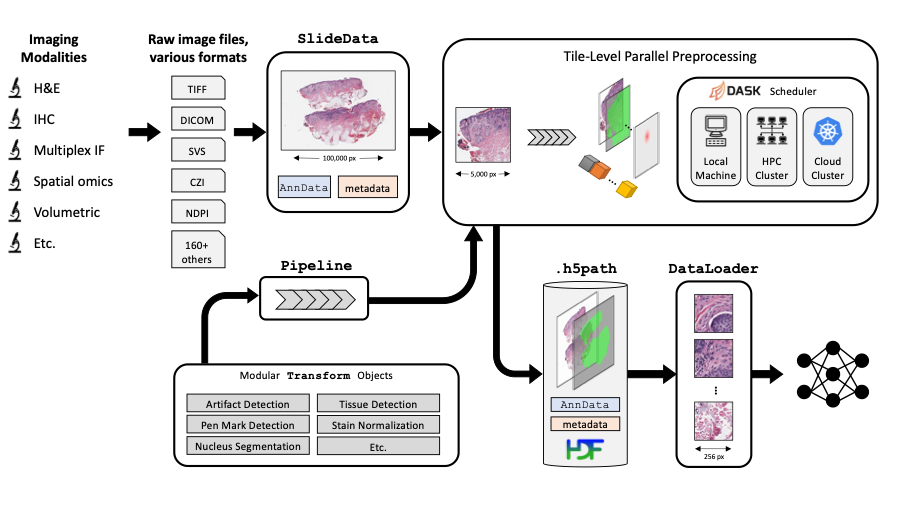
An open-source toolkit for computational pathology and machine learning.
View documentation
:construction: the dev branch is under active development, with experimental features, bug fixes, and refactors that may happen at any time!
Stable versions are available as tagged releases on GitHub, or as versioned releases on PyPI
Installation
There are several ways to install PathML:
pip installfrom PyPI (recommended for users)- Clone repo to local machine and install from source (recommended for developers/contributors)
- Use the PathML Docker container
Options (1) and (2) require that you first install all external dependencies:
- openslide
- JDK 8
We recommend using conda for environment management. Download Miniconda here
Note: these instructions are for Linux. Commands may be different for other platforms.
Installation option 1: pip install
Create conda environment:
conda create --name pathml python=3.8
conda activate pathml
Install external dependencies (Linux) with Apt:
sudo apt-get install openslide-tools g++ gcc libblas-dev liblapack-dev
Install external dependencies (MacOS) with Brew:
brew install openslide
Install OpenJDK 8:
conda install openjdk==8.0.152
Optionally install CUDA (instructions here)
Install PathML from PyPI:
pip install pathml
Installation option 2: clone repo and install from source
Clone repo:
git clone https://github.com/Dana-Farber-AIOS/pathml.git
cd pathml
Create conda environment:
conda env create -f environment.yml
conda activate pathml
Optionally install CUDA (instructions here)
Install PathML from source:
pip install -e .
Installation option 3: Docker
First, download or build the PathML Docker container:
-
Option A: download PathML container from Docker Hub
docker pull pathml/pathml:latestOptionally specify a tag for a particular version, e.g.
docker pull pathml/pathml:2.0.2. To view possible tags, please refer to the PathML DockerHub page. -
Option B: build docker container from source
git clone https://github.com/Dana-Farber-AIOS/pathml.git
cd pathml
docker build -t pathml/pathml .
Then connect to the container:
docker run -it -p 8888:8888 pathml/pathml
The above command runs the container, which is configured to spin up a jupyter lab session and expose it on port 8888.
The terminal should display a URL to the jupyter lab session starting with http://127.0.0.1:8888/lab?token=<.....>.
Navigate to that page and you should connect to the jupyter lab session running on the container with the pathml
environment fully configured. If a password is requested, copy the string of characters following the token= in the
url.
Note that the docker container requires extra configurations to use with GPU.
Note that these instructions assume that there are no other processes using port 8888.
Please refer to the Docker run documentation for further instructions
on accessing the container, e.g. for mounting volumes to access files on a local machine from within the container.
CUDA
To use GPU acceleration for model training or other tasks, you must install CUDA. This guide should work, but for the most up-to-date instructions, refer to the official PyTorch installation instructions.
Check the version of CUDA:
nvidia-smi
Install correct version of cudatoolkit:
# update this command with your CUDA version number
conda install cudatoolkit=11.0
After installing PyTorch, optionally verify successful PyTorch installation with CUDA support:
python -c "import torch; print(torch.cuda.is_available())"
Using with Jupyter
Jupyter notebooks are a convenient way to work interactively. To use PathML in Jupyter notebooks:
Set JAVA_HOME environment variable
PathML relies on Java to enable support for reading a wide range of file formats.
Before using PathML in Jupyter, you may need to manually set the JAVA_HOME environment variable
specifying the path to Java. To do so:
- Get the path to Java by running
echo $JAVA_HOMEin the terminal in your pathml conda environment (outside of Jupyter) - Set that path as the
JAVA_HOMEenvironment variable in Jupyter:import os os.environ["JAVA_HOME"] = "/opt/conda/envs/pathml" # change path as needed
Register environment as an IPython kernel
conda activate pathml
conda install ipykernel
python -m ipykernel install --user --name=pathml
This makes the pathml environment available as a kernel in jupyter lab or notebook.
Contributing
PathML is an open source project. Consider contributing to benefit the entire community!
There are many ways to contribute to PathML, including:
- Submitting bug reports
- Submitting feature requests
- Writing documentation and examples
- Fixing bugs
- Writing code for new features
- Sharing workflows
- Sharing trained model parameters
- Sharing
PathMLwith colleagues, students, etc.
See contributing for more details.
Citing
If you use PathML in your work, please cite our paper:
Rosenthal J, Carelli R, Omar M, Brundage D, Halbert E, Nyman J, Hari SN, Van Allen EM, Marchionni L, Umeton R, Loda M. Building tools for machine learning and artificial intelligence in cancer research: best practices and a case study with the PathML toolkit for computational pathology. Molecular Cancer Research, 2021. DOI: 10.1158/1541-7786.MCR-21-0665
License
The GNU GPL v2 version of PathML is made available via Open Source licensing. The user is free to use, modify, and distribute under the terms of the GNU General Public License version 2.
Commercial license options are available also.
Contact
Questions? Comments? Suggestions? Get in touch!

3 maintainers


Metadata
3 maintainers
Release files for pathml 2.1.0
For a detailed explanation of source distributions (sdists) and built distributions (wheels), please see the package formats documentation.
Source distribution (sdist)
| File | Size | Uploaded | Provenance | Actions |
|---|---|---|---|---|
| pathml-2.1.0.tar.gz | 77.8 kB | Without provenance | Details for pathml-2.1.0.tar.gz |
Built distribution (wheel)
| File | Interpreter | ABI | Platform | Actions Reset |
|---|---|---|---|---|
| pathml-2.1.0-py3-none-any.whl | Python 3 | none | any | Details for pathml-2.1.0-py3-none-any.whl |
Total release size: 164.1 kB
Release files / pathml-2.1.0.tar.gz
| Download URL | pathml-2.1.0.tar.gz |
|---|---|
| Size | 77.8 kB |
| Tags | Source |
|
SHA-256 checksum How to use checksums |
462bb2f16452dddad310c30f62678a1336ce492263355fd6722c07ee4840ea6a
|
|
BLAKE2b-256 checksum How to use checksums |
8c31fb6077bae1f22d094e9d6c53284c7a0ae30b41864657bf4807e3bc4978b2
|
| Upload date | |
|
Uploaded using Trusted Publishing? What is trusted publishing? |
No |
| Uploaded via |
twine/4.0.0 CPython/3.9.12
|
Release files / pathml-2.1.0-py3-none-any.whl
| Download URL | pathml-2.1.0-py3-none-any.whl |
|---|---|
| Size | 86.3 kB |
| Tags | Python 3 |
|
SHA-256 checksum How to use checksums |
953848b9c56d01624e20a060cd0a78631304882e1401a11467524deb2cce8863
|
|
BLAKE2b-256 checksum How to use checksums |
3fae01734cac44cdadda95d4cbd817dfd15667f23c8daec7aa892171c9a4b3d2
|
| Upload date | |
|
Uploaded using Trusted Publishing? What is trusted publishing? |
No |
| Uploaded via |
twine/4.0.0 CPython/3.9.12
|
Security for pathml 2.1.0
Provenance
Provenance describes where a file came from. On PyPI, provenance is shared via attestations, which provide a verifiable record of the build or publishing details. View details, limitations and caveats.
No provenance found
None of the files in this release were uploaded with provenance metadata.
A note on package security
PyPI is a repository for distributing packages, not a service for auditing them. While third-party security researchers and our staff do their best to detect and remove malicious packages, PyPI cannot guarantee the quality, security or suitability of any given package.
To learn more about protecting yourself from malicious actors, visit our package security documentation.














