








PDF scientific paper translation and bilingual comparison.
- 📊 Preserve formulas, charts, table of contents, and annotations (preview).
- 🌐 Support multiple languages, and diverse translation services.
- 🤖 Provides commandline tool, interactive user interface, and Docker
Feel free to provide feedback in GitHub Issues, Telegram Group or QQ Group.
Updates
- [Nov. 26 2024] CLI now supports online file(s) (by @reycn)
- [Nov. 24 2024] ONNX support to reduce dependency sizes (by @Wybxc)
- [Nov. 23 2024] 🌟 Public Service online! (by @Byaidu)
- [Nov. 23 2024] Firewall for preventing web bots (by @Byaidu)
- [Nov. 22 2024] GUI now supports Italian, and has been improved (by @Byaidu, @reycn)
- [Nov. 22 2024] You can now share your deployed service to others (by @Zxis233)
- [Nov. 22 2024] Now supports Tencent Translation (by @hellofinch)
- [Nov. 21 2024] GUI now supports downloading dual-document (by @reycn)
- [Nov. 20 2024] 🌟 Demo online! (by @reycn)
Preview

Public Service 🌟
Free Service (https://pdf2zh.com/)
You can try our public service online without installation.
Hugging Face Demo
You can try our demo on HuggingFace without installation. Note that the computing resources of the demo are limited, so please avoid abusing them.
Installation and Usage
We provide three methods for using this project: Commandline, Portable, GUI, and Docker.
Method I. Commandline
-
Python installed (3.8 <= version <= 3.12)
-
Install our package:
pip install pdf2zh
-
Execute translation, files generated in current working directory:
pdf2zh document.pdf
Method II. Portable
No need to pre-install Python environment
Download and double-click to run setup.bat
Method III. GUI
-
Python installed (3.8 <= version <= 3.12)
-
Install our package:
pip install pdf2zh
-
Start using in browser:
pdf2zh -i -
If your browswer has not been started automatically, goto
http://localhost:7860/

See documentation for GUI for more details.
Method IV. Docker
-
Pull and run:
docker pull byaidu/pdf2zh
docker run -d -p 7860:7860 byaidu/pdf2zh
-
Open in browser:
http://localhost:7860/
For docker deployment on cloud service:




Advanced Options
Execute the translation command in the command line to generate the translated document example-zh.pdf and the bilingual document example-dual.pdf in the current working directory. Use Google as the default translation service.

In the following table, we list all advanced options for reference:
| Option | Function | Example |
|---|---|---|
| files | Local files | pdf2zh ~/local.pdf |
| links | Online files | pdf2zh http://arxiv.org/paper.pdf |
-i |
Enter GUI | pdf2zh -i |
-p |
Partial document translation | pdf2zh example.pdf -p 1 |
-li |
Source language | pdf2zh example.pdf -li en |
-lo |
Target language | pdf2zh example.pdf -lo zh |
-s |
Translation service | pdf2zh example.pdf -s deepl |
-t |
Multi-threads | pdf2zh example.pdf -t 1 |
-o |
Output dir | pdf2zh example.pdf -o output |
-f, -c |
Exceptions | pdf2zh example.pdf -f "(MS.*)" |
Some services require setting environmental variables.
Full / partial document translation
-
Entire document
pdf2zh example.pdf -
Part of the document
pdf2zh example.pdf -p 1-3,5
Specify source and target languages
See Google Languages Codes, DeepL Languages Codes
pdf2zh example.pdf -li en -lo ja
Translate with Different Services
-
DeepL
See DeepL
Set ENVs to construct an endpoint like:
{DEEPL_SERVER_URL}/translateDEEPL_SERVER_URL(Optional), e.g.,export DEEPL_SERVER_URL=https://api.deepl.comDEEPL_AUTH_KEY, e.g.,export DEEPL_AUTH_KEY=xxx
pdf2zh example.pdf -s deepl
-
DeepLX
See DeepLX
Set ENVs to construct an endpoint like:
{DEEPL_SERVER_URL}/translateDEEPLX_SERVER_URL(Optional), e.g.,export DEEPLX_SERVER_URL=https://api.deeplx.orgDEEPLX_AUTH_KEY, e.g.,export DEEPLX_AUTH_KEY=xxx
pdf2zh example.pdf -s deeplx
-
Ollama
See Ollama
Set ENVs to construct an endpoint like:
{OLLAMA_HOST}/api/chatOLLAMA_HOST(Optional), e.g.,export OLLAMA_HOST=https://localhost:11434
pdf2zh example.pdf -s ollama:gemma2
-
LLM with OpenAI compatible schemas (OpenAI / SiliconCloud / Zhipu)
See SiliconCloud, Zhipu
Set ENVs to construct an endpoint like:
{OPENAI_BASE_URL}/chat/completionsOPENAI_BASE_URL(Optional), e.g.,export OPENAI_BASE_URL=https://api.openai.com/v1OPENAI_API_KEY, e.g.,export OPENAI_API_KEY=xxx
pdf2zh example.pdf -s openai:gpt-4o
-
Azure
Following ENVs are required:
AZURE_APIKEY, e.g.,export AZURE_APIKEY=xxxAZURE_ENDPOINT, e.g,export AZURE_ENDPOINT=https://api.translator.azure.cn/AZURE_REGION, e.g.,export AZURE_REGION=chinaeast2
pdf2zh example.pdf -s azure
-
Tencent Machine Translation
See Tencent Machine Translation
Following ENVs are required:
TENCENT_SECRET_ID, e.g.,export TENCENT_SECRET_ID=AKIDxxxTENCENT_SECRET_KEY, e.g,export TENCENT_SECRET_KEY=xxx
pdf2zh example.pdf -s tencent
Translate wih exceptions
Use regex to specify formula fonts and characters that need to be preserved:
pdf2zh example.pdf -f "(CM[^RT].*|MS.*|.*Ital)" -c "(\(|\||\)|\+|=|\d|[\u0080-\ufaff])"
Specify threads
Use -t to specify how many threads to use in translation:
pdf2zh example.pdf -t 1
TODO
-
Parse layout with DocLayNet based models, PaddleX, PaperMage, SAM2
-
Fix page rotation, table of contents, format of lists
-
Fix pixel formula in old papers
-
Support multiple language with Noto Font, Ubuntu Font
-
Async retry except KeyboardInterrupt
-
Knuth–Plass algorithm for western languages
-
Support non-PDF/A files
Acknowledgements
-
Document merging: PyMuPDF
-
Document parsing: Pdfminer.six
-
Document extraction: MinerU
-
Multi-threaded translation: MathTranslate
-
Layout parsing: DocLayout-YOLO
-
Document standard: PDF Explained, PDF Cheat Sheets
Contributors

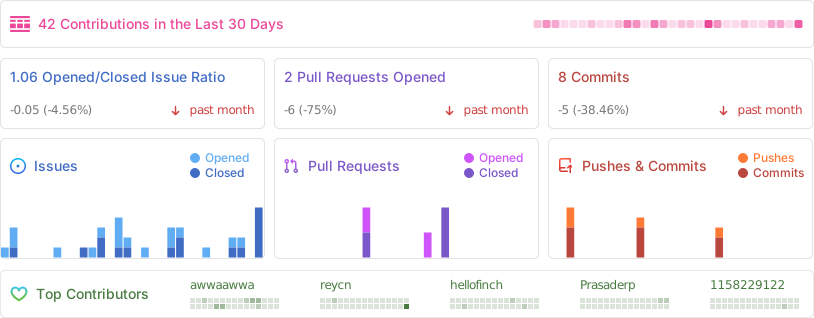
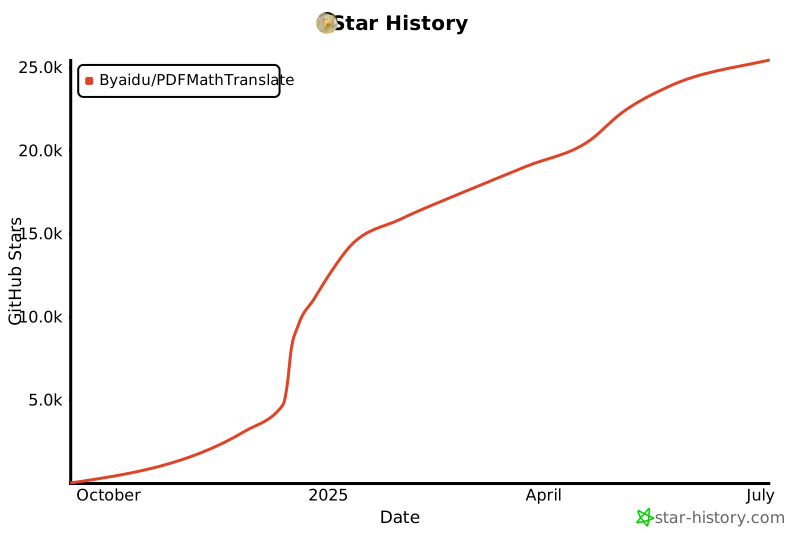
Star History
1 maintainer

Metadata
1 maintainer
Release files for pdf2zh 1.8.3
For a detailed explanation of source distributions (sdists) and built distributions (wheels), please see the package formats documentation.
Source distribution (sdist)
| File | Size | Uploaded | |
|---|---|---|---|
| pdf2zh-1.8.3.tar.gz | 4.1 MB | Details |
Built distribution (wheel)
| File | Interpreter | ABI | Platform | Reset |
|---|---|---|---|---|
| pdf2zh-1.8.3-py3-none-any.whl | Python 3 | none | any | Details |
Total release size: 4.1 MB
Release files / pdf2zh-1.8.3.tar.gz
| Download URL | pdf2zh-1.8.3.tar.gz |
|---|---|
| Size | 4.1 MB |
| Tags | Source |
|
SHA-256 checksum How to use checksums |
e0f9cf6d117b4fc8e970570aa99e12902787ec1fdb4adf7eeda4a4be51c6218b
|
|
BLAKE2b-256 checksum How to use checksums |
1fd40b4338cbea5db5007fb25c80ac87ba67ee6ab32dd8946f36c8891db1fc79
|
| Upload date | |
|
Uploaded using Trusted Publishing? What is trusted publishing? |
Yes |
| Uploaded via |
twine/5.1.1 CPython/3.12.7
|
Provenance
Provenance describes where a file came from. On PyPI, provenance is shared via attestations, which provide a verifiable record of the build or publishing details. View details, limitations and caveats.


PyPI Publish Attestation
PyPI verified that this artifact, at this checksum, originated from the publisher listed below.
Signed by GitHub Actions, verified by PyPI on Dec 3, 2024.
Transparency logRelease files / pdf2zh-1.8.3-py3-none-any.whl
| Download URL | pdf2zh-1.8.3-py3-none-any.whl |
|---|---|
| Size | 42.7 kB |
| Tags | Python 3 |
|
SHA-256 checksum How to use checksums |
0b7a62c04bcb6c8d32f8ec65e458484566193626bd2c519deedc77af8bd50364
|
|
BLAKE2b-256 checksum How to use checksums |
ad52a7dc6dda81e628488757a306124616a24205520b20b58243bd2bfa4f07cf
|
| Upload date | |
|
Uploaded using Trusted Publishing? What is trusted publishing? |
Yes |
| Uploaded via |
twine/5.1.1 CPython/3.12.7
|
Provenance
Provenance describes where a file came from. On PyPI, provenance is shared via attestations, which provide a verifiable record of the build or publishing details. View details, limitations and caveats.
PyPI Publish Attestation
PyPI verified that this artifact, at this checksum, originated from the publisher listed below.
Signed by GitHub Actions, verified by PyPI on Dec 3, 2024.
Transparency log













