
MOOSE GUI developed using Trame from Kitware Inc.
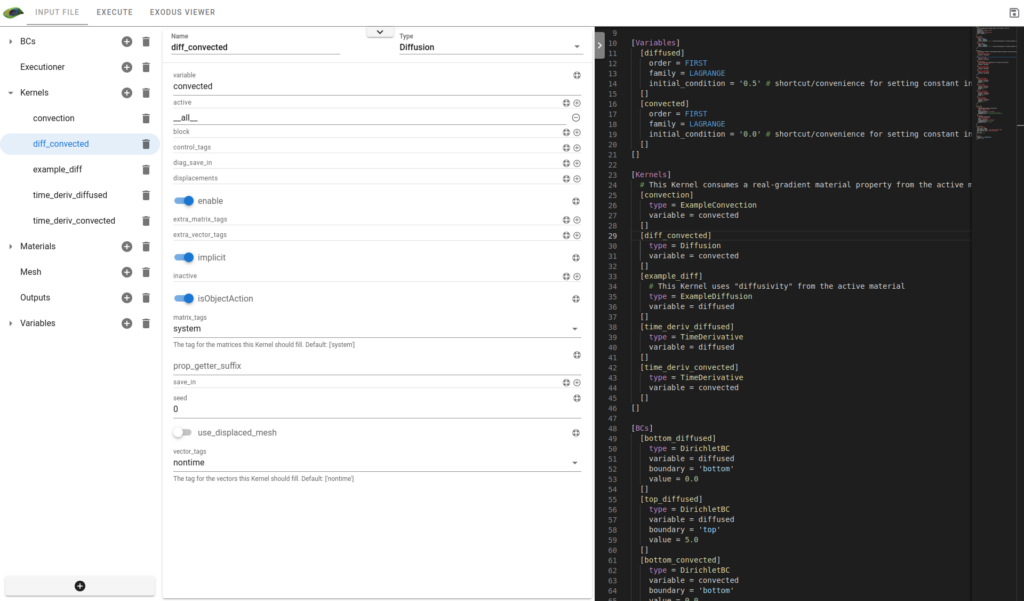
License
Free software: Apache Software License
Mamba setup
curl -L -O https://github.com/conda-forge/miniforge/releases/latest/download/Mambaforge-MacOSX-arm64.sh
bash Mambaforge-MacOSX-arm64.sh -b -p ~/mambaforge3
export PATH=$HOME/mambaforge3/bin:$PATH
You will probably have to move the code that was generated in ~/.bash_profile to ~/.zshrc.
Then after terminal restart add INL channel
conda config --add channels https://conda.software.inl.gov/publicRunning the software
mkdir peacock-work
cd peacock-work
git clone --recursive git@github.com:Kitware/peacock.git
git clone --recursive https://github.com/idaholab/moose.git
Create venv with mamba locally
mamba install python=3.10
mamba create -n moose python=3.10 moose paraview -y
mamba activate moose
pip install peacock-trame
Test application on a moose example
peacock-trame -I ./moose/examples/ex08_materials/ex08.iRunning with language server
Clone and build the moose language server
git clone git@github.com:idaholab/moose-language-support.git
cd moose-language-support
npm run compile
Install middleware packages
cd /path/to/peacock/lang-server
npm i
Point to compiled language server when running app
peacock-trame -I ./ex08.i -L /path/to/moose-language-support/server/out/server.jsDevelopment setup
Installing peacock using the local files
pip install -e ./peacockBuilding the client code
cd vue-components
npm i
npm run build
cd -
Run the application assuming the same layout as previously described
cd ./moose/examples/ex08_materials
make
peacock-trame -I ./ex08.i3 maintainers


Metadata
3 maintainers
Release files for peacock-trame 0.1.2
For a detailed explanation of source distributions (sdists) and built distributions (wheels), please see the package formats documentation.
Source distribution (sdist)
| File | Size | Uploaded | Provenance | Actions |
|---|---|---|---|---|
| peacock-trame-0.1.2.tar.gz | 11.9 MB | Without provenance | Details for peacock-trame-0.1.2.tar.gz |
Built distribution (wheel)
| File | Interpreter | ABI | Platform | Actions Reset |
|---|---|---|---|---|
| peacock_trame-0.1.2-py3-none-any.whl | Python 3 | none | any | Details for peacock_trame-0.1.2-py3-none-any.whl |
Total release size: 23.9 MB
Release files / peacock-trame-0.1.2.tar.gz
| Download URL | peacock-trame-0.1.2.tar.gz |
|---|---|
| Size | 11.9 MB |
| Tags | Source |
|
SHA-256 checksum How to use checksums |
81351c785668295a7b1f1e58074ba00a7e655a3f4d4bd8d870c7ca58c227c0b2
|
|
BLAKE2b-256 checksum How to use checksums |
fd4e228073dbd8b64c993b4925e6d1a8aa9ea674cc044c6f1175973dfc2ee045
|
| Upload date | |
|
Uploaded using Trusted Publishing? What is trusted publishing? |
No |
| Uploaded via |
twine/3.8.0 pkginfo/1.12.1.2 readme-renderer/44.0 requests/2.32.4 requests-toolbelt/1.0.0 urllib3/2.5.0 tqdm/4.67.1 importlib-metadata/8.7.0 keyring/25.6.0 rfc3986/2.0.0 colorama/0.4.6 CPython/3.10.18
|
Release files / peacock_trame-0.1.2-py3-none-any.whl
| Download URL | peacock_trame-0.1.2-py3-none-any.whl |
|---|---|
| Size | 12.0 MB |
| Tags | Python 3 |
|
SHA-256 checksum How to use checksums |
33176d9b20458ce3124c4c6890b20a823c18b9b25272057c441620819acbae85
|
|
BLAKE2b-256 checksum How to use checksums |
af8aa4e68c6aedc34832920c98e953af3cb01d9def2622b7327a6c4b5939156a
|
| Upload date | |
|
Uploaded using Trusted Publishing? What is trusted publishing? |
No |
| Uploaded via |
twine/3.8.0 pkginfo/1.12.1.2 readme-renderer/44.0 requests/2.32.4 requests-toolbelt/1.0.0 urllib3/2.5.0 tqdm/4.67.1 importlib-metadata/8.7.0 keyring/25.6.0 rfc3986/2.0.0 colorama/0.4.6 CPython/3.10.18
|
Security for peacock-trame 0.1.2
Provenance
Provenance describes where a file came from. On PyPI, provenance is shared via attestations, which provide a verifiable record of the build or publishing details. View details, limitations and caveats.
No provenance found
None of the files in this release were uploaded with provenance metadata.
A note on package security
PyPI is a repository for distributing packages, not a service for auditing them. While third-party security researchers and our staff do their best to detect and remove malicious packages, PyPI cannot guarantee the quality, security or suitability of any given package.
To learn more about protecting yourself from malicious actors, visit our package security documentation.














