
Peplum







Introduction
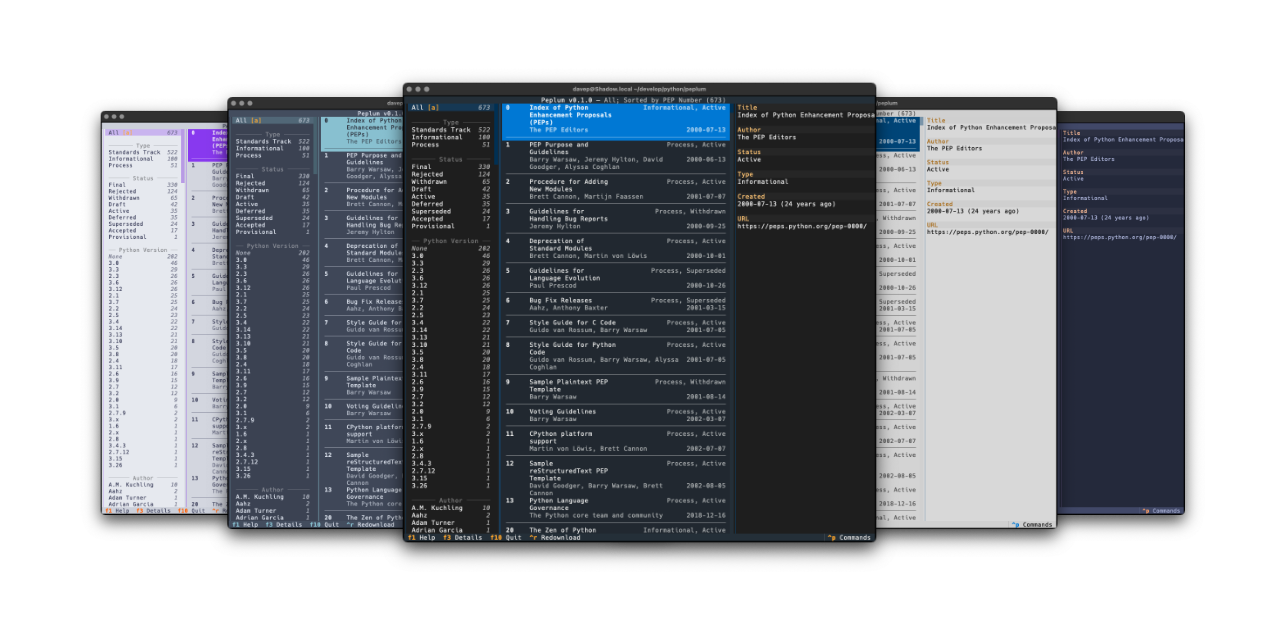
Peplum is a terminal-based lookup manager for Python Enhancement Proposals. It provides the ability to browse, filter and search the metadata for all the PEPs available via the PEP API.
Installing
pipx
The package can be installed using pipx:
$ pipx install peplum
Homebrew
The package is available via Homebrew. Use the following commands to install:
$ brew tap davep/homebrew
$ brew install peplum
Using Peplum
Once you've installed Peplum using one of the above methods, you can run the
application using the peplum command.
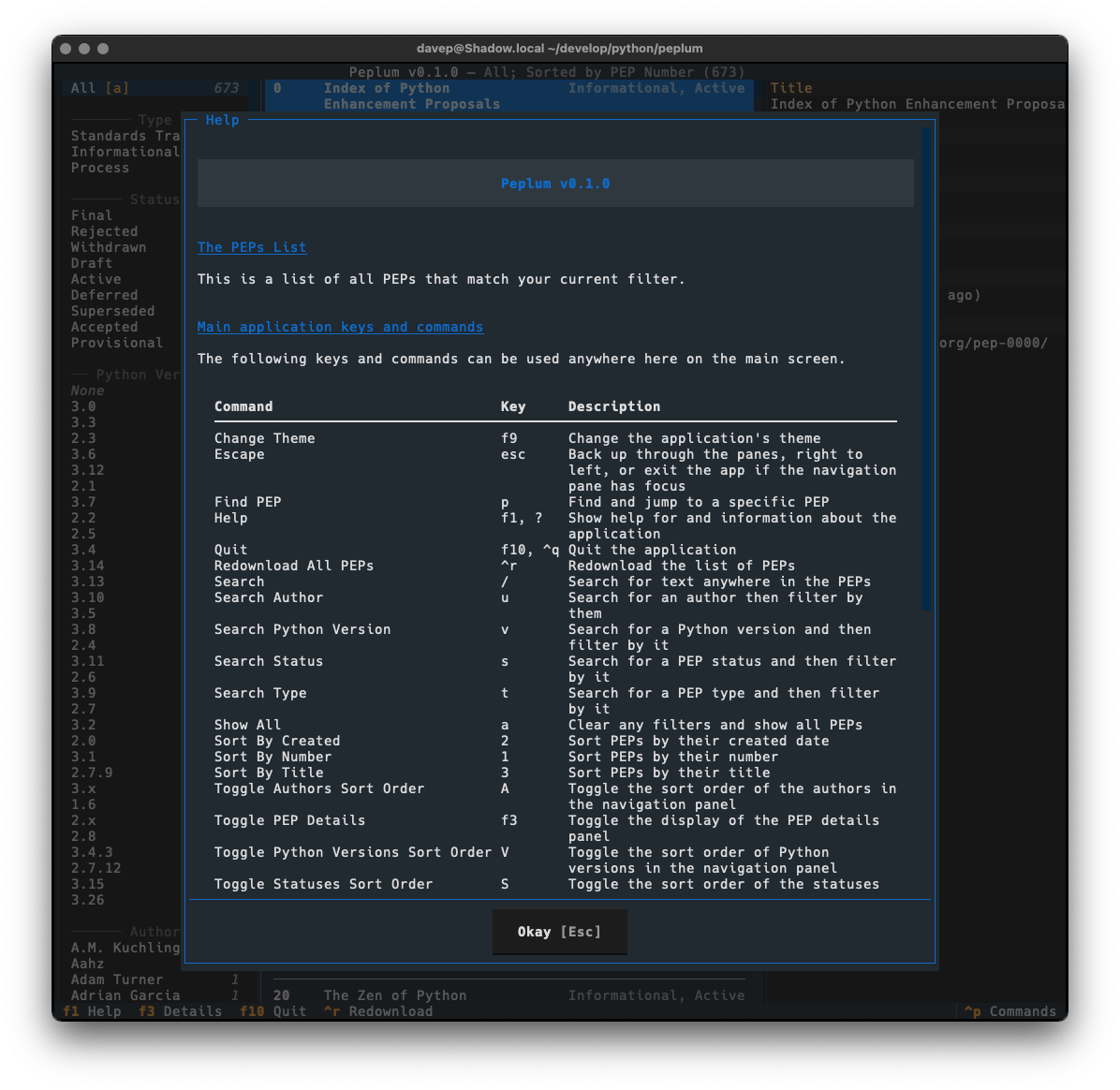
The best way to get to know Peplum is to read the help screen, once in the main application you can see this by pressing F1.
For more information and details on configuring Peplum, see the online documentation.
File locations
Peplum stores files in a peplum directory within both
$XDG_DATA_HOME and
$XDG_CONFIG_HOME.
If you wish to fully remove anything to do with Peplum you will need to
remove those directories too.
Expanding for the common locations, the files normally created are:
~/.config/peplum/configuration.json-- The configuration file.~/.local/share/peplum/*.json-- The locally-held PEP data.~/.local/share/peplum/cache/*.rst-- The locally-cached PEP source files.
Getting help
If you need help, or have any ideas, please feel free to raise an issue or start a discussion.
TODO
See the TODO tag in issues to see what I'm planning.
1 maintainer

Metadata
1 maintainer
Release files for peplum 1.1.0
For a detailed explanation of source distributions (sdists) and built distributions (wheels), please see the package formats documentation.
Source distribution (sdist)
| File | Size | Uploaded | Provenance | Actions |
|---|---|---|---|---|
| peplum-1.1.0.tar.gz | 28.2 kB | Without provenance | Details for peplum-1.1.0.tar.gz |
Built distribution (wheel)
| File | Interpreter | ABI | Platform | Actions Reset |
|---|---|---|---|---|
| peplum-1.1.0-py3-none-any.whl | Python 3 | none | any | Details for peplum-1.1.0-py3-none-any.whl |
Total release size: 71.3 kB
Release files / peplum-1.1.0.tar.gz
| Download URL | peplum-1.1.0.tar.gz |
|---|---|
| Size | 28.2 kB |
| Tags | Source |
|
SHA-256 checksum How to use checksums |
77168b4001154e8f0ddfb16307c4b3bcdcc4ac389e0acff387b04f10f52e37c1
|
|
BLAKE2b-256 checksum How to use checksums |
c90fc36b35ed7ff6944173768c8bf073a79d40482eec1bf73fcd9343ed1eed08
|
| Upload date | |
|
Uploaded using Trusted Publishing? What is trusted publishing? |
No |
| Uploaded via |
uv/0.13.6 {"installer":{"name":"uv","version":"0.13.6","subcommand":["publish"]},"python":null,"implementation":{"name":null,"version":null},"distro":{"name":"macOS","version":null,"id":null,"libc":null},"system":{"name":null,"release":null},"cpu":null,"openssl_version":null,"setuptools_version":null,"rustc_version":null,"ci":null}
|
Release files / peplum-1.1.0-py3-none-any.whl
| Download URL | peplum-1.1.0-py3-none-any.whl |
|---|---|
| Size | 43.2 kB |
| Tags | Python 3 |
|
SHA-256 checksum How to use checksums |
1276ad8b0ec3334758a50ba5d070120c7e18dbce01bd1a9caf43255a2232c697
|
|
BLAKE2b-256 checksum How to use checksums |
15f97fae5c78cf2019b3fab91bf7c81dcaf2e8ddaa08735a6b1d96fb2c168637
|
| Upload date | |
|
Uploaded using Trusted Publishing? What is trusted publishing? |
No |
| Uploaded via |
uv/0.13.6 {"installer":{"name":"uv","version":"0.13.6","subcommand":["publish"]},"python":null,"implementation":{"name":null,"version":null},"distro":{"name":"macOS","version":null,"id":null,"libc":null},"system":{"name":null,"release":null},"cpu":null,"openssl_version":null,"setuptools_version":null,"rustc_version":null,"ci":null}
|
Security for peplum 1.1.0
Provenance
Provenance describes where a file came from. On PyPI, provenance is shared via attestations, which provide a verifiable record of the build or publishing details. View details, limitations and caveats.
No provenance found
None of the files in this release were uploaded with provenance metadata.
A note on package security
PyPI is a repository for distributing packages, not a service for auditing them. While third-party security researchers and our staff do their best to detect and remove malicious packages, PyPI cannot guarantee the quality, security or suitability of any given package.
To learn more about protecting yourself from malicious actors, visit our package security documentation.














