
A package for periorbital distance segmentation and measurement.

Project description
Periorbital Segmentation and Distance Measurement Package
Table of Contents
- Background
- Installation
- Designed with Two Primary Users in Mind
- Instructions for User 1
- Instructions for User 2
- What is Returned
- Important Functions and Classes
- Things to Keep in Mind
- Cite Us
- References
Background
In the literature, there have been many papers using segmentation of external ocular anatomy as an intermediate step in the prediction of periorbital distances. Clinically, the measurement of periorbital distances is an important step to track disease progression and monitor treatment efficacy, however manual measurements is a time consuming and error prone process. While automatic prediction of periorbital distances stands to significantly reduce the time burden of oculoplastic and craniofacial surgeons clinically, it also presents an attractive strategy to objectively measure periorbital distances. For research in this area to move forward, the development of open-source datasets with periorbital annotations created at the level of detail required for prediction of sub millimeter distances is required.
This package is specifically developed for periorbital segmentation and distance prediction. We have trained three models using two open source datasets we have created or improved- Chciago Facial Database (CFD) [1-3], the CelebAMaskHQ dataset (celeb) [4], and one using a mixture of both. Models were trained using a DeepLabV3 segmentation model with a ResNet101 backbone pretrained on ImageNet. All models are hosted on HuggingFace and accessible via the package.
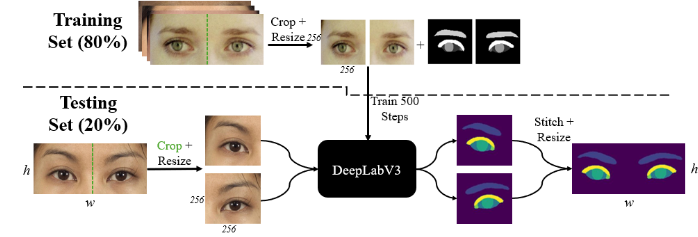
Above is an image depicting the training pipeline for our networks. Briefly, a DeepLabV3 segmentation network with a ResNet-101 backbone pretrained on ImageNet1K was implemented from Torchvision. The final layer was modified to output six output classes, and the model was trained for 500 steps. A train test split of 80/20 was used with cross-entropy loss and a batch size of 16. Adam optimization was used with a learning rate of .0001 and beta values of .9 and .99. Prior to training and prediction, images were split at the midline and resized to 256x256. At test time, the same process was applied, and the resulting segmentation maps of both halves of the image were recombined using the same aspect ratio as the initial image.
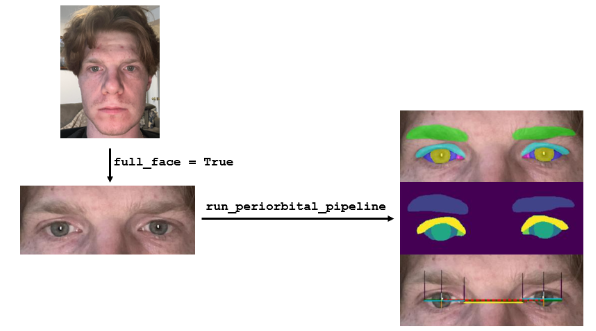
The above image demonstrates the potential workflow. Either full face or cropped images of eyes are compatible with the package. The images on the right side of the figure will be returned along with spreadsheets of the periorbital measurements in mms.
Installation
To install this package, you can clone the repository and install it locally, or install it directly via pip:
pip install periorbital-package
Designed with Two Primary Users in Mind
-
Users with an image of a face or eyes looking to compute periorbital distances and associated plots and want to use our segmentation models:
- This user can leverage the package's built-in segmentation models to process their images, obtain segmentation masks, and compute the relevant periorbital distances and plots.
-
Users who have developed their own segmentation model for the brow, iris, and sclera (+/- caruncle and lid) and want to use the segmentation masks to get arrays:
- This user can input their custom segmentation masks into the package to compute periorbital measurements without the need for additional segmentation.
Instructions for User 1
- Prepare your image in a compatible format (e.g., JPEG, PNG).
- Use the
run_periorbital_pipelinefunction with your image and specifyfull_face=Trueif your image contains a full face. - The package will handle segmentation and return measurements and plots.
Instructions for User 2
-
Prepare your segmentation masks for the brow, iris, sclera, and optional caruncle and lid. For every anatomical object, the mask for both the left and the right anatomical structure needs to be stored in a dict with the following keynames and correspinding pixel values to be compatible with the measurement pipeline
sample_dict = {
    'brow': 1,
    'sclera_orig': 2,
    'iris': 3,
    'caruncle': 4,
    'lid': 5
}
This means that if your segmentation model predicts all 5 structures, you will have 10 entries in the dict (5 for left, and 5 for right). To be compatible with the measurement pipeline, only sclera_orig, iris, and brow are required.
- Use the
run_periorbital_pipelinefunction with your masks and set themodel='custom'parameter. - The package will use your provided masks to compute the relevant measurements.
What is Returned
When you run the periorbital pipeline, the following outputs are returned:
- Pixel Measurements DataFrame: A DataFrame containing periorbital measurements in pixel values.
- Millimeter Measurements DataFrame: A DataFrame containing periorbital measurements converted to millimeters.
- Segmentation Masks: The segmentation masks for each anatomical structure.
- Overlay Images: Images with segmentation masks overlaid on the original image.
- Annotated Image: An image with annotated periorbital measurements.
Important Functions and Classes
-
run_periorbital_pipeline: The main function to run the entire pipeline, from segmentation to measurement extraction. -
PupilIris,Sclera,Brows: Classes responsible for extracting specific anatomical features from the segmentation masks:PupilIris: Extracts the centroid, diameter, and superior/inferior points of the iris.Sclera: Extracts key points of the sclera and fits polynomials to the upper and lower borders of the sclera.Brows: Extracts key points on the eyebrows relative to the medial canthus, lateral canthus, and iris center.
-
EyeFeatureExtractor: A class that coordinates the extraction of all relevant periorbital features from the segmentation masks. It utilizesPupilIris,Sclera, andBrowsclasses to gather and organize landmarks into a cohesive structure for measurement. -
EyeMetrics:- Description: This class is responsible for calculating various periorbital distances based on the extracted landmarks.
- Example Usage: You can instantiate this class with the
landmarksandpredictions_dictand call itsrunmethod to get a dictionary of measurements in pixel values. - Code Example:
periorbital_calculator = EyeMetrics(landmarks, predictions_dict)
measurements_pix = periorbital_calculator.run()
-
Plotter:- Description: This class is used to create annotated plots of the periorbital measurements directly on the resized images. It visualizes the extracted features and measurements.
- Example Usage: After calculating the measurements, use this class to generate annotated images that overlay the results on the original image.
- Code Example:
periorbital_plotter = Plotter()
image_annot = periorbital_plotter.create_plots(resize_img, predictions_dict, landmarks, img_name, measurements_pix)
-
Tester:- Description: This class is responsible for handling the segmentation process. It loads a specified model, applies it to the input image, and returns the segmentation masks and predictions.
- Example Usage: You can instantiate this class with the model weights and image name, then call the
test_single_imagemethod to obtain the segmentation results. - Code Example:
test_obj = Tester(model_weights=model, image_name=img_name)
predictions_dict, resize_img, segmentation_mask_array, merged_image_array = test_obj.test_single_image(img)
Things to Keep in Mind
-
Iris Segmentation Failure:
- If the iris fails to be segmented in both eyes, the entire program will not work. The current implementation cannot handle cases where one eye is closed or absent.
-
Brow Segmentation Failure:
- If the brow is not segmented, the coordinates for the brow points will be set to 0. This will result in curious measurements in the final dataset of periorbital measurements. Future improvements should address this limitation.
Cite Us
If you found this package useful, please check back here for updates as we release our paper. In the meantime, feel free to star this repository: https://github.com/monkeygobah/periorbital_package/tree/main
References
- Ma DS, Kantner J, Wittenbrink B (2021) Chicago Face Database: Multiracial expansion. Behav Res Methods 53:1289–1300. https://doi.org/10.3758/s13428-020-01482-5
- Ma DS, Correll J, Wittenbrink B (2015) The Chicago face database: A free stimulus set of faces and norming data. Behav Res Methods 47:1122–1135. https://doi.org/10.3758/s13428-014-0532-5
- Lakshmi A, Wittenbrink B, Correll J, Ma DS (2021) The India Face Set: International and Cultural Boundaries Impact Face Impressions and Perceptions of Category Membership. Front Psychol 12:. https://doi.org/10.3389/fpsyg.2021.627678
- Lee C-H, Liu Z, Wu L, Luo P (2020) MaskGAN: Towards Diverse and Interactive Facial Image Manipulation


Download files
Download the file for your platform. If you're not sure which to choose, learn more about installing packages.
Source Distribution
Built Distribution
Filter files by name, interpreter, ABI, and platform.
If you're not sure about the file name format, learn more about wheel file names.
Copy a direct link to the current filters
File details
Details for the file periorbital_package-0.1.3.tar.gz.
File metadata
- Download URL: periorbital_package-0.1.3.tar.gz
- Upload date:
- Size: 26.1 kB
- Tags: Source
- Uploaded using Trusted Publishing? No
- Uploaded via: twine/5.1.1 CPython/3.8.10
File hashes
| Algorithm | Hash digest | |
|---|---|---|
| SHA256 |
17b8382db684953e6b6c4bab719e7ee651fd21e9391b35eea563be70ac48f1d9
|
|
| MD5 |
b67ee8eeab68721ea110fee89230e75c
|
|
| BLAKE2b-256 |
24b649b51d8c016f395b4826b0a8f2881a16bf4d01cf47ac622779ed13234bce
|
File details
Details for the file periorbital_package-0.1.3-py3-none-any.whl.
File metadata
- Download URL: periorbital_package-0.1.3-py3-none-any.whl
- Upload date:
- Size: 25.0 kB
- Tags: Python 3
- Uploaded using Trusted Publishing? No
- Uploaded via: twine/5.1.1 CPython/3.8.10
File hashes
| Algorithm | Hash digest | |
|---|---|---|
| SHA256 |
81c46011948bfb4483e34d72c672bbb9e8756d0a3b480716536f5341835ab5dd
|
|
| MD5 |
35e5767597f33f74c9e80aeada9af216
|
|
| BLAKE2b-256 |
11429ade87f8337967b118955cee88e9e9ce3661078e07c528d2b303657a0ad0
|






