
💰 Personal Finance MCP
Deterministic personal-finance toolkit exposed over the Model Context Protocol — 76 calculators, a meta-advisor, and live market data, with a polished web UI. Grounded in established financial mathematics.





Live demo: https://sarveshtalele-personal-finance-mcp.hf.space
Connector URL: https://sarveshtalele-personal-finance-mcp.hf.space/mcp
Demo
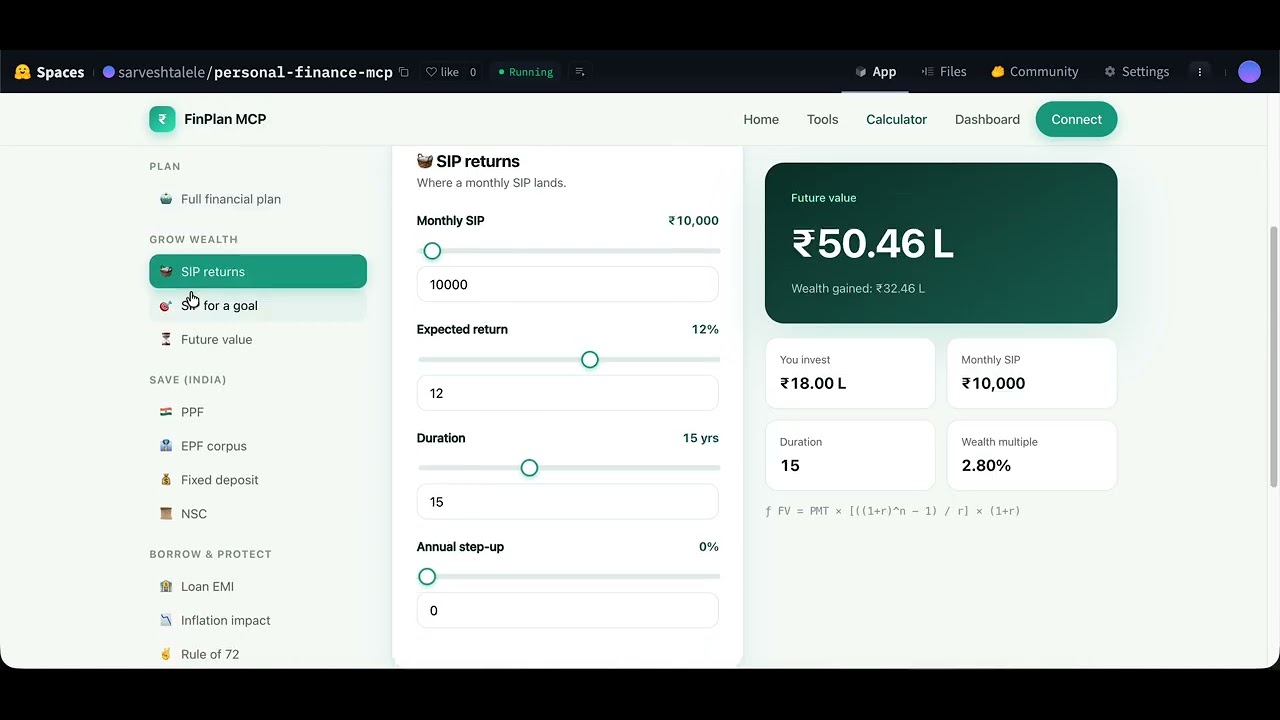
▶️ Watch the 2-minute demo — plain-language question → chained tools → a prioritized plan.
Public demo note: the hosted Space is a shared, best-effort instance (rate-limited, may cold-start after idle). For heavy or private use, run it locally or self-host (see docs/HOW_IT_WORKS.md).
Overview
Most finance "assistants" guess at numbers. This one doesn't. It ships 76 deterministic
calculators — same inputs, same answer, every time — and lets an LLM route a plain-language
question to the right tools. Describe your situation ("I'm 30, earn ₹1L/month, want to retire
at 60") and the create_financial_plan orchestrator chains the relevant calculators into a
single prioritised plan.
It runs three ways from one codebase:
- As an MCP server — connect it to Claude Desktop, Claude Code, Cursor, or any MCP client.
- As a website — a Next.js UI with a live calculator, a market dashboard, and a tool catalog.
- As a hosted connector — deployed to a Hugging Face Docker Space; one URL does all three.
Highlights
- 🔢 Deterministic — pure math, no model inference for the numbers.
- 🤖 Story → tools — the model maps intent to tools; users never name them.
- 🇮🇳 Theory-grounded — TVM, debt, PPF/SSY/NSC/EPF, bonds, derivatives, MPT, and more.
- 🛰️ Live market data — mutual-fund NAVs (AMFI), FX (ECB), equity quotes (Yahoo) — no API keys.
- 🔒 Hardened — stateless, rate-limited, input-bounded APIs with security headers/CSP.
Tool catalog — 76 tools, 13 categories
| Category | Tools | Examples |
|---|---|---|
| Time Value of Money | 10 | future/present value, annuity, perpetuity, EAR, real return |
| Portfolio Analytics | 11 | CAPM, Sharpe, Sortino, Treynor, alpha, allocation, rebalancing |
| Financial Planning | 9 | net worth, ratios, emergency fund, retirement, education, insurance |
| Small Savings (India) | 8 | PPF, SSY, NSC, KVP, SCSS, RD, FD, EPF |
| Mutual Funds | 7 | SIP, SWP, lumpsum-vs-SIP, CAGR, NAV, expense-ratio impact |
| Debt & Loans | 6 | EMI, amortization, prepayment, consolidation, invest-vs-prepay |
| Fixed Income | 6 | bond price, YTM, current yield, duration, convexity, zero-coupon |
| Derivatives | 5 | futures fair value, option payoff, put-call parity, Black-Scholes, beta hedge |
| Equity Valuation | 5 | DDM, two-stage DDM, P/E, DCF, dividend yield |
| Live Market Data | 4 | MF search, live NAV, FX rate, stock/index quote |
| Cash Flow & Budgeting | 3 | household cash flow, debt-to-income, contingency fund |
| Risk Profiling | 1 | suitability score → suggested equity/debt split |
| Advisor | 1 | create_financial_plan — the story → plan orchestrator |
Browse them all (with live descriptions) at /tools.
Quick start
Use the hosted connector (no install)
Claude Desktop — Settings → Connectors → Add custom connector → paste:
https://sarveshtalele-personal-finance-mcp.hf.space/mcp
Claude Code
claude mcp add --transport http personal-finance https://sarveshtalele-personal-finance-mcp.hf.space/mcp
Cursor / VS Code — add to mcp.json:
{
  "mcpServers": {
    "personal-finance": {
      "url": "https://sarveshtalele-personal-finance-mcp.hf.space/mcp",
      "transport": "http"
    }
  }
}
Install from PyPI (stdio server)
pip install personal-finance-mcp # or: uvx personal-finance-mcp
Then point Claude Desktop at it:
{
  "mcpServers": {
    "personal-finance": { "command": "uvx", "args": ["personal-finance-mcp"] }
  }
}
Run locally from source
git clone https://github.com/sarveshtalele/personal-finance-mcp.git
cd personal-finance-mcp
pip install -e .

# Option A — classic stdio MCP server (offline, no web)
python -m src

# Option B — unified server: website + /mcp connector + /api  (http://localhost:7860)
cd web && npm install && npm run build && cd ..
python -m src.web
For stdio, point Claude Desktop at the local process:
{
  "mcpServers": {
    "personal-finance": { "command": "python", "args": ["-m", "src"] }
  }
}
The website
python -m src.web serves everything on one port:
| Path | What |
|---|---|
/ |
Next.js site — home, tool catalog, live calculator, market dashboard, setup guide |
/mcp |
MCP server over streamable-HTTP — the connector URL |
/api/* |
JSON endpoints (tool catalog, calculators, live market data) |
Architecture
src/
├── server.py            # FastMCP server — registers all tool modules
├── __main__.py          # `python -m src`  (stdio transport)
├── tools/               # pure math fns + per-module register(mcp)
│   ├── tvm.py  debt.py  planning.py  bonds.py  stocks.py  mutual_funds.py
│   ├── portfolio.py  derivatives.py  india_savings.py  cashflow.py
│   ├── risk_profile.py  advisor.py   # advisor = story → plan orchestrator
│   └── marketdata.py    # live AMFI / Frankfurter / Yahoo (keyless)
├── models/              # Pydantic schemas + enums
├── utils/               # output formatters
└── web/                 # unified Starlette server (MCP + /api + static site)
    ├── server.py        # routes, security middleware, calculator registry
    └── __main__.py      # `python -m src.web`  (uvicorn, port 7860)

web/                     # Next.js front-end (static export → web/out)
└── app/                 # home, tools, calculator, dashboard, connect
Each tool file keeps deterministic pure functions separate from the thin @mcp.tool
wrappers, so the same functions power the MCP server, the web calculators, and the tests.
Security
- Stateless — no database, no sessions; every call is independent and reproducible.
- Hardened API — per-IP rate limiting, request-body cap, and input validation that bounds loop-driving parameters (years/months/age) to prevent denial-of-service.
- Security headers — CSP (with
frame-ancestorsfor the Hugging Face embed),X-Content-Type-Options,Referrer-Policy,Permissions-Policy; CORS limited to GET/POST without credentials. The header middleware is implemented at the ASGI layer so it never buffers the streaming/mcp(SSE) responses. - No secrets in the app — live-data sources are public and keyless.
See SECURITY.md to report a vulnerability.
Development
pip install -e ".[dev]"
pytest -q                       # 119 tests
ruff check .                    # lint
python -m src.web               # run the full stack locally
Deployment
Deployed as a Hugging Face Docker Space, auto-synced from GitHub on every push to main
(see .github/workflows/hf-sync.yml). Full instructions —
local, Docker, and Hugging Face — are in docs/deployment.md.
Documentation
- docs/HOW_IT_WORKS.md — concepts (MCP, transports, semantic routing), full architecture with diagrams, end-to-end request flows, the security model, hosting it yourself / on a portfolio site, and a production-grade roadmap.
- docs/deployment.md — local, Docker, and Hugging Face deployment.
- docs/Architecture.md · docs/testing.md · docs/setup.md
Contributing
Contributions are welcome — see CONTRIBUTING.md and the
Code of Conduct. Good first issues: add a calculator (a pure function +
a register wrapper + a test), improve descriptions for better tool routing, or extend the
web UI.
Disclaimer
Educational tool for illustrating standard financial formulas. Not investment advice. Figures are illustrative; verify before making financial decisions.
License
MIT — free to use, modify, and distribute.
1 maintainer

Metadata
1 maintainer
Release files for personal-finance-mcp 2.0.0
For a detailed explanation of source distributions (sdists) and built distributions (wheels), please see the package formats documentation.
Source distribution (sdist)
| File | Size | Uploaded | |
|---|---|---|---|
| personal_finance_mcp-2.0.0.tar.gz | 176.2 kB | Details |
Built distribution (wheel)
| File | Interpreter | ABI | Platform | Reset |
|---|---|---|---|---|
| personal_finance_mcp-2.0.0-py3-none-any.whl | Python 3 | none | any | Details |
Total release size: 234.3 kB
Release files / personal_finance_mcp-2.0.0.tar.gz
| Download URL | personal_finance_mcp-2.0.0.tar.gz |
|---|---|
| Size | 176.2 kB |
| Tags | Source |
|
SHA-256 checksum How to use checksums |
02753e025dad3b10f013c8024dd9b7bd70090e1a138eb7f3caf67ef7f73cabd9
|
|
BLAKE2b-256 checksum How to use checksums |
4e7f4327a20170be9f76f48b4161133b31b2cdbb6749fd2036c5d0c54c27f515
|
| Upload date | |
|
Uploaded using Trusted Publishing? What is trusted publishing? |
No |
| Uploaded via |
twine/6.2.0 CPython/3.14.2
|
Release files / personal_finance_mcp-2.0.0-py3-none-any.whl
| Download URL | personal_finance_mcp-2.0.0-py3-none-any.whl |
|---|---|
| Size | 58.2 kB |
| Tags | Python 3 |
|
SHA-256 checksum How to use checksums |
78b748d8605d7b82c70c79910d82fcbf39a1ad1a2f3f0b5ea7da502f7f706952
|
|
BLAKE2b-256 checksum How to use checksums |
035e62596b7a44fec0dcf367c3aea4167b5bb45f79d33a7bc360f0e4e46db034
|
| Upload date | |
|
Uploaded using Trusted Publishing? What is trusted publishing? |
No |
| Uploaded via |
twine/6.2.0 CPython/3.14.2
|














