
perspective.py
The perspective.py library is an easy-to-use API wrapper written in Python for Perspective API, an API that uses machine learning to identify "toxic" comments.
Installation
Download & install git from https://git-scm.com/ and run below command:
python -m pip install --upgrade git+https://github.com/Yilmaz4/perspective.py.git
Or alternatively, you can install from PyPI (Python Package Index):
pyhton -m pip install --upgrade perspective.py
Getting an API key
You need to get an API key from Google to use Perspective API. Instructions are explained in this article.
Command arguments
text: strThe text to analyze
requestedAttributes: list[str]A list of attributes to analyze the text for.
language: strThe language of text.
You can use either Attributes.TOXICITY object or simply "TOXICITY" as a string for requestedAttributes argument.
You can specify the language of the text by using language argument. language argument accepts both language codes (such as "en" or "es") and language names (such as "English" or "Spanish"). Small spelling mistakes in language names can also be accepted (such as "Eglish" or "Spamish"). If you set language argument to None, language will be automatically detected.
You can find a list of all attributes and languages each attribute supports in this article.
Example usage
from perspective import Client, Attributes, utils

# Create the Client object which we will use to make requests with the API key
API_KEY = "your_api_key"
client = Client(token = API_KEY)

# Make a request to Perspective API with a text to analyze and the attributes that you want the text to be analyzed for
response = client.analyze(text = "Hey! How are you?", requestedAttributes = [Attributes.TOXICITY, Attributes.INSULT])

# Print the response as a dictionary
print(response)

# Print the score value of TOXICITY attribute
print(response["TOXICITY"]

print("  ")

# Iterate over the response
for attribute, result in response.items():
    print(attribute.capitalize() + ": " + "%.2f" % result + "%")

print("  ")

# Or alternatively, use utils.format_response to print a formatted text of the response which would return almost the same result as the above code
print(utils.format_response(response, align_right=True))
Output
{'TOXICITY': 7.019685000000001, 'INSULT': 3.9963423999999996}
7.019685000000001

Toxicity: 7.02%
Insult: 4.00%

Toxicity: 7.02%
  Insult: 4.00%
As you can see in the output, Client.analyze returns a dictionary with requested attributes and their analysis results as percents. You can get percents of each attribute, or iterate over dictionary.
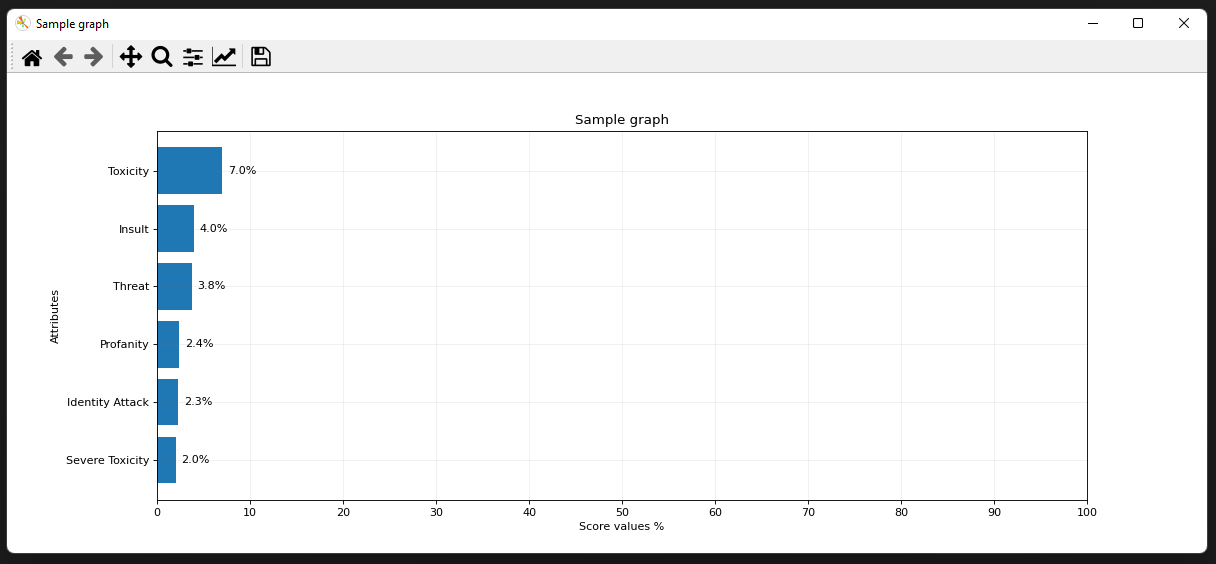
Example usage for creating a bar chart
from perspective import Client, Attributes, utils

# Create the Client object which we will use to make requests with the API key
API_KEY = "your_api_key"
client = Client(token = API_KEY)

# Make a request to Perspective API with a text to analyze and the attributes that you want the text to be analyzed for
response = client.analyze(text = "Hey! How are you?", requestedAttributes = Attributes.Production) # Attributes.Production includes all production-ready attributes

# Create a horizontal bar chart and show it by popping up a window
utils.show_graph(response=response, title="Sample graph")

# Or alternatively, you can save the chart to an image file
utils.save_graph(response=response, filename="my_chart.png", title="Sample graph")
Output
License
MIT License
Copyright (c) 2021-2022 Yilmaz Alpaslan
Permission is hereby granted, free of charge, to any person obtaining a copy of this software and associated documentation files (the "Software"), to deal in the Software without restriction, including without limitation the rights to use, copy, modify, merge, publish, distribute, sublicense, and/or sell copies of the Software, and to permit persons to whom the Software is furnished to do so, subject to the following conditions:
The above copyright notice and this permission notice shall be included in all copies or substantial portions of the Software.
THE SOFTWARE IS PROVIDED "AS IS", WITHOUT WARRANTY OF ANY KIND, EXPRESS OR IMPLIED, INCLUDING BUT NOT LIMITED TO THE WARRANTIES OF MERCHANTABILITY, FITNESS FOR A PARTICULAR PURPOSE AND NONINFRINGEMENT. IN NO EVENT SHALL THE AUTHORS OR COPYRIGHT HOLDERS BE LIABLE FOR ANY CLAIM, DAMAGES OR OTHER LIABILITY, WHETHER IN AN ACTION OF CONTRACT, TORT OR OTHERWISE, ARISING FROM, OUT OF OR IN CONNECTION WITH THE SOFTWARE OR THE USE OR OTHER DEALINGS IN THE SOFTWARE.
1 maintainer

Metadata
1 maintainer
Release files for perspective.py 0.3.4
For a detailed explanation of source distributions (sdists) and built distributions (wheels), please see the package formats documentation.
Source distribution (sdist)
| File | Size | Uploaded | |
|---|---|---|---|
| perspective.py-0.3.4.tar.gz | 14.6 kB | Details |
Built distribution (wheel)
| File | Interpreter | ABI | Platform | Reset |
|---|---|---|---|---|
| perspective.py-0.3.4-py3-none-any.whl | Python 3 | none | any | Details |
Total release size: 32.0 kB
Release files / perspective.py-0.3.4.tar.gz
| Download URL | perspective.py-0.3.4.tar.gz |
|---|---|
| Size | 14.6 kB |
| Tags | Source |
|
SHA-256 checksum How to use checksums |
43fd8484fb7d4b2ad1f02793019c275cb2866c9d537f9f30c2e6c66d236b0796
|
|
BLAKE2b-256 checksum How to use checksums |
ebfbf8e3c42eec6dd330efa55647b4d8319a356dfe148a2d06dcbdce57d1b8ed
|
| Upload date | |
|
Uploaded using Trusted Publishing? What is trusted publishing? |
No |
| Uploaded via |
twine/3.7.1 importlib_metadata/4.10.1 pkginfo/1.8.2 requests/2.26.0 requests-toolbelt/0.9.1 tqdm/4.62.3 CPython/3.9.7
|
Release files / perspective.py-0.3.4-py3-none-any.whl
| Download URL | perspective.py-0.3.4-py3-none-any.whl |
|---|---|
| Size | 17.4 kB |
| Tags | Python 3 |
|
SHA-256 checksum How to use checksums |
264bdd442193ed15206b312179aab4480b13b21eaf1b6d35b2286d700cd3c436
|
|
BLAKE2b-256 checksum How to use checksums |
1c56a62f136dc807873997ada4c1296beef6e9f7bce32ff3649ca7f84965d132
|
| Upload date | |
|
Uploaded using Trusted Publishing? What is trusted publishing? |
No |
| Uploaded via |
twine/3.7.1 importlib_metadata/4.10.1 pkginfo/1.8.2 requests/2.26.0 requests-toolbelt/0.9.1 tqdm/4.62.3 CPython/3.9.7
|














