
Pi5Neo
Simplifying NeoPixel LED Control on Raspberry Pi 5 via SPI (GPIO 10)



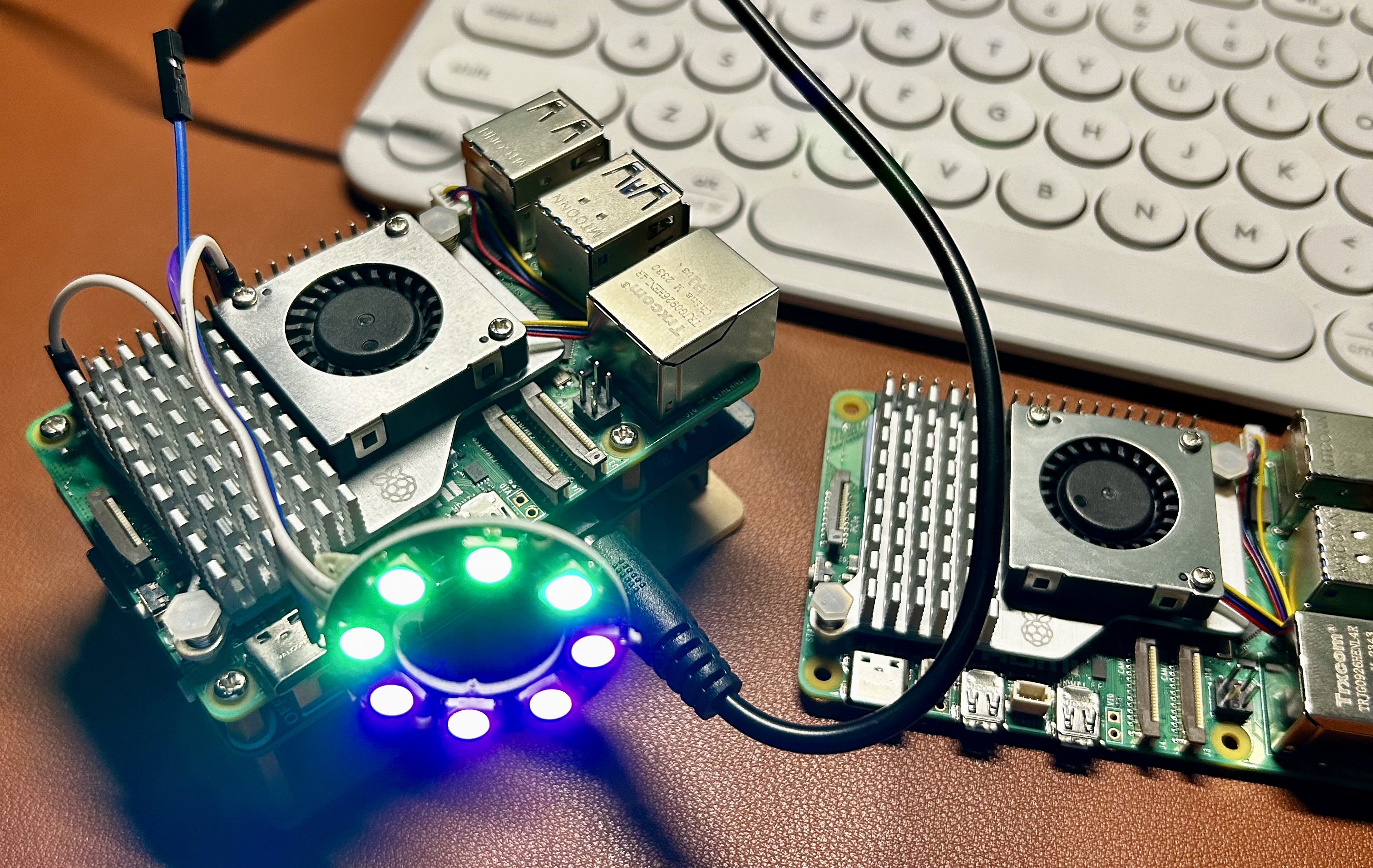
Pi5Neo is a Python library for controlling NeoPixel LED strips on the Raspberry Pi 5 (or equivalent boards) over the SPI interface. It supports both RGB (WS2812B) and RGBW (SK6812) strips, exposes a clean context-manager API, and ships with a growing set of ready-to-run examples.
What's New in v1.1.0
- RGBW / SK6812 support — new
EPixelTypeenum (RGB,GRB,RGBW,GRBW) lets you select the exact channel order for your strip hardware. LEDColordataclass — represent colors as structured objects; read back any LED's current state withget_led_color().set_led_color_object()/get_led_color()— object-oriented helpers alongside the existing index-based API.- Context-manager support —
with Pi5Neo(...) as neo:guarantees the strip is cleared and SPI is released on exit, even after exceptions. quiet_modeparameter — suppress all console output for production scripts.- Configurable
update_stripdelay — passsleep_duration=Noneto skip the latch delay, or any float for custom timing. - Reorganised examples — split into
basic/,animations/, andeffects/sub-directories with clean, well-commented scripts. - Deprecated helpers —
rgb_to_spi_bitstream()andrgbw_to_spi_bitstream()now emitDeprecationWarning; usecolor_to_spi_bitstream()instead.
Key Features
- RGB and RGBW support — WS2812B (GRB) and SK6812 (RGBW/GRBW) out of the box.
LEDColordataclass — structured colour values with per-channel access.- Context-manager API — automatic cleanup with
withstatements. - Quiet mode — silence all print output for daemon/production use.
- Smooth animations — rainbow, breathing, comet, meteor, fireworks, theater chase, and more.
- Minimal dependencies — only
spidevrequired. - High LED count support — configurable kernel SPI buffer for 170+ LEDs.
Installation
pip install pi5neo
Requirements
- Python 3.6+
spidev(installed automatically)
Hardware
- Raspberry Pi 5 (or equivalent board with SPI)
- NeoPixel LED strip — WS2812B (RGB/GRB) or SK6812 (RGBW/GRBW)
Setup: Enable SPI
sudo raspi-config
# → 3 Interface Options → I4 SPI → Yes
Quick Start
from pi5neo import Pi5Neo

# Initialize with 10 LEDs at 800 kHz on /dev/spidev0.0
neo = Pi5Neo('/dev/spidev0.0', num_leds=10, spi_speed_khz=800)

neo.fill_strip(255, 0, 0)   # Red
neo.update_strip()

neo.set_led_color(4, 0, 0, 255)  # Blue on LED #5
neo.update_strip()
Context Manager (recommended)
The strip is always cleared and SPI released on exit, even if an exception occurs:
from pi5neo import Pi5Neo

with Pi5Neo('/dev/spidev0.0', num_leds=10, spi_speed_khz=800, quiet_mode=True) as neo:
    neo.fill_strip(0, 255, 0)   # Green
    neo.update_strip()
    # SPI closed and strip cleared automatically here
RGBW / SK6812 Strips
from pi5neo import Pi5Neo, EPixelType

with Pi5Neo('/dev/spidev0.0', num_leds=10, spi_speed_khz=800,
            pixel_type=EPixelType.GRBW, quiet_mode=True) as neo:
    neo.fill_strip(0, 0, 0, 255)   # White channel only
    neo.update_strip()
LEDColor Objects
from pi5neo import Pi5Neo, LEDColor

with Pi5Neo('/dev/spidev0.0', num_leds=10, spi_speed_khz=800, quiet_mode=True) as neo:
    color = LEDColor(red=255, green=128, blue=0)
    neo.set_led_color_object(0, color)
    neo.update_strip()

    # Read the current colour of any LED
    current = neo.get_led_color(0)
    print(current)   # LEDColor(red=255, green=128, blue=0, white=0)
API Reference
Pi5Neo(spi_device, num_leds, spi_speed_khz, pixel_type, quiet_mode)
| Parameter | Type | Default | Description |
|---|---|---|---|
spi_device |
str |
'/dev/spidev0.0' |
SPI device path |
num_leds |
int |
10 |
Number of LEDs in the strip |
spi_speed_khz |
int |
800 |
SPI clock speed in kHz |
pixel_type |
EPixelType |
EPixelType.GRB |
Channel order — RGB, GRB, RGBW, or GRBW |
quiet_mode |
bool |
False |
Suppress all console output |
Methods
| Method | Description |
|---|---|
fill_strip(r, g, b, w=0) |
Set every LED to the same colour |
set_led_color(index, r, g, b, w=0) |
Set a single LED by index |
set_led_color_object(index, LEDColor) |
Set a single LED using an LEDColor instance |
get_led_color(index) |
Return the current LEDColor for an LED (copy) |
clear_strip() |
Turn off all LEDs |
update_strip(sleep_duration=0.1) |
Flush state to the strip; pass None to skip latch delay |
close() |
Close the SPI device |
EPixelType
| Value | Strip type |
|---|---|
EPixelType.GRB |
WS2812B (most common) |
EPixelType.RGB |
Some RGB strips |
EPixelType.GRBW |
SK6812 RGBW (GRB channel order) |
EPixelType.RGBW |
SK6812 RGBW (RGB channel order) |
LEDColor
from pi5neo import LEDColor

c = LEDColor(red=255, green=0, blue=128, white=0)
All fields default to 0. The white field is only used with RGBW pixel types.
Examples
Examples are organized under the examples/ directory:
examples/
├── basic/
│   ├── example_usage.py      # Solid color + rainbow cycle
│   ├── single_led.py         # Single LED control
│   ├── random_blink.py       # Random blinking LEDs
│   ├── pixel_types.py        # EPixelType demo (RGB / RGBW)
│   ├── led_color_object.py   # LEDColor dataclass + color shifting
│   └── context_manager.py    # Context manager / safe cleanup
├── animations/
│   ├── breath.py             # Breathing / pulse effect
│   ├── fade.py               # Fade in / fade out
│   ├── smooth_fade.py        # Cosine smooth fade
│   ├── rainbow.py            # Rainbow wave
│   └── thinking.py           # "Thinking" spinner animation
└── effects/
    ├── comet.py              # Comet tail
    ├── meteor.py             # Meteor shower
    ├── firework.py           # Firework burst
    ├── knight_rider.py       # Knight Rider scanner
    ├── snake.py              # Snake crawl
    ├── ripple.py             # Ripple effect
    ├── twinkle.py            # Random twinkle
    ├── loading.py            # Loading bar
    ├── colour_bounce.py      # Colour bounce
    └── theater_chase.py      # Theater chase
Driving High LED Counts
The default spidev kernel buffer is 4096 bytes, which supports up to ~170 LEDs. For larger strips, increase the buffer by appending to the single line in /boot/firmware/cmdline.txt and rebooting:
spidev.bufsiz=32768
For RGBW strips the per-LED byte cost is higher (32 bytes vs. 24), so adjust accordingly.
Contributing
- Fork the repo.
- Create a branch:
git checkout -b my-feature - Commit your changes:
git commit -m 'Add new feature' - Push:
git push origin my-feature - Open a Pull Request.
Issues and feature requests are welcome!
License
MIT License — see LICENSE for details.
Acknowledgements
Pi5Neo was inspired by various open-source NeoPixel and SPI projects. Thanks to all contributors and to the maintainers of spidev and the Raspberry Pi ecosystem.
Useful Links
1 maintainer

Metadata
1 maintainer
Release files for Pi5Neo 1.1.0
For a detailed explanation of source distributions (sdists) and built distributions (wheels), please see the package formats documentation.
Source distribution (sdist)
| File | Size | Uploaded | |
|---|---|---|---|
| pi5neo-1.1.0.tar.gz | 12.2 kB | Details |
Built distribution (wheel)
| File | Interpreter | ABI | Platform | Reset |
|---|---|---|---|---|
| pi5neo-1.1.0-py3-none-any.whl | Python 3 | none | any | Details |
Total release size: 32.5 kB
Release files / pi5neo-1.1.0.tar.gz
| Download URL | pi5neo-1.1.0.tar.gz |
|---|---|
| Size | 12.2 kB |
| Tags | Source |
|
SHA-256 checksum How to use checksums |
9ef7bf385f7ae4f073930d6e9739d5ab2713a51c219fd0e1ab4a35858707f3f4
|
|
BLAKE2b-256 checksum How to use checksums |
b30fc0e3711de10c1f0188e4d12eeadfba8d889563bce4b592f04dac6ec567e8
|
| Upload date | |
|
Uploaded using Trusted Publishing? What is trusted publishing? |
No |
| Uploaded via |
twine/6.2.0 CPython/3.14.3
|
Release files / pi5neo-1.1.0-py3-none-any.whl
| Download URL | pi5neo-1.1.0-py3-none-any.whl |
|---|---|
| Size | 20.3 kB |
| Tags | Python 3 |
|
SHA-256 checksum How to use checksums |
5150a19d72a7a02a416259c5f60b3b218960d53d737dd4f936ba037e5008e241
|
|
BLAKE2b-256 checksum How to use checksums |
f50c34212088e2026d899a146f3f0df3f5cf877b6ff3929c32cd27a0ff641d51
|
| Upload date | |
|
Uploaded using Trusted Publishing? What is trusted publishing? |
No |
| Uploaded via |
twine/6.2.0 CPython/3.14.3
|














