

pip-check
pip-check gives you a quick overview of all installed packages and their update status. Under the hood it calls pip list --outdated --format=columns and transforms it into a more user friendly table.
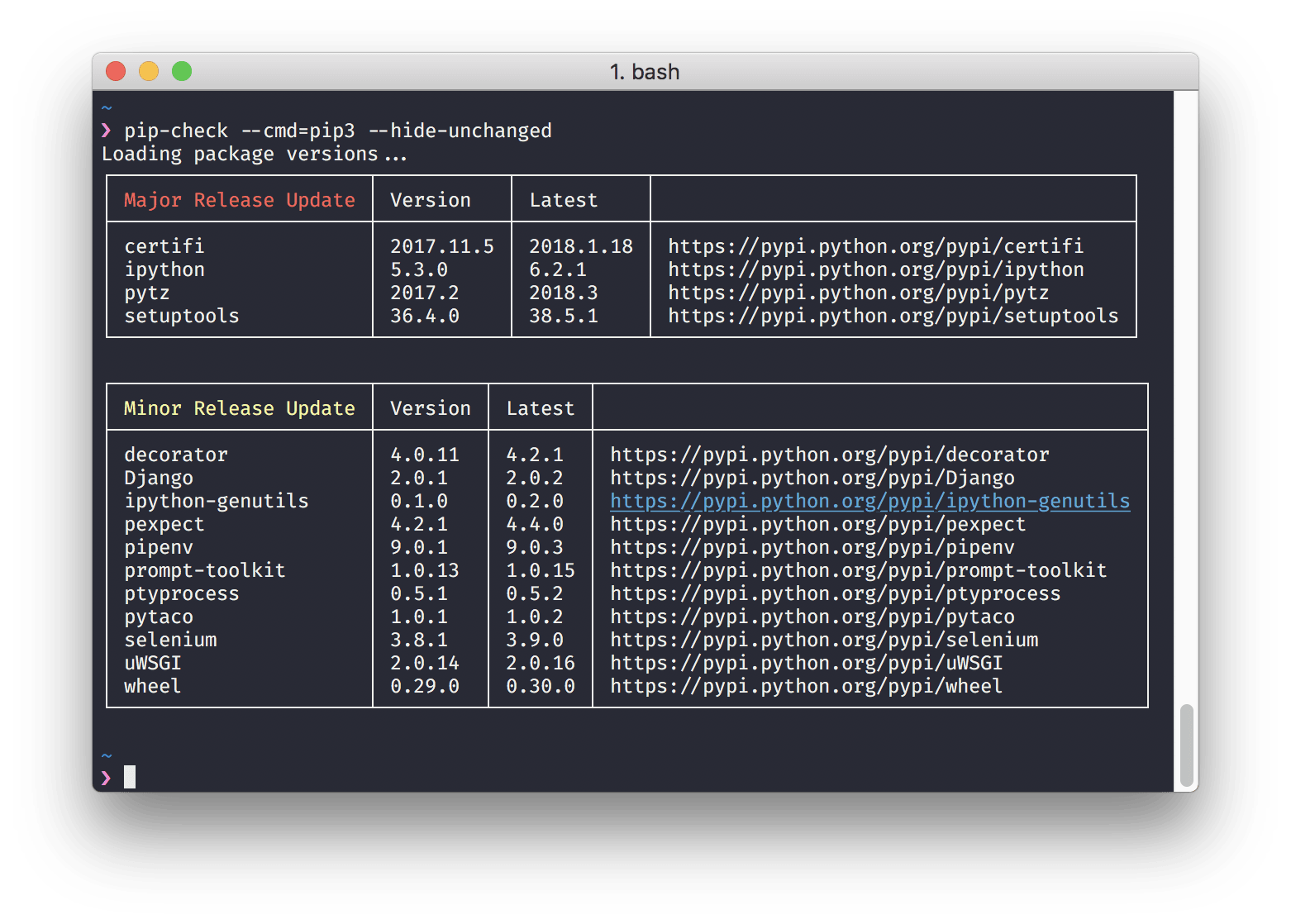
Installation:
pip install pip-check
The last version that runs on Python 2.7 or 3.4 is v2.5.2. Install it with:
pip install pip-check==2.5.2
Usage:
$ pip-check -h
usage: pip-check [-h] [-a] [-c PIP_CMD] [-l] [-r] [-f] [-H] [-u] [-U]

A quick overview of all installed packages and their update status.

optional arguments:
  -h, --help            show this help message and exit
  -a, --ascii           Display as ASCII Table
  -c PIP_CMD, --cmd PIP_CMD
                        The pip executable to run. Default: `pip`
  -l, --local           Show only virtualenv installed packages.
  -r, --not-required    List only packages that are not dependencies of
                        installed packages.
  -f, --full-version    Show full version strings.
  -H, --hide-unchanged  Do not show "unchanged" packages.
  -u, --show-update     Show update instructions for updatable packages.
  -U, --user            Show only user installed packages.
Testing:
Test against a variation of Python versions:
$ pip install tox tox-pyenv
$ tox
Test against your current Python version:
$ python setup.py test
Recommeded Similar Tools
Changelog
v2.7 (2021-11-16):
Drop support for Python 2.7, 3.4 and 3.5
Added support for Python 3.9 and 3.10.
Removed ‘colorclass’ as a dependency and with that the shell argument –disable-colors.
v2.6 (2019-12-12):
Requires Python 3.5 or higher.
Command error is shown if pip exits with a status code 1 (or larger).
Error message is shown if pip is not able to load packages in case of network problems.
Update instructions will now add --user in case the pip-check command should only show user packages as well.
v2.5.2 (2019-08-08):
This is the last version that runs on Python 2.7. Install it with pip install pip-check==2.5.2
Windows color fixes.
v2.5.1 (2019-08-08):
Windows script fixes.
v2.5 (2019-08-08):
A more robust installation that installs pip-check as a proper console script.
Added new --disable-colors argument.
Added tests for Python 3.7 and 3.8.
Fixed Syntax warning happening with no outdated packages.
Cleanup of the entire codebase.
v2.4 (2019-07-23):
Added support to only show packages from the user or local package namespace.
v2.3.3 (2018-02-19):
Visual fixes around --show-update
v2.3.2 (2018-02-18):
New --show-update argument.
Fixed --full-versions argument.
Minor UI improvements.
v2.1 (2018-02-18):
Complete new architecture. It now calls pip directly and parses it output which should be more reliable.
It’s also using distutils for the version comparision now, which is more reliable as well.
Lots of features and bug fixes.
v0.2 (2016-02-09):
Fixes issues with older pip versions.
Truncates extremly long version numbers.
v0.1 (2016-02-06):
Very first version, and yet with very limited features.
1 maintainer

Release files for pip-check 2.7
For a detailed explanation of source distributions (sdists) and built distributions (wheels), please see the package formats documentation.
Source distribution (sdist)
| File | Size | Uploaded | |
|---|---|---|---|
| pip-check-2.7.tar.gz | 6.7 kB | Details |
Built distribution (wheel)
| File | Interpreter | ABI | Platform | Reset |
|---|---|---|---|---|
| pip_check-2.7-py2.py3-none-any.whl | Python 3, Python 2 | none | any | Details |
Total release size:14.0 kB
Release files / pip-check-2.7.tar.gz
| Download URL | pip-check-2.7.tar.gz |
|---|---|
| Size | 6.7 kB |
| Tags | Source |
|
SHA-256 checksum How to use checksums |
17d1612af84fecfebdf8f8c60b9eaa9c389814a49affdcd88a1d4fd98fd17aee
|
|
BLAKE2b-256 checksum How to use checksums |
7e82f4151f090098cec1be4ef6a87aa7f6288904905c095a9a83d9c5ec7fb9e1
|
| Upload date | |
|
Uploaded using Trusted Publishing? What is trusted publishing? |
No |
| Uploaded via |
twine/3.6.0 importlib_metadata/4.8.2 pkginfo/1.7.1 requests/2.26.0 requests-toolbelt/0.9.1 tqdm/4.62.3 CPython/3.10.0
|
Release files / pip_check-2.7-py2.py3-none-any.whl
| Download URL | pip_check-2.7-py2.py3-none-any.whl |
|---|---|
| Size | 7.3 kB |
| Tags | Python 2 Python 3 |
|
SHA-256 checksum How to use checksums |
f14ba13b0a66cd9d4732f958fa79d0b0ed2ef7833239927ef4336266265b72fa
|
|
BLAKE2b-256 checksum How to use checksums |
3c9d48b8cf2da3cd4887a75fb1ac451cf605f4a8333d97d86c9530dd0e07eab8
|
| Upload date | |
|
Uploaded using Trusted Publishing? What is trusted publishing? |
No |
| Uploaded via |
twine/3.6.0 importlib_metadata/4.8.2 pkginfo/1.7.1 requests/2.26.0 requests-toolbelt/0.9.1 tqdm/4.62.3 CPython/3.10.0
|














