
pkgprobe
pkgprobe is a Windows-first CLI tool that statically analyzes EXE and MSI installers and produces a machine-readable install plan for endpoint management and packaging workflows.
Think: package intelligence for Intune, SCCM, Jamf, RMM, and Client Platform Engineering teams.
Available on PyPI.
Full usage documentation — Commands, options, output formats, and trace-install behavior.
✨ Why pkgprobe exists
Packaging software on Windows is still more art than science:
- Silent install flags are undocumented or inconsistent
- Installer technologies vary widely (Inno, NSIS, InstallShield, Burn, etc.)
- Detection rules are often copied, guessed, or discovered via trial-and-error
- Testing installers directly is slow and risky on production machines
pkgprobe focuses on the analysis phase first:
Understand what an installer is likely to do --- before you ever run it.
What it does (v0.1)
Given an .msi or .exe, pkgprobe outputs a structured install
plan containing:
Installer intelligence
- Detects installer type (MSI, Inno Setup, NSIS, InstallShield, Burn, Squirrel, etc.)
- Confidence-scored classification with supporting evidence
Command inference
- Probable silent install commands, ranked by confidence
- Probable uninstall commands
- Evidence explaining why each command was suggested
Detection guidance
- MSI ProductCode--based detection (when available)
- Follow-up guidance for improving detection accuracy
- Designed to integrate cleanly into Intune / SCCM detection logic
Automation-friendly output
- JSON output suitable for pipelines and tooling
- Human-readable CLI summary for engineers
Safety-first by design
This version performs static analysis only.
No installers are executed.
Example
pkgprobe analyze .\setup.exe --out installplan.json
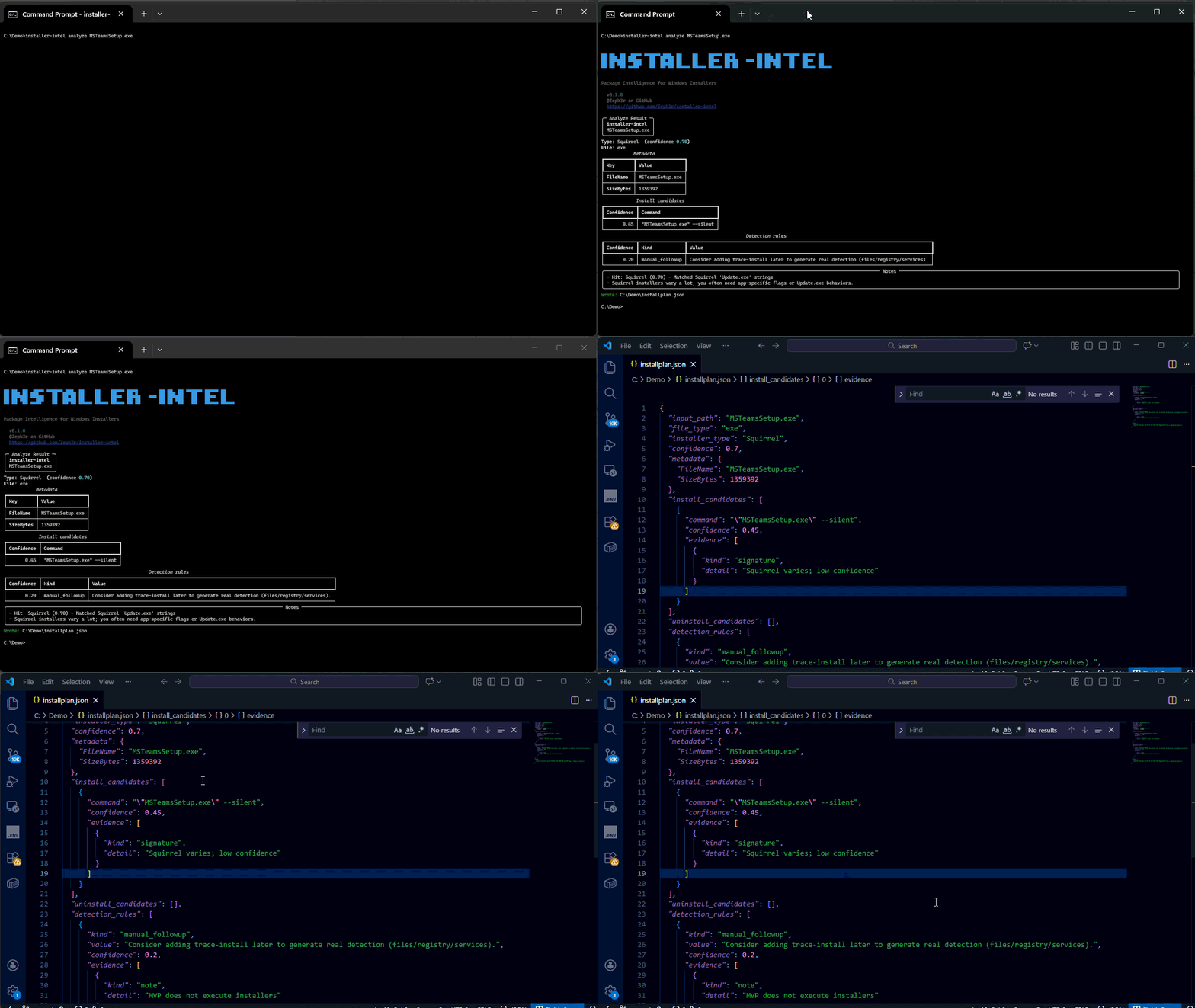
CLI summary:
Type: Inno Setup (confidence 0.92)

Install candidates:
  setup.exe /VERYSILENT /SUPPRESSMSGBOXES /NORESTART /SP- (0.88)
  setup.exe /SILENT /SUPPRESSMSGBOXES /NORESTART /SP-     (0.62)

Uninstall candidates:
  unins000.exe /VERYSILENT (0.55)
Generated installplan.json (excerpt):
{
  "installer_type": "Inno Setup",
  "confidence": 0.92,
  "install_candidates": [
    {
      "command": "setup.exe /VERYSILENT /SUPPRESSMSGBOXES /NORESTART /SP-",
      "confidence": 0.88
    }
  ]
}
Installation
From PyPI (recommended)
pip install pkgprobe
pkgprobe --version
pkgprobe analyze .\setup.exe --out installplan.json
From source (development)
This project uses uv for fast, reproducible Python environments.
pip install uv
git clone https://github.com/Zeph3r/pkgprobe.git
cd pkgprobe
uv venv
uv sync
uv run pkgprobe --help
Use --quiet / -q to suppress the banner when scripting (CI,
pipelines, etc.).
Supported inputs
File type Status Notes
MSI ✅ Metadata parsed via Windows Installer APIs EXE ✅ Heuristic detection via string & signature analysis MSIX / AppX 🔍 Detection hints only (wrapper detection)
How detection works
pkgprobe combines:
- Static string extraction (ASCII + UTF-16LE)
- Known installer signature patterns
- Heuristic confidence scoring
- Evidence tracking (matched strings, metadata clues)
This keeps analysis fast, safe, and explainable.
Current limitations
- Windows-first (intentional --- this targets Windows endpoints)
- EXE analysis is heuristic-based (not guaranteed)
- No execution or sandbox tracing in v0.1
- Detection accuracy improves significantly with runtime tracing (planned)
Roadmap
v0.2.0 (next)
CLI UX
- JSON to stdout -- Support
pkgprobe analyze <file> --format json(or-o -) for pipeline consumption --summary-only-- Print only human summary (no file output)- Exit codes -- Standardized scripting-friendly exit codes
- Subcommand examples in
--help
Output & format
--format yaml-- Optional YAML install plan output
Later (v0.3.0+)
- install4j / Java-based installer detection
- Partial-read scanning for very large EXEs
- ProcMon-backed trace mode
- Optional trace-install mode (opt-in, sandboxed)
Who this is for
- Client Platform Engineers
- Endpoint / EUC Engineers
- Intune / SCCM / Jamf admins
- Security teams validating installer behavior
- Anyone tired of guessing silent install flags
Philosophy
pkgprobe is intentionally conservative.
It prefers:
- Explainability over magic
- Confidence scoring over certainty
- Safety over speed
If it can't be confident, it tells you why.
That's how real platform tooling should behave.
License
MIT
1 maintainer

Metadata
1 maintainer
Release files for pkgprobe 0.2.0
For a detailed explanation of source distributions (sdists) and built distributions (wheels), please see the package formats documentation.
Source distribution (sdist)
| File | Size | Uploaded | Provenance | |
|---|---|---|---|---|
| pkgprobe-0.2.0.tar.gz | 6.4 MB | With provenance | Details |
Built distribution (wheel)
| File | Interpreter | ABI | Platform | Reset |
|---|---|---|---|---|
| pkgprobe-0.2.0-py3-none-any.whl | Python 3 | none | any | Details |
Total release size: 6.4 MB
Release files / pkgprobe-0.2.0.tar.gz
| Download URL | pkgprobe-0.2.0.tar.gz |
|---|---|
| Size | 6.4 MB |
| Tags | Source |
|
SHA-256 checksum How to use checksums |
401ef3b967ad7c55b1e0a797a294e4397e1ca488ccd76e02a39c1d68b06a710c
|
|
BLAKE2b-256 checksum How to use checksums |
1039285f5844d19c568a15faf95f4a19645826cb5898bb5c4fb365297dc0ac33
|
| Upload date | |
|
Uploaded using Trusted Publishing? What is trusted publishing? |
Yes |
| Uploaded via |
twine/6.1.0 CPython/3.13.7
|
Provenance
Provenance describes where a file came from. On PyPI, provenance is shared via attestations, which provide a verifiable record of the build or publishing details. View details, limitations and caveats.


PyPI Publish Attestation
PyPI verified that this artifact, at this checksum, originated from the publisher listed below.
Signed by GitHub Actions, verified by PyPI on Mar 1, 2026.
Transparency logRelease files / pkgprobe-0.2.0-py3-none-any.whl
| Download URL | pkgprobe-0.2.0-py3-none-any.whl |
|---|---|
| Size | 31.5 kB |
| Tags | Python 3 |
|
SHA-256 checksum How to use checksums |
b22212f2dc38828e4f2edde27b8888ee27be4ef7cfe4647edf1b5b4ed58ad9a8
|
|
BLAKE2b-256 checksum How to use checksums |
05c33f42199d3f51544be313d14a9a1cc773fc76a5170bd619fca1183f017fbe
|
| Upload date | |
|
Uploaded using Trusted Publishing? What is trusted publishing? |
Yes |
| Uploaded via |
twine/6.1.0 CPython/3.13.7
|
Provenance
Provenance describes where a file came from. On PyPI, provenance is shared via attestations, which provide a verifiable record of the build or publishing details. View details, limitations and caveats.
PyPI Publish Attestation
PyPI verified that this artifact, at this checksum, originated from the publisher listed below.
Signed by GitHub Actions, verified by PyPI on Mar 1, 2026.
Transparency logSecurity for pkgprobe 0.2.0
Provenance
Provenance describes where a file came from. On PyPI, provenance is shared via attestations, which provide a verifiable record of the build or publishing details. View details, limitations and caveats.
Full provenance
All 2 files in this release have been uploaded with provenance metadata.
Attestation for pkgprobe-0.2.0.tar.gz
PyPI Publish Attestation
PyPI verified that this artifact, at this checksum, originated from the publisher listed below.
Signed by GitHub Actions, verified by PyPI on Mar 1, 2026.
Transparency logA note on package security
PyPI is a repository for distributing packages, not a service for auditing them. While third-party security researchers and our staff do their best to detect and remove malicious packages, PyPI cannot guarantee the quality, security or suitability of any given package.
To learn more about protecting yourself from malicious actors, visit our package security documentation.














