
AI PDF Accessibility Remediation for Plone
The AI PDF Accessibility Remediation Add-on brings PDF Accessibility Remediation for WCAG & PDF/UA Compliance directly into your own Plone site. It is both a PDF Accessibility Checker and an AI Remediation Tool: upload documents or crawl your website for them, let AI repair the accessibility barriers automatically, review every check that was applied, and download conformant files — without leaving Plone.
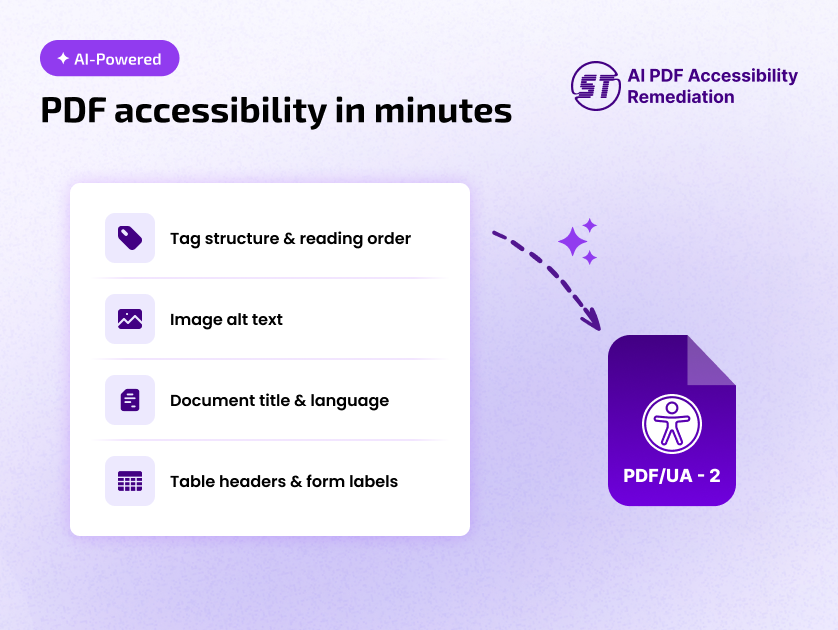
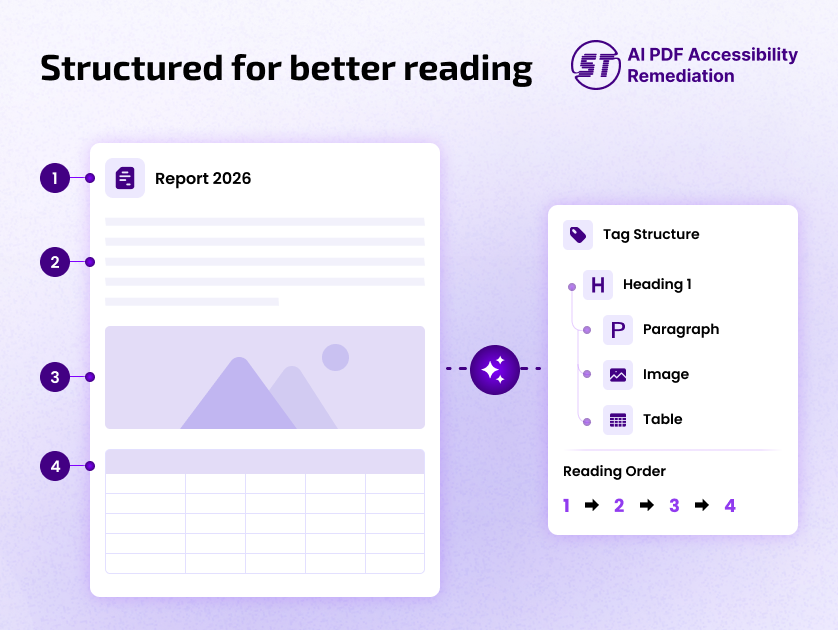
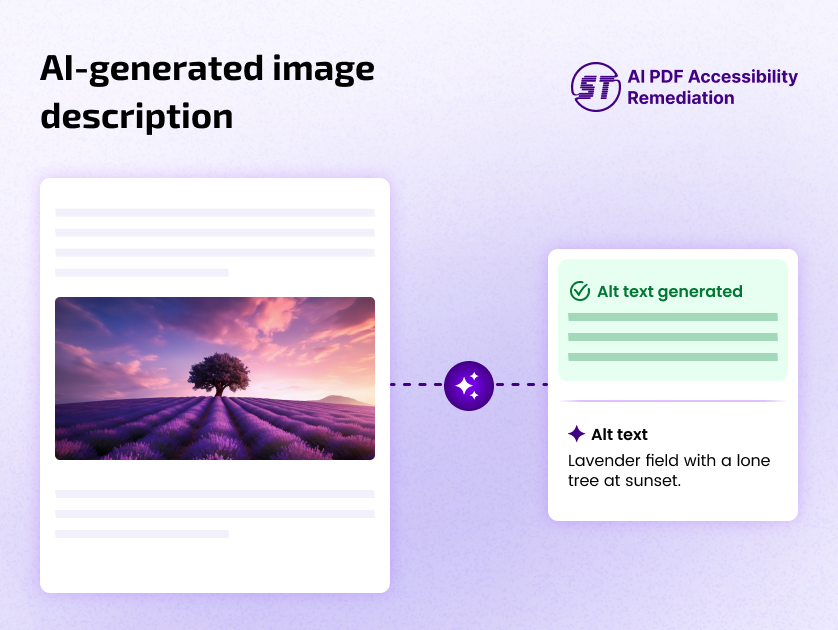
It fixes the barriers that make PDFs unusable with assistive technology: missing tags, incorrect reading order, inaccessible forms and tables, images without alternate text, and absent document structure, language and metadata.
It supports compliance with WCAG 2.0, 2.1, 2.2, PDF/UA, ADA, Section 508, AODA, and EN 301 549 (EAA). With plain-language explanations and before/after examples for every check, even non-technical users can understand what was fixed and why it mattered.
This build is a Plone add-on (plone-SkynetA11y-pdf-remediation, v1.0.0) — a normal pip-installable package with no extra bundler or build step. It installs from Site Setup → Add-ons like any other Plone product, works on Plone 6.0, 6.1 and 6.2, and adds the dashboard to your site's own administration area.
This add-on is designed for:
- Businesses of all sizes
- Enterprises
- Government and public sector entities
- Website owners
- E-commerce platforms
- Development and maintenance agencies
Start with a free AI remediation trial — up to 5 pages!
Why AI PDF Accessibility Remediation?
PDFs are where accessibility compliance quietly fails. A site can pass every page-level audit and still publish hundreds of untagged documents — reports, forms, invoices, policies — that screen readers cannot navigate at all.
Remediating them by hand is slow and expensive. This add-on makes it a routine part of publishing: documents are discovered, repaired and re-checked inside the tools your team already uses, so accessible PDFs become the default rather than a project.
Key Features
- SkynetA11y PDF Remediation – Automated repair of tags, reading order, alt text, headings, tables and metadata.
- PDF Accessibility Checker – Every check reported individually, expandable to a plain-language explanation and a before/after example.
- Upload or Crawl – Add files by drag and drop, or sweep your website for every PDF it links to.
- Free Trial – The free plan covers your first 5 pages; paid plans scale from 50 to 10,000 pages.
- Bulk Remediation – Select any number of documents and process them in one run, with live progress.
- Deep Tag Scan – Post-remediation verification against the document's tag tree, not just its declared metadata.
- Authenticated Downloads – Remediated files are delivered over an authenticated session, never a public link.
- No Settings Screen Required – Nothing to paste and nothing to wire up out of the box. One short dialog asks for a name, email and domain the first time it is needed, and never again — or an administrator can pin these in the Plone configuration registry ahead of time (see Configuration).
- Built into Plone – A Site Setup → SkynetA11y PDF Remediation Dashboard entry (with a "Back to Plone" button on the standalone page), restricted to Managers and Site Administrators.
- Integration with All in One Accessibility® Dashboard – Plans, usage and billing stay in one place.
Compliance Standards Supported
- WCAG 2.0, 2.1, 2.2
- PDF/UA (ISO 14289)
- ADA
- Section 508
- AODA
- EN 301 549 (EU / European Accessibility Act)
Compatibility
| Plone | Python | Status |
|---|---|---|
| 6.2 (latest, 6.2.2) | 3.10 – 3.14 | Tested on 3.10, 3.12 and 3.14 |
| 6.1 | 3.10 – 3.13 | Tested on 6.1.5 / Python 3.13 |
| 6.0 | 3.10 – 3.11 | Tested on 6.0.0 / Python 3.10 |
| 5.2 and earlier | – | Not supported (end of life) |
The add-on uses the Classic UI (server-rendered) and works on any Plone 6 site that has it. On a Volto site, the dashboard is served by the Plone backend at <backend-url>/@@pdf-remediation-dashboard.
Installation
- Install the package into the same Python environment as Plone:
pip install plone-SkynetA11y-pdf-remediation
Plone loads the add-on's configuration automatically. (On a very old buildout that does not autoinclude, also addor, with buildout: ```ini [instance] eggs += plone-SkynetA11y-pdf-remediationzcml += plone_SkynetA11y_pdf_remediation.) - Restart Plone, e.g.
./bin/instance restart(or however your environment restarts — systemd, Docker, supervisord, etc.). - Go to Site Setup → Add-ons and click Install next to SkynetA11y PDF Remediation.
- Open Site Setup → Add-on Configuration → SkynetA11y PDF Remediation Dashboard, or go straight to
<your-site>/@@pdf-remediation-dashboard.
That is all: no database migration and nothing to configure.
Upgrading
Install the new version, restart Plone, then open Site Setup → Add-ons and click Upgrade next to SkynetA11y PDF Remediation if it is offered. Upgrades never overwrite values you have set, and static files are versioned, so browsers pick up the new JavaScript and CSS without a manual cache clear.
Coming from an earlier build that had an SkynetA11y PDF Remediation Settings page? Running the upgrade removes that entry; the dashboard is now the only screen.
Uninstalling
Use Site Setup → Add-ons → Uninstall. This removes the Site Setup entry and the stored settings. Your PDFs and remediated files live in the remediation service, not in Plone, and are not affected.
How It Works
- Add Your PDFs – Upload files, or crawl your website for every PDF it links to.
- Run AI Remediation – Select documents and process them in bulk; progress is reported live.
- Review & Download – Inspect each accessibility check with its explanation and before/after example, then download the conformant file.
Who Can Benefit?
- Website Owners & Businesses
- Developers & Web Agencies
- Government & Public Sector Organizations
- Education, Healthcare & Financial Institutions
- Legal & Compliance Teams
- Publishers & Content Teams
- E-commerce & SaaS Platforms
Security
- Access – The dashboard requires the Manage portal permission (Manager and Site Administrator). Anonymous visitors are sent to the login form and other logged-in users are refused.
- API key – The provisioning key reaches the browser as part of the page (as in every build of this application), so it is visible to anyone who can open the dashboard. If that is not acceptable, set
session_urlto a sign-in endpoint on your own server and the key is never sent. - No caching – The dashboard page is served with
Cache-Control: no-store, so browsers and shared proxies do not keep copies of it.
CORS Policy Configuration
To avoid CORS policy issues, ensure the following URLs are allowed in your website. These URLs should be added to your CORS configuration or trusted domains list.
| Domain | Description | Usage |
|---|---|---|
https://livepdfapi.skynettechnologies.us |
SkynetA11y PDF Remediation API | Documents, remediation jobs, downloads |
https://ada.skynettechnologies.us |
All in One Accessibility® Dashboard | Plan upgrades via autologin |
Instructions
- Update your server's CORS configuration to include these URLs.
- Ensure wildcard subdomains (
*) are supported where necessary. - Verify the application functionality by testing requests to these domains.
- If issues persist, consult the documentation for CORS configuration guidance.
If your site sends a Content-Security-Policy, both origins also need to be in
its connect-src, or the browser will block the requests before they are made.
Troubleshooting
| Symptom | What to check |
|---|---|
| "Add-ons" does not list SkynetA11y PDF Remediation | The package is not installed in Plone's Python environment, or Plone was not restarted. |
| Login form appears instead of the dashboard | You need to be signed in as a Manager or Site Administrator. |
| Page loads but is unstyled, or the JavaScript does not run | Install the add-on from Site Setup → Add-ons (it registers the static files), then hard-refresh. |
| Dashboard loads but sign-in or uploads fail | Open the browser's developer console: a CORS or Content-Security-Policy message means the two origins above need to be allowed. |
| The old Settings entry is still listed | Click Upgrade for the add-on under Site Setup → Add-ons. |
Screenshots
Submit a Support Request
Please visit our support page and fill out the form. Our team will get back to you as soon as possible.
Send Us an Email
Alternatively, you can send an email to our support team: hello@skynettechnologies.com
Accessibility Partnership Opportunities
Accessibility Agency Partnership
Partner with us as an agency to provide comprehensive accessibility solutions to your existing clients. Get access to exclusive resources, training, and support to help you implement and manage accessibility features effectively.
Accessibility Affiliate Partnership
Join our affiliate program and earn hefty commissions by promoting AI PDF Accessibility Remediation. Share our accessibility solution within your network and help businesses improve their document accessibility while generating additional revenue.
For more details, please visit Accessibility Partnership Opportunities Page.
Credits
This AI PDF Accessibility Remediation Add-on (Plone package v1.0.0) is developed and maintained by Skynet Technologies USA LLC.
1 maintainer

Metadata
1 maintainer
Release files for plone-SkynetA11y-pdf-remediation 1.0.0
For a detailed explanation of source distributions (sdists) and built distributions (wheels), please see the package formats documentation.
Source distribution (sdist)
| File | Size | Uploaded | |
|---|---|---|---|
| plone_skyneta11y_pdf_remediation-1.0.0.tar.gz | 72.9 kB | Details |
Built distribution (wheel)
| File | Interpreter | ABI | Platform | Reset |
|---|---|---|---|---|
| plone_skyneta11y_pdf_remediation-1.0.0-py3-none-any.whl | Python 3 | none | any | Details |
Total release size: 148.5 kB
Release files / plone_skyneta11y_pdf_remediation-1.0.0.tar.gz
| Download URL | plone_skyneta11y_pdf_remediation-1.0.0.tar.gz |
|---|---|
| Size | 72.9 kB |
| Tags | Source |
|
SHA-256 checksum How to use checksums |
647633eb50bce63f16b03148947cd34122cc6972270d27b1fda3be94a1c1e9fd
|
|
BLAKE2b-256 checksum How to use checksums |
2ee72a1332c021972416ea75cd198e2f23820d1e5852f896e395835b99041bd5
|
| Upload date | |
|
Uploaded using Trusted Publishing? What is trusted publishing? |
No |
| Uploaded via |
twine/6.2.0 CPython/3.13.12
|
Release files / plone_skyneta11y_pdf_remediation-1.0.0-py3-none-any.whl
| Download URL | plone_skyneta11y_pdf_remediation-1.0.0-py3-none-any.whl |
|---|---|
| Size | 75.6 kB |
| Tags | Python 3 |
|
SHA-256 checksum How to use checksums |
fcf4c89e2d1039e2d4ad0cf20fa74119f17e4afb7f53505e8eba43db4eb2b35e
|
|
BLAKE2b-256 checksum How to use checksums |
328b9d2235f9d9e65273367bd88c3a19fc5b3a213b3d0d21df61c3aaaacf024e
|
| Upload date | |
|
Uploaded using Trusted Publishing? What is trusted publishing? |
No |
| Uploaded via |
twine/6.2.0 CPython/3.13.12
|













