
Introduction
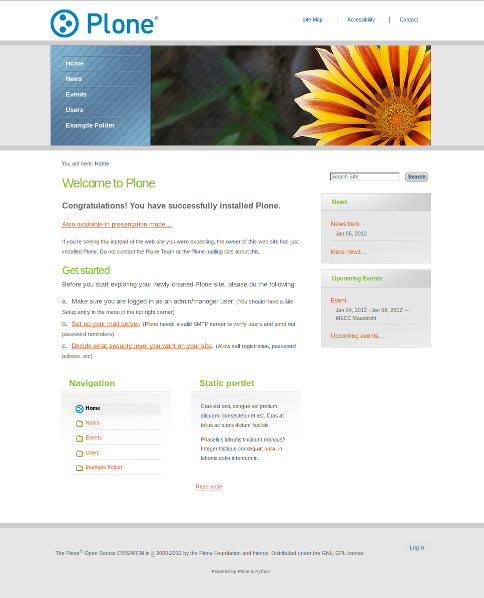
The plonetheme.transition package uses the theming & packaging features available in plone.app.theming to make the theme transition easily available in Plone 4.1.
Installation
Add Plone site
Install Plone 4.1 with plone.app.theming and create a Plone site (if you have not already) with Diazo theming configured.
Zip file
If you are an end user, you might enjoy installation via zip file import.
Download the zip file: https://github.com/gyst/plonetheme.transition/raw/master/transition.zip
Import the theme from the Diazo theme control panel.
Buildout
If you are a developer, you might enjoy installation via buildout.
Add plonetheme.transition to your plone.recipe.zope2instance section’s eggs parameter e.g.:
[instance]
eggs =
    Plone
    plonetheme.transition
Select theme
Select and enable the theme from the Diazo control panel. That’s it!
Changelog
1.1 (2012-03-23)
Minor CSS improvements [gyst]
1.0 (2012-01-06)
FreeCSS template port to Plone theme [gyst]
Credits
Transition styling provided by Free CSS templates.
Plone packaging based on plonetheme.bananaleaf by [giacomos]
2 maintainers


Release files for plonetheme.transition 1.3
For a detailed explanation of source distributions (sdists) and built distributions (wheels), please see the package formats documentation.
Source distribution (sdist)
| File | Size | Uploaded | |
|---|---|---|---|
| plonetheme.transition-1.3.zip | 358.0 kB | Details |
Release files / plonetheme.transition-1.3.zip
| Download URL | plonetheme.transition-1.3.zip |
|---|---|
| Size | 358.0 kB |
| Tags | Source |
|
SHA-256 checksum How to use checksums |
bba6b6fc6a651e22114dfdfae4db344e85ca911bdec93230d340f5bc258e32b1
|
|
BLAKE2b-256 checksum How to use checksums |
d0726ff8495cca5817a635bfe1de370978b2286a8cf4ad7eda0feb27dc89b6d3
|
| Upload date | |
|
Uploaded using Trusted Publishing? What is trusted publishing? |
No |














